Choosing the right laptop has become more important as remote work, online learning, and hybrid education continue to grow. A laptop buying guide for remote workers and students helps match performance, battery life, portability, and value to the tasks you perform every day instead of simply buying the most expensive model.
Whether you attend virtual classes, join video meetings, create documents, analyze spreadsheets, or work from different locations, the right laptop can improve productivity and remain useful for years. This guide explains which specifications matter most, compares carefully selected laptop examples, and shows how to choose confidently based on your budget and workload. If you’re also planning a complete workspace, a practical home office essentials checklist can help you avoid missing important equipment.
What Is the Best Laptop for Remote Workers and Students?
The best laptop for remote workers and students is one that balances processing power, memory, storage, battery life, portability, and long-term reliability. For most people, a laptop with an Intel Core i5 or AMD Ryzen 5 processor, 16GB of RAM, a 512GB SSD, a Full HD display, and Wi-Fi 6 offers an excellent combination of performance and value for everyday productivity.
Remote workers typically benefit from additional memory because video conferencing, spreadsheets, browsers, and communication apps often run simultaneously. Meanwhile, students usually prioritize portability, battery life, and affordability since laptops frequently travel between classrooms, libraries, and home.
Choosing specifications before choosing a brand usually leads to a better purchase. Organizations such as the National Institute of Standards and Technology (NIST) also emphasize keeping modern operating systems updated, making current hardware an important part of long-term security and performance.
Budget also plays a major role. Spending more only makes sense when additional performance solves a real need, such as editing videos, running virtual machines, programming, or handling large datasets. Otherwise, a well-balanced mid-range laptop often delivers the best overall value. Readers looking for lower-cost options may also find suitable choices among the best laptops for working from home under $800.
Laptop Comparison at a Glance
The four laptops below were selected because they represent different budgets and user needs rather than simply being the most expensive models. Each example demonstrates the type of specifications worth considering when shopping for a laptop for remote work or school.
| Laptop | Best For | Current Price | Processor | Memory | Storage | Display | Connectivity |
|---|---|---|---|---|---|---|---|
| HP 14 Laptop 2026 Notebook | Budget students | Around $399.99 | Intel N150 | 8GB RAM | 256GB PCIe SSD | 14-inch | Wi-Fi 6 |
| Lenovo 2026 Premium Business & Student Laptop | Best overall value | Around $550.99 | Intel Core i5-13420H | 8GB DDR5 | 512GB SSD | 15-inch WUXGA | Wi-Fi 6 |
| HP 15.6-inch Touchscreen Notebook | Heavy multitasking | Around $799.99 | Intel Core i5-1235U | 32GB RAM | 1TB SSD | 15.6-inch Touchscreen | USB-C, HDMI |
| Lenovo ThinkPad E14 Gen 7 | Business professionals | Around $999.95 | AMD Ryzen 7 250 | 16GB DDR5 | 512GB PCIe SSD | 14-inch FHD+ | Wi-Fi 6E, RJ-45 |
Best Budget Pick: HP 14 Laptop 2026 Notebook
Why we picked it: The HP 14 Laptop 2026 Notebook offers a practical combination of affordability, portability, and modern connectivity, making it a sensible choice for students, online learners, and light remote work.
 Click image to enlarge
|
Around $399.99
|
Best Overall Value: Lenovo 2026 Premium Business & Student Laptop
Why we picked it: The Lenovo 2026 Premium Business & Student Laptop delivers an excellent balance of processor performance, storage, display quality, and everyday productivity without entering premium pricing.
 Click image to enlarge
|
Around $550.99
|
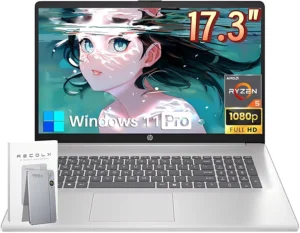
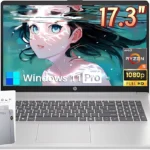
Best for Multitasking: HP 15.6-inch Touchscreen Notebook
Why we picked it: The HP 15.6-inch Touchscreen Notebook includes 32GB of RAM and a 1TB SSD, making it suitable for professionals who regularly multitask across meetings, spreadsheets, browsers, and productivity software.
 Click image to enlarge
|
Around $799.99
|
Best Premium Business Laptop: Lenovo ThinkPad E14 Gen 7
Why we picked it: The Lenovo ThinkPad E14 Gen 7 combines business-class durability, modern AMD Ryzen performance, enterprise connectivity, and a comfortable keyboard for professionals who need dependable daily productivity.
 Click image to enlarge
|
Around $999.95
|
Prices may change over time. We may earn a commission if you purchase through our links at no additional cost to you.
Recommended Laptops for Different Needs
The best laptop buying guide for remote workers and students should recommend only a few laptops that represent different budgets and workloads. Instead of listing dozens of models, the four laptops below demonstrate what to expect at each price point and help you match hardware to your daily tasks.
Best Budget Pick: HP 14 Laptop 2026 Notebook for Students & Remote Work
Price: Around $399.99
Why We Recommend It
The HP 14 Laptop 2026 Notebook is an excellent choice for buyers who mainly use Microsoft Office, Google Workspace, web browsers, online classes, email, and video conferencing. The Intel N150 processor and PCIe SSD provide responsive everyday performance without stretching a limited budget.
Key Features
- Intel N150 processor
- 8GB RAM
- 256GB PCIe SSD plus additional storage
- 14-inch display
- Wi-Fi 6 connectivity
- Windows 11 Home
- Lightweight design
- Includes Microsoft 365 subscription
Pros and Cons
| Pros | Cons |
|---|---|
|
|
During a typical day of online classes, document editing, and web research, the HP 14 Laptop handles everyday productivity smoothly. Additionally, the lightweight design makes carrying the laptop between home, campus, and coffee shops much easier than larger notebooks.
Students who plan to build a comfortable study setup should also consider a quality wireless keyboard for longer typing sessions.
Best Overall Value: Lenovo 2026 Premium Business & Student Laptop
Price: Around $550.99
Why We Recommend It
The Lenovo 2026 Premium Business & Student Laptop offers one of the strongest performance-to-price ratios in this guide. The Intel Core i5-13420H processor delivers enough power for remote work, university assignments, spreadsheets, programming, and multitasking without moving into premium pricing.
Key Features
- Intel Core i5-13420H processor
- 8GB DDR5 RAM
- 512GB SSD
- 15-inch WUXGA display
- Wi-Fi 6
- USB-C and HDMI
- Dolby Audio
- Windows 11
Pros and Cons
| Pros | Cons |
|---|---|
|
|
Running several browser tabs, Microsoft Teams meetings, Excel spreadsheets, and cloud storage at the same time feels comfortable on the Lenovo 2026 Premium Business & Student Laptop. Furthermore, the higher-resolution display improves readability when working with documents for extended periods.
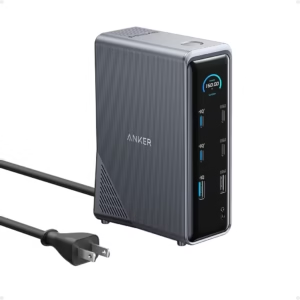
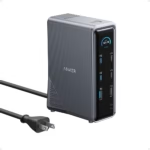
Many professionals eventually connect external displays, and a reliable USB-C docking station can simplify connecting monitors, storage, and peripherals.
Best for Multitasking: HP 15.6-inch Touchscreen Notebook Laptop
Price: Around $799.99
Why We Recommend It
The HP 15.6-inch Touchscreen Notebook is designed for users who regularly multitask across demanding workloads. The combination of an Intel Core i5 processor, 32GB RAM, and a 1TB SSD provides plenty of headroom for business applications, browser tabs, and large files.
Key Features
- Intel Core i5-1235U
- 32GB RAM
- 1TB SSD
- 15.6-inch touchscreen
- Intel Iris Xe Graphics
- USB-C
- HDMI
- Windows 11
Pros and Cons
| Pros | Cons |
|---|---|
|
|
Managing several video meetings, dozens of browser tabs, spreadsheets, and cloud applications at once is where the HP 15.6-inch Touchscreen Notebook performs best. Consequently, professionals who rely on heavy multitasking are less likely to experience slowdowns caused by limited memory.
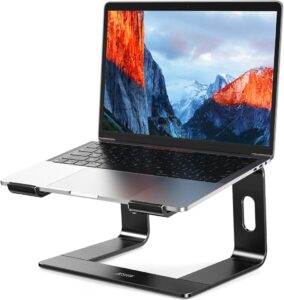
Long workdays become more comfortable when using a laptop stand, especially if the laptop remains on a desk for most of the day.
Best Premium Business Laptop: Lenovo ThinkPad E14 Gen 7
Price: Around $999.95
Why We Recommend It
The Lenovo ThinkPad E14 Gen 7 is aimed at professionals who expect dependable performance, durable construction, and enterprise features. The Ryzen 7 processor, DDR5 memory, Wi-Fi 6E, and business-focused design make it suitable for long-term daily productivity.
Key Features
- AMD Ryzen 7 processor
- 16GB DDR5 RAM
- 512GB PCIe SSD
- 14-inch FHD+ display
- Wi-Fi 6E
- RJ-45 Ethernet
- Backlit keyboard
- Windows 11 Pro
Pros and Cons
| Pros | Cons |
|---|---|
|
|
Professionals who travel frequently often value reliability more than raw specifications. The Lenovo ThinkPad E14 Gen 7 combines a durable chassis with practical features such as a backlit keyboard and Ethernet port, making the laptop suitable for office, home, and travel environments.
Remote workers who spend several hours in video meetings should also consider upgrading to a dedicated webcam if higher image quality is important than the laptop’s built-in camera.
How to Choose the Right Laptop
Choosing the right laptop starts with matching the hardware to your daily workload instead of buying the highest specifications available. A laptop buying guide for remote workers and students should focus on processor performance, memory, storage, battery life, display quality, portability, and connectivity because these factors have the biggest impact on everyday productivity.
Choose the Right Processor
The processor determines how quickly a laptop handles applications, multitasking, and demanding workloads. For most remote workers and students, an Intel Core i5, Intel Core Ultra 5, AMD Ryzen 5, or newer equivalent provides enough performance for video meetings, document editing, research, spreadsheets, and dozens of browser tabs.
Entry-level processors such as the Intel N150 remain suitable for web browsing, note-taking, streaming, and office applications. However, users who edit photos, compile code, analyze data, or work with creative software should consider Intel Core i7, Intel Core Ultra 7, or AMD Ryzen 7 processors for smoother long-term performance.
Processor performance also affects how responsive a laptop feels several years after purchase. Therefore, buying slightly more processing power than you currently need can extend the useful life of the device.
Decide How Much RAM and Storage You Need
Memory and storage determine how many applications a laptop can run smoothly and how much space remains for files. Most students can work comfortably with 8GB of RAM, while 16GB has become the preferred choice for remote professionals who frequently multitask.
A 256GB SSD works well for documents, presentations, and cloud-based work. Meanwhile, a 512GB SSD provides more flexibility for offline files, software installations, and large media libraries. Professionals handling large projects or virtual machines often benefit from 1TB of SSD storage.
Solid-state drives also improve boot times, application launches, and overall responsiveness compared with traditional hard drives. Additionally, modern PCIe SSDs help laptops remain fast even after months of regular use.
Prioritize Battery Life, Display, and Portability
Battery life becomes increasingly important when working away from a desk or attending classes throughout the day. A laptop capable of lasting eight to twelve hours under typical productivity workloads usually provides enough flexibility for most users.
Display quality also affects comfort during extended work sessions. Full HD resolution remains the practical minimum for productivity because text appears sharper and multiple windows are easier to manage. Higher-resolution displays improve clarity further but may reduce battery life depending on brightness settings.
Weight matters if the laptop travels frequently between classrooms, offices, or shared workspaces. Models weighing around three pounds generally offer a good balance between portability and usability.
Many professionals eventually add a larger display for multitasking. Pairing a laptop with one of the curved monitors for a home office can significantly increase screen space when working from a permanent desk.
Check Ports, Webcam, and Connectivity
Modern connectivity makes a laptop more versatile for both remote work and education. USB-C ports, HDMI outputs, Wi-Fi 6 or Wi-Fi 6E, Bluetooth, and reliable webcams reduce the need for additional adapters while improving compatibility with accessories.
Video conferencing has become part of everyday work and study. Consequently, a 1080p webcam generally delivers clearer meetings than older 720p cameras, especially in well-lit environments. Built-in microphones have also improved, although external microphones remain preferable for professional presentations.
Before purchasing a laptop, count the accessories you plan to connect. External monitors, storage devices, keyboards, webcams, and Ethernet adapters all require available ports or a docking station. Readers planning a complete workstation may also benefit from learning how to choose computer accessories that match their laptop.
Essential Accessories That Improve Productivity
A carefully selected laptop performs even better when paired with practical accessories. Remote workers and students often improve comfort, efficiency, and organization by investing in a few well-chosen peripherals rather than replacing the laptop itself.
Docking Stations and External Monitors
USB-C docking stations allow a laptop to connect to multiple displays, wired networks, storage devices, and charging cables through a single connection. This setup reduces cable clutter and makes moving between home and office much easier.
External monitors also increase productivity by displaying multiple applications simultaneously. Instead of constantly switching windows, users can keep video meetings, documents, email, and research visible at the same time.
Keyboard, Mouse, and Laptop Stand
Long typing sessions become more comfortable when the laptop screen is raised to eye level and paired with external input devices. A laptop stand improves posture, while a wireless keyboard and mouse reduce wrist strain during extended work sessions.
Many users notice improved comfort after creating an ergonomic desk setup. Additionally, combining these accessories helps maintain a more natural viewing angle throughout the workday.
Reliable Internet and Online Meeting Essentials
Reliable internet connectivity matters just as much as laptop performance. A stable Wi-Fi network reduces interruptions during virtual meetings, online classes, cloud backups, and large file transfers.
Remote workers who regularly handle sensitive business information should also consider using a VPN when connecting through public wireless networks. Furthermore, upgrading network equipment can improve connection stability in larger homes with multiple connected devices.
Common Laptop Buying Mistakes to Avoid
Buying More Power Than You Need
Buying the most expensive laptop does not always improve productivity. Many students and office workers never fully utilize premium processors or dedicated graphics, making mid-range laptops a better long-term value.
Ignoring Upgrade Potential
Some laptops allow memory or storage upgrades, while others have permanently soldered components. Checking upgrade options before buying can extend the usable lifespan of the laptop and delay future replacement costs.
Choosing Price Over Long-Term Value
The lowest purchase price is not always the lowest ownership cost. Spending slightly more for better build quality, faster hardware, and longer battery life often results in a laptop that remains productive for several additional years.
Forgetting Ergonomics and Accessories
Even an excellent laptop can become uncomfortable when used on a desk for long periods without proper accessories. A supportive workspace improves posture, reduces fatigue, and helps maintain productivity throughout the day. If you’re setting up a dedicated workspace, a budget-friendly home office can often deliver significant comfort improvements without requiring expensive furniture.
Frequently Asked Questions
What laptop specifications do remote workers need?
Most remote workers benefit from an Intel Core i5 or AMD Ryzen 5 processor, 16GB RAM, a 512GB SSD, and a Full HD display. These specifications provide enough performance for video meetings, productivity software, multitasking, and everyday business applications while remaining cost-effective.
Is 8GB RAM enough for students?
Yes, 8GB RAM remains sufficient for many students who primarily use web browsers, Microsoft Office, Google Workspace, streaming services, and online learning platforms. However, 16GB provides additional flexibility for multitasking and helps the laptop remain responsive as software requirements increase.
Should I choose Intel or AMD?
Both Intel and AMD produce excellent processors for remote work and education. The better choice depends on the individual laptop rather than the processor brand alone. Comparing battery life, display quality, memory, storage, and overall value usually leads to a better purchasing decision.
Is 512GB SSD enough?
Yes, a 512GB SSD provides enough space for most students and professionals. The capacity comfortably handles documents, applications, photos, and offline files while maintaining fast system performance. Users working with large video projects or extensive media libraries may prefer a 1TB SSD.
What screen size is best for travel and productivity?
A 14-inch laptop offers one of the best balances between portability and workspace. Travelers often appreciate the lighter weight, while professionals who mainly work at a desk may prefer a 15.6-inch display for increased viewing area.
How long should a good laptop last?
A quality laptop typically remains productive for five to seven years when equipped with modern hardware and maintained properly. Choosing current-generation processors, SSD storage, sufficient memory, and keeping the operating system updated can help extend the laptop’s useful lifespan.
Final Thought
The best laptop buying guide for remote workers and students begins with understanding your workload rather than focusing on brand names alone. Processor performance, memory, storage, battery life, portability, and connectivity should guide every purchasing decision because these specifications determine how well a laptop performs over time.
For many buyers, a well-balanced mid-range laptop delivers the strongest value. Meanwhile, professionals with demanding workloads may benefit from premium hardware, while students often gain more by combining an affordable laptop with practical accessories that improve comfort and productivity every day.