
Modern laptops continue to become thinner, but many models sacrifice useful ports in the process. The best USB-C docking station for laptops solves that limitation by adding extra USB ports, HDMI or DisplayPort outputs, Ethernet, SD card readers, and laptop charging through a single USB-C connection.
Whether you’re building a productive workspace, connecting multiple monitors, or reducing cable clutter, choosing the right USB-C docking station makes a noticeable difference. If you’re planning a complete workspace, pairing a dock with the right laptop stand creates a more comfortable and organized setup.
This guide compares the best USB-C docking stations for laptops based on compatibility, display support, charging capabilities, port selection, portability, and overall value. You’ll also learn which dock best suits remote work, business use, travel, and demanding productivity tasks.
Our Top USB-C Docking Station Picks for Laptops
These six USB-C docking stations stood out based on connectivity, display support, charging performance, build quality, compatibility with Windows and macOS laptops, and overall value. Whether you need an affordable dock for everyday work or a premium solution for multiple monitors, these recommendations cover the best options for most users.
Anker Prime Docking Station 14-Port — Best Overall
Why we picked it: Delivers the best combination of premium build quality, powerful charging, high-speed connectivity, and extensive port selection for demanding laptop users.
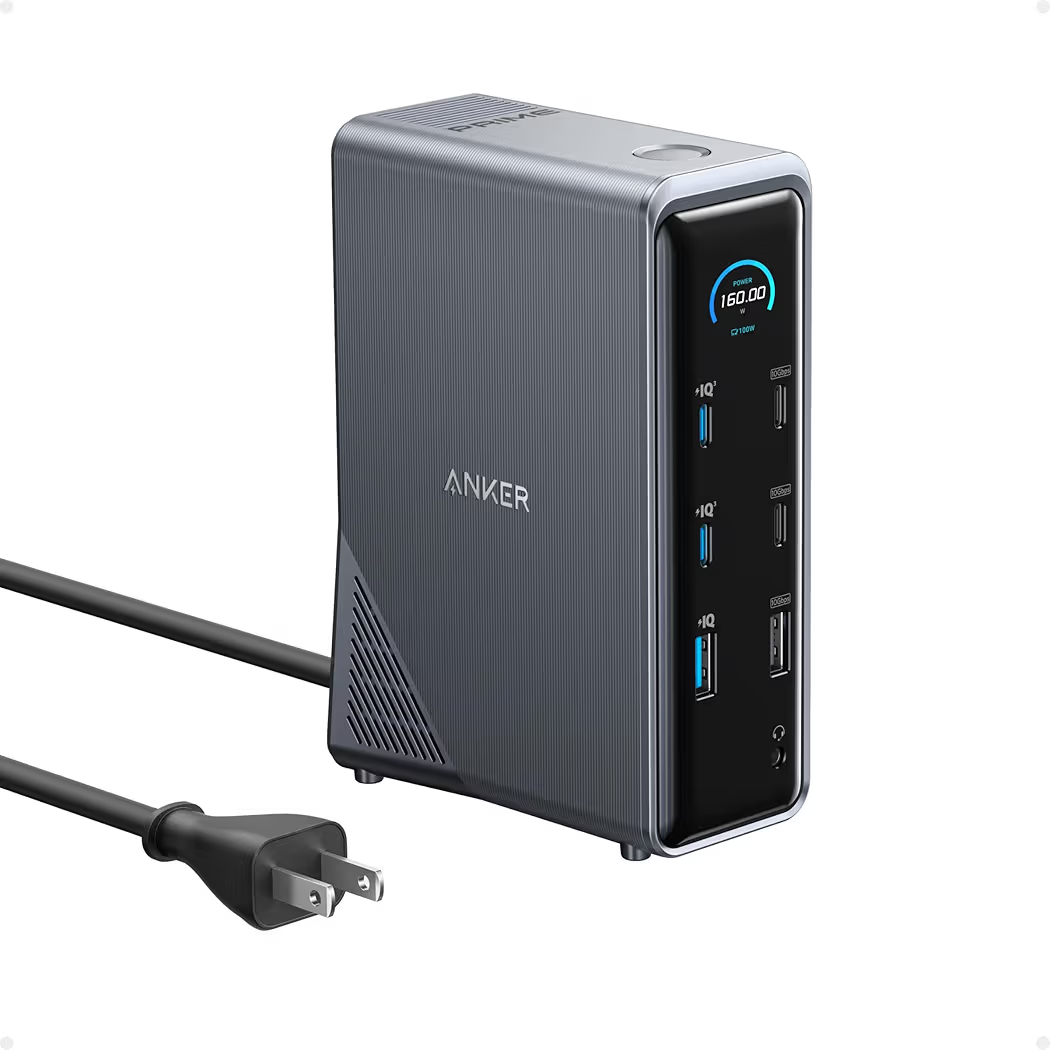 Click image to enlarge
|
Around $169.99
|
Anker Laptop Docking Station 13-in-1 — Best Premium
Why we picked it: Offers excellent connectivity, triple-display capability, and dependable performance for professionals who use several peripherals every day.
 Click image to enlarge
|
Around $199.99
|
Anker Laptop Docking Station 3 Monitors — Best Value
Why we picked it: Combines triple-display support, fast charging, and a generous port selection at a price that suits most home office users.
 Click image to enlarge
|
Around $50.04
|
UGREEN Revodok Pro 7-in-1 — Best Budget
Why we picked it: Delivers dual 4K display support, 100W Power Delivery, and fast USB ports while remaining one of the most affordable quality USB-C docking stations.
 Click image to enlarge
|
Around $28.99
|
Lenovo USB-C Dual Display Travel Dock — Best Portable
Why we picked it: Lightweight design, integrated cable, and dual 4K display support make it an excellent companion for hybrid workers and frequent travelers.
 Click image to enlarge
|
Around $67.99
|
HP USB-C G6 Dock — Best for Business
Why we picked it: Enterprise-grade reliability, HDMI 2.1 support, and 100W charging make it ideal for professionals using business laptops every day.
 Click image to enlarge
|
Around $194.89
|
Prices may change over time. We may earn a commission if you purchase through our links, at no extra cost to you.
Comparison Table
| Docking Station | Best For | Display Support | Power Delivery | Key Ports | Around Price |
|---|---|---|---|---|---|
| Anker Prime Docking Station 14-Port | Overall Performance | Dual 4K | Up to 160W | USB-C, USB-A, Ethernet, SD, Audio | $169.99 |
| Anker Laptop Docking Station 13-in-1 | Professionals | Triple Display | 85W | HDMI, DP, Ethernet, SD | $199.99 |
| Anker Laptop Docking Station 3 Monitors | Best Value | Triple Display | 80W | Dual HDMI, VGA, Ethernet | $50.04 |
| UGREEN Revodok Pro 7-in-1 | Budget Buyers | Dual 4K | 100W Pass-Through | USB-C, USB-A, HDMI | $28.99 |
| Lenovo USB-C Dual Display Travel Dock | Travel | Dual 4K | USB-C PD | USB, HDMI, Ethernet | $67.99 |
| HP USB-C G6 Dock | Business Users | Dual Display | 100W | HDMI 2.1, USB-C, Ethernet | $194.89 |
Best USB-C Docking Stations for Laptops
Anker Prime Docking Station 14-Port — Best Overall
List Price: Around $169.99
Why We Recommend It
The Anker Prime Docking Station 14-Port is the best overall choice because it combines premium connectivity, fast charging, and excellent build quality in one desktop dock. The generous port selection makes the dock suitable for professionals who connect multiple displays, external drives, wired networking, and accessories every day.
Key Features
- 14-in-1 desktop docking station
- High-speed USB-C and USB-A ports
- Dual external monitor support
- Up to 160W total power output
- 2.5 Gigabit Ethernet
- SD card reader
- Audio jack
- Premium aluminum design
| Pros | Cons |
|---|---|
|
|
The Anker Prime Docking Station works particularly well in a permanent home office. After connecting two monitors, an external SSD, Ethernet, keyboard, mouse, and webcam, only one USB-C cable remains connected to the laptop. As a result, switching between working at the desk and taking the laptop away becomes much faster.
Additionally, the generous power output reduces the need for separate laptop chargers on many compatible USB-C laptops. Users building a productive workspace may also benefit from choosing a comfortable wireless keyboard alongside a quality docking station.
Anker Laptop Docking Station 13-in-1 — Best Premium
List Price: Around $199.99
Why We Recommend It
The Anker Laptop Docking Station 13-in-1 is designed for users who need extensive connectivity without compromising reliability. Multiple display outputs, memory card support, and wired networking make the dock well suited for creative professionals and remote workers.
Key Features
- 13 ports
- Triple-display capability
- 85W laptop charging
- DisplayPort and HDMI outputs
- Gigabit Ethernet
- SD and microSD card readers
- USB-C and USB-A data ports
| Pros | Cons |
|---|---|
|
|
During everyday productivity tasks, the Anker Laptop Docking Station makes connecting monitors, storage drives, and wired internet effortless. Furthermore, photographers and video editors will appreciate the integrated SD card reader, eliminating the need for additional adapters.
Anker Laptop Docking Station 3 Monitors — Best Value
List Price: Around $50.04
Why We Recommend It
The Anker Laptop Docking Station 3 Monitors delivers one of the strongest feature-to-price ratios in this guide. Users who want multiple displays without spending premium prices receive a capable docking station with plenty of everyday connectivity.
Key Features
- 14-in-1 docking station
- Triple-monitor support
- Dual HDMI outputs
- USB-C Power Delivery
- Ethernet
- Multiple USB ports
- SD card support
| Pros | Cons |
|---|---|
|
|
The Anker Laptop Docking Station 3 Monitors is an excellent upgrade for users moving from a simple USB-C hub. Additionally, combining the dock with a larger display and an ergonomic mouse creates a more productive workstation. A quality wireless mouse complements this type of setup well.
UGREEN Revodok Pro 7-in-1 — Best Budget
List Price: Around $28.99
Why We Recommend It
The UGREEN Revodok Pro 7-in-1 proves that an affordable USB-C docking station can still offer reliable connectivity. Students, remote workers, and everyday laptop users receive the essential ports needed for daily productivity without paying for features they may never use.
Key Features
- 7 ports
- Dual 4K HDMI support
- 100W Power Delivery pass-through
- 10Gbps USB ports
- Compact aluminum housing
| Pros | Cons |
|---|---|
|
|
The UGREEN Revodok Pro fits easily into a laptop bag, making it ideal for working between home and the office. Consequently, users who only need HDMI, charging, and a few USB ports can save money without sacrificing everyday convenience.
Lenovo USB-C Dual Display Travel Dock — Best Portable
List Price: Around $67.99
Why We Recommend It
The Lenovo USB-C Dual Display Travel Dock is the best portable option because it combines a compact design with enough connectivity for remote work, business travel, and hybrid offices. Instead of carrying several adapters, one lightweight dock handles displays, networking, and USB accessories through a single cable.
Key Features
- Compact 7-in-1 travel dock
- Integrated USB-C cable
- Supports dual external 4K displays
- USB-A connectivity
- HDMI outputs
- Gigabit Ethernet
- Designed for Windows laptops and compatible USB-C devices
| Pros | Cons |
|---|---|
|
|
The Lenovo USB-C Dual Display Travel Dock performs best when moving between different workspaces. After arriving at an office or meeting room, connecting one USB-C cable immediately restores access to monitors, Ethernet, and USB devices without searching for multiple adapters.
Additionally, the compact footprint leaves more room inside a laptop bag than a traditional desktop dock. Users building a flexible remote workspace should also consider a dependable webcam for video meetings to complete a portable office setup.
HP USB-C G6 Dock — Best for Business
List Price: Around $194.89
Why We Recommend It
The HP USB-C G6 Dock is an excellent choice for business users who prioritize dependable connectivity, simple desk management, and long-term compatibility. Enterprise features, modern display support, and strong charging capabilities make the dock well suited to professional offices.
Key Features
- 100W USB-C charging
- HDMI 2.1 connectivity
- Additional USB-C ports
- Multiple USB-A ports
- Enterprise-ready design
- Future-focused connectivity
- Compatible with many USB-C business laptops
| Pros | Cons |
|---|---|
|
|
The HP USB-C G6 Dock simplifies a permanent office desk by connecting displays, storage devices, keyboards, mice, wired networking, and charging through one cable. Consequently, employees can dock and undock a laptop within seconds when moving between meetings and the office.
Furthermore, professionals working from home can create a more efficient workstation by combining a docking station with a larger display. An ergonomic curved monitor helps maximize the productivity benefits of a multi-monitor desk.
Buying Guide: How to Choose the Best USB-C Docking Station
The best USB-C docking station depends on your laptop, monitor requirements, and daily workflow. Choosing a dock based only on the number of ports often leads to compatibility problems, limited display support, or slower charging than expected.
Check Your Laptop Compatibility
USB-C ports do not all support the same features. Some USB-C ports only transfer data, while others also support video output and USB Power Delivery. Checking your laptop’s specifications before buying prevents disappointment after setup.
Additionally, Thunderbolt 4 and USB4 laptops usually offer greater bandwidth for multiple displays and faster storage devices. The USB Implementers Forum provides official information about USB-C, USB4, and Power Delivery standards.
Choose the Right Display Support
Monitor support is one of the biggest differences between docking stations. Some models support a single external display, while others handle dual or triple monitors depending on the laptop’s graphics capabilities and operating system.
Furthermore, macOS and Windows sometimes handle multiple displays differently. Users planning dual-monitor productivity should confirm whether a docking station supports native display output or requires DisplayLink software before purchasing.
Look for Enough Ports and Fast Charging
A good USB-C docking station should provide the ports you actually use every day instead of simply offering the highest port count. HDMI, DisplayPort, USB-A, USB-C, Ethernet, SD card readers, and audio outputs remain the most useful connections for most laptop users.
Power Delivery is equally important because it allows the docking station to charge a compatible laptop through the same cable used for data and displays. Therefore, users with power-hungry laptops should verify the charging wattage before buying.
Pick a Dock That Matches Your Workflow
Remote workers, students, business professionals, gamers, and content creators all benefit from different docking station designs. A compact travel dock is perfect for hybrid work, while a desktop docking station offers more expansion for permanent workspaces.
If you’re building an efficient desk from scratch, choosing the right accessories together usually provides better results than upgrading one item at a time. A complete home office checklist can help identify the remaining equipment needed for a productive workspace.
USB-C Dock vs USB-C Hub: Which Should You Buy?
A USB-C docking station is usually the better choice for desktop productivity, while a USB-C hub is better suited to travel and basic connectivity. The right option depends on how many devices you connect and whether you need charging, Ethernet, or multiple external displays.
Key Differences
| Feature | USB-C Hub | USB-C Docking Station |
|---|---|---|
| Primary Purpose | Basic expansion | Complete desktop connectivity |
| Monitor Support | Usually one display | One to three displays depending on compatibility |
| Charging | Limited or pass-through | Higher Power Delivery support |
| Ethernet | Not always included | Common feature |
| Best Use | Travel and occasional use | Permanent home or office workstation |
Which Option Fits Your Needs?
A USB-C hub is sufficient for connecting a few accessories while traveling. However, users who rely on external monitors, wired networking, charging, storage devices, and desktop accessories will benefit much more from a dedicated USB-C docking station.
Frequently Asked Questions
Will a USB-C docking station work with any laptop?
Not always. A USB-C docking station works best with laptops that support video output through the USB-C port. Checking whether your laptop supports DisplayPort Alt Mode, USB4, or Thunderbolt helps ensure full compatibility before purchasing.
Can a docking station charge my laptop?
Yes, many USB-C docking stations support USB Power Delivery. However, the charging speed depends on both the docking station’s maximum wattage and your laptop’s charging requirements.
Do I need Thunderbolt or USB-C?
USB-C is sufficient for most everyday users. Thunderbolt becomes worthwhile if you regularly connect multiple high-resolution monitors, very fast external storage, or demanding professional accessories.
Can one docking station support multiple monitors?
Yes, many docking stations support two or three monitors. The exact number depends on the dock itself, your laptop’s graphics hardware, and your operating system.
Are USB-C docking stations good for gaming laptops?
Yes, provided the gaming laptop supports display output through USB-C or Thunderbolt. Many gamers use docking stations for peripherals, Ethernet, and additional monitors while leaving the laptop charger connected separately if higher power is required.
What’s the difference between DisplayLink and native display output?
Native display output uses your laptop’s graphics hardware directly. DisplayLink relies on software to drive additional monitors, making it useful when a laptop cannot natively support multiple external displays through USB-C alone.
Final Thought
The best USB-C docking station for laptops is the one that matches your laptop’s capabilities and your everyday workflow. Premium models offer maximum expandability for professionals, while budget and travel-friendly docks provide excellent value for students, hybrid workers, and anyone who simply needs more ports without replacing their laptop.