A wireless mouse designed for productivity can reduce hand fatigue, improve cursor precision, and speed up everyday tasks such as document editing, spreadsheet work, coding, and multitasking. Choosing the right model depends on ergonomics, programmable controls, connectivity, battery life, and how you work throughout the day.
If you’re building or upgrading a workspace, pairing a quality mouse with the right wireless keyboard and an ergonomic desk setup can make a noticeable difference in comfort and efficiency. This guide compares the best wireless mouse for productivity based on comfort, features, real-world usability, and overall value to help you choose the right option.
Our Top Wireless Mouse Picks for Productivity
These six wireless mice stood out based on ergonomics, productivity features, multi-device connectivity, battery life, software customization, and overall value. Whether you need a premium productivity mouse, an ergonomic model for long workdays, or an affordable option for everyday office use, these recommendations cover the best choices for most users.
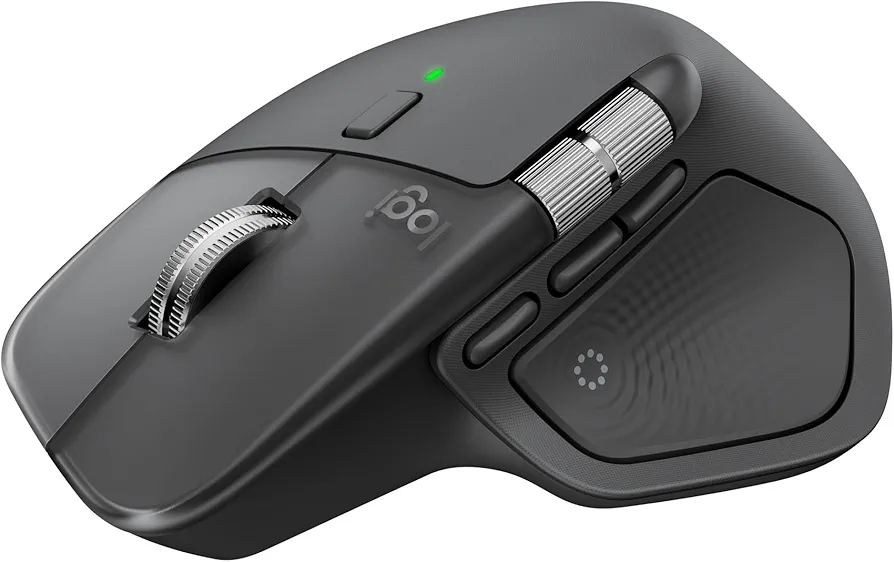
Logitech MX Master 4 — Best Overall Premium
Why we picked it: Logitech MX Master 4 combines outstanding ergonomics, advanced scrolling, customizable controls, and multi-device support, making it one of the most complete wireless productivity mice available.
 Click image to enlarge
|
Around $119.99
|
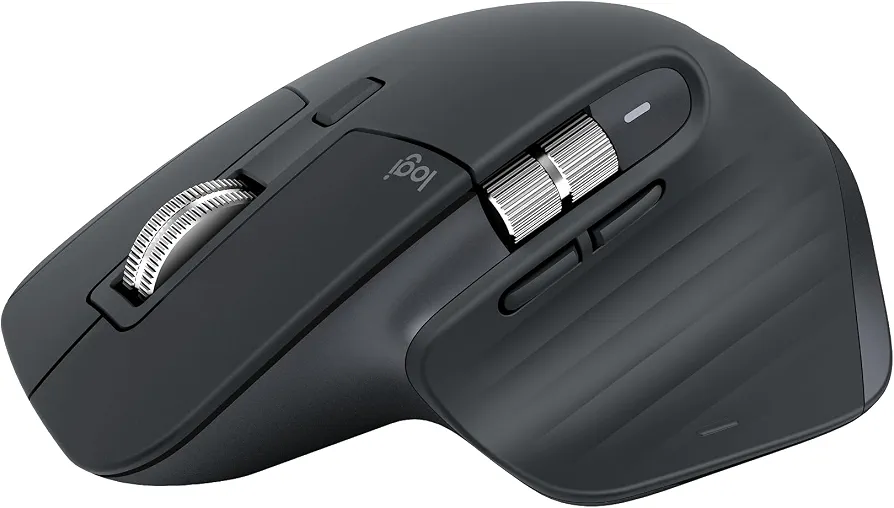
Logitech MX Master 3S Bluetooth Edition — Best Overall Value
Why we picked it: Logitech MX Master 3S delivers premium productivity features, exceptionally quiet clicks, and precise tracking while costing less than the newest flagship model.
 Click image to enlarge
|
Around $79.99
|
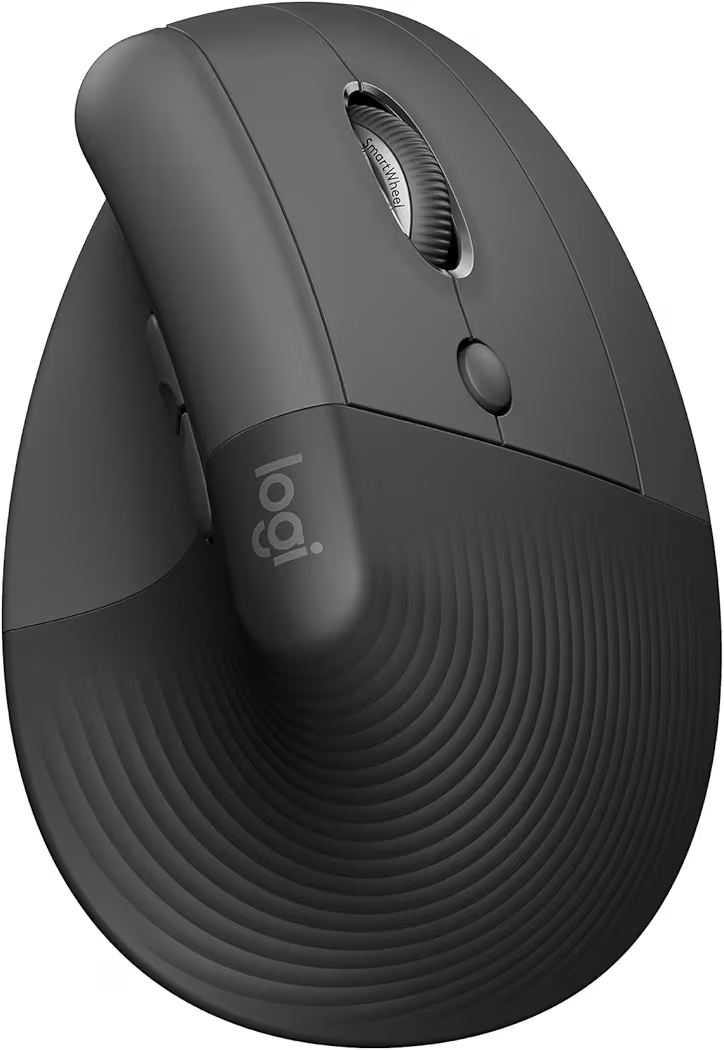
Logitech Lift Vertical Ergonomic Mouse — Best Ergonomic Choice
Why we picked it: Logitech Lift Vertical Ergonomic Mouse promotes a more natural hand position, helping reduce wrist strain during long work sessions.
 Click image to enlarge
|
Around $59.49
|

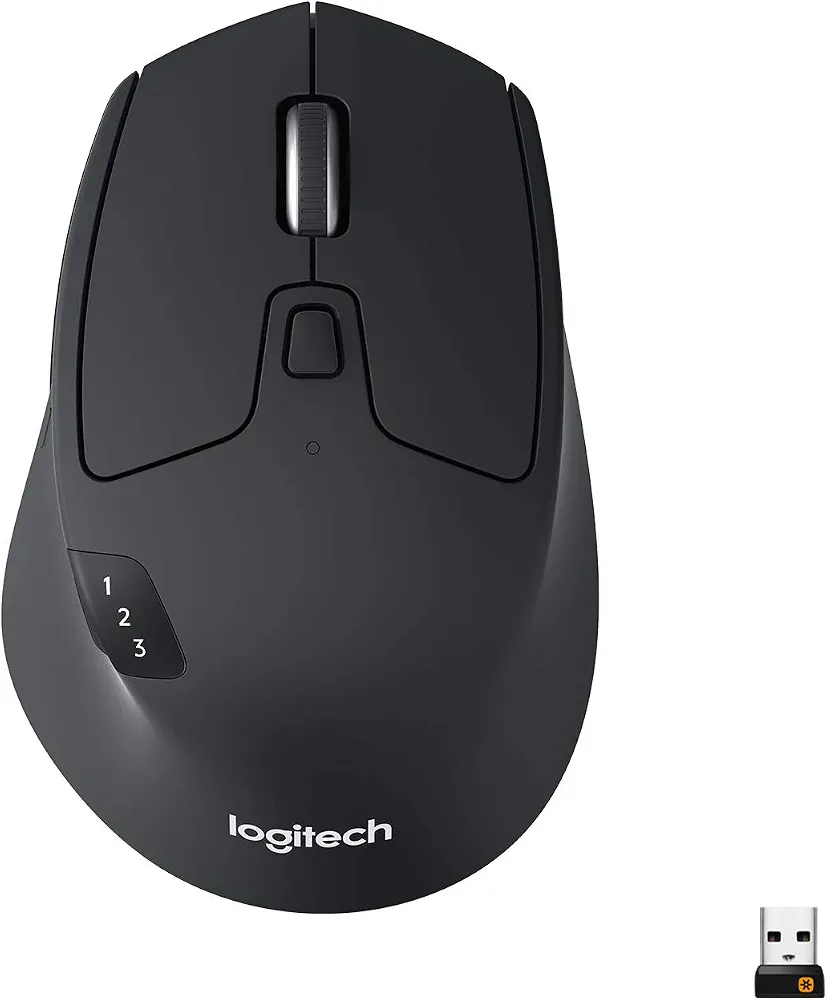
Logitech M720 Triathlon — Best for Multi-Device Work
Why we picked it: Logitech M720 Triathlon easily switches between multiple computers and tablets, making it ideal for professionals who regularly work across different devices.
 Click image to enlarge
|
Around $36.99
|
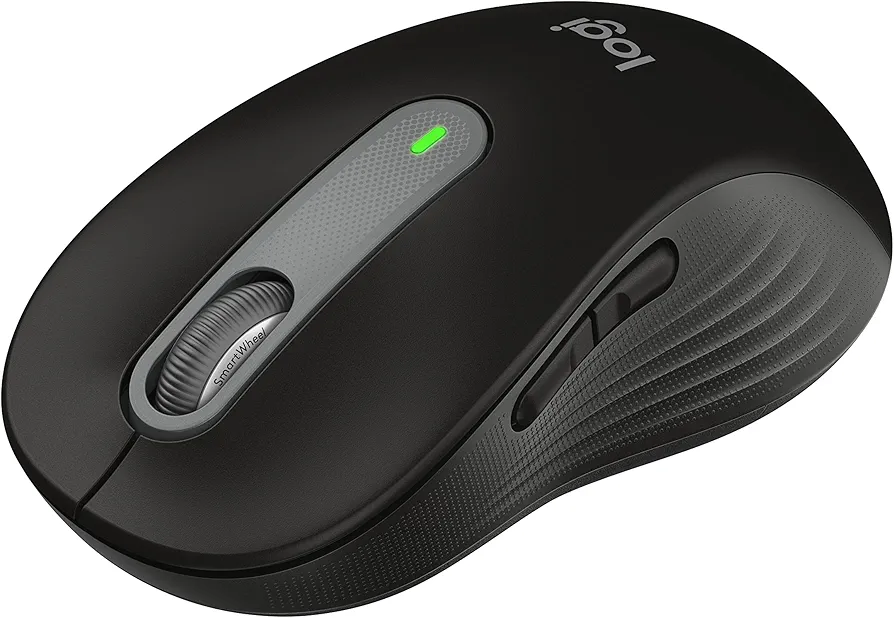
Logitech Signature M650 L — Best Mid-Range Value
Why we picked it: Logitech Signature M650 L balances comfort, quiet clicks, and dependable wireless performance at a price that fits most home office budgets.
 Click image to enlarge
|
Around $31.49
|
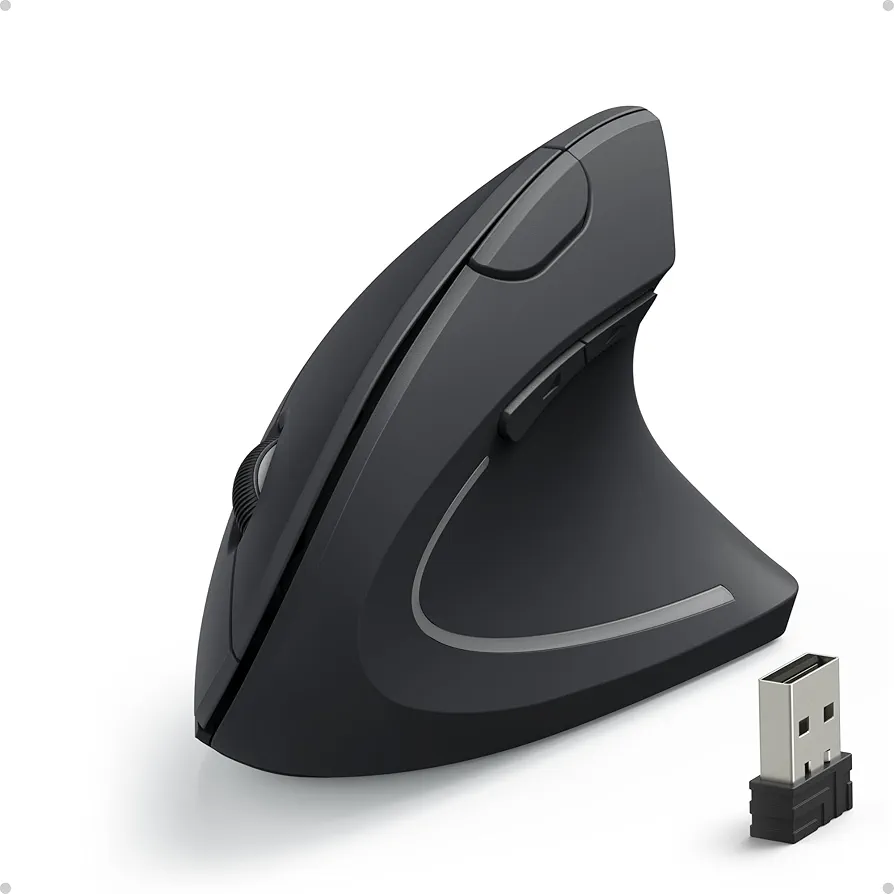
Anker Vertical Ergonomic Mouse — Best Budget Ergonomic Pick
Why we picked it: Anker Vertical Ergonomic Mouse offers excellent wrist support and dependable performance without the premium price of high-end ergonomic models.
 Click image to enlarge
|
Around $20.48
|
Prices may change over time. We may earn a commission if you purchase through our links, at no extra cost to you.
Best Wireless Mouse for Productivity Reviews
Logitech MX Master 4
Price: Around $119.99
Why We Recommend It
Logitech MX Master 4 is the best wireless mouse for productivity if you spend most of the day switching between documents, browsers, spreadsheets, and creative software. The combination of ergonomic comfort, fast scrolling, programmable controls, and multi-device support makes everyday work noticeably more efficient.
Key Features
- Ergonomic right-handed design
- USB-C rechargeable battery
- Bluetooth multi-device connectivity
- Ultra-fast scrolling wheel
- Customizable buttons
- Advanced haptic feedback
- High-precision optical sensor
Pros and Cons
| Pros | Cons |
|---|---|
| Excellent comfort for long workdays | Premium price |
| Fast and accurate scrolling | Large size may not suit smaller hands |
| Rechargeable USB-C battery | Right-handed design only |
| Excellent software customization | Advanced features require Logitech software |
Logitech MX Master 4 feels particularly useful when editing long documents or navigating large spreadsheets. The thumb wheel and customizable buttons reduce repetitive cursor movements, while the ergonomic shape keeps the wrist comfortable throughout a full workday.
Additionally, Logitech MX Master 4 easily switches between multiple computers without reconnecting every time. That flexibility benefits professionals who regularly move between a work laptop and a desktop PC. If you’re creating a complete workspace, pairing this mouse with a quality laptop stand can further improve posture.
Logitech MX Master 3S Bluetooth Edition
Price: Around $79.99
Why We Recommend It
Logitech MX Master 3S remains one of the best values for professionals because it delivers flagship productivity features at a lower price than newer premium models.
Key Features
- 8K DPI optical sensor
- Track-on-glass technology
- MagSpeed scroll wheel
- Quiet click switches
- USB-C rechargeable battery
- Bluetooth multi-device support
Pros and Cons
| Pros | Cons |
|---|---|
| Extremely quiet buttons | Premium pricing |
| Excellent battery life | Not ideal for very small hands |
| Outstanding tracking accuracy | Large body limits portability |
| Highly customizable | Learning curve for extra controls |
Logitech MX Master 3S performs especially well during multitasking because the high-precision sensor works reliably on nearly every desk surface, including glass. Quiet switches also make the mouse suitable for shared offices and video meetings.
Furthermore, Logitech Options+ software allows different button layouts for each application. That feature becomes valuable when switching between Photoshop, Excel, web browsers, and productivity software throughout the day.
Logitech Lift Vertical Ergonomic Mouse
Price: Around $59.49
Why We Recommend It
Logitech Lift Vertical Ergonomic Mouse is an excellent choice for users who experience wrist discomfort after long hours of computer work. The vertical grip encourages a more natural hand position without sacrificing productivity.
Key Features
- Vertical ergonomic design
- Bluetooth and Logi Bolt connectivity
- Quiet click buttons
- Six programmable buttons
- Customizable shortcuts
- Long battery life
Pros and Cons
| Pros | Cons |
|---|---|
| Excellent wrist support | Requires adjustment period |
| Very comfortable for office work | Not designed for gaming |
| Quiet operation | Vertical grip isn’t for everyone |
| Reliable wireless connection | Limited portability |
Logitech Lift Vertical Ergonomic Mouse becomes comfortable after a few days of regular use. Many users find that the natural handshake position reduces wrist pressure during extended typing and navigation sessions.
Additionally, Logitech Lift works well alongside an ergonomic desk setup. If you’re improving your workspace, reviewing common home office setup mistakes can help you avoid posture issues that affect long-term comfort.
Logitech M720 Triathlon
Price: Around $36.99
Why We Recommend It
Logitech M720 Triathlon offers one of the best balances of price, features, and battery life for professionals who regularly work across several devices.
Key Features
- Easy-Switch multi-device support
- Bluetooth and USB receiver
- Six programmable buttons
- Two-year battery life
- Comfortable full-size design
Pros and Cons
| Pros | Cons |
|---|---|
| Excellent value | Uses AA battery |
| Long battery life | Older sensor than MX series |
| Works with multiple devices | Heavier than compact mice |
| Comfortable grip | Plastic finish feels basic |
Logitech M720 Triathlon stands out for professionals who carry one mouse between work and personal computers. Switching devices takes only a button press, reducing interruptions during multitasking.
Logitech Signature M650 L
Price: Around $31.49
Why We Recommend It
Logitech Signature M650 L delivers dependable productivity features at a mid-range price, making it an excellent upgrade from a basic office mouse.
Key Features
- SilentTouch buttons
- Bluetooth and USB receiver
- Customizable side buttons
- Two-year battery life
- Comfortable full-size shape
Pros and Cons
| Pros | Cons |
|---|---|
| Affordable | Not rechargeable |
| Comfortable shape | Fewer premium features |
| Quiet clicks | No horizontal scroll wheel |
| Easy setup | Limited customization |
Logitech Signature M650 L is well suited to everyday office work, online meetings, and general productivity. Silent buttons help keep distractions to a minimum, especially in shared workspaces.
Anker Vertical Ergonomic Mouse
Price: Around $20.48
Why We Recommend It
Anker Vertical Ergonomic Mouse provides an affordable way to improve wrist comfort without paying premium prices for advanced ergonomic features.
Key Features
- Vertical ergonomic design
- Adjustable DPI
- Five-button layout
- Plug-and-play setup
- Comfortable sculpted grip
Pros and Cons
| Pros | Cons |
|---|---|
| Excellent value | Uses replaceable battery |
| Comfortable vertical grip | No companion software |
| Simple setup | Basic materials |
| Reliable tracking | Limited customization |
Anker Vertical Ergonomic Mouse is a practical choice for office users who want better wrist support without a large investment. While the feature set remains simple, everyday navigation, document editing, and web browsing feel comfortable during extended work sessions.
How to Choose the Best Wireless Mouse for Productivity
The best wireless mouse for productivity should match your daily workflow rather than simply offering the highest specifications. Comfort, programmable controls, reliable connectivity, and battery life often have a bigger impact on productivity than extremely high DPI or gaming-focused features.
Choose an Ergonomic Design for Long Work Sessions
An ergonomic wireless mouse reduces wrist strain by supporting a more natural hand position. If you spend six to eight hours working at a computer, a comfortable shape can help minimize fatigue and improve cursor control throughout the day.
Vertical designs such as the Logitech Lift and Anker Vertical Ergonomic Mouse are ideal for users experiencing wrist discomfort. Meanwhile, traditional ergonomic mice like the Logitech MX Master series provide excellent palm support without requiring a major adjustment period.
Bluetooth vs USB Receiver
Bluetooth connectivity keeps USB ports free and works well with most modern laptops, while a USB receiver often provides a more stable connection in busy wireless environments. Many productivity mice include both options, giving you flexibility across different devices.
If you regularly switch between a desktop and laptop, choosing a mouse with multi-device pairing saves time because you won’t need to reconnect it each time you change computers.
Battery Life and Charging
Battery life affects convenience more than many buyers realize. Rechargeable wireless mice eliminate disposable batteries, while AA-powered models can last for one or even two years before needing replacement.
Professionals who travel frequently may appreciate rechargeable USB-C models because they recharge using the same cable as many laptops. On the other hand, replaceable batteries remain convenient for users who prefer longer runtimes without charging.
Programmable Buttons and Software
Programmable buttons increase productivity by placing common shortcuts within easy reach. Tasks such as copying, pasting, switching applications, opening folders, or navigating browser tabs become much faster with customized controls.
Software such as Logitech Options+ also allows different button layouts for individual applications. For example, the same button can zoom in Photoshop while performing a different function in Microsoft Excel.
Feature Comparison Table
| Mouse | Best For | Amazon | Connectivity | Rechargeable | Programmable Buttons | Multi-Device | Approx. Price |
|---|---|---|---|---|---|---|---|
| Logitech MX Master 4 | Premium productivity | View | Bluetooth | Yes | Yes | Yes | $119.99 |
| Logitech MX Master 3S | Overall value | View | Bluetooth | Yes | Yes | Yes | $79.99 |
| Logitech Lift | Ergonomics | View | Bluetooth / USB | No | Yes | Yes | $59.49 |
| Logitech M720 Triathlon | Multi-device work | View | Bluetooth / USB | No | Yes | Yes | $36.99 |
| Logitech Signature M650 L | Mid-range value | View | Bluetooth / USB | No | Yes | Yes | $31.49 |
| Anker Vertical Ergonomic Mouse | Budget ergonomic | View | USB Receiver | No | Yes | No | $20.48 |
Frequently Asked Questions
What is the best wireless mouse for productivity?
Logitech MX Master 4 is the best wireless mouse for productivity if you want premium ergonomics, customizable controls, and excellent multi-device support. Logitech MX Master 3S remains the better value for most users because it offers many of the same productivity features at a lower price.
Is a vertical mouse better for office work?
A vertical mouse is often better for office work if wrist discomfort is a concern. The handshake-style grip places less pressure on the wrist than a traditional flat mouse, making models like the Logitech Lift and Anker Vertical Ergonomic Mouse good options for extended computer use.
Should I choose Bluetooth or a USB receiver?
Bluetooth is the better choice when USB ports are limited or when using modern laptops. A USB receiver may provide a slightly more reliable connection in environments with heavy wireless interference. Mice that support both methods offer the greatest flexibility.
What DPI is best for productivity?
A DPI range between 1,000 and 4,000 is sufficient for most productivity tasks. Higher DPI settings become useful when working with multiple high-resolution monitors, while moderate DPI settings provide precise cursor control for spreadsheets, document editing, and graphic design.
Are rechargeable wireless mice worth buying?
Rechargeable wireless mice are worth buying if you use your computer every day. USB-C charging eliminates the need for disposable batteries, reduces ongoing costs, and makes it easier to keep the mouse ready for work using the same charger as many laptops.
What other accessories improve productivity?
A wireless mouse delivers the best results when combined with other ergonomic accessories. For example, an external monitor improves multitasking, while a docking station helps organize cables and expand laptop connectivity. Choosing the right monitor and a reliable USB-C docking station can significantly improve an office setup.
Final Thought
The best wireless mouse for productivity depends on your budget, workspace, and daily tasks. Logitech MX Master 4 is the strongest premium choice for demanding professionals, while Logitech MX Master 3S offers outstanding value with many flagship features. Users focused on comfort should consider the Logitech Lift Vertical Ergonomic Mouse, and the Anker Vertical Ergonomic Mouse remains an affordable ergonomic alternative.
Building an efficient workspace goes beyond choosing the right mouse. Pairing your mouse with a comfortable keyboard, an ergonomic desk layout, and reliable networking equipment creates a more productive environment. If you’re upgrading your entire workstation, exploring a remote work laptop and a dependable Wi-Fi 7 router can further improve your work experience.