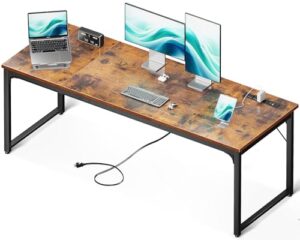
What makes a desk work well with both a laptop and an external monitor? The best option provides enough width and depth for your screens, laptop, keyboard, and mouse. For most home-office users, the ODK 55-Inch Computer Desk is the strongest overall choice because it combines useful workspace with built-in storage.
A good setup also needs stability, sensible cable management, and enough room for daily work. This guide compares five desks for different needs, including standing workstations, L-shaped layouts, and storage-focused designs.
Best Desks for a Monitor and Laptop at a Glance
The ODK 55-Inch Computer Desk is the best overall option for most laptop-and-monitor setups. The other picks target specific needs such as standing work, built-in power, storage, and corner layouts.
- Best Overall: ODK 55-Inch Computer Desk
- Best Standing Desk: FEZIBO 55 × 24-Inch Electric Standing Desk
- Best Feature-Rich: AODK 55-Inch Computer Desk
- Best L-Shaped Option: ODK 55-Inch L-Shaped Computer Desk
- Best Organized Workstation: ODK 55-Inch Computer Desk with Keyboard Tray
ODK 55-Inch Computer Desk with Drawers and Storage Shelves
Best Overall
Best For: Most laptop and single-monitor home-office setups.

ODK
ODK Computer Desk with Drawers and Storage Shelves, 55 inch Home Office Desk with Monitor Stand, Modern Work Study Writing Table Desk for Small Spaces, Black
This 55-inch ODK desk is the article's best overall choice for a laptop and external monitor. Its 55-inch width, 20-inch depth, monitor shelf, three drawers, and two shelves provide a practical balance of workspace and storage.
Who Should Buy It
It suits remote workers, students, and home-office users with a laptop and one monitor. Users with several large monitors should consider a wider or L-shaped desk.
Why We Pick It
It earned the top position because it combines useful desktop space with built-in storage without requiring a large workstation footprint. The monitor shelf can also help free space on the main work surface.
Features & Benefits
| Feature | Benefit |
|---|---|
| 55-inch desktop | provides useful room for a laptop and external monitor |
| 20-inch depth | gives adequate front-to-back workspace for many setups |
| monitor shelf | raises the display and preserves some desktop space |
| three drawers | keeps office supplies and accessories organized |
| two shelves | adds additional storage |
Pros & Cons
| Pros | Cons |
|---|---|
| ✓ Good balance of workspace and storage | ✕ 20-inch depth is less generous than a 24-inch desk |
| ✓ monitor shelf saves desktop space | ✕ Not ideal for several large monitors |
| ✓ Suitable for home-office and study use |
The ODK 55-Inch Computer Desk earns the top spot by balancing workspace, storage, and size. The desktop measures 55 inches wide and 20 inches deep.
That footprint gives a laptop and external monitor useful working space. The desk also includes three drawers and two shelves for accessories and office supplies.
The metal base supports the engineered-wood desktop. A monitor shelf can also raise the display while preserving some usable surface below.
Who should buy it: Choose this desk for remote work, studying, browsing, and everyday productivity.
Who should avoid it: Users with several large monitors may need a wider or L-shaped workstation.
Important limitation: The 20-inch depth works for many setups, but deeper desks offer more front-to-back flexibility.
FEZIBO 55 × 24-Inch Electric Standing Desk
Best Standing Desk
Best For: Users who want to alternate between sitting and standing.

FEZIBO
FEZIBO 55x 24 Inches Standing Desk with Drawer, Adjustable Height Electric Stand up Desk with Storage, Sit Stand Home Office Desk, Ergonomic Computer Desk, Black
This FEZIBO standing desk is the article's top choice for users who want to alternate between sitting and standing. Its 55-inch width and 24-inch depth give a laptop, external monitor, keyboard, and mouse more front-to-back room than the 20-inch ODK desk.
Who Should Buy It
It is a good fit for remote workers, students, and anyone who wants an adjustable workstation. Users who prefer a simple fixed desk may not need the added electric mechanism.
Why We Pick It
It earned the standing-desk position because it combines a large 55-inch work surface with electric height adjustment. The drawer, hooks, cable-management tray, and USB charging add practical workstation features.
Features & Benefits
| Feature | Benefit |
|---|---|
| 55 × 24-inch desktop | provides generous room for a laptop and monitor setup |
| Electric height adjustment | allows sitting and standing positions |
| Four preset buttons | makes preferred heights easier to select |
| Drawer | provides convenient storage |
| Cable-management tray | helps keep wires organized |
| USB charging port | provides convenient device charging |
Pros & Cons
| Pros | Cons |
|---|---|
| ✓ Adjustable sitting and standing height | ✕ More mechanical components than a fixed desk |
| ✓ 24-inch depth gives more workspace | ✕ Assembly and adjustment add complexity |
| ✓ Useful cable management and storage |
The FEZIBO 55 × 24-Inch Electric Standing Desk is the strongest standing option in this lineup. Its 55-inch width gives a laptop and external monitor useful working room.
The 24-inch depth also provides more front-to-back space than the 20-inch ODK desk. That extra room helps when a laptop, monitor, keyboard, and mouse share the desktop.
The desk includes electric height adjustment, four preset buttons, a drawer, two hooks, cable management, and USB charging.
Who should buy it: This desk suits remote workers and students who want adjustable working height.
Who should avoid it: Choose a fixed desk if you want a simpler setup without electric height adjustment.
Important limitation: Electric desks have more mechanical components than fixed desks.
AODK 55-Inch Computer Desk with Drawers and Power
Best Feature-Rich Desk
Best For: Users who want storage, charging, and workstation features in one desk.

AODK
AODK Computer Desk with 4 Drawers, 55 Inch Office Desk with Printer Shelf & Built-in Power Outlet, Work Desk with Monitor Shelf for Home Small Spaces, Black
This AODK desk focuses on storage, charging, and workstation convenience in a 55-inch design. The article highlights its four drawers, three AC outlets, two USB ports, RGB lighting, printer shelf, and raised monitor shelf.
Who Should Buy It
It suits users who want integrated charging and storage for a compact home office. Users who prioritize maximum desk depth or a simpler design may prefer another pick.
Why We Pick It
It earned the feature-rich position because it combines several workstation functions in one desk. The reversible storage configuration also gives users more flexibility when arranging a small office.
Features & Benefits
| Feature | Benefit |
|---|---|
| 55.9-inch width | provides useful room for a laptop and monitor |
| 18.89-inch depth | fits compact workspaces but limits front-to-back room |
| Three AC outlets | provides convenient access to power |
| Two USB ports | makes charging compatible devices easier |
| Four fabric drawers | keeps documents and accessories organized |
| Raised monitor shelf | frees main desktop space and raises the display |
| RGB lighting | adds customizable ambient lighting |
| Reversible storage | lets the storage section suit different room layouts |
Pros & Cons
| Pros | Cons |
|---|---|
| ✓ Integrated power and USB charging | ✕ Shallow 18.89-inch depth |
| ✓ Extensive storage | ✕ Built-in outlets should not be assumed to provide surge protection |
| ✓ Reversible and feature-rich design |
The AODK 55-Inch Computer Desk stands out for its integrated workstation features. The desktop measures about 55.9 inches wide and 18.89 inches deep.
The listed configuration includes four fabric drawers, three AC outlets, two USB ports, RGB lighting, and a monitor stand.
Those features can help reduce desktop clutter. However, the shallow depth makes monitor and laptop positioning important.
Who should buy it: Choose this model if integrated power and storage are high priorities.
Who should avoid it: Users who prefer a simple desk without built-in electronics may prefer the ODK fixed desk.
Important limitation: Built-in AC outlets should not automatically be considered surge protection.
ODK 55-Inch L-Shaped Computer Desk
Best L-Shaped Option
Best For: Corner workspaces and users who need separate work zones.
ODK
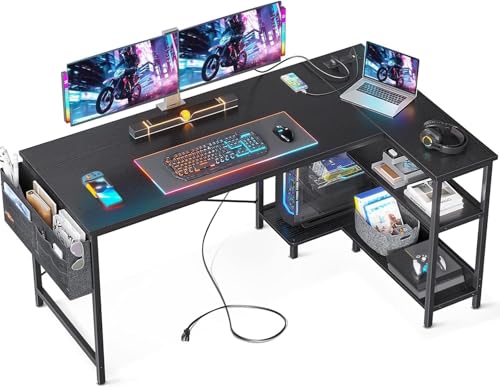
ODK 55" Small L Shaped Desk with Power Outlets & Storage Shelves, Black
This ODK L-shaped desk is the article's choice for corner workspaces and users who need separate work zones. Its layout provides room for monitors, a laptop, documents, and accessories while using a corner more efficiently.
Who Should Buy It
It suits users with a corner office or anyone who wants separate areas for computer equipment and other work. It is less suitable for rooms where floor space is limited.
Why We Pick It
It earned its position because the L-shaped design offers more flexible workspace than a straight desk. Power outlets, storage shelves, a PC stand, and a reversible configuration add practical versatility.
Features & Benefits
| Feature | Benefit |
|---|---|
| L-shaped design | creates separate work zones |
| Power outlets | provides convenient access to electricity |
| USB and Type-C charging | supports convenient device charging |
| Reversible shelves | lets the storage configuration fit different layouts |
| PC stand | keeps a desktop computer off the main work surface |
| Two-tier shelves | adds storage for books, equipment, and accessories |
Pros & Cons
| Pros | Cons |
|---|---|
| ✓ Flexible corner layout | ✕ Requires more floor space than a rectangular desk |
| ✓ Useful storage and PC stand | ✕ Corner placement needs careful room measurements |
| ✓ Built-in charging features |
The ODK 55-Inch L-Shaped Computer Desk works well when a straight desktop does not provide enough flexibility. Its corner design creates separate areas for monitors, laptops, documents, and accessories.
The listed configuration includes power outlets, a PC stand, and reversible storage shelves. Those features make the workstation more flexible than a basic rectangular desk.
An L-shaped layout can also help users separate work tasks. For example, one side can hold the primary monitor while the other handles the laptop and accessories.
Who should buy it: Choose this desk for a corner office or a workstation that needs multiple work zones.
Who should avoid it: Avoid this style if your room has limited floor space.
Important limitation: Measure the complete corner area before buying. The required floor footprint is larger than a straight desk’s footprint.
ODK 55-Inch Computer Desk with Keyboard Tray
Best for an Organized Workstation
Best For: Users who want a monitor shelf, keyboard tray, and storage.

ODK
ODK Computer Desk Study Table, 55 Inch Office Desk with Drawers and Keyboard Tray, Study Desk Work Desk with Monitor Shelf, Writing Desk with Storage for Home Office, White
This ODK 55-inch desk is designed around an organized laptop-and-monitor workspace. Its keyboard tray, monitor shelf, two drawers, and 18.9-inch depth make it useful for study and everyday office work.
Who Should Buy It
It suits students and home-office users who want to keep the keyboard and accessories organized. Users with large monitor stands or extensive peripherals may benefit from a deeper desk.
Why We Pick It
It earned a spot because the keyboard tray moves the keyboard below the main surface while the monitor shelf creates additional usable desktop space. The two drawers provide storage for smaller office items.
Features & Benefits
| Feature | Benefit |
|---|---|
| 55-inch width | provides useful horizontal space |
| 18.9-inch depth | fits smaller work areas but limits front-to-back room |
| Keyboard tray | keeps the keyboard below the main work surface |
| Monitor shelf | raises the display and preserves desktop space |
| Two drawers | provides storage for accessories and supplies |
Pros & Cons
| Pros | Cons |
|---|---|
| ✓ Dedicated keyboard tray | ✕ Shallow 18.9-inch depth |
| ✓ Useful monitor shelf | ✕ Less suitable for large monitors and many peripherals ### |
| ✓ Good storage for an organized setup |
The ODK 55-Inch Computer Desk with Keyboard Tray is designed to keep the main desktop organized. The desk measures about 55 inches wide and 18.9 inches deep.
The keyboard tray places the keyboard below the main desktop. A monitor shelf can also raise the display and preserve some surface space.
Two drawers provide additional storage for smaller accessories. That arrangement works well for everyday computer use.
Who should buy it: Choose this desk if you want an organized keyboard and monitor layout.
Who should avoid it: Users with deep monitor stands or large peripherals may prefer a deeper desktop.
Important limitation: The 18.9-inch depth provides less front-to-back room than the FEZIBO’s 24-inch desktop.
Desk Size for a Laptop and Monitor
A 55-inch desk is a practical starting point for many laptop-and-monitor setups. The ideal size still depends on monitor count, display size, accessories, and available room.
| Desk Size | Best Use | Typical Setup |
|---|---|---|
| Around 40–42 inches | Small rooms | Laptop + one compact monitor |
| 55 inches | Home office | Laptop + one or two monitors |
| 60–63 inches | Larger workstations | Dual monitors + more accessories |
| L-shaped | Corner offices | Multiple displays + separate zones |
A 55-inch desk offers more flexibility than a compact workstation. However, desk width alone does not determine whether everything will fit.
Measure the monitor, stand, laptop, keyboard, mouse, speakers, and other equipment before buying. Leave some open surface for normal work.
If your setup includes two monitors, our guide to a desk for 2 monitors and a laptop covers larger workstation requirements.
How Much Desk Depth Do You Need?
Desk depth determines how much front-to-back room your laptop and monitor have. A deeper desktop generally provides more flexibility.
The FEZIBO provides a 24-inch-deep surface. The ODK B0B2LVQMN2 provides a 20-inch depth.
That difference becomes important when using a large monitor stand. It also matters when the laptop sits beside the external display.
A monitor arm can free some desktop space. Before installing one, check the desk’s construction and the arm’s mounting requirements.
You can compare more options in our guide to computer desks with monitor arms.
Desk for Two Monitors and a Laptop
A 55-inch desk can support two monitors and a laptop in many setups. However, monitor size and stand width determine how comfortable the arrangement will be.
Two 27-inch monitors can consume much of a conventional desktop. Monitor arms can help by removing the footprint of factory stands.
For larger displays, consider a 60-inch or wider workstation. An L-shaped desk can also create separate work areas without requiring one extremely wide straight desktop.
Our desk for 2 monitors guide can help when the workstation needs more display space.
For another perspective on larger workstations, GearQuarters also covers home office desks for multiple monitors.
What to Look for in a Desk for a Monitor and Laptop
The main buying factors are usable surface area, stability, depth, cable management, and layout. Start with the equipment you already own.
Choose Enough Desk Width
Desk width determines how much horizontal room your laptop and monitor can share. Wider desks also leave more room for keyboards, mice, speakers, and documents.
Measure the actual monitor width and stand footprint. Then measure the laptop and other equipment that will remain on the desk.
Choose Enough Desk Depth
Desk depth determines how much front-to-back room the setup has. A 24-inch surface generally provides more flexibility than an 18- to 20-inch desktop.
Depth matters even more when the monitor uses a large stand. A laptop placed beside the display also consumes valuable surface area.
Check Desk Stability
A stable desk helps prevent unwanted monitor movement while you type or adjust equipment. Check the frame construction and published weight capacity before buying.
Do not judge stability by desktop size alone. A large desktop can still wobble when the supporting frame lacks sufficient rigidity.


Look for Cable Management
Cable management keeps monitor, laptop, keyboard, and power cables organized. Look for cable holes, trays, or dedicated routing channels.
Built-in power can also reduce cable clutter. However, integrated outlets should not automatically be treated as surge protection.
Consider a Monitor Arm
A monitor arm can free desktop space and provide more control over display positioning. The benefit becomes more noticeable when a laptop shares the same surface.
Check the arm’s weight limit, VESA compatibility, desk thickness requirements, and mounting method before installation.
Our guide to desks with built-in monitor mounts covers another way to reduce monitor stand clutter.
Consider a Laptop Stand
A laptop stand can raise the laptop and free some space beneath it. It can also help align the laptop display with an external monitor.
For more options, see our guide to the best laptop stands for a desk setup.
Consider a USB-C Docking Station
A USB-C docking station can simplify connections between a laptop, monitor, keyboard, mouse, and other peripherals. That can reduce the number of cables connected directly to the laptop.
Our guide to the best USB-C docking stations for laptops covers options for multi-device workstations.
Standing Desk vs. Regular Desk
A standing desk is better when adjustable working height matters, while a regular desk provides a simpler fixed setup. Both styles can support a laptop and external monitor.
Standing desks make it easier to alternate between sitting and standing. Fixed desks have fewer mechanical components and usually require less setup.
Choose the FEZIBO when height adjustment is important. Choose the ODK when you prefer a conventional fixed workstation.
L-Shaped vs. Rectangular Desk
An L-shaped desk is better for corner workspaces and separate work zones, while a rectangular desk fits more room layouts.
Rectangular desks usually have a simpler footprint. They are also easier to position against a single wall.
L-shaped desks can provide more usable zones. However, the corner design requires more careful room measurement.
How to Set Up a Laptop and Monitor on a Desk
Start by placing the external monitor directly in front of your normal working position. Then position the laptop where it remains accessible without blocking the display.
- Place the main monitor directly in front of you.
- Position the laptop beside the monitor or on a laptop stand.
- Keep the keyboard and mouse directly in front of your normal working position.
- Route power and display cables through the desk’s cable-management features.
- Move speakers and accessories away from the main keyboard area.
- Check the monitor and desk for unwanted movement before finishing the setup.
For larger workstations, a monitor arm can make display alignment easier. A docking station can also reduce cable clutter around the laptop.
Best Desk Features for a Home Office
A good home-office desk should provide enough workspace without overcrowding the room. Storage, cable management, and stable construction usually matter more than decorative extras.
- Wide desktop: Gives the monitor and laptop enough horizontal room.
- Useful depth: Provides more front-to-back positioning space.
- Stable frame: Helps reduce movement during typing.
- Cable management: Keeps power and display cables organized.
- Storage: Moves chargers and accessories away from the desktop.
- Monitor support: Makes display positioning easier.
- Height adjustment: Useful when alternating between sitting and standing.
For additional workspace equipment, our home office essentials checklist covers other useful additions.
How to Build a More Comfortable Workstation
A comfortable workstation combines the right desk, monitor position, keyboard placement, and chair height. The desk alone cannot solve every ergonomic issue.
Position the monitor so you can work without constantly bending your neck. Keep the keyboard and mouse close enough to avoid reaching forward.
Your chair should also match the desk height. A poorly matched chair and desk can make an otherwise good workstation uncomfortable.
For more workstation seating guidance, GearQuarters also covers ergonomic office chairs.
💡 Pro Tip: Measure your equipment before buying. Include monitor stands, laptop dimensions, keyboard space, and cable clearance.
Frequently Asked Questions
What is the best desk for a monitor and laptop?
The ODK 55-Inch Computer Desk is the best overall choice for most users. Its 55-inch width provides useful room for a laptop, external monitor, keyboard, and mouse.
What size desk do I need for a laptop and monitor?
A 55-inch desk is a practical starting point for many laptop-and-monitor setups. Smaller setups can work on compact desks, while larger setups need more room.
Is a 60-inch desk big enough for a monitor and laptop?
Yes, a 60-inch desk is generally spacious for a laptop and one external monitor. It also gives you more flexibility for larger displays and accessories.
Can a 55-inch desk fit two monitors and a laptop?
Yes, a 55-inch desk can fit two monitors and a laptop in many setups. Monitor size, stand width, and laptop placement determine how comfortably everything fits.
What desk depth is best for a laptop and monitor?
A 24-inch depth provides more front-to-back flexibility for most laptop-and-monitor setups. A shallower desk can still work with compact equipment.
Do I need a monitor arm for a laptop and monitor?
No, a monitor arm is optional. It becomes useful when you want more desktop space or greater control over monitor positioning.
Is an L-shaped desk good for a laptop and monitor?
Yes, an L-shaped desk works well when you need separate work zones or have a corner workspace. The design does require more floor space.
Is a standing desk good for a laptop and monitor?
Yes, a standing desk works well when adjustable working height is important. Choose a stable model with enough surface area for your complete setup.
What should I look for in a desk for a laptop and monitor?
Prioritize width, depth, stability, cable management, and monitor compatibility. Storage and height adjustment are useful extras when they match your needs.
Can a compact desk work with an external monitor?
Yes, a compact desk can work with one external monitor and a laptop. Measure your equipment carefully because smaller desktops provide less room for accessories.
Final Thoughts
The ODK 55-Inch Computer Desk is the best overall choice for a typical laptop-and-monitor workstation. It provides a useful balance of workspace, storage, and footprint.
The FEZIBO is the better choice if you want adjustable standing height. The AODK makes more sense if built-in power and storage are priorities.
Meanwhile, the ODK L-shaped model suits corner workspaces, while the keyboard-tray ODK works well for organized setups.
- ODK 55-Inch Computer Desk — Best overall balance of workspace and storage.
- FEZIBO 55 × 24-Inch Electric Standing Desk — Best for adjustable working height.
- AODK 55-Inch Computer Desk — Best for integrated power and storage.
- ODK 55-Inch L-Shaped Computer Desk — Best for corner workspaces.
- ODK 55-Inch Computer Desk with Keyboard Tray — Best for an organized workstation.
Before buying, measure your monitor, laptop, keyboard, and available room. The best desk is the one that comfortably fits your complete setup without leaving you short on working space.
Related Articles
Best Desk for 2 Monitors and a Laptop: 8 Top Picks
August 30, 2026
Best Computer Desk for Multiple Computers: 6 Top Picks
August 30, 2026
Best Multiple Computer Desks in 2026: Top Picks for 2+ PCs
August 30, 2026