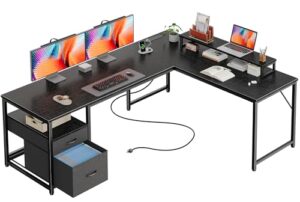
Need more screen space without turning your workspace into a crowded mess? A good desk for 2 monitors should give both displays enough room while leaving space for your keyboard, mouse, laptop, and other essentials.
For most users, the Coleshome 71-Inch Computer Desk is the strongest overall choice because its wide 70.9-inch desktop gives a dual-monitor setup plenty of usable space. Check the Coleshome 71-Inch Computer Desk on Amazon if you already know you want a large straight desk.
Best Desks for 2 Monitors at a Glance
The Coleshome 71-Inch is the best overall desk for two monitors, while the AODK and SEDETA models suit shoppers who prefer L-shaped layouts and built-in storage.
- Best Overall: Coleshome 71-Inch Computer Desk
- Best for Storage: AODK 79-Inch L-Shaped Desk
- Best Flexible L-Shaped Desk: Bestier 75-Inch L-Shaped Desk
- Best for Smaller Spaces: SEDETA 58-Inch L-Shaped Desk
- Best Mid-Size L-Shaped Desk: AODK 66-Inch L-Shaped Desk
- Best Compact L-Shaped Desk: Tribesigns 53-Inch L-Shaped Desk
- Best Standing Desk: SHW 55 x 28-Inch Electric Standing Desk
Best Desks for 2 Monitors
Coleshome 71-Inch Computer Desk
Best Overall
Best For: Large dual-monitor setups, home offices, gaming, and users who also need laptop space.

COLESHOME
Coleshome 71 Inch Computer Desk with USB Ports, Large Office Desk, Long Study Student Writing Desk, Rustic Brown
The Coleshome 71-inch desk is the article's top choice for a spacious two-monitor workstation. Its 70.9-inch width and 23.6-inch depth leave room for two monitors, a keyboard, mouse, laptop, and accessories.
Who Should Buy It
Buy this if you need a large straight desk for a dual-monitor home office, gaming setup, or study area. Avoid it if your room cannot accommodate a roughly 71-inch desk or you specifically want an L-shaped layout.
Why We Pick It
It earned the top spot because of its large uninterrupted work surface and integrated charging features. The three AC outlets, USB port, and USB-C port also help reduce charging clutter.
Features & Benefits
| Feature | Benefit |
|---|---|
| 70.9-inch width | gives two monitors plenty of side-by-side space |
| 23.6-inch depth | provides useful front-to-back room for monitors and peripherals |
| 3 AC outlets + USB + USB-C | makes charging devices easier |
Pros & Cons
| Pros | Cons |
|---|---|
| ✓ Spacious dual-monitor surface | ✕ Requires substantial floor space |
| ✓ Built-in charging ports | ✕ Straight design lacks L-shaped storage |
| ✓ Sturdy metal frame |
The Coleshome 71-Inch Computer Desk earns the top position because it provides a large, uninterrupted work surface. Its listed desktop measures about 70.9 inches wide and 23.6 inches deep.
That combination gives two monitors room to sit side by side without consuming the entire workspace. You can also leave space for a keyboard, mouse, laptop, speakers, or other accessories.
The desk also includes three AC outlets, one USB port, and one USB-C port. Those built-in charging options can reduce cable clutter around a busy workstation.
Who should buy it: Choose this model if you want a traditional straight desk with plenty of room for two monitors and additional equipment.
Who should avoid it: Avoid it if your room cannot accommodate a roughly 71-inch-wide workstation or if you specifically need an L-shaped configuration.
💡 Pro Tip: A wide desk is useful for two monitors, but measure the monitor stands before buying. Stand width can consume more desktop space than expected.
AODK 79-Inch L-Shaped Desk
Best for Storage
Best For: Dual-monitor workstations that need drawers, shelves, lighting, and built-in power.

AODK
AODK 79 inch L Shaped Desk with 5 Drawers, LED Light & 2 Power Outlets
The AODK 79-inch L-shaped desk is designed for dual-monitor workstations that need extensive storage. Its reversible layout combines a large corner workspace with five fabric drawers, four open shelves, LED lighting, a CPU stand, and two power outlets.
Who Should Buy It
Buy this if storage and built-in features matter as much as monitor space. Avoid it if you need a deep desktop because its listed depth is about 18.9 inches.
Why We Pick It
It earned a storage-focused position because it combines multiple storage areas, lighting, power, and a reversible L-shaped layout. The shallow depth remains an important consideration for large monitor stands.
Features & Benefits
| Feature | Benefit |
|---|---|
| Reversible L-shaped design | lets the workstation adapt to different room layouts |
| 5 fabric drawers | keeps accessories and supplies organized |
| 4 open shelves + CPU stand | adds storage while keeping equipment accessible |
Pros & Cons
| Pros | Cons |
|---|---|
| ✓ Extensive built-in storage | ✕ Shallow 18.9-inch depth |
| ✓ LED lighting | ✕ Large L-shaped footprint |
| ✓ Two power outlets |
The AODK 79-Inch L-Shaped Desk is the strongest choice when storage matters as much as monitor space. Its reversible L-shaped design creates separate areas for displays, accessories, and other equipment.
The desk includes five fabric drawers, four open shelves, a CPU stand, LED lighting, and two power outlets. That feature set makes the desk particularly useful for gaming and larger home-office setups.
However, the listed desktop depth is only about 18.9 inches. Therefore, users with large monitor stands should check the available front-to-back space before buying.
Who should buy it: This desk suits users who want two monitors plus substantial storage and organization.
Who should avoid it: Avoid it if you need a deep desktop for bulky monitor stands or large peripherals.
Bestier 75-Inch L-Shaped Desk
Best Flexible L-Shaped Desk
Best For: Users who want a reversible workspace that can adapt to different room layouts.

BESTIER
Bestier L Shaped Desk with Shelves 75 Inch Reversible Corner Computer Desk or 2 Person Long Table, Writing Study Desk for Home Office Small Space Bedroom Apartment, Wash White
The Bestier 75-inch desk gives users a reversible L-shaped configuration that can also work as a longer two-person table. Its four adjustable shelves and cable-management features make it practical for flexible dual-monitor workspaces.
Who Should Buy It
Buy this if you want a configurable desk that can adapt to a corner or longer workstation layout. It also suits home offices, students, and smaller apartments where flexibility matters.
Why We Pick It
It earned a spot because its reversible design offers more layout options than a conventional straight desk. The four shelves provide additional organization without requiring a separate storage unit.
Features & Benefits
| Feature | Benefit |
|---|---|
| Reversible configuration | supports different room arrangements |
| 4 adjustable shelves | provides flexible storage for accessories |
| Built-in cable management | helps keep monitor and computer cables organized |
Pros & Cons
| Pros | Cons |
|---|---|
| ✓ Flexible reversible layout | ✕ Less uninterrupted desktop than a straight desk |
| ✓ Four adjustable shelves | ✕ Shelves may limit computer-tower placement |
| ✓ Built-in cable management |
The Bestier 75-Inch L-Shaped Desk stands out because its configuration offers more flexibility than a conventional straight desk. The design can work as a corner workstation or as a longer desk configuration.
The desk uses a metal frame with engineered wood and includes four adjustable shelves. Built-in cable management also helps keep monitor and computer cables organized.
Its flexible design makes it useful for dual-monitor setups, especially when the workstation needs to fit into a corner. The available surface can also accommodate other office equipment.
Who should buy it: Choose this desk if room layout and configuration flexibility matter more than having one uninterrupted straight desktop.
Who should avoid it: Avoid it if you want the simplest possible desk with one large rectangular desktop.

SEDETA 58-Inch L-Shaped Computer Desk
Best for Smaller Spaces
Best For: Small rooms, bedrooms, compact home offices, and dual-monitor setups that need vertical storage.

SEDETA
SEDETA L Shaped Computer Desk with Storage Shelves, Bookshelf, Rustic Brown
The SEDETA 58-inch L-shaped desk is aimed at compact rooms that still need a dual-monitor workstation. Its 21.6-inch depth, seven open shelves, glass storage cabinet, and reversible design add useful workspace and vertical storage.
Who Should Buy It
Buy this if you have limited floor space but still want room for two monitors and accessories. Avoid it if you need a very large uninterrupted surface for several large displays.
Why We Pick It
It earned its position because it balances a relatively compact footprint with substantial vertical storage. The reversible layout also gives users more freedom when positioning the desk.
Features & Benefits
| Feature | Benefit |
|---|---|
| 58-inch width | fits more easily into compact workspaces |
| 21.6-inch depth | provides useful front-to-back monitor space |
| 7 open shelves + glass cabinet | adds substantial vertical storage |
Pros & Cons
| Pros | Cons |
|---|---|
| ✓ Compact L-shaped footprint | ✕ Limited surface for very large monitors |
| ✓ Plenty of storage | ✕ Storage can make the setup feel visually busy |
| ✓ Reversible design |
The SEDETA 58-Inch L-Shaped Desk is a strong choice when floor space is limited. Its 58-inch configuration provides a useful workstation without requiring the footprint of a very large desk.
The listed depth is about 21.6 inches, giving it more front-to-back space than some shallow L-shaped alternatives. The design also includes seven open shelves and a glass storage cabinet.
That vertical storage can keep books, accessories, chargers, and other items away from the main monitor area. The reversible configuration also gives you more freedom when arranging the room.
Who should buy it: This model suits users who want two monitors but also need storage in a smaller workspace.
Who should avoid it: Avoid it if you need a very large uninterrupted desktop for several large displays.
AODK 66-Inch L-Shaped Computer Desk
Best Mid-Size L-Shaped Desk
Best For: Users who want an L-shaped workstation with storage, lighting, and monitor support without moving to the largest desk category.

AODK
AODK 66" L Shaped Computer Desk, 113“ Reversible Home Office Desk with File Cabinet & 4 Fabric Drawers, Two Person Desk with LED Lights & Power Outlet, Corner Gaming Desk with Monitor Shelf, Black
The AODK 66-inch L-shaped desk provides a middle ground between compact and oversized dual-monitor workstations. Its reversible configuration can form a 66-by-66-inch corner setup or a much longer two-person configuration.
Who Should Buy It
Buy this if you want storage, lighting, power, and monitor support without choosing the largest desk in the group. Avoid it if deep desktop space is your main priority because the listed depth is about 18.9 inches.
Why We Pick It
It earned its position through its combination of flexible configuration and integrated workstation features. The 47.2-inch monitor shelf can also raise displays and preserve some usable desktop space.
Features & Benefits
| Feature | Benefit |
|---|---|
| Reversible 66-inch configuration | adapts to different room layouts |
| 47.2-inch monitor shelf | raises displays and frees some desktop area |
| File cabinet + 4 fabric drawers | provides dedicated storage for office supplies and documents |
Pros & Cons
| Pros | Cons |
|---|---|
| ✓ Flexible layout | ✕ Shallow 18.9-inch depth |
| ✓ Built-in monitor shelf | ✕ Large configuration can require significant floor space |
| ✓ Storage and power features |
The AODK 66-Inch L-Shaped Desk provides a useful middle ground between compact and oversized workstations. Its reversible design can be configured around different room layouts.
The desk includes a 47.2-inch monitor shelf, storage drawers, a file cabinet, LED lighting, and built-in power. The monitor shelf can raise displays while leaving more usable surface underneath.
One important limitation is its listed 18.9-inch depth. That measurement makes monitor-arm compatibility especially useful for setups using large displays.
Who should buy it: Choose this model if you want an L-shaped workstation with integrated features but do not need a huge straight desktop.
Who should avoid it: Avoid it if deep desktop space is your highest priority.
Tribesigns 53-Inch L-Shaped Computer Desk
Best Compact L-Shaped Desk
Best For: Small rooms, corner workstations, and users who want storage without a very large desk.

TRIBESIGNS
Tribesigns L-Shaped Computer Desk with 3 Drawers, Reversible Corner Home Office Desk with Shelves, 53-Inch Industrial PC Desk Study Writing Table Workstation for Small Space, Rustic Brown
The Tribesigns 53-inch L-shaped desk is the most compact full desk among the article's main L-shaped choices. Its corner layout, three drawers, shelves, and reversible design make it suitable for smaller dual-monitor workstations.
Who Should Buy It
Buy this if you need a compact corner workstation with built-in storage. Avoid it if you use very large monitors, bulky monitor stands, or several desktop computers.
Why We Pick It
It earned a spot because it makes efficient use of corner space without requiring a large desk footprint. The reversible design also gives users more control over the workstation orientation.
Features & Benefits
| Feature | Benefit |
|---|---|
| 53-inch desk width | fits smaller rooms more easily |
| 3 drawers | provides enclosed storage for accessories |
| Reversible L-shaped design | lets users choose the corner orientation |
Pros & Cons
| Pros | Cons |
|---|---|
| ✓ Compact footprint | ✕ Limited surface for large dual-monitor setups |
| ✓ Three drawers | ✕ Less room for multiple computers |
| ✓ Reversible layout |
The Tribesigns 53-Inch L-Shaped Computer Desk is the most compact full desk among the main L-shaped options here. Its corner design makes use of space that a straight desk may leave unused.
The desk provides three drawers and open shelving for office supplies and accessories. Its reversible design also gives you more control over the orientation of the workstation.
The approximately 53-by-39-inch footprint can work well in smaller rooms. However, users should measure their monitors before buying because two large displays can quickly consume the available surface.
Who should buy it: This model is a good fit when you need a compact dual-monitor workstation with storage.
Who should avoid it: Avoid it if you use very large monitors, bulky monitor stands, or several desktop computers.
SHW 55 x 28-Inch Electric Height Adjustable Standing Desk
Best Standing Desk
Best For: Users who want a traditional straight desk with electric sit-stand adjustment.
SHW
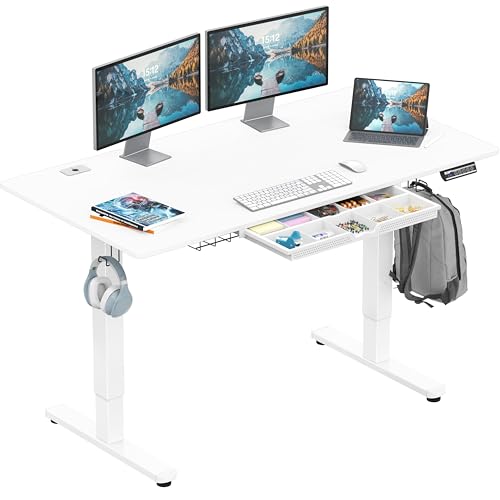
SHW 55 x 28 Electric Height Adjustable Standing Desk w/Drawer, White
The SHW 55 x 28-inch electric standing desk is the article's dedicated sit-stand option for two-monitor users. Its 55-inch width and 28-inch depth provide a practical starting point for a dual-monitor setup.
Who Should Buy It
Buy this if you want to alternate between sitting and standing while keeping a traditional straight desk layout. Avoid it if you need extensive shelves or an L-shaped workstation.
Why We Pick It
It earned its position because it combines electric height adjustment with useful workstation features. The drawer, cable-management tray, and utility hooks also help organize a busy desk.
Features & Benefits
| Feature | Benefit |
|---|---|
| Electric height adjustment | lets users switch between sitting and standing |
| 55 x 28-inch desktop | provides useful space for two monitors |
| Cable tray + drawer + utility hooks | keeps accessories and cables organized |
Pros & Cons
| Pros | Cons |
|---|---|
| ✓ Electric sit-stand adjustment | ✕ Smaller surface than the 71-inch Coleshome |
| ✓ 28-inch desk depth | ✕ Limited built-in storage |
| ✓ Built-in organization |
The SHW 55 x 28-Inch Electric Standing Desk is the strongest option here for users who want to alternate between sitting and standing. Its 55-inch-wide desktop provides a useful starting point for many two-monitor setups.
The desk uses an electric height-adjustment system and includes a drawer, cable-management tray, and utility hooks. The listed maximum weight recommendation is 50 kg.
The 28-inch depth is also useful for a dual-monitor setup because it leaves more front-to-back space than several shallow L-shaped models in this roundup.
Who should buy it: Choose it if adjustable height is more important than built-in shelves or an L-shaped configuration.
Who should avoid it: Avoid it if you need extensive storage or a large corner workstation.
Best Alternatives for a Dual-Monitor Setup
The following alternatives are not traditional desks, but they can solve specific dual-monitor workspace problems.
TechOrbits 32-Inch Standing Desk Converter
Best for Converting an Existing Desk
Best For: Users who already own a desk but want a sit-stand dual-monitor workstation.

TECHORBITS
TechOrbits Standing Desk Converter - 32 Inch Adjustable Sit to Stand Up Workstation, Particle Board, Dual Monitor Desktop Riser with Keyboard Tray, for Home Office Laptop, Black 32"
The TechOrbits Standing Desk Converter is an alternative for users who already own a suitable desk. It adds adjustable sit-stand functionality while providing a dual-monitor riser and keyboard tray.
Who Should Buy It
Buy this if your existing desk has enough surface area and you want to convert the workstation rather than replace the desk. Avoid it if you need a completely new full-size desk.
Why We Pick It
It earned a place as an alternative because it can upgrade an existing workspace without requiring a new desk. Its 32-inch platform also provides dedicated space for monitors and a keyboard.
Features & Benefits
| Feature | Benefit |
|---|---|
| Adjustable sit-stand platform | lets users change working height |
| Dual-monitor riser | raises two compatible displays while freeing some desk area |
| Keyboard tray | keeps the keyboard below the main work surface |
Pros & Cons
| Pros | Cons |
|---|---|
| ✓ Converts an existing desk | ✕ Requires a sturdy existing desk |
| ✓ Dual-monitor support | ✕ Smaller work surface than a full desk |
| ✓ Keyboard tray included |
The TechOrbits Standing Desk Converter is different from the desks above because it sits on an existing desktop. It provides an adjustable work surface instead of replacing the entire desk.
The product includes a dual-monitor desktop riser and keyboard tray. Its listed work area is about 31.5 inches wide and 27.45 inches deep.
This option makes sense when your current desk is sturdy and spacious enough. It can also save money compared with replacing an entire workstation.
Who should buy it: Choose it if you already have a suitable desk and want standing functionality.
Who should avoid it: Avoid it if you need a completely new desk or have limited space on your existing desktop.
VIVO Dual Monitor Desk Mount
Best Monitor-Arm Alternative
Best For: Users who want to free desktop space and position two monitors more precisely.

VIVO
VIVO Dual Monitor Desk Mount, Holds 2 Computer Screens up to 30 inches and 22lbs Each, Heavy Duty Fully Adjustable Steel Stand with C-Clamp and Grommet, Black, STAND-V002
The VIVO STAND-V002 is a dual-monitor mount rather than a complete desk. The article includes it as an alternative for users who want to reclaim desktop space from two monitor stands.
Who Should Buy It
Buy this if your existing desk is suitable but monitor stands consume too much surface area. Avoid it if your displays are not compatible with the mount's VESA requirements or your desk cannot safely accept a clamp or grommet mount.
Why We Pick It
It earned a place because a monitor arm can make a smaller desk more practical for two displays. The mount supports two monitors up to 30 inches and 22 pounds per screen.
Features & Benefits
| Feature | Benefit |
|---|---|
| Dual-monitor support | mounts two compatible displays on one stand |
| 22-pound capacity per monitor | accommodates many standard monitors |
| C-clamp and grommet mounting | provides two common installation options |
Pros & Cons
| Pros | Cons |
|---|---|
| ✓ Frees desktop space | ✕ Requires compatible VESA monitors |
| ✓ Adjustable monitor positioning | ✕ Installation depends on suitable desk mounting space ### |
| ✓ Supports two monitors |
The VIVO Dual Monitor Desk Mount is a monitor accessory rather than a desk. It can make a conventional desk more useful for two monitors by moving the displays off their factory stands.
The STAND-V002 supports two compatible monitors and uses VESA mounting. Current product information lists support for displays up to 30 inches and up to 22 pounds per monitor.
The mount can also provide tilt, swivel, rotation, and height adjustment. Therefore, it is especially useful when the desk surface is limited.
Who should buy it: Choose this mount if your existing desk is good but the monitor stands consume too much space.
Who should avoid it: Avoid it if your monitors are not VESA-compatible or if your desktop cannot safely support the mounting hardware.
Desk Size Guide for Two Monitors
A desk between about 55 and 71 inches wide gives most dual-monitor users more flexibility than a compact computer desk.
However, width alone does not determine whether a desk works. Monitor size, stand width, desk depth, mounting method, keyboard space, and other equipment all matter.
What Size Desk Do You Need for 2 Monitors?
A 55-inch desk is a practical starting point for many two-monitor setups, while a 60- to 71-inch desk gives you more room for accessories.
Two 27-inch monitors can fit on a wide desk, but the monitor stands can consume considerable surface area. A dual-monitor arm can recover some of that space.
Before buying, measure the actual width of both monitors and their stands. Then add space for the keyboard, mouse, laptop, speakers, and anything else that will remain on the desktop.
Is a 60-Inch Desk Better for Two Monitors?
A 60-inch desk can be better when you want more room for two displays and other equipment. The extra width gives you more flexibility than a compact 47- or 48-inch desk.
However, a larger desk is not automatically better. Room dimensions, desk depth, monitor stands, and your preferred layout still determine the best choice.
Can a 55-Inch Desk Fit Two Monitors?
Yes, a 55-inch desk can fit two monitors in many setups. The result depends on monitor width, stand design, mounting method, and the remaining space needed for your keyboard and accessories.
The SHW 55 x 28-Inch model is especially interesting because its 28-inch depth provides more front-to-back room than several shallow L-shaped desks.
Desk Width vs. Desk Depth for Two Monitors
Desk width controls side-to-side monitor space, while desk depth controls viewing distance and front-to-back workspace.
A wide but shallow desk may fit two monitors but leave little room for a keyboard and mouse. A deeper desk can provide a more comfortable working area, especially when monitors use large factory stands.
For ergonomic positioning, OSHA recommends placing the monitor at a comfortable viewing distance and keeping the top of the screen at or slightly below eye level. A dedicated monitor setup can also help reduce awkward head and neck positions.
Straight Desk vs. L-Shaped Desk for Two Monitors
A straight desk is usually easier to position, while an L-shaped desk provides more surface area and can make better use of a corner.
The Coleshome and SHW models are better examples of straightforward rectangular workstations. The AODK, Bestier, SEDETA, and Tribesigns models provide L-shaped alternatives.
When a Straight Desk Is Better
A straight desk is better when you want one continuous surface facing the same direction. It also tends to work well in rooms where a corner configuration would waste floor space.
- Choose a straight desk for simple layouts.
- Choose more width when using large monitors.
- Choose more depth when using large monitor stands.
- Consider a monitor arm when desktop space becomes limited.
When an L-Shaped Desk Is Better
An L-shaped desk is better when you want separate work zones or need to use a corner efficiently.
You can place the primary monitors on one section and use the other section for a laptop, printer, speakers, documents, or a secondary computer.
However, L-shaped desks often have shallower sections than large straight desks. Check the dimensions carefully before assuming a larger product name means a deeper workstation.
Should You Use Monitor Arms With Two Monitors?
Monitor arms are useful when two monitor stands consume too much desktop space or when you want more control over screen positioning.
The VIVO STAND-V002 is one example of a dual-monitor mount designed for compatible VESA displays. The listed capacity reaches 22 pounds per monitor, with support for displays up to 30 inches.
Before installing a monitor arm, check the monitor’s VESA pattern, weight, and the desk’s mounting area. Also confirm that the desk can handle the clamp or grommet installation.
If you want to explore desks designed around monitor arms, you can also compare computer desks with monitor arms before making a final choice.
What to Look for in a Desk for Two Monitors
The best desk for two monitors should provide enough space, stability, depth, and useful features for the entire workstation.
- Width: Look for enough horizontal space for both displays and your main peripherals.
- Depth: Choose enough front-to-back space for your monitor setup and keyboard.
- Stability: A sturdy frame helps reduce movement when typing or adjusting monitors.
- Weight capacity: Add the weight of monitors, computers, monitor arms, speakers, and other equipment.
- Cable management: Cable trays, grommets, and built-in routing can reduce clutter.
- Monitor compatibility: Check whether the desk shelf or monitor arm supports your display setup.
- Storage: Drawers and shelves can keep accessories away from the main work surface.
- Power: Built-in outlets and USB ports can simplify charging.
- Room footprint: Measure the floor space before choosing a large L-shaped or straight desk.
- Future upgrades: Leave some spare space if you expect to add another display or laptop.
How to Position Two Monitors on a Desk
Place the monitor you use most directly in front of you, then position the second display beside it.
If both monitors receive equal use, place them close together and keep their viewing angles comfortable. Avoid positioning the displays so far apart that you constantly turn your head.
OSHA’s workstation guidance recommends placing the primary monitor directly in front of the user and keeping secondary monitors beside it when multiple displays are used.
- Place the primary monitor directly in front of your chair.
- Position the second monitor beside the primary display.
- Align the screens at a comfortable height.
- Keep the keyboard and mouse close to your body.
- Route display and power cables through the desk’s cable-management system.
- Check that monitor arms or stands do not consume unnecessary workspace.
For a more complete setup, a desk for 2 monitors and a laptop should leave enough room for the laptop without pushing the keyboard and mouse too far forward.
How We Evaluated These Desks
We focused on the factors that matter most for a real dual-monitor workstation. These include desktop size, depth, desk shape, storage, power features, monitor support, and height adjustment.
We also considered the role each product can realistically play. A large straight desk should not compete with a compact L-shaped desk on exactly the same criteria.
Workspace
Desktop space matters because two monitors consume more room than a single display. We favored models that leave usable space for keyboards, mice, laptops, and other equipment.
Desk Design
We included straight, L-shaped, and standing desks because different rooms and workflows require different layouts.
Storage and Features
Drawers, shelves, power outlets, USB ports, monitor shelves, and cable-management features can make a dual-monitor workstation easier to organize.
Practical Limitations
We also considered limitations such as shallow desktop depth, large footprints, limited storage, and the need for monitor arms.
Frequently Asked Questions
What is the best desk for 2 monitors?
The Coleshome 71-Inch Computer Desk is the best overall choice in this roundup because its wide desktop provides substantial room for two monitors and additional equipment.
What size desk do I need for 2 monitors?
A 55-inch desk is a practical starting point for many dual-monitor setups, while larger desks provide more room for accessories and larger displays.
Can a 47-inch desk fit two monitors?
Yes, a 47-inch desk can fit two monitors in some configurations, but the setup may feel crowded. Monitor stands, keyboard space, and desk depth can quickly become limiting factors.
Can a 55-inch desk fit two 27-inch monitors?
Yes, a 55-inch desk can accommodate two 27-inch monitors when the monitor widths and stands fit within the available surface.
Is an L-shaped desk good for two monitors?
Yes, an L-shaped desk can be excellent for two monitors because it creates additional workspace and makes efficient use of corners.
Do I need a monitor arm for two monitors?
No, you do not need a monitor arm for two monitors. However, a dual-monitor arm can free desktop space and make screen positioning easier.
Is a standing desk good for two monitors?
Yes, a standing desk can work well for two monitors when the frame remains stable and the desktop provides enough room for the complete setup.
How deep should a desk be for two monitors?
There is no single ideal depth because monitor size and stand design vary. A deeper desktop generally gives more room for viewing distance, keyboards, and other equipment.
Can I use two monitors and a laptop on one desk?
Yes, a sufficiently wide desk can hold two monitors and a laptop. A 60- to 71-inch desk gives more flexibility than a compact workstation.
What is better for two monitors, a straight desk or L-shaped desk?
A straight desk is better for a simple forward-facing setup, while an L-shaped desk is better for corner placement and separate work zones.
Final Thoughts
The best desk for 2 monitors depends on your monitor size, available room, preferred layout, and the amount of equipment you keep on the desktop.
The Coleshome is the strongest overall choice because it combines a large straight desktop with useful charging features. The AODK, Bestier, SEDETA, and Tribesigns models make more sense when you prefer an L-shaped workspace.
Meanwhile, the SHW is the better option when electric height adjustment matters. The TechOrbits converter and VIVO mount are useful alternatives when you already have a desk and want to upgrade the existing setup.
- Coleshome 71-Inch Computer Desk — Best overall for a spacious dual-monitor workstation.
- AODK 79-Inch L-Shaped Desk — Best for storage, power, and a large L-shaped setup.
- Bestier 75-Inch L-Shaped Desk — Best for a flexible reversible workstation.
- SEDETA 58-Inch L-Shaped Desk — Best for smaller rooms with storage needs.
- AODK 66-Inch L-Shaped Computer Desk — Best mid-size L-shaped option.
- Tribesigns 53-Inch L-Shaped Computer Desk — Best compact L-shaped option.
- SHW 55 x 28-Inch Electric Standing Desk — Best for electric sit-stand adjustment.
- TechOrbits 32-Inch Standing Desk Converter — Best for upgrading an existing desk.
- VIVO Dual Monitor Desk Mount — Best for freeing desktop space with a dual-monitor arm.
Before buying, measure your monitors, monitor stands, available room, and equipment. A desk that fits the displays but leaves no room for the keyboard or mouse will still feel cramped.
If you also use a laptop, a desk for a monitor and laptop can help you compare layouts designed around multiple devices.
Related Articles
Best Desk for 4 Monitors: 6 Top Picks for 2026
August 30, 2026
Best Multiple Computer Desks in 2026: Top Picks for 2+ PCs
August 30, 2026
Best Desks With Built-In Monitor Mounts in 2026
August 30, 2026