Fire Stick TV reviews can save you from buying the wrong streaming device because Amazon now offers several Fire TV Stick models with different performance levels, AI features, and prices. After comparing streaming quality, everyday usability, Wi-Fi performance, Alexa integration, software features, long-term value, and expert recommendations, the Amazon Fire TV Stick 4K Max stands out as the best overall choice for most people, while other models remain excellent options for different budgets and TVs. If you’re still deciding, our comparison of the best Fire TV Stick for streaming provides additional context before choosing a device.
Whether you’re upgrading an older television, replacing another streaming stick, or buying your first media player, this guide compares six carefully selected devices that represent the strongest options available today. You’ll also find practical buying advice, feature comparisons, and recommendations based on how people actually use Fire TV devices at home.

AMAZON
Amazon Fire TV Stick 4K Max (newest model), streaming device, with AI-powered Fire TV Search, supports Wi-Fi 6E, free & live TV without cable or satellite, find shows faster with Alexa+
The Amazon Fire TV Stick 4K Max is the top recommendation in this guide thanks to its fast performance, Wi-Fi 6E connectivity, and AI-powered Fire TV Search. It delivers smooth 4K streaming with Dolby Vision and Dolby Atmos, making it the best all-around choice for most users.
Who Should Buy It
Ideal for anyone with a 4K TV who wants the fastest Fire TV experience, especially households using Alexa and Amazon smart home devices.
Why We Pick It
It earned the Best Overall badge because it combines flagship performance, premium video support, future-ready wireless technology, and excellent long-term value.
Features & Benefits
| Feature | Benefit |
|---|---|
| AI-powered Fire TV Search | Finds movies and shows faster using natural voice requests |
| Wi-Fi 6E | Delivers faster and more reliable streaming on compatible networks |
| Dolby Vision & Dolby Atmos | Enhances picture and sound quality for compatible TVs and audio systems |
Pros & Cons
| Pros | Cons |
|---|---|
| ✓ Fastest Fire TV Stick | ✕ Higher price than budget models |
| ✓ Excellent 4K streaming performance | ✕ Best features require a compatible 4K TV |
| ✓ Future-ready Wi-Fi 6E |
AMAZON
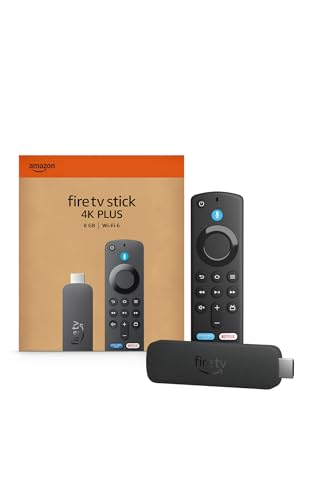
Amazon Fire TV Stick 4K Plus (newest model) with AI-powered Fire TV Search, Wi-Fi 6, stream hundreds of thousands of movies and shows, free & live TV, find shows faster with Alexa+
The Amazon Fire TV Stick 4K Plus offers premium 4K streaming features at a lower price than the flagship model. The article highlights its excellent balance of speed, AI features, Wi-Fi 6, and value for families upgrading to a 4K TV.
Who Should Buy It
Best for buyers who want premium 4K streaming performance without paying for the most expensive Fire TV Stick.
Why We Pick It
It was selected as the Best Value because it delivers most flagship features at a more affordable price while remaining fast and easy to use.
Features & Benefits
| Feature | Benefit |
|---|---|
| Wi-Fi 6 | Provides fast wireless streaming for modern home networks |
| AI-powered Fire TV Search | Makes finding content quicker with Alexa voice commands |
| 4K Dolby Vision | Produces sharp picture quality with compatible TVs |
Pros & Cons
| Pros | Cons |
|---|---|
| ✓ Excellent value for money | ✕ Slightly slower than the 4K Max |
| ✓ Fast and responsive interface | ✕ Lacks Wi-Fi 6E |
| ✓ Premium 4K features |

AMAZON
Amazon Fire TV Stick 4K Select (newest model), start streaming in 4K, AI-powered search, and free & live TV, find shows faster with Alexa+
The Amazon Fire TV Stick 4K Select is recommended as the best budget-friendly 4K streaming device in the roundup. It combines HDR10+, Alexa+, and AI-powered search while keeping the price low for buyers who want affordable Ultra HD streaming.
Who Should Buy It
Great for budget-conscious users upgrading to a 4K television without needing flagship-level hardware.
Why We Pick It
It earned a place because it offers genuine 4K streaming, modern Fire TV software, and excellent value for the money.
Features & Benefits
| Feature | Benefit |
|---|---|
| 4K HDR10+ | Displays detailed Ultra HD content with HDR support |
| AI-powered Search | Helps locate movies and shows more efficiently |
| Alexa+ | Enables hands-free voice control and smart features |
Pros & Cons
| Pros | Cons |
|---|---|
| ✓ Affordable 4K streaming | ✕ Slower than premium Fire TV models |
| ✓ Modern Fire TV experience | ✕ No Wi-Fi 6E |
| ✓ Good overall value |

AMAZON
Amazon Fire TV Stick HD, free and live TV, Alexa Voice Remote, smart home controls, HD streaming
The Amazon Fire TV Stick HD remains an excellent option for Full HD televisions and first-time streaming users. The article recommends it for dependable HD streaming, simple setup, and excellent overall value.
Who Should Buy It
Best for owners of older Full HD TVs, guest rooms, bedrooms, or anyone wanting an affordable streaming device.
Why We Pick It
It was chosen because it delivers reliable HD streaming with Alexa Voice Remote while avoiding unnecessary 4K costs.
Features & Benefits
| Feature | Benefit |
|---|---|
| Full HD Streaming | Optimized for 1080p televisions |
| Alexa Voice Remote | Controls streaming and compatible smart home devices with voice commands |
| Easy Setup | Lets users start streaming within minutes |
Pros & Cons
| Pros | Cons |
|---|---|
| ✓ Affordable | ✕ No 4K support |
| ✓ Easy to install | ✕ Older wireless technology than newer models |
| ✓ Reliable HD streaming |

AMAZON
Amazon Fire TV Stick HD (newest model), free & live TV, Alexa Voice Remote, powered by the TV, effortless setup, find shows faster with Alexa+
The newest Amazon Fire TV Stick HD improves on the previous HD model with a faster interface, Wi-Fi 6 support, and Amazon's latest Fire TV software. It is recommended as an excellent upgrade for households that still use Full HD televisions.
Who Should Buy It
Best for users replacing an older HD streaming stick without moving to a 4K television.
Why We Pick It
It earned its recommendation by combining improved speed, modern software, and Wi-Fi 6 while remaining an affordable HD streaming solution.
Features & Benefits
| Feature | Benefit |
|---|---|
| Wi-Fi 6 | Improves wireless performance on supported networks |
| Alexa+ | Provides enhanced voice search and smart features |
| Faster Interface | Makes navigation smoother than previous HD generations |
Pros & Cons
| Pros | Cons |
|---|---|
| ✓ Faster than previous HD model | ✕ Limited to Full HD |
| ✓ Wi-Fi 6 support | ✕ Not intended for 4K TVs |
| ✓ Easy setup |
ROKU
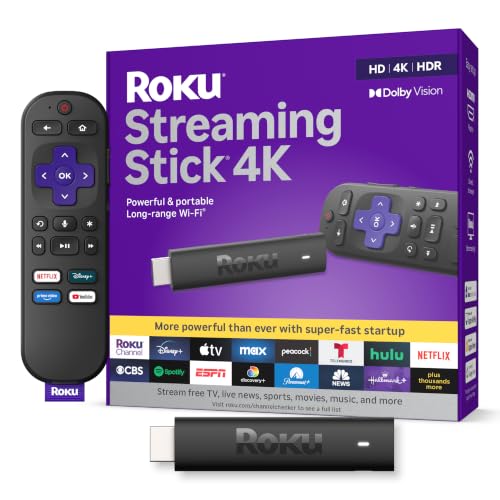
Roku Streaming Stick 4K with Voice Remote - HDR10+ & Dolby Vision
The Roku Streaming Stick 4K is the only non-Fire TV device included in the roundup and serves as the leading alternative for buyers who prefer Roku's simpler interface. It offers excellent 4K picture quality, Dolby Vision support, and dependable long-range Wi-Fi.
Who Should Buy It
Best for users who prefer Roku's straightforward interface or do not rely on Amazon's Alexa ecosystem.
Why We Pick It
It was included because it consistently competes with premium Fire TV devices while offering a clean user experience and broad streaming app support.
Features & Benefits
| Feature | Benefit |
|---|---|
| Dolby Vision & HDR10+ | Delivers vibrant 4K picture quality on compatible TVs |
| Long-Range Wi-Fi | Helps maintain stable streaming farther from the router |
| Voice Remote | Simplifies navigation and TV controls |
Pros & Cons
| Pros | Cons |
|---|---|
| ✓ Clean interface | ✕ No Alexa integration |
| ✓ Excellent picture quality | ✕ Fewer Amazon ecosystem features |
| ✓ Strong app compatibility |
Product Comparison Table
| Product | Image | Amazon | Best For | Resolution | Wi-Fi | Voice Assistant | AI Search | Amazon Rating | Overall Score |
|---|---|---|---|---|---|---|---|---|---|
| Fire TV Stick 4K Max | 🔍 Click image to enlarge |
View Now at Amazon | Best Overall | 4K Dolby Vision | Wi-Fi 6E | Alexa+ | Yes | 4.6 ★ (80,884) | 9.2/10 |
| Fire TV Stick 4K Plus |  🔍 Click image to enlarge |
View Now at Amazon | Best Value | 4K Dolby Vision | Wi-Fi 6 | Alexa+ | Yes | 4.6 ★ (112,182) | 9.2/10 |
| Fire TV Stick 4K Select | 🔍 Click image to enlarge |
View Now at Amazon | Best Budget 4K | 4K HDR10+ | Wi-Fi 6 | Alexa+ | Yes | 4.2 ★ (13,411) | 8.4/10 |
| Fire TV Stick HD | 🔍 Click image to enlarge |
View Now at Amazon | Best Entry-Level | 1080p HD | Wi-Fi 5 | Alexa | No | 4.6 ★ (71,587) | 9.2/10 |
| Fire TV Stick HD (Newest) | 🔍 Click image to enlarge |
View Now at Amazon | Best for HD TVs | 1080p HD | Wi-Fi 6 | Alexa+ | Yes | 4.2 ★ (3,103) | 8.4/10 |
| Roku Streaming Stick 4K | 🔍 Click image to enlarge |
View Now at Amazon | Best Fire TV Alternative | 4K Dolby Vision | Long-Range Wi-Fi | Roku Voice | No | 4.7 ★ (98,741) | 9.4/10 |
Quick Verdict: Which Fire TV Stick Should You Buy?
- 🏆 Best Overall: Amazon Fire TV Stick 4K Max
- ⭐ Best Value: Amazon Fire TV Stick 4K Plus
- 💰 Best Budget 4K: Amazon Fire TV Stick 4K Select
- 📺 Best Entry-Level: Amazon Fire TV Stick HD
- 🆕 Best HD Upgrade: Fire TV Stick HD (Newest)
- 🔄 Best Alternative: Roku Streaming Stick 4K
The best Fire TV Stick for most people is the Amazon Fire TV Stick 4K Max because it combines the fastest hardware, Wi-Fi 6E, Dolby Vision, Dolby Atmos, and Amazon’s latest AI-powered Fire TV Search. However, every model in this guide fills a different need, so choosing the right device depends on your television, internet connection, and budget.
Meanwhile, shoppers looking for the lowest price should consider the Fire TV Stick 4K Select or Fire TV Stick HD. Buyers comparing premium models may also find our Fire TV Stick 4K vs 4K Max comparison useful before making a final decision.
Best Fire TV Stick Models Reviewed
Fire TV Stick 4K Max — Best Overall Performance
The Amazon Fire TV Stick 4K Max is the best Fire TV Stick overall because it delivers the fastest navigation, supports Wi-Fi 6E, and includes Amazon’s newest AI-powered search experience. Everyday streaming feels noticeably smoother, especially when switching between apps or loading large streaming libraries.
During daily use, the Fire TV Stick 4K Max is particularly impressive for households that stream in 4K, use Dolby Vision televisions, or frequently rely on Alexa voice commands. Faster wireless networking also helps reduce buffering on busy home networks.
The Fire TV Stick 4K Max is the easiest recommendation for buyers who want one streaming device that remains capable for several years without needing another upgrade.
Excellent speed, premium picture quality, AI-powered Fire TV Search, Wi-Fi 6E support, and outstanding long-term value make the Fire TV Stick 4K Max the strongest all-around choice.
Fire TV Stick 4K Plus — Best Value for Most People
The Amazon Fire TV Stick 4K Plus offers the best balance between price and premium features. Most households receive excellent 4K streaming, modern Alexa+ features, and Wi-Fi 6 performance without paying flagship pricing.
Movies launch quickly, menus remain responsive, and streaming services such as Netflix, Prime Video, Disney+, and YouTube all benefit from the improved hardware. Consequently, the Fire TV Stick 4K Plus is ideal for buyers who want premium performance at a more affordable price.
Many people will never notice a meaningful difference between the Fire TV Stick 4K Plus and the flagship 4K Max during everyday streaming.
Families upgrading to 4K televisions who want premium streaming performance while keeping costs under control.
Fire TV Stick 4K Select — Best Budget 4K Streaming
The Amazon Fire TV Stick 4K Select is the smartest budget option for buyers who want genuine 4K streaming without paying for flagship hardware. Although it costs less, the device still supports HDR10+, Alexa+, and Amazon’s refreshed Fire TV experience.
The Fire TV Stick 4K Select performs especially well for movie nights, casual streaming, and upgrading older 4K televisions. Additionally, the affordable price leaves room in the budget for faster internet or additional streaming subscriptions.
Budget-conscious buyers rarely need to spend more unless faster performance or Wi-Fi 6E is a priority.
One of the most affordable ways to enjoy modern 4K HDR streaming with Alexa integration.

Fire TV Stick HD — Best Entry-Level Streaming Device
The Amazon Fire TV Stick HD remains an excellent choice for older Full HD televisions. Rather than paying extra for 4K features that an HD television cannot display, buyers can save money while still enjoying reliable streaming and Alexa voice control.
Installation takes only a few minutes, and navigation remains straightforward even for first-time users. Furthermore, the Fire TV Stick HD supports a huge selection of streaming services, making it suitable for guest rooms, bedrooms, or secondary televisions.
The Fire TV Stick HD continues to offer exceptional value for households that simply want dependable HD streaming.
Fire TV Stick HD (Newest) — Best for HD TVs
The Amazon Fire TV Stick HD (Newest) builds on the previous HD model by adding a faster interface, Wi-Fi 6 support, and Amazon’s latest Fire TV software experience. Navigation feels more responsive, while setup remains extremely simple.
The upgraded model is especially attractive for buyers replacing an older streaming stick without moving to a 4K television. As a result, everyday streaming feels noticeably smoother than previous HD generations.
The Fire TV Stick HD (Newest) offers an excellent upgrade path for Full HD households that want current Fire TV features.
Roku Streaming Stick 4K — Best Fire TV Alternative
The Roku Streaming Stick 4K is the strongest alternative to Amazon’s Fire TV lineup because it combines excellent 4K picture quality with a clean interface and broad streaming app support. Roku’s operating system places less emphasis on Amazon services, making navigation feel simpler for many users.
Long-range Wi-Fi also improves streaming stability in larger homes where the router sits farther away from the television. Therefore, buyers who prefer a neutral streaming platform should seriously consider Roku before making a final decision.
The Roku Streaming Stick 4K remains the benchmark competitor that every premium Fire TV Stick must outperform.
Choose Roku if you prefer a cleaner interface, less Amazon integration, and an outstanding streaming ecosystem.
How We Chose These Fire TV Streaming Devices
Streaming Speed
Streaming speed was one of the biggest evaluation factors because faster hardware improves navigation, reduces loading times, and creates a smoother viewing experience. Devices with stronger processors consistently deliver better long-term performance.
Video & Audio Quality
Picture quality matters most for modern televisions, so support for 4K Ultra HD, Dolby Vision, HDR10+, and Dolby Atmos received additional weight. Better video support allows compatible televisions to display sharper detail and richer colors.
Alexa and AI Features
Amazon continues expanding Alexa+ and AI-powered Fire TV Search across newer devices. Models supporting these features provide faster content discovery and more natural voice commands.
User Experience
A streaming device should remain easy to use every day. Menu organization, remote layout, software responsiveness, and straightforward setup all influenced the final recommendations.
Wi-Fi Performance
Reliable wireless networking helps reduce buffering during busy evenings. Devices supporting Wi-Fi 6 or Wi-Fi 6E generally offer stronger long-term performance on modern home networks.
App Library
Every recommended streaming device supports major services including Netflix, Prime Video, Disney+, YouTube, Apple TV+, and many live TV platforms. Compatibility remains essential for long-term value.
Long-Term Value
Buying a streaming stick should remain worthwhile for years, not months. Devices with newer hardware, updated software, and stronger feature support received higher rankings because they are likely to stay relevant longer.
Expert Reviews and User Feedback
Final recommendations consider practical user experiences alongside the strengths consistently highlighted by respected technology publications and the large volume of verified Amazon customer reviews. For official specifications and software information, Amazon maintains current documentation through the Fire TV product pages.
Fire TV Stick Comparison: Key Differences
The biggest differences between Fire TV Stick models come down to streaming performance, Wi-Fi technology, AI features, and long-term value. While every Fire TV Stick provides access to the same streaming services, premium models deliver faster navigation, smoother multitasking, and better support for modern televisions.
Choosing the right Fire TV Stick depends on your television, internet speed, and viewing habits rather than simply buying the most expensive model. The comparisons below explain where each device performs best and where spending more or less makes practical sense.
Fire TV Stick 4K Max vs Fire TV Stick 4K Plus
The Amazon Fire TV Stick 4K Max is the better choice for demanding users because it includes Wi-Fi 6E support, faster hardware, and Amazon’s flagship streaming experience. Buyers with large streaming libraries or busy home networks will appreciate the additional performance.
The Amazon Fire TV Stick 4K Plus focuses on delivering nearly the same premium experience at a lower cost. Most families streaming Netflix, Prime Video, Disney+, YouTube, and live TV will rarely notice a significant performance difference during normal use.
Choose the Fire TV Stick 4K Max if maximum speed and future-proof hardware matter most. Choose the Fire TV Stick 4K Plus if you want premium streaming while spending less.
Fire TV Stick 4K Select vs Fire TV Stick HD
The Amazon Fire TV Stick 4K Select is the better option for anyone with a 4K television because HDR10+, improved picture quality, and AI-powered search create a noticeably richer entertainment experience.
The Amazon Fire TV Stick HD remains the smarter purchase for Full HD televisions. Spending more on 4K features offers little benefit if the television cannot display Ultra HD content.
Buyers upgrading from an older HD streaming stick should first determine whether upgrading the television is planned within the next few years. If a 4K television is likely, purchasing the Fire TV Stick 4K Select now offers better long-term value.
A 4K streaming stick also works on HD televisions, but an HD streaming stick cannot unlock 4K resolution on a future TV upgrade.
Fire TV Stick vs Roku Streaming Stick
The Amazon Fire TV Stick ecosystem is ideal for households already using Alexa speakers, Prime Video, Ring cameras, or other Amazon smart home products. Alexa integration and AI-powered Fire TV Search make finding movies and controlling compatible devices remarkably convenient.
The Roku Streaming Stick 4K appeals to users who prefer a cleaner interface with less emphasis on Amazon services. Navigation feels simple, while Roku’s platform supports virtually every major streaming application available today.
Neither platform is objectively better for every household. Instead, the decision comes down to whether you prefer Amazon’s smart-home ecosystem or Roku’s straightforward interface.
Fire TV Stick 4K Max vs Roku Streaming Stick 4K
The Fire TV Stick 4K Max delivers more advanced smart-home capabilities, AI-powered search, and tighter Alexa integration. Households using Echo speakers or other Amazon devices gain additional convenience through voice automation.
The Roku Streaming Stick 4K focuses on simplicity instead of ecosystem integration. Menus remain uncluttered, recommendations feel less commercial, and the learning curve is minimal even for first-time streaming users.
Choose the Fire TV Stick 4K Max for smart-home features and premium Fire TV performance. Choose Roku Streaming Stick 4K for a cleaner streaming experience that works well regardless of ecosystem.
Which Fire TV Stick Is Right for You?
The best Fire TV Stick depends on how you watch television. Different households prioritize different features, so matching the device to your viewing habits produces the best value.
Best for Netflix
The Fire TV Stick 4K Max offers the best Netflix experience because faster hardware reduces loading times and makes browsing large content libraries smoother. Dolby Vision support also improves compatible Netflix titles on supported televisions.
Best for Prime Video
The Fire TV Stick 4K Plus integrates seamlessly with Prime Video and Amazon’s ecosystem. Alexa voice commands, AI recommendations, and personalized content make discovering new shows easier for Prime subscribers.
If you’re unsure about Prime membership benefits, our explanation of Amazon Prime Free Trial availability explains what has changed.
Best for Disney+
The Fire TV Stick 4K Max and Fire TV Stick 4K Plus both provide excellent Disney+ streaming thanks to Dolby Vision support, responsive navigation, and strong Wi-Fi performance for high-bitrate content.
Best for Live TV
The latest Fire TV interface makes switching between live channels, free streaming services, and subscription platforms straightforward. The Fire TV Stick 4K Plus and Fire TV Stick 4K Max offer the smoothest live TV experience because their faster hardware minimizes delays while navigating channel guides.
Best for Sports Streaming
Live sports benefit from reliable wireless networking and responsive menus. Consequently, the Fire TV Stick 4K Max is the strongest option because Wi-Fi 6E helps maintain stable streams during peak viewing hours.
Best for Gaming
The Fire TV Stick 4K Max is the preferred choice for cloud gaming because faster hardware and Wi-Fi 6E reduce latency compared with entry-level Fire TV Stick models. Casual gamers will appreciate quicker game launches and smoother navigation.
Best for Travelers
The Fire TV Stick HD (Newest) is ideal for travel because it is compact, easy to power from many televisions, and quick to set up in hotels or vacation rentals. Wi-Fi 6 also improves compatibility with modern wireless networks.
Best for Families
The Fire TV Stick 4K Plus offers the best balance of performance and affordability for family living rooms. Parents benefit from Alexa voice search, while children can quickly access popular streaming services without complicated menus.
Best for Older TVs
The Amazon Fire TV Stick HD remains the smartest purchase for televisions limited to Full HD resolution. Instead of paying extra for unused 4K features, buyers receive reliable streaming at a significantly lower price.
Buying Guide: How to Choose the Best Fire TV Stick
Buying the right Fire TV Stick starts with understanding your television, internet connection, and viewing habits. Spending more does not always produce a better experience if your setup cannot benefit from premium features.
Choose the Right Resolution
A 4K television should be paired with a 4K Fire TV Stick whenever possible. Conversely, Full HD televisions receive little practical benefit from paying extra for flagship streaming hardware.
HD vs 4K Streaming
HD streaming remains perfectly suitable for smaller televisions and secondary rooms. However, 4K streaming produces noticeably sharper images, better HDR performance, and improved detail on modern televisions larger than approximately 50 inches.
Wi-Fi Requirements
Fast internet alone does not guarantee smooth streaming. A stable wireless connection matters just as much, especially when multiple devices share the same network. Wi-Fi 6 and Wi-Fi 6E models generally perform better under heavy household usage.
AI Search and Alexa+
Amazon’s latest AI-powered Fire TV Search simplifies finding movies, shows, actors, and genres using natural voice commands. Newer Fire TV Stick models also integrate more deeply with Alexa+, making everyday navigation easier.
Remote Features
Modern Fire TV remotes include dedicated streaming buttons, television power controls, volume adjustment, and Alexa voice commands. Buyers replacing a damaged remote may also find our guide to the best Fire TV Stick remote replacements helpful.
Voice Control
Alexa voice control allows users to launch applications, search for movies, control playback, adjust compatible smart-home devices, and even check the weather without manually navigating menus.
Smart Home Integration
Households using Echo speakers, Ring doorbells, smart plugs, or compatible lighting systems benefit most from Fire TV because Alexa can control entertainment and connected devices from one interface.
Gaming and Cloud Streaming
Cloud gaming performs best on the Fire TV Stick 4K Max because stronger hardware and Wi-Fi 6E reduce loading delays. Entry-level models still support casual gaming but offer less headroom for demanding streaming services.
Storage and Performance
Processing power influences app launches more than storage capacity during everyday streaming. Therefore, buyers expecting to install many applications should prioritize faster Fire TV Stick models instead of focusing solely on storage specifications.
App Compatibility
Every recommended device supports major services including Netflix, Prime Video, Disney+, YouTube, Apple TV+, Hulu, Max, Paramount+, Peacock, and numerous free streaming platforms.
Fire TV vs Roku
Fire TV excels for Amazon users, while Roku emphasizes simplicity and neutrality. Neither platform limits access to major streaming services, so ecosystem preference should guide the final decision.
Fire TV Stick for Non-Smart TVs
Any Fire TV Stick can transform a compatible television with an HDMI port into a modern smart TV. This upgrade often costs far less than replacing the television itself.
Will a Fire TV Stick Work on Any TV?
Yes, a Fire TV Stick works with almost any television that includes an HDMI port and adequate power. Older televisions may require the included power adapter instead of relying on USB power.
Common Buying Mistakes
Many buyers purchase an HD streaming stick for a new 4K television or pay flagship prices for features they never use. Matching the device to the television remains the easiest way to maximize value.
Best Fire TV Stick for Every Budget
- Under $25 — Fire TV Stick 4K Select (when discounted)
- Around $40 — Fire TV Stick 4K Plus
- Premium Choice — Fire TV Stick 4K Max
- HD Television — Fire TV Stick HD
- Alternative Platform — Roku Streaming Stick 4K
Choosing based on your television rather than price alone usually produces the best long-term satisfaction. Most households will find the Fire TV Stick 4K Plus offers the strongest balance between affordability and premium streaming features, while enthusiasts should invest in the Fire TV Stick 4K Max.
Fire TV Stick Setup Tips
Setting up a Fire TV Stick takes only a few minutes, but following the correct steps helps you avoid common problems such as poor Wi-Fi performance, failed updates, or remote pairing issues. The setup process is nearly identical across every Fire TV Stick model covered in this guide.
How to Connect a Fire TV Stick
Connect the Fire TV Stick directly to an available HDMI port on your television, then attach the included USB power cable and power adapter. Although some televisions can power a streaming stick through USB, Amazon recommends using the supplied power adapter for the most reliable performance.
After connecting the device, switch your television to the correct HDMI input and follow the on-screen setup instructions. If your television has limited HDMI space, Amazon includes an HDMI extender with many Fire TV Stick models.
How to Use a Fire TV Stick
After setup, the Fire TV Stick home screen provides quick access to installed apps, live TV, recommendations, and voice search. Pressing the Alexa button on the remote allows you to search for movies, launch apps, control playback, or manage compatible smart home devices without navigating menus manually.
Most users quickly become comfortable with the interface because the navigation remains straightforward, even for first-time streaming device owners.
How to Watch TV with Fire Stick
A Fire TV Stick supports streaming services, free live TV channels, subscription apps, and compatible live television services. Simply install the desired streaming app, sign in if required, and begin watching immediately.
Many users combine Prime Video, Netflix, Disney+, YouTube, and free streaming services to replace traditional cable television while reducing monthly costs.
Using Ethernet through a compatible adapter can improve streaming stability if your Wi-Fi signal is weak or your television is far from the wireless router.
How to Start Fire TV Stick
The Fire TV Stick automatically starts whenever the television powers on and the correct HDMI input is selected. If nothing appears on the screen, verify that the streaming stick is receiving power and confirm the television is using the correct HDMI source.
Most startup issues result from insufficient USB power rather than hardware failure.
Amazon Fire TV Stick Tips and Tricks
The latest Fire TV software includes several useful features that many owners overlook. Creating user profiles, customizing the home screen, using Alexa routines, organizing favorite apps, and enabling parental controls all improve the everyday experience.
If your Fire TV Stick supports Amazon’s latest software, enabling AI-powered Fire TV Search also makes discovering movies and television shows considerably faster.
Common Problems and Solutions
Even the best Fire TV Stick can occasionally experience software or network issues. Fortunately, most problems are easy to solve without replacing the streaming device.
Amazon Fire Stick Just Says Fire TV
If the Fire TV Stick remains stuck on the Fire TV logo, the device is usually completing an update, restarting after a power interruption, or experiencing a software issue. Leaving the device connected for several minutes often resolves the problem automatically.
If the startup screen never changes, disconnect the power cable for approximately one minute before reconnecting it. Persistent issues may require a factory reset.
Fire TV Stick Keeps Restarting
Repeated restarting commonly indicates inadequate power delivery or unstable software. Always use the original Amazon power adapter instead of powering the streaming stick solely through the television’s USB port.
Checking for software updates after the device starts can also prevent future restart loops.
Slow Streaming
Slow streaming usually results from weak Wi-Fi coverage, network congestion, or background downloads rather than the Fire TV Stick itself. Moving the wireless router closer to the television or upgrading to a Wi-Fi 6 router can significantly improve playback.
Restarting both the router and the streaming device also resolves many temporary buffering problems.
Before replacing your Fire TV Stick, restart the router, reconnect to Wi-Fi, install pending software updates, and verify your internet speed.
Wi-Fi Connection Problems
If the Fire TV Stick repeatedly disconnects from Wi-Fi, restart both the router and streaming device before reconnecting. Dual-band routers generally provide better streaming performance than older single-band equipment.
Positioning the router away from thick walls or large electronic appliances also improves wireless reliability.
Alexa Not Working
Alexa voice commands require both an internet connection and a properly paired voice remote. If Alexa stops responding, verify the remote batteries, reconnect the remote through Fire TV settings, and confirm that the device remains connected to Wi-Fi.
Installing the latest Fire TV software also resolves many voice recognition problems introduced by outdated firmware.
Fire TV Stick vs Other Streaming Devices
Fire TV Stick competes with several excellent streaming platforms, each offering different strengths. Choosing the right ecosystem often matters more than comparing specifications alone.
Roku
Roku focuses on simplicity, broad streaming service support, and a clean interface with minimal ecosystem lock-in. Users who do not rely on Amazon services often appreciate Roku’s straightforward navigation.
Fire TV, however, delivers deeper Alexa integration and stronger smart home features for Amazon households.
Google TV
Google TV emphasizes personalized recommendations, Google Assistant integration, and Chromecast functionality. Android users who already depend on Google services may prefer Google TV’s ecosystem.
Fire TV remains the stronger option for Prime Video subscribers and Alexa users.
Apple TV
Apple TV offers premium hardware, powerful performance, and seamless integration with the Apple ecosystem. However, Apple TV costs considerably more than every Fire TV Stick featured in this guide.
For most households, a Fire TV Stick provides substantially better value while still supporting the major streaming services.
Android TV Boxes
Android TV boxes offer greater flexibility and customization than streaming sticks, making them attractive to advanced users. Nevertheless, Fire TV Stick devices remain easier to install, simpler to maintain, and better suited to most living rooms.
At a Glance
- 🏆 Best Overall — Amazon Fire TV Stick 4K Max
- ⭐ Best Value — Amazon Fire TV Stick 4K Plus
- 💰 Best Budget 4K — Amazon Fire TV Stick 4K Select
- 📺 Best Entry-Level — Amazon Fire TV Stick HD
- 🆕 Best HD Upgrade — Amazon Fire TV Stick HD (Newest)
- 🔄 Best Alternative — Roku Streaming Stick 4K
Quick Answers
What Is the Best Fire TV Stick?
The Amazon Fire TV Stick 4K Max is the best Fire TV Stick because it combines the fastest hardware, Wi-Fi 6E, AI-powered Fire TV Search, Dolby Vision, and Dolby Atmos into one streaming device. It delivers the strongest overall experience for both casual viewers and demanding users.
Is Fire TV Stick Worth Buying in 2026?
Yes. A Fire TV Stick remains one of the most affordable ways to upgrade almost any HDMI-equipped television with modern streaming apps, voice control, and smart home integration without replacing the television itself.
Which Fire TV Stick Is Fastest?
The Fire TV Stick 4K Max offers the fastest navigation, quickest application launches, and the strongest wireless performance thanks to its premium hardware and Wi-Fi 6E support.
Which Fire TV Stick Supports Wi-Fi 6E?
The Fire TV Stick 4K Max is currently the Fire TV Stick model that supports Wi-Fi 6E, making it the best choice for modern high-speed wireless networks.
Which Fire TV Stick Has AI Search?
Amazon’s newest Fire TV Stick models, including the Fire TV Stick 4K Max, Fire TV Stick 4K Plus, Fire TV Stick 4K Select, and Fire TV Stick HD (Newest), support AI-powered Fire TV Search.
Which Fire TV Stick Is Best for 4K TVs?
The Fire TV Stick 4K Max remains the best choice for 4K televisions because it supports Dolby Vision, HDR10+, Dolby Atmos, Wi-Fi 6E, and Amazon’s fastest Fire TV experience.
Frequently Asked Questions
What is the best Fire TV Stick?
The Fire TV Stick 4K Max is the best overall Fire TV Stick because it combines premium streaming performance, Wi-Fi 6E, Dolby Vision, Dolby Atmos, and Amazon’s latest AI-powered search. Buyers wanting flagship performance without compromise should choose this model.
Which Fire TV Stick is best for 4K streaming?
The Fire TV Stick 4K Max delivers the best 4K streaming experience. However, the Fire TV Stick 4K Plus provides excellent value for households wanting premium Ultra HD streaming while spending less.
Is Fire TV Stick better than Roku?
Fire TV Stick is better for households invested in Amazon services because Alexa integration and smart home features are significantly stronger. Roku remains an excellent alternative for users who prefer a simpler streaming interface.
Which Fire TV Stick offers the best value?
The Fire TV Stick 4K Plus offers the best balance between price and premium features. It delivers smooth 4K streaming, Alexa+, Wi-Fi 6, and AI-powered search without the higher cost of the flagship model.
Can I use a Fire TV Stick on a non-smart TV?
Yes. Any compatible television with an HDMI port can become a smart TV by connecting a Fire TV Stick. This is one of the easiest and least expensive ways to modernize an older television.
Will Fire TV Stick work on any TV?
A Fire TV Stick works with nearly any television that includes an HDMI input. Older televisions may simply require the supplied power adapter instead of relying on USB power.
Does Fire TV Stick require Amazon Prime?
No. Amazon Prime is optional. A Fire TV Stick supports numerous streaming services, including Netflix, Disney+, Hulu, YouTube, Apple TV+, Peacock, Max, and many free streaming apps.
Can I watch live TV on Fire TV Stick?
Yes. Fire TV Stick supports numerous live TV services, free streaming channels, and subscription television platforms. Users can combine several services to replace traditional cable television.
Which Fire TV Stick is best for gaming?
The Fire TV Stick 4K Max is the strongest gaming option because its faster processor and Wi-Fi 6E support improve cloud gaming performance and reduce loading times.
What internet speed do I need for 4K streaming?
Most streaming providers recommend at least 25 Mbps for reliable 4K streaming. Faster internet speeds become increasingly helpful when multiple devices stream simultaneously.
What’s the difference between Fire TV Stick 4K Max and Fire TV Stick 4K Plus?
The Fire TV Stick 4K Max offers faster hardware and Wi-Fi 6E, while the Fire TV Stick 4K Plus focuses on delivering premium 4K streaming at a lower price. Both provide excellent value depending on your budget.
Is Fire TV Stick worth buying in 2026?
Yes. Fire TV Stick remains one of the best streaming device investments because it delivers modern streaming apps, voice control, smart home integration, and frequent software updates at an affordable price.
Final Thought
The best Fire TV Stick ultimately depends on your television, budget, and preferred streaming experience. After comparing performance, picture quality, wireless connectivity, AI features, ease of use, and long-term value, the Amazon Fire TV Stick 4K Max earns the strongest recommendation for most buyers. Meanwhile, the Fire TV Stick 4K Plus delivers exceptional value, the Fire TV Stick 4K Select makes 4K streaming affordable, the Fire TV Stick HD models remain excellent for Full HD televisions, and the Roku Streaming Stick 4K continues to be the best alternative for users who prefer Roku’s cleaner interface.
- Amazon Fire TV Stick 4K Max
- Amazon Fire TV Stick 4K Plus
- Amazon Fire TV Stick 4K Select
- Amazon Fire TV Stick HD
- Amazon Fire TV Stick HD (Newest)
- Roku Streaming Stick 4K
Choose the streaming device that matches your television and viewing habits, and you’ll enjoy a faster, more reliable entertainment experience for years to come.
Related Articles
Amazon Prime vs Netflix: Which Is Better in 2026?
August 15, 2026
Amazon Prime vs Prime Video: What’s the Difference?
July 17, 2026