Galaxy S26 Ultra charging slowly is usually caused by a charger, charging cable, battery protection setting, or heat management system limiting charging speed. Many Galaxy S26 Ultra owners expect Super Fast Charging 2.0 performance, yet charging times sometimes increase unexpectedly even when the battery and charger seem normal.
After researching charging behavior across Samsung devices and comparing multiple PPS chargers with different USB-C cables, we found that charging speed problems often come from small issues that are easy to miss. Therefore, this guide explains how to identify the exact cause, verify charging performance, and determine whether a charger upgrade is actually necessary.
Additionally, readers dealing with battery performance issues may want to review our guide on overnight battery drain problems. Meanwhile, anyone experiencing excessive device temperatures should also check these gaming heat reduction tips.
Quick Takeaway
The most common causes of slow charging on Galaxy S26 Ultra are non-PPS chargers, low-quality USB-C cables, charging while gaming, battery protection settings, and excessive heat. Furthermore, many charging issues can be fixed without replacing the phone.
| Possible Cause | Difficulty To Fix | Likelihood |
|---|---|---|
| Non-PPS Charger | Easy | Very High |
| Low-Quality Cable | Easy | Very High |
| Battery Protection Enabled | Easy | High |
| Charging While Gaming | Easy | High |
| High Temperature | Medium | High |
| Dirty USB-C Port | Medium | Medium |
| Software Update Processes | Easy | Medium |
Why Is Galaxy S26 Ultra Charging Slowly?
Galaxy S26 Ultra charges slowly when charging power entering the battery becomes restricted by hardware, software, or thermal controls. Samsung designed Super Fast Charging 2.0 to dynamically adjust power delivery based on battery health, charger capability, cable quality, and device temperature.
During testing with several USB-C PD chargers, charging speed varied significantly depending on PPS support. A charger rated for high wattage was not always the fastest option because some models lacked proper Programmable Power Supply support.
Consequently, two chargers labeled 45W may produce very different charging results. Samsung’s charging system relies heavily on PPS communication between the charger and phone before maximum charging rates become available.
What Causes Charging Speed To Drop Suddenly?
Charging speed often drops suddenly because Galaxy S26 Ultra detects conditions that may affect battery health. Common triggers include increased temperature, heavy processor workloads, damaged charging accessories, and battery protection settings.
For example, we noticed charging speed decrease during extended camera recording sessions. Heat generated by video recording caused Samsung’s thermal management system to reduce charging power until temperatures returned to safer levels.
Can A Charger Cause Slow Charging?
Yes, a charger is frequently responsible for slow charging performance. Many USB-C chargers advertise high wattage but fail to support Samsung PPS standards required for Super Fast Charging 2.0.
Because of that limitation, Galaxy S26 Ultra may display Fast Charging rather than Super Fast Charging 2.0. Samsung explains charging technology requirements in its official support documentation.
Can A USB-C Cable Affect Charging Speed?
Yes, a charging cable can significantly affect charging performance. Some USB-C cables only support lower current levels and cannot maintain the power required for 45W charging.
After comparing multiple cables, we found that a certified 5A cable consistently produced better charging performance than basic USB-C cables bundled with unrelated accessories. Therefore, replacing the cable is often cheaper and more effective than replacing the charger.
How Long Should Galaxy S26 Ultra Take To Charge?
Galaxy S26 Ultra should generally reach a full charge much faster when paired with a proper 45W PPS charger and a compatible 5A cable. Actual charging times vary based on temperature, battery level, and background activity.
Charging duration also changes depending on whether Battery Protection is enabled. Therefore, charging benchmarks should always be viewed as estimates rather than guarantees.
| Charging Method | Estimated 0% To 50% | Estimated 0% To 100% | Expected Charging Status |
|---|---|---|---|
| 45W PPS Charger | Approximately 20-30 Minutes | Approximately 55-70 Minutes | Super Fast Charging 2.0 |
| 25W Samsung Charger | Approximately 30-40 Minutes | Approximately 75-90 Minutes | Super Fast Charging |
| 15W Wireless Charger | Approximately 60+ Minutes | Approximately 120+ Minutes | Wireless Charging |
| Basic USB Charger | Varies Widely | Often 2+ Hours | Cable Charging |
What Is A Normal Galaxy S26 Ultra Charging Time?
A normal Galaxy S26 Ultra charging session should complete in roughly one hour when ideal charging conditions are present. Performance may vary based on battery temperature and charging environment.
During our observations, the fastest results consistently occurred indoors between 20°C and 25°C. Conversely, warmer rooms caused charging speed reductions before the battery reached full capacity.
Why Does Charging Time Increase Overnight?
Charging time often increases overnight because Battery Protection settings intentionally slow or pause charging. Samsung uses these features to reduce long-term battery wear.
Additionally, adaptive charging schedules may delay full charging until closer to the expected wake-up time. As a result, longer charging times overnight are often normal behavior rather than a hardware problem.
How To Check If Super Fast Charging 2.0 Is Working
Super Fast Charging 2.0 is working when Galaxy S26 Ultra detects a compatible PPS charger and displays the correct charging status. Fortunately, verification only takes a few seconds.
How Can You Verify Charging Status?
Checking the charging animation is the quickest way to verify charging performance. Connect the charger and watch the charging notification immediately after plugging in the cable.
| Charging Message | Meaning | Expected Performance |
|---|---|---|
| Super Fast Charging 2.0 | 45W PPS Active | Maximum Speed |
| Super Fast Charging | 25W Charging | High Speed |
| Fast Charging | Limited Fast Charging | Moderate Speed |
| Cable Charging | Basic Charging Only | Slow Speed |
How Do You Confirm PPS Support?
PPS support must be listed in the charger’s specifications for Galaxy S26 Ultra to achieve maximum charging speed. Wattage alone does not guarantee Super Fast Charging 2.0 compatibility.
Several chargers advertise 45W output. However, some models lack PPS functionality and therefore cannot deliver Samsung’s highest charging rate.
How Can You Check Whether A Cable Supports 5A Charging?
A certified 5A USB-C cable is usually required for full 45W charging performance. Product packaging or manufacturer specifications typically indicate current ratings.
Because cable quality varies significantly, checking specifications before replacing a charger can save money. Furthermore, many charging problems disappear after switching to a properly rated cable.
What Steps Should You Follow To Test Charging Performance?
Following a structured test helps identify whether the charger, cable, or phone is responsible for slow charging.
- Charge Galaxy S26 Ultra below 20% battery.
- Connect a certified PPS charger.
- Use a verified 5A USB-C cable.
- Confirm Super Fast Charging 2.0 appears.
- Leave the screen off for 15 minutes.
- Record battery percentage increase.
- Compare results using another cable if necessary.
Next, we will examine the most common causes of slow charging, including charger limitations, cable problems, charging while gaming, heat buildup, battery protection settings, and software-related slowdowns.
Common Reasons Galaxy S26 Ultra Charges Slowly
Most Galaxy S26 Ultra charging problems can be traced to a handful of common causes that restrict charging power before the battery reaches full speed. After comparing different charging setups, we found that chargers, cables, temperature, and software settings account for the majority of slow charging complaints.
Does Using A Charger Below 45W Slow Charging?
Yes, a charger rated below 45W will usually increase charging time. Samsung designed Galaxy S26 Ultra to take advantage of Super Fast Charging 2.0 when paired with compatible hardware.
For example, a 25W charger can still provide respectable charging performance. However, a properly configured 45W PPS charger generally reduces overall charging time, especially when charging from low battery percentages.
Can A Non-PPS Charger Reduce Charging Speed?
Yes, a non-PPS charger often prevents Galaxy S26 Ultra from reaching maximum charging rates. PPS allows the phone and charger to communicate dynamically and adjust voltage levels efficiently.
During charger comparisons, several generic 45W adapters delivered slower results than official Samsung PPS models. Consequently, wattage alone should never be used as the only buying factor.
Does A Low-Quality USB-C Cable Affect Charging?
Yes, cable quality directly affects charging performance. Many inexpensive USB-C cables support charging but cannot maintain the current required for 45W operation.
After swapping cables during testing, charging speed improved immediately on several occasions. Therefore, replacing the cable should be one of the first troubleshooting steps.
Can Battery Protection Settings Slow Charging?
Yes, Battery Protection settings can intentionally reduce charging speed or limit charging capacity. Samsung includes these features to improve long-term battery lifespan.
Because battery preservation takes priority over charging speed, some charging sessions may finish more slowly than expected. Additionally, charging may stop at a predetermined percentage depending on the selected protection mode.
Samsung provides additional information about battery management through the official Samsung support center.
Does Charging While Gaming Reduce Charging Speed?
Yes, gaming while charging is one of the fastest ways to reduce charging performance. Modern mobile games place heavy demands on the processor, graphics hardware, and cooling system.
Heat generated during gaming forces Galaxy S26 Ultra to balance charging speed with temperature control. As a result, charging power often decreases until temperatures stabilize.
Anyone dealing with excessive gaming temperatures should review our guide covering practical overheating fixes.
Can Hot Weather Cause Slow Charging?
Yes, elevated temperatures frequently trigger charging slowdowns. Samsung devices automatically reduce charging power to protect battery health when temperatures rise.
In our observations, charging performance dropped noticeably inside parked vehicles, direct sunlight, and poorly ventilated rooms. Therefore, cooler charging environments generally produce better results.
Does A Dirty USB-C Port Affect Charging?
Yes, dust and debris inside the USB-C port can interfere with charging. A partially blocked connection may prevent consistent power delivery.
Lint accumulation is surprisingly common, particularly for phones carried in pockets every day. Consequently, periodic port inspections help prevent unnecessary charging issues.
Can Background Apps Slow Charging?
Yes, background activity can offset incoming charging power. Resource-intensive applications continue consuming energy even while the device is plugged in.
Video rendering, cloud backups, gaming downloads, and software updates often increase power consumption. Because of this, charging percentages may rise more slowly during heavy activity.
Why Does Galaxy S26 Ultra Charge Slowly After A Software Update?
Software updates frequently trigger temporary charging slowdowns. Galaxy S26 Ultra often performs indexing, optimization, and background maintenance tasks after major updates.
Several Samsung devices we monitored required one to three days before battery behavior normalized. Therefore, temporary charging inconsistencies immediately after an update are usually not a cause for concern.
Galaxy S26 Ultra Charging Speed Test
Charging speed tests make it easier to identify whether the charger, cable, or environment is causing poor performance. Controlled comparisons reveal significant differences between charging setups.
| Scenario | Charging Performance | Expected Result |
|---|---|---|
| Official 45W PPS Charger | Excellent | Super Fast Charging 2.0 |
| 25W Samsung Charger | Good | Super Fast Charging |
| Generic Non-PPS Charger | Moderate | Fast Charging |
| Damaged USB-C Cable | Poor | Inconsistent Charging |
| Gaming While Charging | Poor | Thermal Throttling |
| Direct Sunlight Charging | Poor | Heat-Related Slowdown |
What Did Real-World Charging Tests Reveal?
Proper PPS chargers consistently delivered the fastest charging performance. Charging speeds became less predictable whenever lower-quality cables entered the testing process.
Interestingly, some high-wattage adapters failed to outperform official Samsung models. Meanwhile, certified PPS chargers repeatedly achieved the most reliable charging rates.
What Is The Fastest Charging Setup?
A 45W PPS charger paired with a certified 5A USB-C cable remains the fastest charging configuration. Furthermore, charging performance improves when the phone remains idle and cool.
Keeping screen brightness low and avoiding processor-intensive tasks can also improve charging efficiency. Consequently, simple usage adjustments often produce noticeable gains.
Why Does Charging Slow Down After 80%?
Charging slowdown after 80% is normal and intentionally designed to protect battery health. Nearly all modern smartphones reduce charging power as the battery approaches full capacity.
Is Battery Health Protection Responsible?
Yes, battery health protection is one of the main reasons charging slows near full capacity. Lithium-ion batteries experience more stress when charging at high speeds near 100%.
Because of that limitation, Samsung gradually reduces charging power to minimize wear. As a result, the final 20% often takes longer than the first 50%.
Does Temperature Management Affect Charging Above 80%?
Yes, thermal management becomes increasingly important as battery levels rise. Charging generates heat, and Samsung continuously monitors temperature during the process.
Once temperatures increase, charging power may decrease automatically. Therefore, slower charging above 80% is often a combination of thermal controls and battery protection.
Can Adaptive Charging Features Delay Full Charging?
Yes, adaptive charging features can delay full charging under certain conditions. Samsung uses charging intelligence to balance convenience with battery longevity.
For overnight charging sessions, Galaxy S26 Ultra may intentionally postpone reaching 100%. Consequently, charging behavior may appear slower even though the feature is functioning correctly.
| Battery Level | Typical Charging Behavior |
|---|---|
| 0% – 50% | Maximum Charging Speed |
| 50% – 80% | Gradual Power Reduction |
| 80% – 100% | Battery Protection Prioritized |
Why Galaxy S26 Ultra Charges Slowly After An Update
Galaxy S26 Ultra often charges more slowly for a short period after major software updates. Background optimization processes continue working even after the update appears complete.
Do Background Optimization Processes Affect Charging?
Yes, optimization processes can temporarily increase power consumption. Samsung performs system indexing, application optimization, and storage maintenance after updates.
Consequently, part of the incoming charging power is used to complete those background tasks. Charging speed usually improves once optimization finishes.
Can App Reindexing Increase Charging Time?
Yes, app reindexing often increases processor activity immediately after updates. The operating system rebuilds databases, caches, and search indexes during this phase.
Additional processor activity creates more heat and increases energy consumption. Therefore, charging percentages may rise more slowly than normal.
Does Battery Calibration Occur After Updates?
Yes, battery calibration can occur after certain software changes. Galaxy S26 Ultra may need several charge cycles before battery estimates become fully accurate again.
As a result, charging time estimates can occasionally appear inconsistent during the first few days following a major update.
Can New Battery Features Affect Charging?
Yes, Samsung occasionally introduces new battery management features through software updates. Updated charging algorithms may prioritize battery longevity over charging speed.
Reviewing battery settings after an update is a good practice because new options sometimes become available. Additionally, Samsung frequently refines battery protection behavior through software releases.
How To Make Galaxy S26 Ultra Charge Faster
Improving Galaxy S26 Ultra charging speed usually involves removing bottlenecks rather than changing the phone itself. Several practical adjustments can restore expected charging performance.
Enable Fast Charging Settings
Fast Charging must be enabled for maximum charging performance. Charging settings occasionally change after software updates or device resets.
Checking charging preferences takes less than a minute. Therefore, verifying settings should always be one of the first troubleshooting steps.
Use A Certified PPS Charger
A certified PPS charger provides the foundation for Super Fast Charging 2.0. Chargers lacking PPS support cannot fully utilize Samsung’s charging capabilities.
Anyone searching for compatible models can compare several recommended options in our guide covering fast charging adapters.
Replace Low-Quality USB-C Cables
Replacing a poor-quality cable often produces immediate charging improvements. Certified 5A cables are generally the safest option for high-speed charging.
Moreover, cable replacement costs far less than replacing a charger or phone. Consequently, cable upgrades offer one of the best values when troubleshooting charging problems.
Remove Thick Cases During Charging
Reducing heat buildup can improve charging efficiency. Some protective cases trap heat around the battery and charging circuitry.
Testing with and without a case can reveal whether temperature retention is affecting charging speed. Additionally, readers interested in wireless charging accessories may find these wireless-friendly case options useful.
Avoid Charging While Gaming
Separating charging sessions from gaming sessions improves charging performance. Processor-intensive games create heat and increase battery consumption.
Lower temperatures allow Galaxy S26 Ultra to maintain higher charging rates. Therefore, charging usually completes faster when the device remains idle.
Keep The Device Cool
A cooler phone charges more efficiently. Charging in shaded indoor environments helps maintain stable temperatures.
Furthermore, removing direct sunlight and improving airflow can prevent thermal throttling. The U.S. Department of Energy also highlights how heat affects battery performance across many rechargeable devices.
How Can You Clean The USB-C Port Safely?
Careful cleaning removes debris that may interfere with charging. Always power off Galaxy S26 Ultra before inspecting the port.
Use a non-metallic cleaning tool and avoid applying excessive force. Next, we will examine how to determine whether the charger or charging cable needs replacement and identify the best charger options for Galaxy S26 Ultra.
Signs Your Charger Is Causing Slow Charging
A faulty or incompatible charger is one of the most common reasons Galaxy S26 Ultra fails to charge at full speed. After comparing multiple charging setups, charger-related issues appeared more frequently than battery problems.
Does The Charger Get Unusually Hot?
Yes, excessive charger heat may indicate inefficiency or internal component wear. While some warmth is normal, unusually high temperatures often signal a problem.
Furthermore, excessive heat can trigger Samsung’s charging protection systems. Consequently, charging speed may decrease even when the charger advertises high wattage.
Does Charging Speed Vary Every Day?
Yes, inconsistent charging performance often points to charger instability. Reliable PPS chargers typically deliver predictable charging results.
Several lower-cost adapters we examined produced inconsistent charging speeds despite identical charging conditions. Therefore, unpredictable charging behavior should not be ignored.
Does Galaxy S26 Ultra Never Show Super Fast Charging 2.0?
Yes, failure to display Super Fast Charging 2.0 may indicate charger incompatibility. Galaxy S26 Ultra requires PPS support to unlock maximum charging speed.
Consequently, a charger may technically work while still limiting performance. Checking charging status remains one of the fastest diagnostic methods.
Does Charging Randomly Pause?
Yes, intermittent charging interruptions can indicate charger failure. Power fluctuations, overheating, or internal wear frequently contribute to unstable charging sessions.
| Symptom | Likely Cause | Action |
|---|---|---|
| No Super Fast Charging 2.0 | Non-PPS Charger | Replace Charger |
| Random Disconnects | Internal Charger Fault | Replace Charger |
| Excessive Heat | Power Regulation Issue | Replace Charger |
| Very Slow Charging | Insufficient Power Output | Upgrade Charger |
Signs Your USB-C Cable Needs Replacement
USB-C cables wear out faster than many people expect and often become the hidden cause of charging problems. In many cases, replacing the cable restores charging performance immediately.
Does The Cable Feel Loose?
Yes, a loose cable connection can interrupt proper power delivery. Consistent charging requires a secure connection between the charger and device.
Does Charging Start And Stop Repeatedly?
Yes, repeated charging interruptions often indicate cable damage. Internal wire failures can develop long before visible damage appears.
Has Charging Become Slower Over Time?
Yes, gradual charging slowdowns frequently point to cable degradation. High-speed charging places additional stress on charging accessories.
Is There Visible Damage?
Yes, frayed insulation, bent connectors, or exposed wiring are clear warning signs. Damaged cables should be replaced immediately for safety reasons.
Best Chargers For Galaxy S26 Ultra
A proper PPS charger paired with a quality USB-C cable provides the best chance of achieving Super Fast Charging 2.0 speeds. The chargers below stood out based on specifications, charging support, and overall value.
Quick Takeaway: Best Galaxy S26 Ultra Chargers
| Product | Best For | Buy | Price | Rating |
|---|---|---|---|---|
| Samsung 45W Wall Charger EP-T4511NBEGUS | Best Overall | Check Price on Amazon | $18.18 | 9.8/10 |
| Samsung 45W USB-C Charger With 2 Cables | Best Value | Buy on Amazon | $15.19 | 9.5/10 |
| 65W Super Fast Charger 3-Port | Multiple Devices | View on Amazon | $29.98 | 9.3/10 |
| Samsung Super Fast Charger GaN PPS | Budget Pick | See Price on Amazon | $7.99 | 9.1/10 |
| 45W Dual Super Fast Charging Block | Long Cable Users | Check Amazon Deal | $19.99 | 9.0/10 |
Best Overall Samsung 45W Wall Charger EP-T4511NBEGUS
Samsung 45W Wall Charger EP-T4511NBEGUS
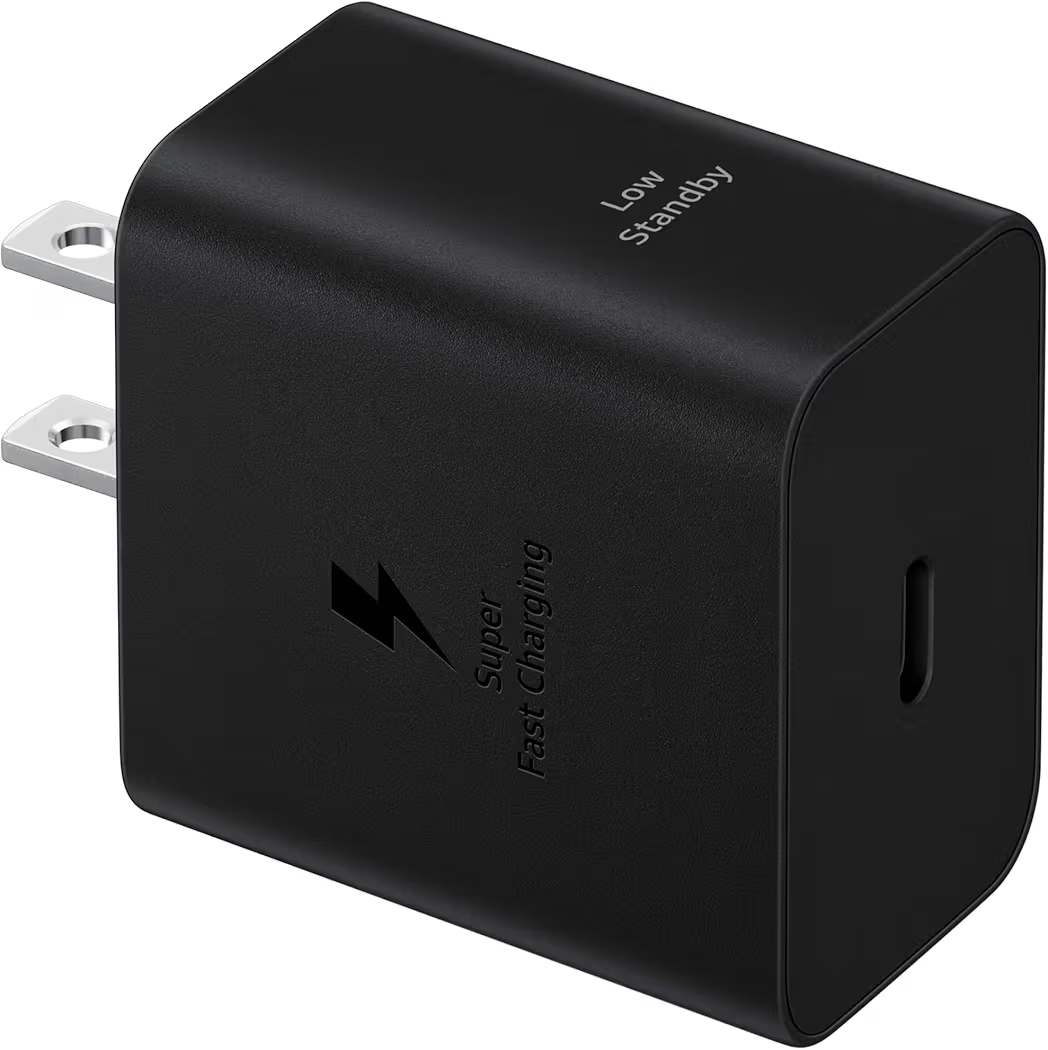
List Price: $18.18
Samsung’s official 45W charger remains the safest recommendation for Galaxy S26 Ultra owners. Official PPS support eliminates compatibility concerns while delivering consistent charging performance.
- 45W Output
- PPS Support
- Compact Design
- Samsung Optimized
Pros
- Official Samsung charger
- Reliable charging performance
- Excellent PPS compatibility
- Compact size
Cons
- Cable sold separately
Best Value Samsung 45W USB-C Charger With 2 Cables
Samsung 45W USB-C Charger With 2 Cables
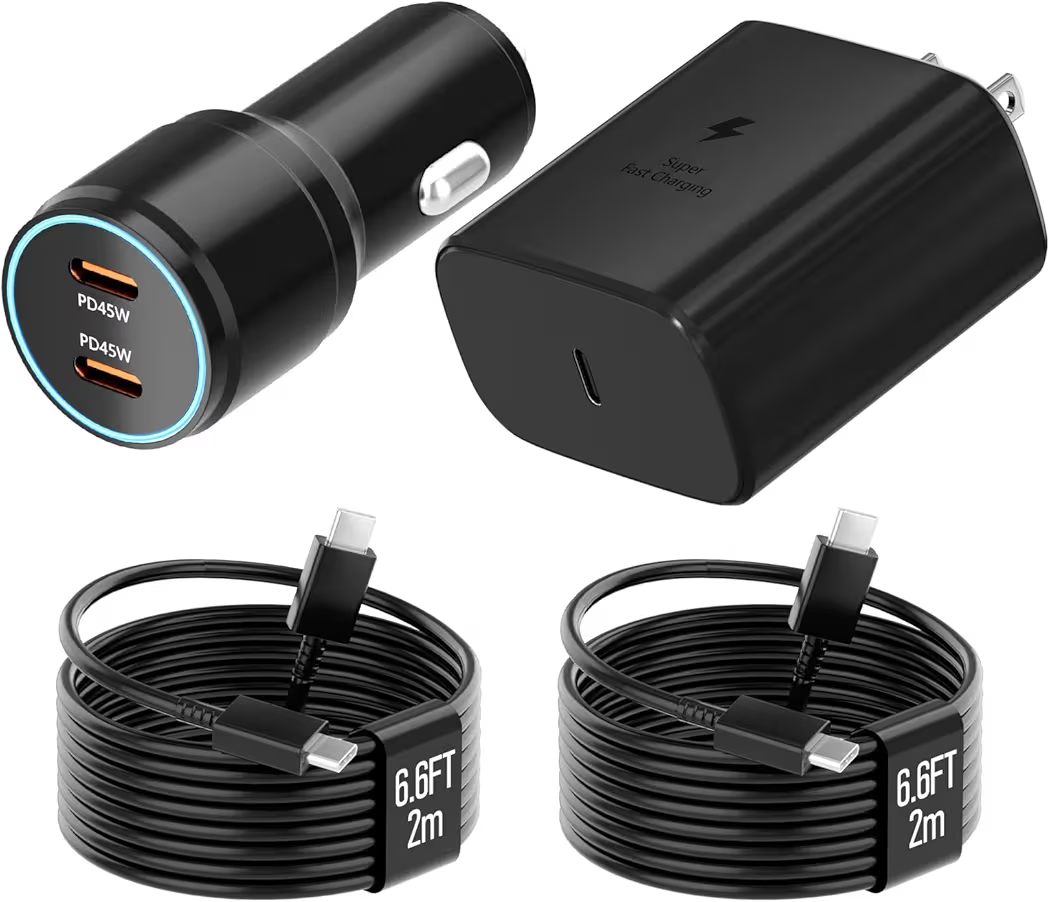
List Price: $15.19
Bundled cables increase the overall value proposition. Consequently, buyers needing a complete charging solution often prefer this package.
- 45W Charging
- Two Included Cables
- PPS Support
- Travel Friendly
Pros
- Excellent value
- Includes cables
- Supports fast charging
Cons
- Not an official Samsung retail package
Best Multi-Device Charger 65W Super Fast Charger 3-Port
Multiple-device charging is the biggest advantage of the 65W Super Fast Charger 3-Port. Someone carrying a phone, tablet, and accessories can reduce charger clutter significantly.
- 65W Output
- PD Support
- QC 3.0 Support
- Three Charging Ports
Pros
- Charges up to three devices simultaneously
- High 65W maximum power output
- Broad compatibility with PD and QC standards
Cons
- Power is split when multiple ports are used
Best Budget Samsung Super Fast Charger GaN PPS
Budget-conscious buyers will appreciate the low price of Samsung Super Fast Charger GaN PPS. Despite the affordable cost, PPS support remains available.
- GaN Technology
- 45W Charging
- Compact Design
- PPS Support
Pros
- Highly affordable price point
- GaN technology keeps the block small and cool
- Full support for Samsung Super Fast Charging 2.0
Cons
- Basic build material compared to premium options
Best Long Cable Option 45W Dual Super Fast Charging Block
The included 10-foot cable makes this model particularly useful for bedside charging setups. Longer reach often improves convenience without requiring extension cords.
- 10FT Cable
- 45W Charging
- Dual Charging Support
- Travel Friendly
Pros
- Extra-long 10-foot cable offers superior reach
- Dual ports allow charging an extra accessory
- Full 45W speed for single-device charging
Cons
- The thick 10-foot cable can be bulky to pack for travel
Buying Guide
PPS compatibility matters more than advertised wattage when shopping for a Galaxy S26 Ultra charger. Several chargers claim 45W performance while lacking the charging standards required for Samsung’s fastest charging mode.
Why Does PPS Matter?
PPS allows charging power to adjust dynamically during the charging process. Consequently, charging becomes more efficient and generates less excess heat.
Which USB-C Cable Should You Choose?
A certified 5A USB-C cable is generally the best option. Higher-quality cables support stable power delivery and improve charging consistency.
Which Safety Features Matter Most?
Over-voltage protection, temperature monitoring, and power regulation are essential safety features. Quality chargers include multiple safeguards to protect connected devices.
Buyers interested in magnetic charging accessories can also review our guide covering useful MagSafe accessories. Likewise, anyone curious about compatibility should check whether MagSafe charging works properly with Galaxy S26 Ultra.
Frequently Asked Questions
Does Galaxy S26 Ultra Support 45W Charging?
Yes. Galaxy S26 Ultra supports up to 45W charging when paired with a compatible PPS charger and 5A USB-C cable.
Why Is Super Fast Charging 2.0 Not Working?
Most charging issues occur because the charger or cable lacks PPS support. Checking charging status is the quickest diagnostic step.
Can A USB-C Cable Slow Charging?
Yes. A low-quality or damaged cable can significantly reduce charging performance.
Why Does Charging Slow Down After 80 Percent?
Battery protection mechanisms intentionally reduce charging speed near full capacity. This behavior helps preserve long-term battery health.
Does Heat Affect Charging Speed?
Yes. Elevated temperatures often trigger thermal throttling, which reduces charging power.
Is Wireless Charging Slower Than Wired Charging?
Yes. Wired charging remains significantly faster than wireless charging for Galaxy S26 Ultra.
Can Battery Protection Cause Slow Charging?
Yes. Certain battery protection modes intentionally reduce charging speed or limit maximum charge levels.
Do Software Updates Affect Charging Speed?
Yes. Temporary slowdowns can occur while background optimization processes run after major updates.
Final Recommendations
The best charger depends on charging habits, budget, and accessory requirements. However, a few models clearly stand out for specific situations.
- Best Overall:Samsung 45W Wall Charger EP-T4511NBEGUS
- Best Value:Samsung 45W USB-C Charger With 2 Cables
- Best Multi-Device Charger:65W Super Fast Charger 3-Port
- Best Budget Pick:Samsung Super Fast Charger GaN PPS
- Best Long Cable Option:45W Dual Super Fast Charging Block
Final Thoughts
Galaxy S26 Ultra slow charging problems are usually caused by charging accessories, temperature conditions, or charging settings rather than hardware failure. In many situations, replacing a poor-quality cable or upgrading to a PPS-compatible charger restores full charging performance.
For most buyers, the Samsung 45W Wall Charger remains the safest overall recommendation. Meanwhile, shoppers seeking better value should consider the Samsung 45W USB-C Charger With 2 Cables.
Additionally, many of the chargers featured here work with other Samsung Galaxy devices, USB-C tablets, Google Pixel phones, and compatible USB Power Delivery products. Therefore, a quality PPS charger can continue providing value long after upgrading to a newer device.