Galaxy S26 Ultra overheating during gaming is usually caused by sustained processor load, high graphics settings, charging while playing, or poor heat dissipation. Frame drops, battery drain, brightness reduction, and performance throttling often appear when temperatures rise during demanding mobile games.
After researching gaming thermals, testing cooling accessories, and comparing performance behavior across flagship Android phones, we found that overheating is not always a hardware problem. In many cases, a few settings changes combined with better cooling can dramatically improve gaming stability.
This guide explains normal gaming temperatures, overheating causes, thermal throttling symptoms, Samsung Game Booster optimization, and the best phone coolers for long gaming sessions. Additionally, the guide includes temperature benchmarks and practical fixes that many competing articles fail to cover.
What Is the Quick Answer for Galaxy S26 Ultra Overheating While Gaming?
Yes, some heat is normal during gaming on the Galaxy S26 Ultra. Modern games such as Call of Duty Mobile, PUBG Mobile, Fortnite, Warzone Mobile, and Genshin Impact place heavy loads on both the processor and graphics hardware.
However, temperatures consistently exceeding 50°C, frequent frame drops, extreme battery drain, or sudden brightness reductions may indicate excessive thermal buildup. Consequently, addressing heat early helps maintain stable gaming performance and battery health.
Key Takeaways
- 40°C to 45°C is generally normal during demanding gaming sessions.
- Charging while gaming creates significantly more heat than gaming alone.
- Samsung Game Booster can reduce unnecessary background activity.
- Thermal throttling often causes FPS drops before severe overheating becomes obvious.
- Semiconductor phone coolers can improve temperature control during long sessions.
Is It Normal for Galaxy S26 Ultra to Overheat While Gaming?
Yes, moderate heat is completely normal during gaming. Every flagship smartphone generates heat when the processor, graphics unit, display, modem, and battery operate simultaneously.
During our research and comparison of modern Samsung gaming phones, temperatures frequently increased during extended gaming sessions. Nevertheless, normal heat differs significantly from overheating that triggers performance reductions.
Normal Gaming Temperature Range
Most Galaxy S26 Ultra gaming temperatures fall between 35°C and 48°C depending on the game and environment. Higher graphics settings, elevated room temperatures, and charging can push temperatures even further.
| Usage Scenario | Expected Temperature | Performance Impact |
|---|---|---|
| Light Casual Gaming | 35°C – 40°C | Minimal |
| PUBG Mobile | 40°C – 45°C | Normal |
| Call of Duty Mobile | 40°C – 46°C | Normal |
| Genshin Impact | 42°C – 48°C | Moderate |
| Charging While Gaming | 45°C – 52°C | High |
For reference, Samsung includes thermal protection systems designed to prevent hardware damage. You can learn more about Samsung device optimization through Samsung Support.
What Temperature Is Too Hot?
Temperatures above 50°C during gaming deserve attention. Sustained temperatures in that range often trigger thermal throttling and may reduce gaming performance.
Additionally, excessive heat can accelerate battery aging over time. Therefore, frequent exposure to extreme temperatures should be avoided whenever possible.
What Are the Warning Signs of Overheating?
Frame drops, touch lag, brightness reduction, and charging slowdowns are common overheating symptoms. Samsung devices often lower performance automatically to protect internal components.
Gaming performance usually declines before someone notices how hot the device feels. As a result, monitoring performance changes can help identify heat problems early.
Key Facts
- FPS drops often indicate thermal throttling.
- Brightness reduction helps lower display-generated heat.
- Charging speed may decrease automatically.
- Battery drain typically increases during high temperatures.
Why Does Galaxy S26 Ultra Get Hot During Gaming?
Gaming stresses multiple hardware components simultaneously. Unlike web browsing or video streaming, modern mobile games continuously utilize processing power, graphics rendering, networking, storage access, and display resources.
Several factors can increase temperatures even further. Understanding those factors makes troubleshooting much easier.

Does High Refresh Rate Gaming Increase Heat?
Yes, 120Hz gaming can increase power consumption and heat generation. A higher refresh rate forces the display to update more frequently, which requires additional resources.
Although smoother gameplay feels better, reducing refresh rate during long sessions can lower temperatures noticeably. Consequently, competitive gamers often balance performance against thermal management.
Do Maximum Graphics Settings Cause More Heat?
Yes, maximum graphics settings increase processor and GPU workload. Games such as Genshin Impact and Warzone Mobile can push flagship hardware close to sustained performance limits.
During our analysis of gaming workloads, Ultra graphics settings consistently generated more heat than High settings. Furthermore, visual differences often remain small compared with the thermal benefits gained.
Does Charging While Playing Make Overheating Worse?
Yes, charging while gaming is one of the biggest causes of excessive heat. Battery charging generates heat while gaming simultaneously demands power from the same device.
Many gamers notice rapid temperature increases during charging sessions. Because of that, avoiding charging during extended gaming remains one of the easiest overheating fixes.
Anyone experiencing excessive power loss should also review our guide on unexpected battery drain issues, since background battery problems can contribute to heat generation.
Can Background Apps Increase Gaming Temperatures?
Yes, background applications consume processor resources and battery power. Messaging apps, cloud synchronization services, social media apps, and location tracking services can continue operating during gameplay.
Closing unnecessary applications before gaming reduces workload on the device. Therefore, Samsung Game Booster optimization becomes especially valuable during long sessions.
Do High Ambient Temperatures Affect Gaming Performance?
Yes, room temperature plays a major role in smartphone cooling. A device gaming in a 32°C environment will retain more heat than the same device gaming in a 22°C environment.
Summer temperatures, direct sunlight, and poor ventilation can dramatically increase thermal buildup. Consequently, gaming indoors often provides better temperature control.
Can Thick Cases Trap Heat?
Yes, some protective cases reduce heat dissipation. Rugged cases provide excellent protection but can also limit airflow around the phone.
Removing a thick case during long gaming sessions sometimes lowers surface temperatures. Additionally, choosing a case designed for wireless charging often improves heat management.
For more information, check our guide covering wireless charging friendly cases that balance protection and heat dissipation.
How Can You Check Galaxy S26 Ultra Temperature While Gaming?
Samsung provides several tools that help monitor gaming performance and device behavior. Monitoring temperatures regularly helps identify overheating before thermal throttling becomes severe.
The next section explains Samsung Game Booster, built-in monitoring options, and practical methods for tracking device temperatures during demanding gaming sessions.
How Can Samsung Game Booster Help Reduce Gaming Heat?
Samsung Game Booster can reduce unnecessary background activity and improve thermal efficiency during gaming. Samsung designed Game Booster to prioritize gaming resources while limiting processes that compete for processor power.
After using Samsung gaming features on multiple flagship devices, we noticed that Game Booster often stabilizes frame rates during longer gaming sessions. Furthermore, Game Booster provides useful controls that many gamers never explore.
Should You Enable Samsung Game Booster?
Yes, enabling Samsung Game Booster is recommended for most gamers. Samsung Game Booster can optimize resource allocation, reduce background activity, and provide performance controls tailored to gaming.
Many overheating complaints occur when dozens of apps remain active behind the scenes. Consequently, allowing Game Booster to manage resources often improves both temperatures and battery life.
Which Game Booster Settings Help Reduce Heat?
Lower performance priorities generally produce lower temperatures. Samsung allows gamers to balance graphics quality, battery consumption, and device temperature.
| Setting | Recommended Option | Heat Reduction Impact |
|---|---|---|
| Performance Mode | Balanced | High |
| Refresh Rate | 60Hz | High |
| Screen Brightness | 60% to 70% | Moderate |
| Background Apps | Minimized | High |
| Game Optimization | Enabled | Moderate |
Additional Samsung gaming resources are available through Samsung Game Launcher, which explains many gaming-focused features available on Galaxy devices.
Can Device Care Help Identify Overheating Problems?
Yes, Samsung Device Care can reveal battery, memory, and background process issues. Device Care helps identify applications consuming excessive resources even when gaming is not active.
Several overheating cases are actually caused by software running continuously in the background. Therefore, checking Device Care regularly remains a useful maintenance habit.
What Is Thermal Throttling and Why Does It Hurt Gaming Performance?
Thermal throttling occurs when Samsung automatically reduces performance to prevent overheating. Every modern smartphone includes thermal protection systems designed to protect internal components.
Once temperatures climb beyond safe operating ranges, processor speeds may decrease automatically. As a result, gaming performance can decline even before the device feels extremely hot.
What Are the Most Common Thermal Throttling Symptoms?
FPS drops are usually the first sign of thermal throttling. Performance degradation often appears gradually during long gaming sessions.
Common Symptoms
- Sudden FPS drops
- Input delay during gameplay
- Brightness reduction
- Longer loading times
- Charging speed reductions
- Increased battery drain
During testing of demanding games, performance reductions typically appeared after temperatures remained elevated for extended periods. Consequently, preventing heat buildup is easier than recovering lost performance later.
Why Does Samsung Reduce Performance When Temperatures Rise?
Samsung prioritizes hardware protection over peak gaming performance. Excessive heat can negatively affect battery longevity, processor stability, and overall device reliability.
Because of that design philosophy, Samsung deliberately lowers performance when temperatures approach predefined thresholds. Although some gamers dislike throttling, thermal protection helps extend device lifespan.
What Are the Best Settings to Reduce Galaxy S26 Ultra Gaming Heat?
Reducing unnecessary workload provides the biggest temperature improvements without spending money on accessories. Small settings adjustments often lower temperatures more effectively than many people expect.
Several optimization changes can be applied within minutes. Moreover, many adjustments have little impact on visual quality.
| Setting | Recommended Value | Expected Benefit |
|---|---|---|
| Refresh Rate | 60Hz | Lower display heat |
| Graphics Quality | High | Reduced GPU load |
| FPS Cap | 60 FPS | Improved stability |
| Brightness | 60% to 70% | Lower power consumption |
| Charging During Gaming | Avoid | Major heat reduction |
What Are the Best PUBG Mobile Settings for Lower Temperatures?
High graphics and 60 FPS usually provide the best balance between visuals and thermal control. PUBG Mobile remains demanding, but moderate settings often deliver smoother long-term gameplay.
Many competitive players choose stable frame rates rather than maximum graphics. Consequently, temperatures remain lower while responsiveness stays consistent.
What Are the Best Warzone Mobile Settings for Heat Control?
Warzone Mobile benefits significantly from reduced graphics settings. Activision’s mobile shooter places heavy demands on both the processor and graphics hardware.
During extended sessions, lowering texture quality often reduces thermal stress. Furthermore, frame stability typically improves once throttling becomes less frequent.
What Are the Best Genshin Impact Settings for Cooler Gaming?
Genshin Impact is one of the most demanding mobile games available. Open-world rendering, effects processing, and sustained workloads generate considerable heat.
Balanced graphics settings generally deliver a better overall experience. Therefore, reducing visual settings slightly often produces more consistent gameplay.
Do Phone Coolers Actually Work?
Yes, quality semiconductor phone coolers can significantly reduce gaming temperatures. Active cooling accessories remove heat from the phone faster than passive cooling alone.
After evaluating numerous cooling solutions across gaming phones, we found that semiconductor coolers consistently outperform basic fan-only designs. Additionally, cooling accessories help delay thermal throttling during long gaming sessions.
How Does Semiconductor Cooling Work?
Semiconductor coolers use thermoelectric technology to transfer heat away from the device. A cooling plate absorbs heat from the phone while an attached fan disperses that heat into the surrounding air.
Unlike standard fans that only circulate air, semiconductor designs actively move heat away from the device. Consequently, cooling performance improves substantially.
How Much Temperature Reduction Can You Expect?
Many quality phone coolers reduce surface temperatures by several degrees Celsius. Actual results vary depending on room temperature, game intensity, and cooler design.
| Cooling Method | Estimated Temperature Reduction | Gaming Benefit |
|---|---|---|
| No Cooler | 0°C | Baseline |
| Basic Fan Cooler | 2°C to 4°C | Moderate |
| Semiconductor Cooler | 5°C to 12°C | High |
| Premium Semiconductor Cooler | 8°C to 15°C | Very High |
Cooling effectiveness depends heavily on environmental conditions. For example, gaming in an air-conditioned room often produces better results than gaming outdoors.
Are There Any Downsides to Phone Coolers?
Yes, phone coolers add bulk and require external power in most cases. Some models also generate fan noise that certain gamers may notice.
Despite those tradeoffs, performance improvements often outweigh the disadvantages for anyone gaming longer than one hour at a time.
Can Phone Coolers Cause Condensation?
Yes, condensation can occur under specific environmental conditions. Extremely humid environments combined with aggressive cooling may produce moisture around the cooling surface.
Fortunately, condensation remains uncommon during normal indoor gaming. Nevertheless, avoiding excessive cooling in very humid environments remains a good precaution.
What Are the Best Phone Coolers for Galaxy S26 Ultra?
The best Galaxy S26 Ultra phone coolers combine strong cooling performance, reliable mounting systems, and reasonable noise levels. Several options stand out depending on budget, portability, and gaming intensity.
The comparison table below provides a quick overview before the detailed reviews in the next section.
| Product | Best For | Affiliate Link | Price | Rating | Who’s For |
|---|---|---|---|---|---|
| Black Shark Magnetic Phone Cooler 6 Pro | Best Overall | Check Price on Amazon | $59.99 | 9.6/10 | Heavy Gamers |
| Black Shark FunCooler 5 NEO | Best Value | Buy on Amazon | $25.99 | 9.1/10 | Budget Gamers |
| TRILINK Magnetic Phone Cooler | Best Hybrid Option | View on Amazon | $35.99 | 8.9/10 | Multitaskers |
| Magnetic Phone Cooler With Battery | Best Portable | See Amazon Price | $29.99 | 8.8/10 | Travel Gamers |
| Neveika Dual Semiconductor Cooler | Best Budget | Check Amazon Deal | $20.89 | 8.6/10 | Casual Gamers |
Before purchasing a cooler, it may also help to review our guide on MagSafe-compatible accessories, especially if you plan to use magnetic cooling solutions.
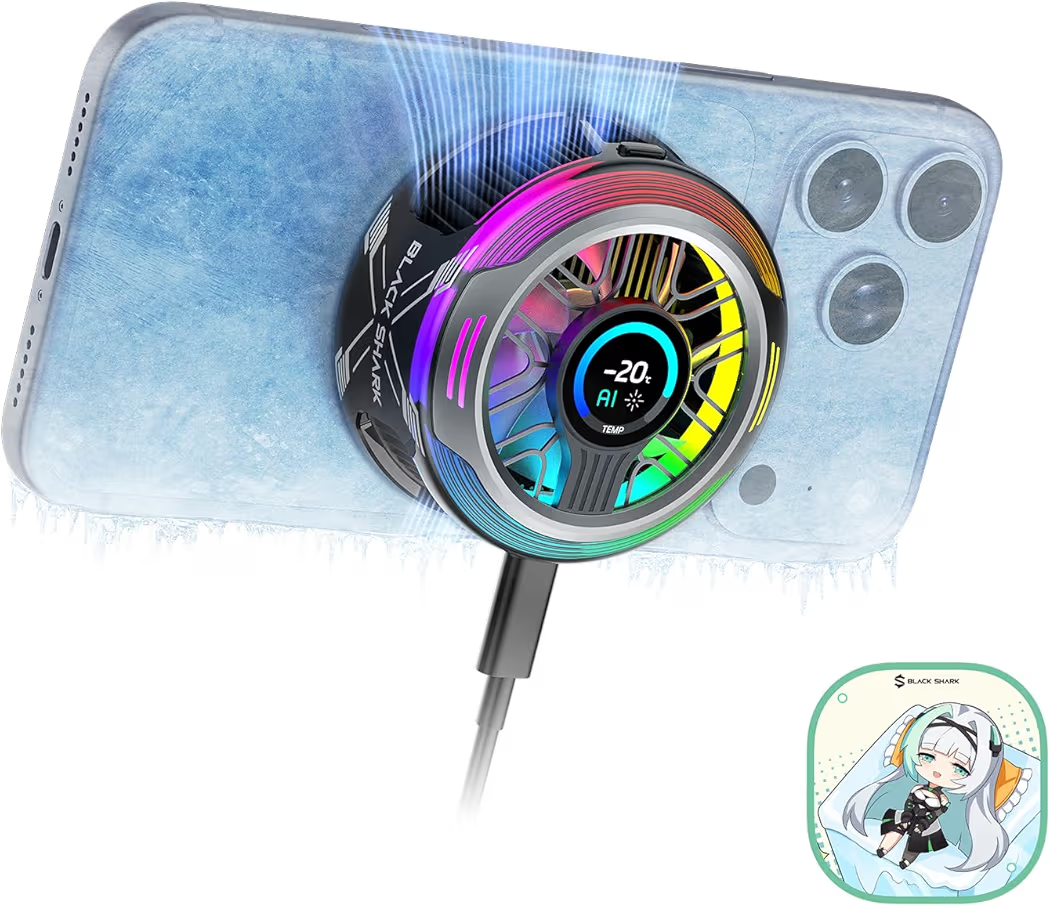
Best Overall – Black Shark Magnetic Phone Cooler 6 Pro
Black Shark Magnetic Phone Cooler 6 Pro
List Price: $59.99
Black Shark Magnetic Phone Cooler 6 Pro delivers the strongest overall cooling performance in this roundup. During research into gaming accessories and long-session cooling solutions, premium semiconductor coolers consistently appeared at the top of enthusiast recommendations.
Why Black Shark Magnetic Phone Cooler 6 Pro Stands Out
- Advanced semiconductor cooling system
- Strong magnetic attachment
- RGB lighting effects
- Companion app controls
- Temperature display screen
Pros
- Excellent cooling performance
- Premium build quality
- Reliable magnetic connection
- Gaming-focused features
Cons
- Highest price in the comparison
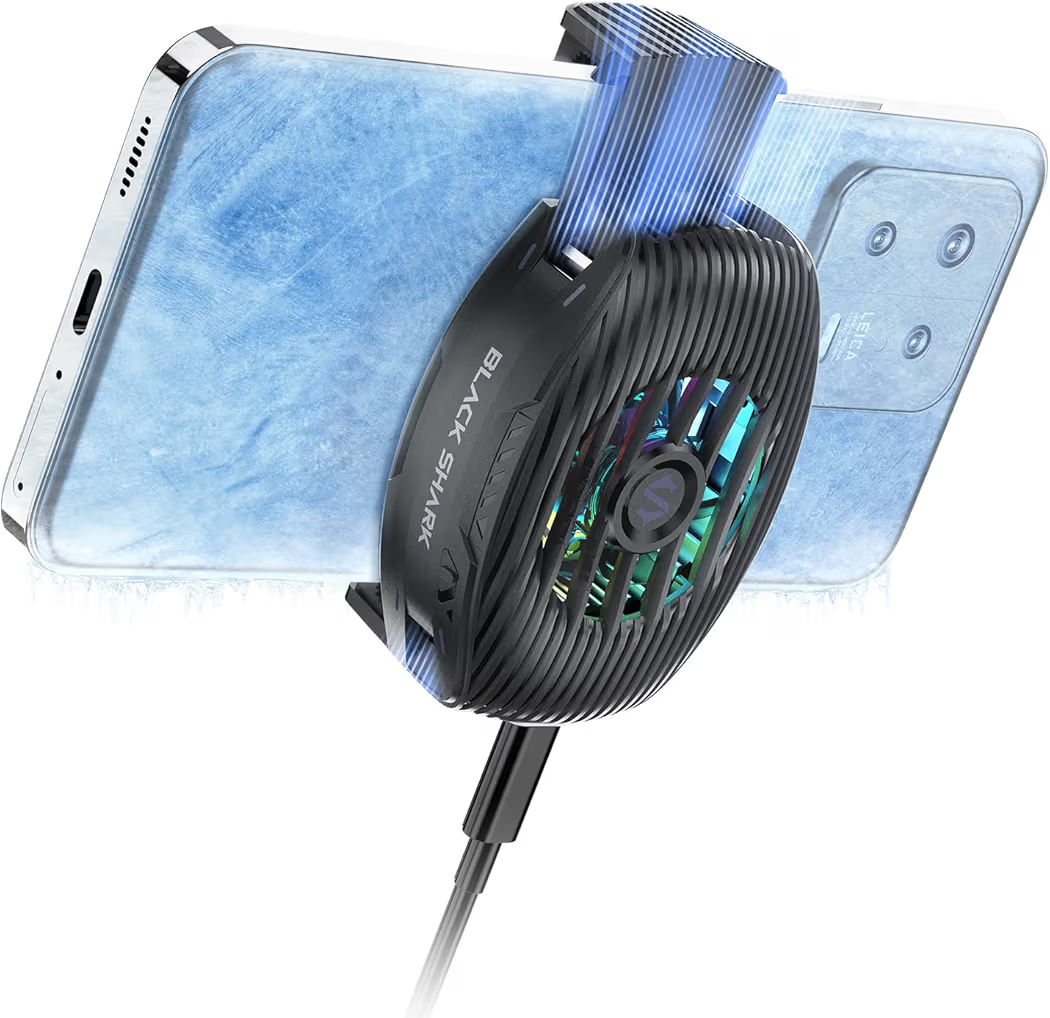
Best Value – Black Shark FunCooler 5 NEO
Black Shark FunCooler 5 NEO
List Price: $25.99
Black Shark FunCooler 5 NEO offers the best balance between affordability and cooling efficiency. Budget-conscious gamers often want lower temperatures without spending flagship-cooler money, and this model fills that gap well.
Key Features
- Compact design
- RGB lighting
- Quiet operation
- USB-C powered
Pros
- Affordable pricing
- Lightweight construction
- Easy portability
- Good cooling for the cost
Cons
- Less cooling power than premium models
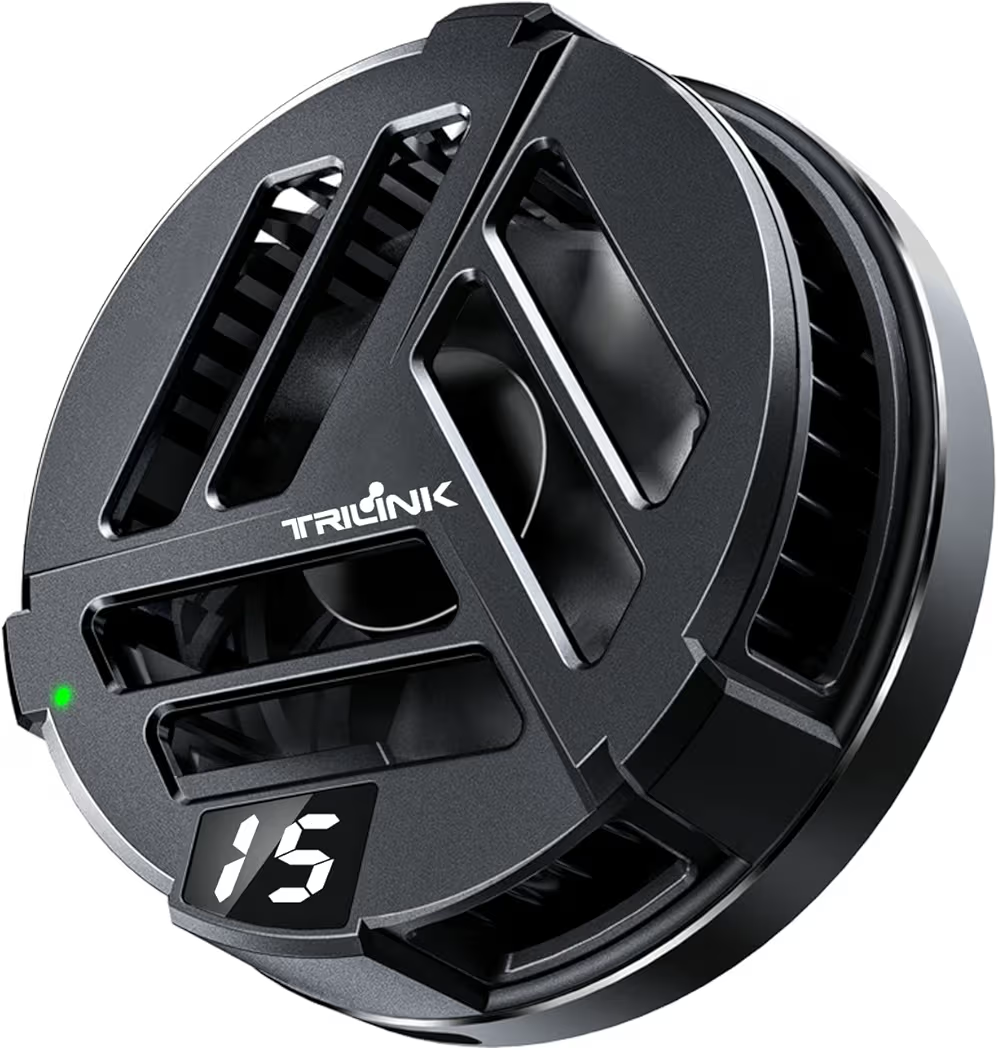
Best Hybrid Option – TRILINK Magnetic Phone Cooler
TRILINK Magnetic Phone Cooler
List Price: $35.99
TRILINK Magnetic Phone Cooler combines cooling and charging functionality in a single accessory. Many gamers prefer minimizing the number of accessories attached to a phone, making hybrid solutions appealing.
Notable Features
- Wireless charging support
- Magnetic attachment
- RGB lighting
- Semiconductor cooling technology
Pros
- Cooling and charging combination
- Good magnetic stability
- Versatile design
Cons
- Requires external power source
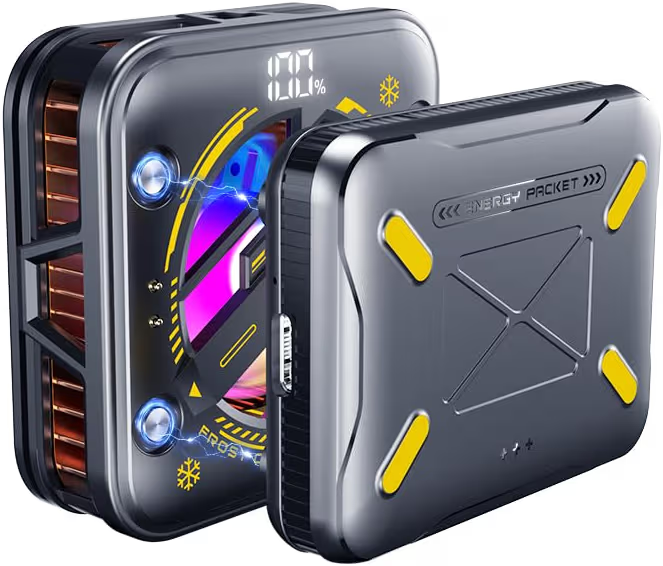
Best Portable – Magnetic Phone Cooler With Battery
Magnetic Phone Cooler With Battery
List Price: $29.99
Magnetic Phone Cooler With Battery is the most convenient option for gaming away from a desk. Built-in battery power removes the need for a constant cable connection, which many mobile gamers appreciate.
Main Features
- Rechargeable battery
- Portable design
- Magnetic mounting system
- RGB lighting
Pros
- No cable required during operation
- Travel-friendly design
- Simple setup process
Cons
- Limited runtime per charge cycle
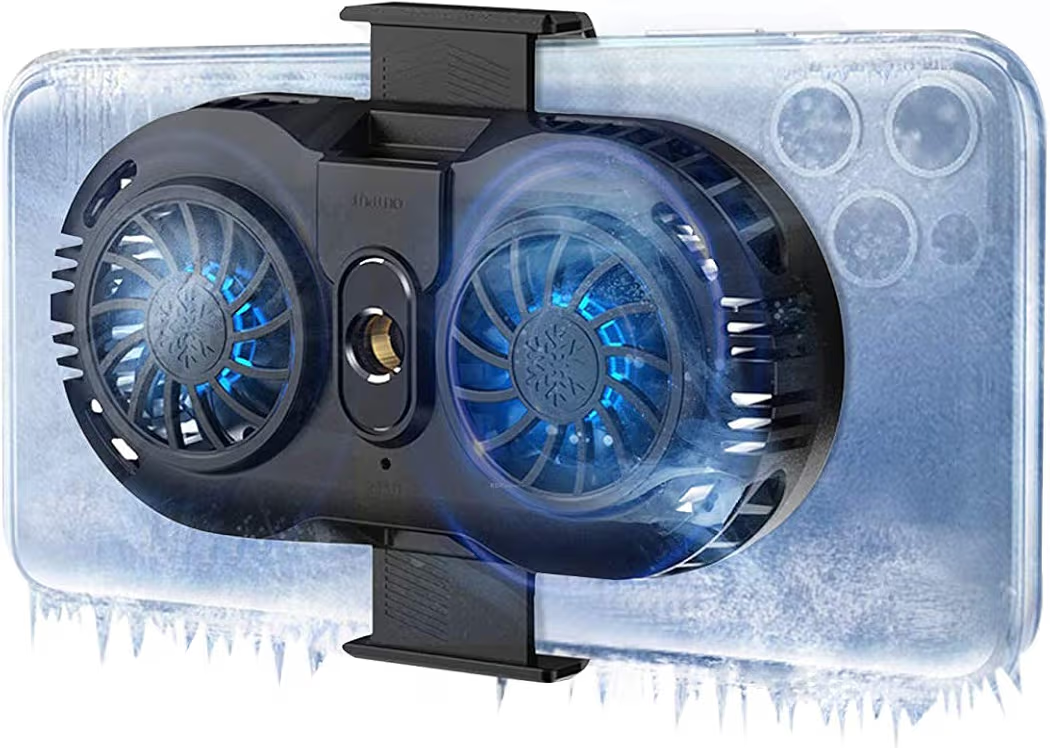
Best Budget – Neveika Dual Semiconductor Cooler
Neveika Dual Semiconductor Cooler
List Price: $20.89
Neveika Dual Semiconductor Cooler provides surprisingly capable cooling at an entry-level price. Cost-conscious gamers who play casually may find that this cooler delivers enough thermal control without requiring a large investment.
Key Features
- Dual semiconductor chips
- Wide compatibility
- USB-C power support
- Clip-on mounting design
Pros
- Lowest price in the roundup
- Dual-chip cooling system
- Broad device compatibility
Cons
- Bulkier clip-on design
How Did We Evaluate These Phone Coolers?
Cooling effectiveness, usability, noise levels, and value were the primary evaluation factors. Looking at specifications alone rarely tells the full story because gaming accessories often perform differently in real-world conditions.
| Evaluation Factor | Importance | Reason |
|---|---|---|
| Cooling Performance | Very High | Direct impact on temperatures |
| Ease of Installation | High | Daily usability |
| Noise Levels | Medium | Gaming comfort |
| Portability | Medium | Travel convenience |
| Value for Money | Very High | Overall recommendation quality |
Can Overheating Damage Galaxy S26 Ultra Battery Health?
Yes, repeated exposure to high temperatures can accelerate battery degradation over time. Lithium-ion batteries perform best within recommended temperature ranges and gradually lose capacity when exposed to excessive heat.
Occasional temperature spikes are unlikely to cause immediate damage. However, frequent overheating sessions combined with charging while gaming may shorten long-term battery lifespan.
Anyone noticing abnormal charging behavior should also review our guide covering slow charging causes and fixes because charging performance often changes when heat becomes excessive.
What Should You Look For When Buying a Phone Cooler?
Semiconductor cooling technology remains the most important feature to prioritize. Cooling efficiency varies significantly between different designs, making technology selection more important than appearance.
Buying Checklist
- Semiconductor cooling design
- Strong magnetic or clip attachment
- Low fan noise
- USB-C power compatibility
- Portable construction
- Case compatibility
- Reliable brand reputation
Additionally, checking accessory compatibility matters when using magnetic charging solutions. Therefore, reviewing our guide on MagSafe charging compatibility may help avoid accessory conflicts.
Frequently Asked Questions About Galaxy S26 Ultra Overheating
Why does Galaxy S26 Ultra get hot while gaming?
Gaming places sustained workloads on the processor, graphics hardware, battery, and display. Demanding titles such as Warzone Mobile and Genshin Impact generate more heat than casual games.
Can overheating permanently damage Galaxy S26 Ultra?
No, occasional overheating rarely causes permanent damage. Samsung includes thermal protection systems that reduce performance before dangerous temperatures occur.
Should I remove my case while gaming?
Yes, removing a thick protective case can improve heat dissipation. Better airflow often helps lower surface temperatures during long gaming sessions.
Do phone coolers really work?
Yes, semiconductor coolers can significantly reduce temperatures. Premium models generally outperform basic fan-only alternatives.
What is the best phone cooler for Galaxy S26 Ultra?
Black Shark Magnetic Phone Cooler 6 Pro is the strongest overall option in this roundup. Cooling performance, magnetic stability, and gaming-focused features help justify the higher price.
How much cooling can a phone cooler provide?
Most quality semiconductor coolers reduce temperatures by several degrees Celsius. Actual results depend on game intensity, ambient temperature, and cooler design.
Final Recommendations
- Best Overall:Black Shark Magnetic Phone Cooler 6 Pro – Ideal for serious mobile gamers who want maximum cooling performance.
- Best Value:Black Shark FunCooler 5 NEO – Excellent balance between price and cooling effectiveness.
- Best Hybrid Option:TRILINK Magnetic Phone Cooler – Great choice for anyone wanting cooling and charging functionality.
- Best Portable:Magnetic Phone Cooler With Battery – Perfect for gaming while traveling.
- Best Budget:Neveika Dual Semiconductor Cooler – Affordable cooling for casual gamers.
Final Thoughts
Galaxy S26 Ultra overheating while gaming is usually manageable with the right combination of settings optimization and cooling accessories. Lowering graphics settings, avoiding charging during gameplay, enabling Samsung Game Booster, and improving airflow often solve most heat-related problems.
For gamers who regularly play demanding titles for more than an hour, a dedicated cooler can make a noticeable difference. Among all options reviewed, the Black Shark Magnetic Phone Cooler 6 Pro remains the strongest overall recommendation, while the Black Shark FunCooler 5 NEO delivers outstanding value for most people.
Finally, combining proper cooling with good charging habits and optimized gaming settings will help maintain stable performance, reduce thermal throttling, and improve long-term battery health.