
GTBank USSD Code lets Guaranty Trust Bank customers access banking services directly from a mobile phone by dialing *737#. The GTBank USSD Code works without an internet connection and supports transfers, airtime purchases, bill payments, account balance enquiries, Quick Credit, Salary Advance, and more. This guide explains the latest official GTBank Bank 737 codes, how to activate the service, and how to use every major feature safely.
If you also use multiple Nigerian banks, comparing different banking short codes can be helpful. Our guide to Nigerian bank USSD codes provides a broader overview alongside the official GTBank Bank 737 platform.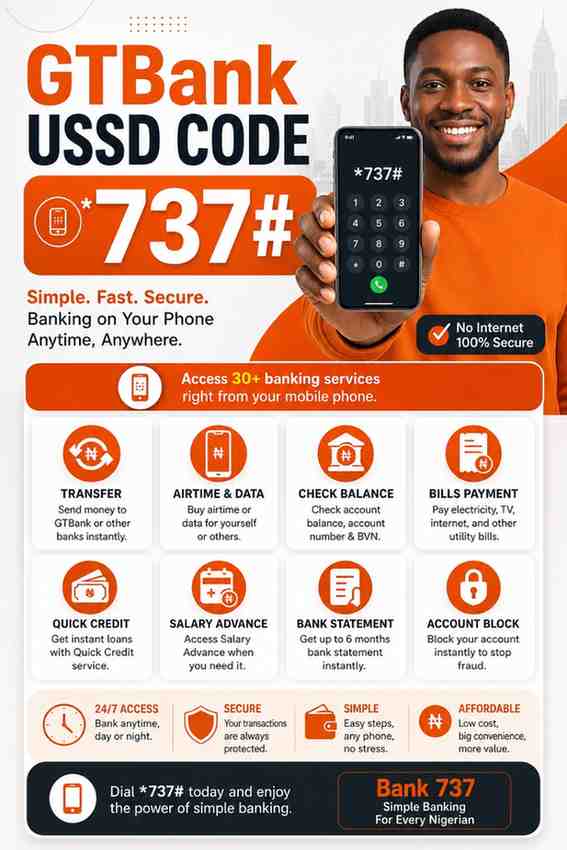
What Is the GTBank USSD Code?
The GTBank USSD Code is *737#. GTBank introduced Bank 737 to allow customers to complete banking transactions on any mobile phone without requiring mobile data or a banking app.
Additionally, GTBank USSD banking offers instant access to essential banking services at any time. Customers can manage accounts, transfer funds, recharge airtime, and perform other transactions securely using the registered mobile number linked to their GTBank account.
What is Bank 737?
Bank 737 is GTBank’s official USSD banking platform designed for convenient mobile banking. Bank 737 provides access to everyday banking services through simple numeric codes instead of requiring internet access or a smartphone application.
Furthermore, GTBank Bank 737 works on feature phones and smartphones alike. This flexibility makes the service especially useful in areas with limited internet connectivity.
Who can use GTBank *737#?
GTBank *737# is available to customers who have a GTBank account and a phone number registered with the bank. The registered SIM card serves as an additional security layer during every transaction.
Before using GTBank USSD banking, ensure your mobile number is linked to your GTBank account. Otherwise, registration and transaction authorization may fail.
What services are available through *737#?
GTBank USSD Code supports a wide range of banking services. Customers can transfer money, purchase airtime, pay bills, check account balances, request Quick Credit, access Salary Advance, block accounts, perform BVN and NIN enquiries, request bank statements, and complete cardless withdrawals.
Because GTBank continues improving Bank 737, customers should always rely on the official service menu after dialing *737# for the latest available options.

How Do You Register and Activate GTBank USSD Banking?
GTBank USSD banking is activated by dialing *737# from the mobile number registered with your GTBank account. During the first setup, GTBank prompts you to create a secure transaction PIN before allowing financial transactions.


What do you need before registration?
GTBank requires an active account, a registered mobile number, and access to that SIM card before Bank 737 can be activated. These requirements help verify ownership and improve transaction security.
Additionally, keeping your registered phone number updated with GTBank prevents activation issues when changing SIM cards.
How do you create your transaction PIN?
GTBank allows customers to create a transaction PIN during the initial Bank 737 setup. The transaction PIN authorizes transfers, airtime purchases, bill payments, and other sensitive banking activities.
Choose a unique PIN that is difficult for others to guess. Never share your GTBank transaction PIN with anyone, including individuals claiming to represent the bank.
Which phone number should you use?
GTBank USSD banking only works correctly when customers dial *737# from the phone number linked to their GTBank account. Using another SIM card usually prevents authentication.
If your registered phone number changes, visit a GTBank branch to update your banking records before attempting to use Bank 737 again.
What Are the Latest Official GTBank USSD Codes?
GTBank officially provides several Bank 737 codes for common banking services. Using the correct code helps customers complete transactions faster while reducing errors.
| Service | Official USSD Code |
|---|---|
| Quick Transfer | *737*23# |
| Self Airtime Recharge | *737*Amount# |
| Airtime for Others | *737*Amount*PhoneNumber# |
| Account Balance | *737*6*1# |
| PIN Creation | *737*5# |
| Cardless Withdrawal | *737*3# |
| Bills Payment | *737*50# |
| BVN/NIN Enquiry | *737*65# |
| Six-Month Bank Statement | *737*51*33# |
| Quick Credit | *737*51*51# |
| Salary Advance | *737*82# |
| Account Block | *737*911# |
| Transfer to GTBank | *737*1*Amount*AccountNumber# |
| Transfer to Other Banks | *737*2*Amount*AccountNumber# |
Which code is used for Quick Transfer?
GTBank uses *737*23# for Quick Transfer. The Quick Transfer option provides fast access to the transfer menu directly from your mobile phone.
Which code checks your account balance?
GTBank customers can check their account balance by dialing *737*6*1#. The service displays available account information after successful verification.
Which code buys airtime?
GTBank customers can recharge their own mobile line using *737*Amount#. Enter the desired airtime amount and complete the transaction using your transaction PIN.
Which code buys airtime for another number?
GTBank customers can buy airtime for family or friends using *737*Amount*PhoneNumber#. Ensure the recipient’s phone number is entered correctly before authorizing the recharge.
Which code transfers money to another GTBank account?
GTBank customers can transfer funds between GTBank accounts using *737*1*Amount*AccountNumber#. The system confirms the recipient details before final authorization.
Which code transfers money to other Nigerian banks?
GTBank customers can transfer money to accounts in other Nigerian banks by dialing *737*2*Amount*AccountNumber#. After confirmation, the transaction proceeds once the correct PIN is entered.
Customers interested in comparing transfer options across banks may also find the Access Bank transfer code useful.
Which code pays bills?
GTBank uses *737*50# for bill payments. Customers can follow the menu prompts to pay supported utility and service providers directly from their GTBank account.
Which code requests Quick Credit?
GTBank customers can access Quick Credit services through *737*51*51#. Eligibility depends on the customer’s banking profile and the bank’s lending requirements.
Which code checks BVN and NIN?
GTBank provides BVN and NIN enquiries through *737*65#. This feature allows customers to verify important banking identification details from their registered mobile phone.
Which code blocks your account?
GTBank customers can immediately block account access using *737*911#. This security feature is valuable when a phone is lost or suspicious account activity is detected.
Which code requests Salary Advance?
GTBank customers can access Salary Advance services using *737*82#. Available offers depend on customer eligibility and GTBank’s internal lending assessment.
Which code requests a six-month bank statement?
GTBank customers can request a six-month account statement using *737*51*33#. This option provides convenient access to recent account history without visiting a banking hall.
Which code enables cardless withdrawal?
GTBank provides cardless withdrawal through *737*3#. Customers can generate withdrawal details and access cash without using a physical ATM card where supported.
Which code creates or resets your PIN?
GTBank customers can create or reset their Bank 737 transaction PIN using *737*5#. A secure PIN protects every transaction completed through GTBank USSD banking.

How Do You Transfer Money Using GTBank *737#?
GTBank allows customers to transfer money directly through Bank 737 using the official transfer codes. The process is designed to be fast, secure, and available every day without internet access.
How do you transfer to another GTBank account?
GTBank customers transfer funds to another GTBank account by dialing *737*1*Amount*AccountNumber#. The system displays the recipient details before requesting the transaction PIN for confirmation.
How do you transfer to other banks?
GTBank customers transfer funds to other Nigerian banks by dialing *737*2*Amount*AccountNumber#. Carefully verify the account number and recipient name before approving the transaction.
What information is required before confirming the transfer?
GTBank requires the recipient’s account number, transfer amount, and your transaction PIN before processing the transfer. Confirming these details reduces the risk of sending money to the wrong account.
What happens after a successful transfer?
GTBank sends a confirmation message after a successful transfer. The notification usually contains important transaction details that should be kept for future reference if any dispute arises.
For complete Bank 737 documentation and the latest supported services, visit the official GTBank Bank 737 page.
How Do You Buy Airtime and Data Using GTBank USSD?
GTBank USSD Code allows customers to recharge airtime and access supported mobile services directly from their registered phone. Bank 737 makes these transactions available without internet access, making it useful when mobile data is unavailable.
How do you recharge your own phone?
GTBank customers can buy airtime for their own phone by dialing *737*Amount#. Replace Amount with the value you want to recharge, then confirm the transaction using your GTBank transaction PIN.
Additionally, GTBank processes airtime purchases instantly in most cases. Always verify that you entered the correct amount before authorizing the transaction.
How do you recharge another phone?
GTBank customers can send airtime to another mobile number by dialing *737*Amount*PhoneNumber#. Enter the recipient’s phone number carefully because airtime transactions generally cannot be reversed after completion.
Furthermore, GTBank Bank 737 supports major Nigerian mobile networks, making it convenient to recharge family members and friends from anywhere.
Can you buy mobile data through *737#?
Yes. GTBank confirms that Bank 737 supports mobile data purchases. Customers should dial *737# and follow the available menu options because supported data services and providers may change over time.
Using the official menu helps ensure you see the latest available data purchase options instead of relying on outdated USSD shortcuts.
How Can You Check Your Account Balance, BVN, and Bank Statement?
GTBank USSD Code provides quick access to account information without visiting a branch or signing into internet banking. Bank 737 includes account balance enquiries, BVN and NIN verification, and bank statement requests.
How do you check your GTBank account balance?
GTBank customers can check their available account balance by dialing *737*6*1#. After successful verification, Bank 737 displays the requested account information on your phone.
Checking your balance before making a transfer helps reduce failed transactions caused by insufficient funds.
How do you check your BVN and NIN?
GTBank customers can verify their Bank Verification Number (BVN) and National Identification Number (NIN) details using *737*65#. This feature is useful when confirming banking records or completing account verification requirements.
Additionally, keeping your BVN and NIN records updated helps prevent delays when applying for banking services.
How do you request a six-month bank statement?
GTBank customers can request a six-month account statement by dialing *737*51*33#. The statement provides a convenient summary of recent account activity without visiting a banking hall.
Many customers use this feature when reviewing transactions, preparing financial records, or confirming previous payments.
How Do You Use GTBank USSD for Quick Credit and Salary Advance?
GTBank USSD Code also provides access to eligible loan products through Bank 737. Customers can check available offers and begin the application process directly from their mobile phone.
What is GTBank Quick Credit?
GTBank Quick Credit is a digital loan service that allows eligible customers to access short-term financing. Customers can check their Quick Credit eligibility by dialing *737*51*51#.
Loan approval depends on GTBank’s lending criteria, account activity, and other internal eligibility requirements.
How do you access Salary Advance?
GTBank customers can access Salary Advance services by dialing *737*82#. Bank 737 guides eligible customers through the available options after verifying account details.
Additionally, Salary Advance is designed for qualifying salary earners who meet the bank’s lending conditions.
Who is eligible?
Eligibility for GTBank Quick Credit and Salary Advance depends on the customer’s banking relationship with GTBank. Factors such as account activity, income history, and internal credit assessment determine whether an offer is available.
Because eligibility varies from one customer to another, the official Bank 737 platform displays only the offers available to your account.

How Do You Block Your GTBank Account Using USSD?
GTBank USSD Code includes a security feature that allows customers to block account access immediately if they suspect fraud or lose their phone. Acting quickly helps reduce the risk of unauthorized transactions.
When should you block your account?
GTBank customers should block their account immediately after losing a phone, noticing suspicious account activity, or believing someone has gained unauthorized access to their banking information.
Taking prompt action can prevent further transactions while you contact GTBank for additional assistance.
Which official code blocks your account?
GTBank customers can block their account using *737*911#. Follow the prompts on your registered mobile number to complete the security process.
What should you do after blocking your account?
After blocking your GTBank account, contact GTBank customer support or visit the nearest branch to secure your banking profile and restore normal account access when appropriate.
Why Should You Use GTBank USSD Banking?
GTBank USSD Code offers convenient banking that works across different types of mobile phones. Bank 737 is especially useful when internet access is unavailable or when you need to complete a transaction quickly.
Does it work without internet?
Yes. GTBank Bank 737 works without mobile data or Wi-Fi because USSD technology communicates directly through your mobile network.
Does it work on every mobile phone?
Yes. GTBank designed Bank 737 to work on both smartphones and basic feature phones. As long as your mobile network supports USSD services, you can access GTBank banking functions.
Is GTBank USSD secure?
Yes. GTBank protects Bank 737 transactions using your registered mobile number and a personal transaction PIN. Never disclose your PIN or other confidential banking information to anyone.
Can you use it anytime?
Yes. GTBank USSD banking is available throughout the day, allowing customers to perform supported banking transactions whenever the service is operational.
How does it save time?
GTBank Bank 737 reduces the need to visit a banking hall for routine transactions. Customers can complete transfers, recharge airtime, check balances, and access several other services within minutes.
What Problems Can Occur When Using GTBank USSD and How Can You Fix Them?
GTBank USSD Code is reliable, but occasional issues can occur because of network problems, registration errors, or incorrect transaction details. Most issues can be resolved by checking a few common causes.
Why is *737# not working?
GTBank Bank 737 may not work if your mobile network is temporarily unavailable, your SIM is not registered with GTBank, or the USSD session has timed out. Restarting your phone or trying again after a few minutes often resolves temporary network issues.
Why was your transaction declined?
GTBank may decline a transaction because of insufficient funds, incorrect account details, daily transaction limits, or an incorrect transaction PIN. Reviewing these details before trying again usually helps.
What should you do if you do not receive a confirmation message?
If GTBank does not send a confirmation message immediately, first check your account balance or recent transaction history before repeating the transaction. This step helps avoid duplicate payments.
What happens if your SIM is not linked to your GTBank account?
GTBank USSD banking requires the registered phone number linked to your account. If your SIM is not linked correctly, visit a GTBank branch to update your mobile number before using Bank 737.
Which GTBank USSD Codes Should You Know?
GTBank customers can use the following official Bank 737 codes for everyday banking services.
| Service | Official USSD Code | Category |
|---|---|---|
| Quick Transfer | *737*23# | Money Transfer |
| Self Airtime | *737*Amount# | Airtime |
| Airtime for Others | *737*Amount*PhoneNumber# | Airtime |
| Account Balance | *737*6*1# | Account |
| PIN Creation | *737*5# | Security |
| Cardless Withdrawal | *737*3# | Cash Withdrawal |
| Bills Payment | *737*50# | Payments |
| BVN/NIN Enquiry | *737*65# | Verification |
| Six-Month Statement | *737*51*33# | Statements |
| Quick Credit | *737*51*51# | Loans |
| Salary Advance | *737*82# | Loans |
| Account Block | *737*911# | Security |
| Transfer to GTBank | *737*1*Amount*AccountNumber# | Transfer |
| Transfer to Other Banks | *737*2*Amount*AccountNumber# | Transfer |
Frequently Asked Questions
What is the official GTBank USSD code?
The official GTBank USSD Code is *737#. GTBank customers use this code to access Bank 737 services, including transfers, airtime purchases, bill payments, account enquiries, and several other banking functions without internet access.
Can I use GTBank USSD without internet?
Yes. GTBank Bank 737 works through USSD technology, so mobile data and Wi-Fi are not required. However, your mobile phone must have network coverage from your telecom provider to complete transactions.
How do I check my GTBank account balance?
GTBank customers can check their account balance by dialing *737*6*1# from the mobile number registered with their GTBank account. The service displays your available balance after successful verification.
How do I transfer money to another bank using *737#?
GTBank customers can transfer money to other Nigerian banks using *737*2*Amount*AccountNumber#. Carefully review the recipient details before entering your transaction PIN to authorize the transfer.
How do I block my GTBank account?
GTBank customers can block their account immediately by dialing *737*911#. This feature helps protect your account if your phone is lost or if you notice suspicious banking activity.
How do I create or reset my GTBank USSD PIN?
GTBank allows customers to create or reset their Bank 737 transaction PIN using *737*5#. Use a secure PIN that is difficult for others to guess, and never share it with anyone.
Is GTBank USSD available 24 hours a day?
Yes. GTBank Bank 737 is designed to provide access to supported banking services throughout the day. Temporary interruptions may occur because of mobile network or system maintenance, but the service is generally available whenever needed.
Final Thought
GTBank USSD Code remains one of the simplest ways to manage everyday banking without an internet connection. Bank 737 combines transfers, airtime purchases, bill payments, account enquiries, security features, and loan services into one convenient platform that works on almost any mobile phone.
For the most accurate information, always use the latest official GTBank Bank 737 menu after dialing *737# and rely on the official GTBank website for service updates. Never disclose your transaction PIN or personal banking details to anyone claiming to represent the bank.
Related Articles

StarTimes Packages, Prices & Channels (2026)
February 26, 2026