Gizmosum

TECH REVIEWS

Galaxy S23 vs iPhone 13: Which Phone Is Better?

August 29, 2026 Updated 2 weeks ago 16 min read

Could two compact flagship phones from different ecosystems still be this close? The Galaxy S23 is the better overall choice for most buyers, while the iPhone 13 remains a strong option for people who prefer iOS and the Apple ecosystem.

The Galaxy S23 has a smoother 120Hz display, a more versatile camera system, USB-C, and a fingerprint sensor. The iPhone 13 counters with strong video recording, the A15 Bionic chip, Face ID, and tight integration with Apple’s ecosystem.

For buyers who already know they want Android, the Samsung Galaxy S23 is the model I would choose. The linked Amazon listing is a 128GB Phantom Black unlocked renewed model.

This comparison covers the display, performance, cameras, battery, charging, software, durability, storage, and everyday experience. I also explain when the iPhone 13 makes more sense and whether the newer iPhone 14 is worth considering.

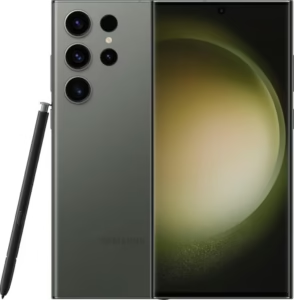
Samsung Galaxy S23 Phantom Black

Galaxy S23 vs iPhone 13: Which Phone Is Better?

The Galaxy S23 is the better all-around phone for most buyers. Its 120Hz display, triple-camera system, USB-C port, and compact design give it several practical advantages.

The iPhone 13 still makes more sense for Apple users. Its A15 Bionic chip remains capable, while iOS and Apple’s ecosystem can matter more than individual hardware differences.

Samsung gives the S23 a 6.1-inch Dynamic AMOLED 2X display with a 48–120Hz adaptive refresh rate. Apple gives the iPhone 13 a 6.1-inch Super Retina XDR OLED display with a 60Hz refresh rate.

The camera difference is also important. The S23 has a 50MP main camera, 12MP ultrawide camera, and 10MP telephoto camera with 3x optical zoom. The iPhone 13 uses two 12MP rear cameras and has no dedicated telephoto lens.

For the official specifications, see Samsung’s Galaxy S23 specifications and Apple’s iPhone 13 technical specifications.

Galaxy S23 and iPhone 13 at a Glance

The Galaxy S23 wins more hardware categories, while the iPhone 13 remains competitive in performance and software.

  • Best overall: Galaxy S23
  • Best display: Galaxy S23
  • Best camera versatility: Galaxy S23
  • Best zoom: Galaxy S23
  • Best iOS experience: iPhone 13
  • Best Apple ecosystem integration: iPhone 13
  • Best compact Android option: Galaxy S23
  • Best for Face ID: iPhone 13
  • Best for USB-C: Galaxy S23
  • Best choice for existing Apple users: iPhone 13

Samsung Galaxy S23

Best Overall

Best For: Buyers who want a compact Android flagship with a smooth display and versatile cameras.

Best Overall
SAMSUNG Galaxy S23 5G, US Version, 128GB, Phantom Black - Unlocked (Renewed)

SAMSUNG

SAMSUNG Galaxy S23 5G, US Version, 128GB, Phantom Black - Unlocked (Renewed)

The Galaxy S23 is the article's overall winner because it combines a smooth 120Hz display, strong performance, and versatile cameras. Its 50MP main camera, dedicated telephoto lens, USB-C port, wireless charging, and compact design give it several advantages over the iPhone 13.

6.1-inch Dynamic AMOLED 2X display Snapdragon 8 Gen 2 for Galaxy Triple-camera system
4.1/5.0 (2,085)
$254.50
View on Amazon

The Galaxy S23 earns the top position because it offers the strongest balance of display, cameras, performance, and usability.

Samsung uses a 6.1-inch Dynamic AMOLED 2X panel with an adaptive refresh rate from 48Hz to 120Hz. Scrolling therefore looks noticeably smoother than on the 60Hz iPhone 13.

The S23 also uses the Snapdragon 8 Gen 2 Mobile Platform for Galaxy. The chip gives the phone plenty of performance for demanding apps, multitasking, and modern mobile games.

Camera versatility is another major advantage. The rear system combines a 50MP main camera, 12MP ultrawide camera, and 10MP telephoto camera.

The dedicated telephoto camera provides 3x optical zoom. That gives the S23 more flexibility for portraits and distant subjects.

Samsung also includes USB-C, wireless charging, Wireless PowerShare, and an in-display fingerprint sensor. The compact 168g body makes the S23 comfortable for one-handed use.

However, buyers should remember that the Amazon listing used here is a renewed model. Check the listing condition and warranty details before ordering.

Buy the Galaxy S23 if: you want Android, a 120Hz display, better camera versatility, USB-C, and a compact flagship.

Avoid it if: you strongly prefer iOS, Face ID, iMessage, or Apple’s device ecosystem.

If charging is important, see the guide on how to fast-charge the Galaxy S23 series. You can also learn how Wireless PowerShare works on the Galaxy S23 series.

Apple iPhone 13

Best for iOS Users

Best For: Apple users who want a compact iPhone with strong performance and long-term ecosystem integration.

Best for iOS Users
Apple iPhone 13, 128GB, Midnight - Unlocked (Renewed)

APPLE

Apple iPhone 13, 128GB, Midnight - Unlocked (Renewed)

The iPhone 13 remains a capable compact phone and is the article's preferred choice for Apple users. Its A15 Bionic chip, OLED display, strong video capabilities, Face ID, and Apple ecosystem integration keep it competitive despite its 60Hz display.

6.1-inch Super Retina XDR OLED display A15 Bionic chip Dual 12MP camera system
4.0/5.0 (27,659)
Discount −5%
$262.00 $277.00 Save $15
View on Amazon

The iPhone 13 remains a capable phone, especially for people already invested in Apple’s ecosystem.

Apple uses a 6.1-inch Super Retina XDR OLED display with a 2532 × 1170 resolution. The panel supports HDR and reaches up to 1,200 nits peak brightness for HDR content.

The main limitation against the S23 is the refresh rate. The standard iPhone 13 uses a 60Hz display, while the S23 can reach 120Hz.

Apple’s A15 Bionic chip still delivers strong everyday performance. The processor handles social apps, photography, video, gaming, and multitasking without difficulty.

The iPhone 13 has two 12MP rear cameras. One handles standard shots, while the second provides an ultrawide view.

Apple also uses sensor-shift optical image stabilization on the main camera. The iPhone 13 supports 4K video recording and benefits from Apple’s strong computational photography and video processing.

There is no dedicated telephoto camera. Therefore, the iPhone 13 cannot match the S23’s 3x optical zoom hardware.

The iPhone 13 also uses Lightning instead of USB-C. That can be inconvenient if your other devices already use USB-C.

However, the iPhone 13 has a major ecosystem advantage. AirDrop, iMessage, FaceTime, Apple Watch integration, and other Apple services can make the phone easier to live with for existing Apple users.

Buy the iPhone 13 if: you want iOS, Face ID, strong video performance, and seamless Apple ecosystem integration.

Avoid it if: you want a 120Hz display, USB-C, a dedicated telephoto camera, or an in-display fingerprint sensor.

Apple iPhone 14

Best Newer iPhone Alternative

Best For: Buyers who prefer the iPhone 13 experience but want a slightly newer model.

Best Newer iPhone Alternative
Apple iPhone 14, 128GB, Midnight - Unlocked (Renewed)

APPLE

Apple iPhone 14, 128GB, Midnight - Unlocked (Renewed)

The iPhone 14 is the article's newer alternative for buyers who prefer Apple's platform but want a later model than the iPhone 13. It retains the familiar 6.1-inch OLED design and A15-generation performance while adding camera and safety improvements.

6.1-inch OLED display A15 Bionic family Dual-camera system
4.0/5.0 (13,396)
$302.29
View on Amazon

The iPhone 14 is a useful alternative when its price sits close to the iPhone 13.

The iPhone 14 retains the familiar 6.1-inch OLED design and uses Apple’s A15 Bionic family. It therefore does not create a dramatic performance gap over the iPhone 13.

However, the newer model adds some camera and safety improvements. It can also make more sense for buyers who want a newer iPhone generation.

Still, the iPhone 14 does not solve the biggest hardware differences against the Galaxy S23. The standard iPhone 14 remains limited to a 60Hz display and lacks a dedicated telephoto camera.

Choose the iPhone 14 if: the price difference from the iPhone 13 is small and you prefer a newer Apple model.

Choose the iPhone 13 instead if: the iPhone 13 is substantially cheaper and you only need the core iPhone experience.

Galaxy S23 vs iPhone 13: Specs Comparison

The Galaxy S23 has the stronger hardware feature set, while the iPhone 13 offers a very capable Apple platform.

Specification Galaxy S23 iPhone 13
Display 6.1-inch Dynamic AMOLED 2X 6.1-inch Super Retina XDR OLED
Refresh rate 48–120Hz adaptive 60Hz
Resolution 2340 × 1080 2532 × 1170
Processor Snapdragon 8 Gen 2 for Galaxy A15 Bionic
Rear cameras 50MP + 12MP + 10MP 12MP + 12MP
Telephoto 3x optical zoom No dedicated telephoto
Front camera 12MP 12MP TrueDepth
Battery capacity 3,900mAh typical Apple does not publish battery capacity in its standard specifications
Charging port USB-C Lightning
Wireless charging Yes Yes
Biometrics Fingerprint sensor Face ID
Water resistance IP68 IP68
Weight 168g 173g
Storage options 128GB / 256GB 128GB / 256GB / 512GB

Samsung confirms the S23’s 6.1-inch display, 120Hz refresh rate, camera system, Snapdragon platform, 3,900mAh battery, 168g weight, and IP68 rating in its official specifications.

Apple lists the iPhone 13’s 6.1-inch OLED display, A15 Bionic chip, camera system, storage options, 173g weight, and IP68 rating in its official technical specifications.

Galaxy S23 vs iPhone 13 Display

The Galaxy S23 has the better display because its adaptive refresh rate reaches 120Hz.

Both phones use 6.1-inch OLED-class panels. The difference becomes obvious during scrolling, animations, gaming, and other fast-moving content.

The S23 adjusts between 48Hz and 120Hz. That range allows the phone to use a high refresh rate when smooth motion matters.

The iPhone 13 stays at 60Hz. Its Super Retina XDR display still looks sharp and vibrant, but motion is less fluid than on the S23.

For everyday viewing, both screens are excellent. For smoothness, the Galaxy S23 wins clearly.

Galaxy S23 vs iPhone 13 Performance

Both phones deliver strong performance, but they use different hardware and software approaches.

The Galaxy S23 uses the Snapdragon 8 Gen 2 for Galaxy. The iPhone 13 uses Apple’s A15 Bionic.

Neither phone feels slow for normal tasks. Both can handle social media, productivity apps, photography, streaming, and demanding games.

However, benchmark results do not tell the whole story. Apple’s tight control of hardware and software gives the iPhone 13 excellent optimization.

Samsung’s S23 provides more Android flexibility. The phone also gives users features such as split-screen multitasking and broader customization.

For gaming and high-refresh gameplay, the S23 has the more attractive package. For general performance, both remain capable.

Galaxy S23 vs iPhone 13 Camera

The Galaxy S23 has the more versatile camera system.

Samsung gives the S23 three rear cameras. The system includes a 50MP main sensor, 12MP ultrawide sensor, and 10MP telephoto sensor.

The dedicated telephoto camera supports 3x optical zoom. That makes the S23 more useful for distant subjects and compressed portraits.

The iPhone 13 uses two 12MP rear cameras. The system combines a main camera with an ultrawide camera.

Apple does not provide a dedicated telephoto lens on the iPhone 13. Instead, the phone relies on its main cameras and computational photography.

For video, the iPhone 13 remains highly competitive. Apple’s video processing, stabilization, and ecosystem tools make the iPhone attractive for creators.

Choose the S23 for camera versatility and optical zoom. Choose the iPhone 13 if video and Apple’s camera workflow matter more.

Galaxy S23 vs iPhone 13 Battery Life

The Galaxy S23 has a 3,900mAh typical battery, while Apple does not publish the iPhone 13’s battery capacity on its standard specification page.

Battery capacity alone does not determine battery life. Processor efficiency, display behavior, network conditions, software, and app usage all affect endurance.

The S23 can reduce its refresh rate when high refresh speed is unnecessary. That can help balance smoothness and power use.

The iPhone 13 also benefits from Apple’s hardware and software optimization. Real-world battery life can therefore vary substantially between users.

For either phone, heavy gaming, mobile data, high brightness, and camera use can drain the battery faster.

Galaxy S23 vs iPhone 13 Charging

The Galaxy S23 is more convenient for modern charging setups because it uses USB-C.

Samsung supports wired charging up to 25W, along with Fast Wireless Charging 2.0 and Wireless PowerShare.

The iPhone 13 uses a Lightning connector. It also supports wireless charging and MagSafe accessories.

Therefore, the choice depends partly on your existing cables and accessories.

If most of your devices use USB-C, the S23 creates a simpler charging setup. If you already own several Lightning accessories, the iPhone 13 may be more convenient.

For more S23 charging guidance, see how to fast-charge the Galaxy S23 series.

⚡ Pro Tip: Do not compare battery capacity alone. Compare charging speed, screen behavior, software efficiency, and your actual usage.

Galaxy S23 vs iPhone 13 Software

The better software choice depends on whether you prefer Android or iOS.

The Galaxy S23 runs Android with Samsung’s One UI interface. One UI offers extensive customization and useful multitasking features.

The iPhone 13 runs iOS. Apple’s software focuses on consistency, simplicity, and integration with other Apple devices.

For example, an iPhone 13 works particularly well with AirPods, Apple Watch, iPad, and Mac devices.

The S23 fits naturally into Samsung’s ecosystem. Galaxy Buds, Galaxy Watch, Windows integration, Quick Share, and Smart Switch can simplify daily use.

Neither platform is universally better. Your existing ecosystem should influence the buying decision.

Galaxy S23 vs iPhone 13 Design and Durability

Both phones offer compact designs and IP68 water and dust resistance.

The Galaxy S23 measures 146.3 × 70.9 × 7.6mm and weighs 168g. The iPhone 13 measures 146.7 × 71.5 × 7.65mm and weighs 173g.

That makes the S23 slightly lighter. Both phones remain comfortable choices for people who dislike large smartphones.

Samsung uses Gorilla Glass Victus 2 and an Armor Aluminum frame. Apple uses Ceramic Shield on the front, a glass back, and an aluminum frame.

Both models carry an IP68 rating. However, IP68 does not mean either phone is waterproof in every situation.

Samsung specifically advises against beach or pool use despite the S23’s water-resistance rating.

If water resistance is important, read the dedicated guide on whether the Galaxy S23 is waterproof.

Galaxy S23 vs iPhone 13 Biometrics

The Galaxy S23 uses an in-display fingerprint sensor, while the iPhone 13 uses Face ID.

The S23 fingerprint reader lets you unlock the phone without looking directly at the display.

The iPhone 13 uses Apple’s TrueDepth camera system for Face ID. Face ID can also authenticate compatible apps and payments.

This difference comes down to preference. Fingerprint unlocking can be useful when wearing a mask or when holding the phone at an angle.

Face ID can feel more seamless when the phone is positioned directly in front of you.

Galaxy S23 vs iPhone 13 Storage

The iPhone 13 offers more maximum storage, while the S23 covers the most common 128GB and 256GB capacities.

The S23 is available with 128GB and 256GB storage options in Samsung’s listed configurations.

The iPhone 13 comes in 128GB, 256GB, and 512GB configurations.

Neither phone provides a microSD card slot for expandable storage.

For most users, 128GB works well for everyday apps and photography. Heavy video users should consider 256GB or more.

Galaxy S23 vs iPhone 13 for Gaming

The Galaxy S23 is the more appealing gaming phone because of its 120Hz display and Snapdragon 8 Gen 2 platform.

The higher refresh rate can make compatible games and system animations feel smoother.

The Snapdragon platform also gives the S23 strong graphics performance for demanding games.

The iPhone 13 remains a capable gaming phone. Its A15 Bionic chip still handles demanding games well.

However, the iPhone 13’s 60Hz display limits the visual smoothness advantage compared with the S23.

If gaming is a major priority, the S23 is the stronger choice between these two models.

For broader recommendations, see the best Samsung Galaxy phones for gaming.

Galaxy S23 vs iPhone 13: Which Should You Buy?

Choose the Galaxy S23 if you want the strongest combination of hardware features.

  • Choose the Galaxy S23 for a 120Hz display.
  • Choose the Galaxy S23 for a dedicated telephoto camera.
  • Choose the Galaxy S23 for USB-C.
  • Choose the Galaxy S23 for fingerprint unlocking.
  • Choose the Galaxy S23 for Android customization.
  • Choose the iPhone 13 for iOS.
  • Choose the iPhone 13 if you already use an Apple Watch or Mac.
  • Choose the iPhone 13 for Apple’s ecosystem and Face ID.
  • Choose the iPhone 14 if its price is close to the iPhone 13.

Is the Galaxy S23 Still Worth Buying?

Yes, the Galaxy S23 can still be worth buying when its price is attractive.

The phone remains competitive because its core hardware is strong. The 120Hz display, Snapdragon 8 Gen 2 chip, triple-camera system, wireless charging, and compact body still hold up well.

However, condition matters when buying a renewed unit. Check the battery condition policy, return window, warranty, and seller information before ordering.

The Amazon listing used in this article is specifically a renewed 128GB unlocked model.

Is the iPhone 13 Still Worth Buying?

Yes, the iPhone 13 remains worth considering for buyers who want an affordable entry into the Apple ecosystem.

The A15 Bionic chip remains capable, while the OLED display and camera system still provide a good everyday experience.

The biggest drawbacks are its 60Hz display, Lightning port, and lack of a dedicated telephoto camera.

If the iPhone 14 costs only slightly more, compare both before choosing the older model.

Galaxy S23 vs iPhone 14: Should You Consider the Newer iPhone?

The iPhone 14 is worth considering when the price difference from the iPhone 13 is small.

The iPhone 14 keeps the same general 6.1-inch design and A15-generation platform. It therefore does not eliminate the S23’s 120Hz display advantage.

For a dedicated comparison, read Galaxy S23 vs iPhone 14.

Galaxy S23 vs iPhone 15: What Changes?

The iPhone 15 is a more substantial alternative because it moves Apple’s standard iPhone line to USB-C.

It also introduces newer hardware than the iPhone 13. However, the iPhone 15 is a separate buying decision and should not replace the core S23 versus iPhone 13 comparison.

Read the dedicated Galaxy S23 vs iPhone 15 comparison for that decision.

Frequently Asked Questions

Which is better, Galaxy S23 or iPhone 13?

The Galaxy S23 is better overall for most buyers. It has a smoother display, more versatile cameras, USB-C, and fingerprint unlocking.

What is the biggest difference between Galaxy S23 and iPhone 13?

The biggest differences are the display refresh rate, camera hardware, connector, and operating system. The S23 uses a 120Hz AMOLED display and triple-camera system, while the iPhone 13 uses a 60Hz OLED display and dual cameras.

Which has the better camera, Galaxy S23 or iPhone 13?

The Galaxy S23 has the more versatile camera hardware. Its dedicated 3x telephoto camera gives it an advantage for zoom and portraits.

Which takes better video, Galaxy S23 or iPhone 13?

The iPhone 13 remains an excellent video phone. Apple’s stabilization and video processing make the iPhone especially appealing for people who prioritize video recording.

Which has the better display, Galaxy S23 or iPhone 13?

The Galaxy S23 has the better display for smooth motion. Its adaptive 48–120Hz refresh rate is a major advantage over the iPhone 13’s 60Hz panel.

Which is faster, Galaxy S23 or iPhone 13?

Both phones are fast enough for demanding everyday use. The S23 uses Snapdragon 8 Gen 2 for Galaxy, while the iPhone 13 uses A15 Bionic.

Does the Galaxy S23 have wireless charging?

Yes, the Galaxy S23 supports wireless charging. It also supports Fast Wireless Charging 2.0 and Wireless PowerShare.

Does the iPhone 13 support wireless charging?

Yes, the iPhone 13 supports wireless charging. It also supports MagSafe charging and accessories.

Does the Galaxy S23 use USB-C?

Yes, the Galaxy S23 uses USB-C. The USB-C connection also supports high-speed wired data transfer.

Does the iPhone 13 use USB-C?

No, the iPhone 13 uses Apple’s Lightning connector. USB-C arrived on later standard iPhone generations.

Does the Galaxy S23 have a fingerprint scanner?

Yes, the Galaxy S23 has an in-display fingerprint sensor. The fingerprint reader provides an alternative to face-based authentication.

Does the iPhone 13 have a fingerprint scanner?

No, the iPhone 13 does not have a fingerprint scanner. It uses Face ID for biometric authentication.

Is the Galaxy S23 waterproof?

No phone should be treated as completely waterproof. The Galaxy S23 has an IP68 water and dust resistance rating, but Samsung does not recommend beach or pool use.

Which is better for gaming, Galaxy S23 or iPhone 13?

The Galaxy S23 is the better gaming choice between the two. Its 120Hz display and Snapdragon 8 Gen 2 platform create a stronger gaming package.

Is the Galaxy S23 still worth buying in 2026?

Yes, the Galaxy S23 can still be a good buy at the right price. Its display, processor, camera system, and compact design remain competitive.

Is the iPhone 13 still worth buying in 2026?

Yes, the iPhone 13 can still make sense for budget-conscious Apple users. However, compare its price with the newer iPhone 14 before buying.

Final Thoughts

The Galaxy S23 wins this comparison because it offers more modern hardware flexibility. The 120Hz display, telephoto camera, USB-C port, fingerprint sensor, and compact design make the S23 the stronger all-around recommendation.

The iPhone 13 remains a sensible alternative for Apple users. Its A15 Bionic chip, OLED display, strong video capabilities, and Apple ecosystem keep it competitive.

The iPhone 14 makes sense when its price is close to the iPhone 13. Otherwise, the iPhone 13 can provide much of the same core Apple experience for less.

Related Articles

Leave a Reply

Your email address will not be published. Required fields are marked *

As an Amazon Associate, Gizmosum earns from qualifying purchases. If you click certain affiliate links on this site and make a purchase, we may earn a small commission at no extra cost to you. Your support helps us create honest reviews, buying guides, and helpful tech content. Thank you!