Many people wonder whether a Tapo Camera becomes useless when Wi-Fi is unavailable. The good news is that a Tapo Camera can continue performing several important functions without Wi-Fi, although some cloud-based features become unavailable. Understanding what works offline helps you choose the right setup and avoid unexpected surprises.
This guide explains how a Tapo Camera behaves without Wi-Fi, which features continue working, which ones stop, and when an internet connection is actually required. You’ll also learn how to configure a Tapo Camera correctly so local recording remains available even during network interruptions.
Does Tapo Camera Work Without WiFi?
Yes, a Tapo Camera can work without Wi-Fi in certain situations. After the initial setup is complete, many Tapo Camera models can continue recording video locally to a compatible microSD card even if the Wi-Fi network or internet connection becomes unavailable. However, features that depend on online communication, such as remote viewing and cloud storage, will no longer function until connectivity is restored.
A common source of confusion is the difference between Wi-Fi and internet access. A Tapo Camera uses Wi-Fi to communicate with your local network, while internet access allows the Tapo app to connect remotely. As a result, losing internet affects remote features differently than losing local wireless connectivity.
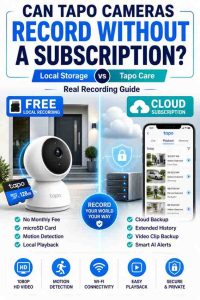
For homeowners who want reliable recording without monthly costs, understanding offline recording is just as important as knowing whether Tapo cameras can record without a subscription. Both topics determine how dependable the camera will be during everyday use.
The Short Answer
A Tapo Camera does not need Wi-Fi all the time to continue recording. Once the camera has been configured and a supported microSD card is installed, local recording can continue during many network interruptions. This makes a Tapo Camera suitable for users who occasionally experience temporary internet outages.
For example, after installing a Tapo Camera near a front door, the camera can continue saving motion events to local storage while the broadband connection is temporarily unavailable. Reviewing footage later becomes possible once network connectivity returns or by accessing the stored recordings locally.
Although offline recording works well, remote access depends on an active network connection. Therefore, homeowners who frequently monitor their property while away should understand the limitations before relying entirely on offline operation.
What Still Works Without Wi-Fi
A Tapo Camera continues supporting several important security features without continuous Wi-Fi access. Local recording remains the most valuable feature because footage is written directly to the installed microSD card instead of depending on cloud servers.
| Feature | Works Without Wi-Fi? | Notes |
|---|---|---|
| Local Recording | Yes | Requires a compatible microSD card |
| Motion Detection | Yes (supported models) | Can continue triggering local recordings |
| Continuous Recording | Yes | Depends on model and settings |
| Local Storage | Yes | Stored directly on the microSD card |
| Scheduled Recording | Yes | Works after initial configuration |
During normal home monitoring, a Tapo Camera can continue saving important events while internet service is unavailable. Additionally, homeowners who install a high-endurance memory card usually experience dependable local recording without paying ongoing subscription fees.
Choosing the correct memory card greatly improves recording reliability. For storage recommendations, see our guide on choosing the right SD card for Tapo cameras.
Bottom Line: A Tapo Camera can continue recording locally without Wi-Fi as long as power remains available and a compatible microSD card has been installed.
What Stops Working Without Wi-Fi
A Tapo Camera loses several remote features when Wi-Fi is unavailable. Features that require communication with the Tapo cloud, including remote live viewing and cloud storage, cannot operate until the network connection is restored.
After leaving home, users typically notice that the Tapo app cannot connect to the camera while the device remains offline. Meanwhile, locally stored recordings continue accumulating on the memory card, preserving important events even though remote access is temporarily unavailable.
Smart home integrations, firmware downloads, cloud synchronization, and remote notifications also depend on an active network connection. Consequently, offline recording should be viewed as a backup capability rather than a complete replacement for internet connectivity.
Bottom Line: A Tapo Camera continues protecting your home locally, but remote access, cloud storage, and online services require Wi-Fi and internet connectivity.
Does Tapo Camera Need Wi-Fi for Initial Setup?
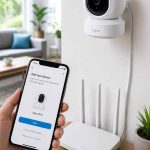
Yes, a Tapo Camera requires Wi-Fi during the initial installation process. The first setup allows the camera to connect to your home network, register with the Tapo app, and download any required configuration settings before normal operation begins.

Setting Up the Camera
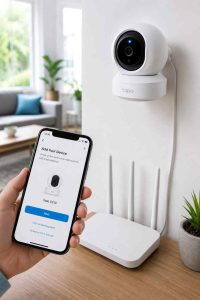
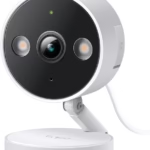
The initial setup process requires a stable Wi-Fi connection. During installation, the Tapo Camera creates a temporary connection with your smartphone before joining your home wireless network through the Tapo app.
Most installations take only a few minutes when the camera is located within good Wi-Fi coverage. However, placing the Tapo Camera too far from the router may interrupt the setup process and require repositioning the device.
If QR code scanning becomes difficult during installation, follow our guide on setting up a Tapo Camera without a QR code for alternative pairing methods.
Bottom Line: A stable Wi-Fi connection is necessary only during the initial setup so the Tapo Camera can join your home network correctly.
Pairing with the Tapo App
The Tapo app manages the connection between your smartphone and the Tapo Camera. During pairing, the app transfers your wireless network credentials so the camera can communicate with your router and complete activation.
After pairing is complete, the Tapo Camera appears inside the Tapo app, allowing users to adjust recording schedules, motion detection sensitivity, and storage preferences. Additionally, checking for firmware updates immediately after installation helps improve reliability and security.
The pairing process also confirms that the Tapo Camera can communicate correctly with your home network before regular recording begins.
Bottom Line: Proper pairing ensures the Tapo Camera is fully configured before relying on local or remote recording features.
Can You Skip Wi-Fi During Setup?
No, most Tapo Camera models cannot complete their initial setup without Wi-Fi. The setup process requires communication with the Tapo app and your wireless network before offline recording features become available.
Some users attempt to install a Tapo Camera in locations without wireless coverage and later discover that activation cannot finish. Therefore, completing setup near your router before relocating the camera is usually the simplest approach.
Once setup is complete, many Tapo Camera models can continue recording locally during temporary internet interruptions, depending on the recording configuration.
Bottom Line: Wi-Fi is required for initial activation, but continuous internet access is not always required afterward.
Common Setup Mistakes
Several common mistakes prevent a Tapo Camera from completing setup successfully. Weak Wi-Fi signals, incorrect passwords, unsupported network bands, and outdated firmware are among the most frequent causes of installation problems.
Another common issue occurs when users forget to install a compatible microSD card before configuring recording settings. As a result, the Tapo Camera appears online but cannot save local recordings until storage has been added.
If motion recordings fail after installation, our guide on fixing Tapo Camera motion detection issues explains several practical solutions that improve recording reliability.
Bottom Line: Correct Wi-Fi setup, proper storage installation, and updated firmware help a Tapo Camera operate reliably both online and during temporary network interruptions.
What Features Work Without Wi-Fi?
A Tapo Camera continues providing several important security features without an active Wi-Fi connection after the initial setup is complete. Local storage allows the camera to keep recording events directly to a compatible microSD card, making offline recording one of the biggest advantages of the Tapo ecosystem.
| Feature | Works Without Wi-Fi? | Requirements | Best Use |
|---|---|---|---|
| Local Recording | Yes | microSD Card Installed | Daily Home Security |
| Motion Detection | Yes | Supported Camera Model | Motion Event Recording |
| Continuous Recording | Yes | Supported Model + microSD Card | 24/7 Monitoring |
| Scheduled Recording | Yes | Recording Schedule Configured | Specific Hours |
| Local Playback | Yes | Stored Recordings | Review Recorded Events |
Local Recording Using a microSD Card
Local recording is the most reliable feature that continues working without Wi-Fi. A Tapo Camera stores video directly on a compatible microSD card instead of depending on cloud storage, allowing recordings to continue during many network interruptions.
For example, while monitoring a garage overnight, a Tapo Camera can continue recording movement even if the home’s internet service temporarily stops. When internet access returns, the recorded footage remains safely stored on the memory card for playback.
Choosing a high-endurance memory card improves reliability because surveillance cameras perform frequent write operations every day. For detailed recommendations, read our guide on choosing the right SD card for Tapo cameras.
Bottom Line: Local microSD recording makes a Tapo Camera dependable even when Wi-Fi or internet service becomes unavailable.
Motion Detection
Motion detection continues working on many Tapo Camera models without an internet connection. The camera analyzes movement locally and can automatically trigger recordings whenever activity is detected within the configured detection zones.
During driveway monitoring, a Tapo Camera can continue capturing vehicles entering the property even while the router has temporarily lost internet access. Consequently, important events remain stored locally instead of being lost completely.
If the Tapo Camera stops recording motion events, incorrect sensitivity settings or detection zones may be responsible. Our guide on fixing Tapo Camera motion detection issues explains the most common solutions.
Bottom Line: Motion detection remains one of the strongest offline features available on many Tapo Camera models.
Continuous Recording
Continuous recording can also work without Wi-Fi when supported by the camera model. Instead of recording only motion events, the Tapo Camera saves video continuously until the memory card becomes full, after which loop recording automatically replaces the oldest files.
Continuous recording works especially well for entrances, retail spaces, garages, and driveways where capturing every second of activity matters more than saving storage space. However, larger memory cards provide longer recording history before overwriting begins.
Users who need extended retention should select a higher-capacity, high-endurance microSD card to maximize offline recording time.
Bottom Line: Continuous recording provides complete surveillance history without relying on cloud storage.
Local Playback
Local playback remains available after recordings have been saved to the microSD card. Once internet connectivity returns, the Tapo app allows users to browse stored recordings by date and time without requiring a Tapo Care subscription.
After reviewing footage the next morning, homeowners can quickly locate recorded motion events because the Tapo Camera organizes clips chronologically. This makes investigating deliveries, visitors, or unusual activity much easier.
If your goal is completely subscription-free recording, you may also want to learn how Tapo cameras record without a subscription and how local playback compares with cloud storage.
Bottom Line: Local playback gives Tapo Camera owners convenient access to recorded events without paying monthly subscription fees.
What Features Stop Working Without Wi-Fi?
Although a Tapo Camera continues recording locally, several cloud-based features stop working when Wi-Fi becomes unavailable. Understanding these limitations prevents unrealistic expectations and helps determine whether additional backup solutions are necessary.
Remote Viewing
Remote viewing requires both Wi-Fi and internet access. Without network connectivity, the Tapo app cannot establish communication with the Tapo Camera from another location, making live streaming temporarily unavailable.
For example, while traveling, users may notice that the camera appears offline inside the app even though local recording continues normally at home. Once connectivity returns, remote viewing resumes automatically without requiring another setup.
Bottom Line: A Tapo Camera can continue recording locally, but live remote viewing depends on an active network connection.
Cloud Recording with Tapo Care
Cloud recording stops whenever the Tapo Camera cannot reach the internet. A Tapo Care subscription uploads supported recordings to cloud servers only while an internet connection remains available.
During a prolonged internet outage, the Tapo Camera continues relying on local storage instead of uploading new recordings. Therefore, homeowners who require maximum redundancy often combine cloud recording with local microSD storage.
Bottom Line: Tapo Care protects recordings only while internet connectivity allows cloud synchronization.
Push Notifications
Push notifications depend on online communication between the Tapo Camera and the Tapo app. Without Wi-Fi or internet access, alerts about motion detection cannot reach your smartphone until connectivity returns.
Although notifications stop temporarily, the Tapo Camera may still record the motion event locally. As a result, reviewing stored footage later usually provides a complete history of activity during the outage.
Bottom Line: Motion recordings may continue, but real-time smartphone alerts require an internet connection.
Firmware Updates
Firmware updates require internet access because update files are downloaded from TP-Link servers. A Tapo Camera cannot receive new security patches or feature improvements while it remains offline.
Keeping firmware current improves security, compatibility, and recording stability. Therefore, checking for updates after internet service returns is a good maintenance practice for every Tapo Camera owner.
Bottom Line: Firmware updates cannot occur without internet, so reconnect the Tapo Camera whenever possible to maintain optimal performance.
What Happens During a Wi-Fi or Internet Outage?
A Wi-Fi outage and an internet outage affect a Tapo Camera differently. Understanding the difference helps explain why some features continue working while others temporarily stop.
Wi-Fi Outage vs Internet Outage
A Wi-Fi outage disconnects the Tapo Camera from your local network, while an internet outage disconnects your router from the outside internet. These situations have different effects on recording and remote access.
| Situation | Recording | Remote Viewing | Notifications |
|---|---|---|---|
| Internet Outage | Usually Continues | No | No |
| Wi-Fi Failure | May Continue Locally* | No | No |
| Power Outage | No | No | No |
*Behavior depends on the camera model, storage configuration, and whether local recording has already been enabled.
Bottom Line: Internet outages mainly affect cloud services, while complete Wi-Fi or power failures have a greater impact on overall camera functionality.
Local Recordings During Outages
Local recordings usually continue during temporary internet outages when power remains available. A Tapo Camera saves footage directly to its installed microSD card, reducing dependence on cloud services.
For example, after reviewing footage following a broadband outage, homeowners often discover that the Tapo Camera successfully captured important motion events throughout the interruption. This makes local storage especially valuable in areas with unstable internet service.
Bottom Line: Local storage helps ensure that a Tapo Camera continues protecting your property even when internet service becomes unavailable.
When Remote Access Returns
Remote access normally resumes automatically after network connectivity has been restored. Once the Tapo Camera reconnects to Wi-Fi and the internet, the Tapo app can communicate with the device again without requiring a complete reinstallation.
If the camera remains offline after internet service has returned, restarting the router and checking Wi-Fi signal strength often resolves the problem. Additionally, monitoring internet usage can help identify unstable connections, especially if multiple smart devices share the same network. For more information, see our guide on how much internet data Tapo cameras use.
Bottom Line: Most Tapo Cameras reconnect automatically after internet service returns, allowing remote monitoring to continue with minimal interruption.
Best Ways to Keep Your Tapo Camera Recording
The best way to keep a Tapo Camera recording is to combine reliable local storage with a stable home network. Although a Tapo Camera can continue recording during many internet interruptions, choosing the right accessories and settings significantly improves long-term reliability. These practical recommendations help reduce downtime and prevent missed recordings.
Use a High-Endurance microSD Card
A high-endurance microSD card is the most important accessory for reliable offline recording. A Tapo Camera continuously writes video data to the memory card, so surveillance-grade cards are designed to handle far more write cycles than standard consumer cards.
After months of daily recording, a high-endurance card generally provides more consistent performance than a standard memory card. Additionally, selecting the correct storage capacity allows the Tapo Camera to retain more footage before loop recording begins replacing older files.
If you’re unsure which capacity to buy, our guide on choosing the right SD card for Tapo cameras explains the best options for different recording needs.
Bottom Line: A high-endurance microSD card is the foundation of dependable local recording on a Tapo Camera.
Improve Wi-Fi Reliability
A strong Wi-Fi signal reduces interruptions and improves the overall performance of a Tapo Camera. Positioning the router closer to the camera, reducing physical obstacles, or adding a mesh Wi-Fi system can improve connection stability.
For example, a Tapo Camera installed in a detached garage may experience fewer disconnections after moving the router to a more central location or adding a Wi-Fi extender. Furthermore, restarting networking equipment occasionally helps maintain stable connectivity.
Users installing cameras outdoors or in large homes should verify signal strength before choosing a permanent mounting location.
Bottom Line: Better Wi-Fi coverage improves remote viewing, notifications, firmware updates, and overall camera reliability.
Consider NAS Storage
NAS storage is an excellent option for users who need more recording capacity than a single microSD card can provide. A compatible Network Attached Storage device allows supported Tapo Camera models to save recordings across your local network without depending entirely on cloud services.
During long-term monitoring of multiple entrances or commercial spaces, NAS storage simplifies centralized video management while providing significantly larger storage capacity. However, confirming NAS compatibility before purchasing additional hardware is important because support varies by camera model.
For homeowners managing several cameras, combining NAS storage with local microSD recording creates an effective backup strategy.
Bottom Line: NAS storage provides expanded local recording capacity for compatible Tapo Camera models without requiring cloud subscriptions.
When Tapo Care Is Helpful
Tapo Care is most useful when cloud backups are more important than avoiding monthly fees. A Tapo Camera already performs local recording well, but Tapo Care adds off-site storage that protects important footage if the camera or memory card is stolen or damaged.
For example, homeowners monitoring a vacation property may prefer cloud backups because recorded events remain available even if someone removes the camera. Meanwhile, users monitoring their primary residence often find that local recording alone provides sufficient protection.
If you’re comparing recording methods, our guide on whether Tapo cameras can record without a subscription explains the differences between free local recording and Tapo Care.
Bottom Line: Tapo Care is an optional upgrade that complements local recording rather than replacing it.
Frequently Asked Questions
Can Tapo Camera record without internet?
Yes, a Tapo Camera can usually record without internet after the initial setup has been completed. Local recording continues on a compatible microSD card as long as the camera has power and recording has already been configured. However, remote viewing and cloud services remain unavailable until internet access returns.
Does motion detection work without Wi-Fi?
Yes, motion detection continues working on many Tapo Camera models without internet connectivity. Motion events can still trigger local recordings because detection is handled by the camera itself. The main limitation is that push notifications cannot be delivered while the camera is offline.
Can I use a mobile hotspot?
Yes, a mobile hotspot can work with a Tapo Camera if the hotspot provides a stable Wi-Fi connection. Many users temporarily connect a Tapo Camera to a smartphone hotspot during setup or when home broadband is unavailable. Keep in mind that video streaming may consume significant mobile data.
Can I watch recordings offline?
Yes, locally stored recordings remain available after they have been saved to the microSD card. Once the Tapo Camera reconnects to your network, the Tapo app allows you to browse recorded clips. Depending on the situation, recordings may also be accessed directly from the memory card.
Does Tapo Care require Wi-Fi?
Yes, Tapo Care requires internet connectivity because cloud recording depends on uploading video to remote servers. When internet access is unavailable, the Tapo Camera cannot synchronize new recordings with the cloud until the connection has been restored.
Is local recording enough?
Yes, local recording is enough for many homeowners who want dependable security without recurring subscription fees. A Tapo Camera paired with a quality high-endurance microSD card provides reliable recording for everyday home monitoring. Users who need off-site backups can later add Tapo Care without changing their existing setup.
Conclusion
Yes, a Tapo Camera can work without Wi-Fi in many situations, but the available features depend on how the camera has been configured. After the initial setup, local recording, motion detection, and continuous recording can continue on supported models when a compatible microSD card is installed. However, remote viewing, cloud storage, push notifications, and firmware updates require an active network connection.
A Tapo Camera offers an excellent balance between affordable local storage and optional cloud services. For many homeowners, local recording provides everything needed to monitor a property without recurring subscription costs. Meanwhile, users who require off-site backups can add Tapo Care whenever additional protection becomes necessary.
Before installing a Tapo Camera, choose a high-endurance microSD card, ensure reliable Wi-Fi coverage, and configure recording settings correctly. If you’re deciding which model to purchase, explore our guides on the best Tapo camera for apartment security, the best indoor Tapo camera for elderly monitoring, Tapo Camera vs Blink for renters, and the best Tapo cameras to find the right option for your home.