The best Samsung S25 Ultra charger for maximum wired charging is a compatible 45W USB-C charger that supports USB Power Delivery and PPS. Samsung rates the Galaxy S25 Ultra for up to 65% charge in around 30 minutes with a 45W adapter under its test conditions.
The Galaxy S25 Ultra does not include a wall charger in the box. Therefore, choosing the right adapter matters if you want the phone’s fastest wired charging mode.
A 25W charger remains a practical choice for everyday charging. However, a compatible 45W charger makes more sense when quick top-ups are important.
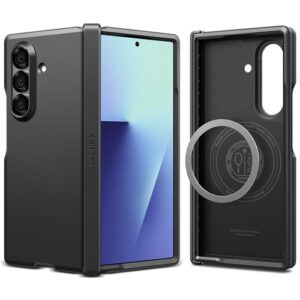
If you are also protecting the phone, see our guide to the best Samsung S25 Ultra cases.
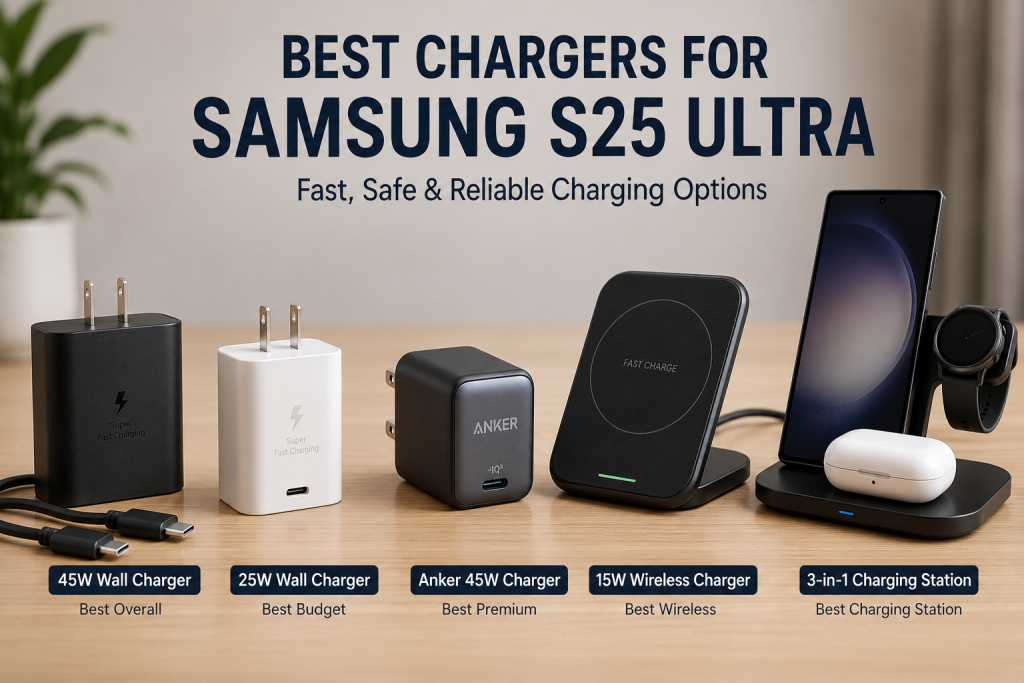
Best Samsung S25 Ultra Chargers at a Glance
- Best Overall: Samsung 45W Wall Charger
- Best Budget: Samsung 25W Wall Charger
- Best Premium: Anker 45W USB-C Charger
- Best Wireless: AILKIN 15W Wireless Charger Pad
- Best Charging Station: EloBeth 3-in-1 Wireless Charging Station
Recommended Samsung S25 Ultra Chargers
The five chargers below cover fast wired charging, everyday charging, wireless charging, and multi-device setups. The wired recommendations focus on USB-C charging and compatibility, while the wireless options prioritize convenience.
Samsung 45W Wall Charger Power Adapter with Cable Included
The Samsung 45W Wall Charger is the best overall choice for maximum wired charging performance. It is the most straightforward option for users who want a Samsung-branded charger designed around the phone’s fast-charging requirements.
Best For: Maximum wired charging and straightforward Samsung compatibility.

SAMSUNG
Samsung 45W Wall Charger Power Adapter with Cable Included, Black
The Samsung 45W Wall Charger is the top recommendation in this guide because it delivers Samsung Super Fast Charging 2.0 with full USB Power Delivery and PPS compatibility. It includes a USB-C cable and offers the fastest official wired charging experience for the Samsung S25 Ultra.
Who Should Buy It
Ideal for Samsung S25 Ultra owners who frequently need fast top-ups during busy days, travel, or work. It's also perfect for users who want an official Samsung charging solution.
Why We Pick It
It earned the Best Overall position thanks to its full compatibility with Samsung charging standards, reliable performance, included cable, and official build quality.
Features & Benefits
| Feature | Benefit |
|---|---|
| 45W Super Fast Charging | provides Samsung's fastest supported wired charging |
| USB PD + PPS | enables Super Fast Charging 2.0 safely |
| USB-C Cable Included | ready to use straight from the box |
Pros & Cons
| Pros | Cons |
|---|---|
| ✓ Official Samsung charger | ✕ Higher price than 25W model |
| ✓ Full PPS support | ✕ Single USB-C port |
| ✓ Cable included |
Choose this charger if fast top-ups are more important than saving money. It also makes a strong choice for users who prefer an official Samsung charging accessory.
Samsung 25W Wall Charger Power Adapter
The Samsung 25W Wall Charger is the best budget option for everyday charging. It provides a practical alternative for users who usually charge overnight or have enough time for longer charging sessions.
Best For: Affordable everyday wired charging.

SAMSUNG
Samsung 25W Wall Charger Power Adapter, Cable Not Included, Super Fast Charging, Compact Design, Energy Efficient, Compatible with Galaxy and USB Type C Devices, Black
The Samsung 25W Wall Charger offers excellent everyday charging performance while fully supporting USB Power Delivery and PPS. The article recommends it as the best value option because most Galaxy S25 Ultra users won't notice a significant difference compared to 45W charging during normal daily use.
Who Should Buy It
Best for casual users, overnight charging, students, and anyone replacing an older USB-A charger without spending extra on 45W charging.
Why We Pick It
It earned the Budget Pick recommendation because it combines official Samsung compatibility, compact size, excellent efficiency, and affordable pricing.
Features & Benefits
| Feature | Benefit |
|---|---|
| 25W Super Fast Charging | reliable everyday charging speeds |
| Compact Design | easy to carry while traveling |
| Energy Efficient | reduces standby power consumption |
Pros & Cons
| Pros | Cons |
|---|---|
| ✓ Excellent value | ✕ Cable sold separately |
| ✓ Official Samsung compatibility | ✕ Slower than 45W during short charging sessions |
| ✓ Compact and portable |
Choose the 25W model if you do not regularly need the fastest available charging speed. The lower output can also make sense when replacing an older charger without paying for extra capacity you rarely use.
Anker 45W USB-C Charger Block
The Anker 45W USB-C Charger is the premium third-party option in this guide. It gives buyers an alternative to Samsung’s official adapter while targeting the same 45W charging category.
Best For: Users who prefer a premium third-party USB-C charger.

ANKER
Anker 45W USB C Charger Block, 2-Pack Type C Charger Fast Charging
The Anker 45W USB-C Charger is the guide's recommended premium third-party alternative for Samsung S25 Ultra owners. It supports USB Power Delivery and PPS while adding Anker's trusted safety technology and the convenience of two chargers in one package.
Who Should Buy It
Perfect for users who charge multiple devices, travel frequently, or prefer premium third-party accessories instead of official Samsung chargers.
Why We Pick It
It earned the Premium Pick title because of its excellent reputation, strong safety features, reliable fast charging, and outstanding overall value.
Features & Benefits
| Feature | Benefit |
|---|---|
| 45W USB-C PD Charging | fast charging for compatible Galaxy devices |
| PPS Support | enables Samsung Super Fast Charging 2.0 |
| Dual-Pack Bundle | two chargers for home and travel |
Pros & Cons
| Pros | Cons |
|---|---|
| ✓ Trusted Anker quality | ✕ Not an official Samsung accessory |
| ✓ Excellent safety features | ✕ Slightly larger than Samsung 25W adapter |
| ✓ Two chargers included |
Choose this option when you prefer Anker or want an alternative to Samsung’s branded charger. Before buying, confirm the current product specifications and PPS support.
AILKIN 15W Wireless Charger Pad
The AILKIN wireless charger is the convenience-focused option in this lineup. Its supplied product information identifies it as a 15W wireless charging pad.
Best For: Desk, bedside, and convenient wireless charging.

AILKIN
Wireless Charger Samsung S26, 15W Android Wire Less Charging Pad for Galaxy
The AILKIN 15W Wireless Charger Pad is recommended for users who prefer the convenience of cable-free charging. The article highlights it as the best wireless option for Samsung S25 Ultra owners who want dependable 15W wireless charging.
Who Should Buy It
Best for office desks, bedside tables, and anyone who prefers simply placing the phone on a charging pad instead of plugging in a cable.
Why We Pick It
It earned the Best Wireless recommendation because it balances convenience, compatibility, and dependable wireless charging performance.
Features & Benefits
| Feature | Benefit |
|---|---|
| 15W Wireless Charging | optimized fast wireless charging for Galaxy phones |
| Charging Pad Design | simple drop-and-charge convenience |
| Power Adapter Included | ready for immediate setup |
Pros & Cons
| Pros | Cons |
|---|---|
| ✓ Convenient wireless charging | ✕ Slower than wired charging |
| ✓ Easy to use | ✕ Requires proper phone alignment |
| ✓ Good compatibility |
Choose a wireless pad when convenience matters more than maximum wired charging speed. Wireless charging also works well for casual top-ups during the day.
EloBeth 3-in-1 Wireless Charging Station
The EloBeth 3-in-1 station is the best choice here for users who want a multi-device charging setup. Its main advantage is convenience rather than maximum wired charging speed.
Best For: Users charging multiple compatible devices in one location.

ELOBETH
Wireless Charging Station for Samsung Galaxy Watch 8/7/6/5/4/3,S26 Ultra
The EloBeth 3-in-1 Wireless Charging Station is the ideal solution for users invested in the Samsung Galaxy ecosystem. It charges a Galaxy phone, Galaxy Watch, and Galaxy Buds simultaneously while reducing cable clutter.
Who Should Buy It
Best for Galaxy users who own multiple Samsung devices and want one organized charging station on a desk or bedside table.
Why We Pick It
It earned the Best Charging Station recommendation because it offers the most convenient all-in-one charging experience for Samsung ecosystem users.
Features & Benefits
| Feature | Benefit |
|---|---|
| 3-in-1 Charging | charges phone, watch, and earbuds together |
| Foldable Design | saves desk space and travels easily |
| Wireless Convenience | reduces cable clutter |
Pros & Cons
| Pros | Cons |
|---|---|
| ✓ Charges three devices at once | ✕ Wireless charging is slower than wired |
| ✓ Clean desktop setup | ✕ Best suited to Samsung devices |
| ✓ Ideal for Galaxy ecosystem |
Choose a charging station if your desk or bedside setup includes several wireless devices. Confirm the current charging specifications before buying.
Samsung S25 Ultra Charger Comparison
The main difference between these chargers is the charging method and intended use. The Samsung and Anker models target wired charging, while the AILKIN and EloBeth products target wireless convenience.
| Product | Best For | Amazon | Rated Output | PPS | Cable | Wireless |
|---|---|---|---|---|---|---|
| Samsung 45W Wall Charger | Best Overall | View Now at Amazon | 45W | Yes | Included | No |
| Samsung 25W Wall Charger | Best Budget | View Now at Amazon | 25W | Yes | No | No |
| Anker 45W USB-C Charger | Premium | View Now at Amazon | 45W | Verify current specifications | Included | No |
| AILKIN Wireless Charger | Wireless Charging | View Now at Amazon | 15W | Not applicable | Included | Yes |
| EloBeth Charging Station | Multi-Device Setup | View Now at Amazon | 15W wireless | Not applicable | Included | Yes |
Important: Product specifications, included accessories, and availability can change. Check the current Amazon listing before buying.
Does the Samsung S25 Ultra Come With a Charger?
No, the Samsung Galaxy S25 Ultra does not include a wall charger in the box. Samsung sells the 45W power adapter separately and recommends compatible Samsung-approved charging accessories.
The phone does include a USB-C to USB-C data cable. Therefore, buyers who already own a compatible USB-C power adapter may not need to buy another charger.
If you are comparing flagship phones before buying accessories, see our Galaxy S25 Ultra vs Pixel 9 Pro XL comparison.
Galaxy S25 Ultra Box Contents
- Galaxy S25 Ultra smartphone
- USB-C to USB-C cable
- Ejection pin
- Quick Start Guide
No wall charger is included.
Why Does Samsung Sell the Charger Separately?
Samsung sells the charging adapter separately to reduce unnecessary accessories and electronic waste. Users who already own a compatible charger can continue using it.
However, an older charger may not support the charging standards needed for the fastest charging mode. Therefore, check the charger’s specifications before assuming an existing adapter can deliver maximum speed.
What Cable Comes With the S25 Ultra?
The Galaxy S25 Ultra comes with a USB-C to USB-C cable. The included cable connects the phone to a compatible USB-C power adapter.
Charging performance depends on the charger, cable, phone, battery level, temperature, and other operating conditions.
What Charger Does the Samsung S25 Ultra Need?
The Samsung S25 Ultra needs a compatible USB-C charger for wired fast charging, with 45W recommended for maximum wired charging capability. Samsung’s support documentation identifies USB-C Power Delivery and PPS specifications for Super Fast Charging compatibility.
What Is USB Power Delivery?
USB Power Delivery, or USB PD, is a charging standard that lets the charger and phone negotiate power. The USB-C connector alone does not guarantee USB PD or a specific charging speed.
Therefore, check the charger’s technical specifications rather than relying only on the USB-C connector.
What Is PPS?
PPS stands for Programmable Power Supply and allows compatible chargers to adjust charging voltage and current. PPS is part of the USB PD charging ecosystem and is important when selecting a charger for Samsung’s higher-speed charging modes.
For maximum S25 Ultra wired charging performance, look for a charger that explicitly lists the required PD and PPS capabilities.
Does a 45W Charger Automatically Give 45W Charging?
No, a 45W label alone does not guarantee the S25 Ultra will use 45W charging. The charger must support the appropriate charging protocol and profile.
Therefore, a lower-rated charger with compatible charging technology can be a better match than a higher-rated charger with unsuitable protocols.
What Is Super Fast Charging 2.0?
Super Fast Charging 2.0 is Samsung’s higher-speed wired charging system for compatible Galaxy devices. The Galaxy S25 Ultra supports up to 45W wired charging with a compatible adapter.
Samsung’s published test result shows the S25 Ultra reaching up to 65% charge in around 30 minutes with a 45W adapter under controlled test conditions. Actual charging time varies with usage and charging conditions.
For Maximum Wired Charging
- Use a compatible USB-C charger.
- Look for USB Power Delivery support.
- Check for PPS support.
- Choose a 45W charger for maximum wired charging capability.
- Use a suitable USB-C cable.
How to Identify a Compatible S25 Ultra Fast Charger
Check the charger’s USB PD, PPS, output, and cable specifications before buying. A high wattage number alone does not prove compatibility.
Check for USB Power Delivery
Look for USB Power Delivery in the charger’s specifications. USB-C describes the connector, while USB PD describes a charging protocol.
This distinction matters because two USB-C chargers can provide different charging capabilities.
Check for PPS
Check that the charger explicitly lists PPS support. PPS is an important specification for Samsung’s higher-speed charging ecosystem.
When a listing only says “45W USB-C” without explaining its charging protocols, verify the detailed specifications before buying.
Check the Charger Output
A 45W charger is the appropriate target when maximum S25 Ultra wired charging capability matters. A 25W charger remains suitable for users who prefer lower-cost everyday charging.
Check the Cable
Use a suitable USB-C to USB-C cable with the charger. Samsung’s published S25 Ultra specifications support 45W charging with a compatible USB-C cable, and Samsung documentation identifies cable requirements for different charging modes.
Do not assume that every USB-C cable has identical power capabilities. Check the cable specifications when buying a replacement.
25W vs 45W Charging for the S25 Ultra
A 45W charger is the better choice when you regularly need faster top-ups, while 25W works well for routine charging. The choice depends on how quickly you need to replenish the battery.
| Charging Option | Best For | Main Advantage |
|---|---|---|
| 25W | Everyday charging | Lower-cost option |
| 45W | Fast top-ups | Maximum wired charging capability |
| Wireless | Convenience | Easy placement without a cable |
Is 25W Enough for the S25 Ultra?
Yes, a compatible 25W charger can charge the Galaxy S25 Ultra. It is a sensible option for overnight charging and longer charging sessions.
Choose 25W when charging speed is not your main priority. The Samsung 25W charger is therefore a practical budget recommendation.
When Should You Buy a 45W Charger?
Buy a 45W charger if you regularly need quick battery top-ups. The higher charging capability is especially useful when you have limited time to recharge.
The Samsung 45W charger and Anker 45W charger are the two wired 45W options featured in this guide.
Who Benefits From a 45W Charger?
- Frequent travelers
- Business users
- Mobile gamers
- Content creators
- Heavy smartphone users
Can You Use a 65W Charger?
Yes, a compatible 65W USB-C charger can charge the Galaxy S25 Ultra. However, the phone does not become a 65W charging device simply because the adapter has a higher rating.
A higher-wattage charger can be useful if you also charge a laptop, tablet, or other USB-C device. However, check the charger’s supported charging protocols if maximum S25 Ultra charging speed matters.
Can You Use a 100W Charger?
Yes, a compatible 100W USB-C charger can be used, but the S25 Ultra will not charge at 100W. The phone determines how much power it can accept.
Therefore, buying a 100W charger only makes sense when you also need its extra capacity for other devices.
Important:
A 100W charger does not make the S25 Ultra charge faster than its supported charging capability. Compatibility matters more than the charger’s maximum wattage.
What USB-C Cable Does the S25 Ultra Need?
The Galaxy S25 Ultra uses a USB-C to USB-C cable for wired charging. The cable should match the charging setup and support the required power level.
Does the S25 Ultra Need a 5A Cable for 45W?
Do not assume that a 5A cable is universally required for the S25 Ultra. Samsung’s published specifications identify compatible USB-C cables for its 45W charging setup.
The exact cable requirement can depend on the charger and charging configuration. Therefore, check the specifications of both the charger and cable before buying a replacement.
Can the Included Cable Be Used?
Yes, the included USB-C cable is designed for use with the phone. Pair it with a compatible USB-C power adapter.
If you replace the cable, choose a reputable cable with specifications appropriate for your intended charging setup.
Why Can a Cable Affect Charging?
A cable can affect charging when its capabilities do not match the charger and phone. A damaged or unsuitable cable can also cause unreliable connections.
Therefore, inspect the cable if the phone suddenly charges more slowly or repeatedly disconnects.
Wired Charging vs Wireless Charging
Wired charging is the better choice when maximum charging speed matters, while wireless charging prioritizes convenience. The S25 Ultra supports both wired and wireless charging.
Which Charging Method Is Faster?
Wired charging provides the S25 Ultra’s highest supported charging capability. Samsung rates the phone for up to 45W wired charging.
Wireless charging is better suited to desks, bedside tables, and casual top-ups.
Does the S25 Ultra Support Fast Wireless Charging?
Yes, the Galaxy S25 Ultra supports Fast Wireless Charging 2.0. Samsung does not describe the S25 Ultra as supporting 45W wireless charging.
Wireless performance also depends on the compatible charger, alignment, accessories, temperature, and charging conditions.
Is 15W Wireless Charging the Maximum?
Do not assume that every S25 Ultra wireless charging setup is limited to 15W. Samsung uses Fast Wireless Charging 2.0 for the S25 series, while specific wireless accessories can have their own power limits.
The AILKIN product featured in this guide is a 15W wireless charger. Its 15W rating describes the accessory, not necessarily every wireless charging configuration available for the phone.
When Does Wireless Charging Make Sense?
Wireless charging makes sense when convenience matters more than maximum charging speed. A charging pad lets you place the phone down without connecting a cable.
Users with several compatible devices may also prefer a multi-device charging station.
For broader information about the phone, see our Samsung Galaxy S25 Ultra review.
Best Charging Method by Situation
- Fastest wired charging: Samsung 45W charger
- Everyday wired charging: Samsung 25W charger
- Premium third-party wired charging: Anker 45W charger
- Desk or bedside convenience: AILKIN wireless charger
- Multiple-device setup: EloBeth charging station
Can You Use an Old Samsung Charger?
Yes, an older Samsung charger can charge the S25 Ultra if its output and charging standards are compatible. However, an older adapter may not provide the phone’s maximum charging capability.
Can You Use an Old Samsung USB-C Charger?
Yes, an older Samsung USB-C charger can work with the S25 Ultra. Check its output and supported charging protocols before expecting fast charging.
If the adapter supports the appropriate USB PD and PPS requirements, it may remain useful for high-speed charging.
Can You Use a Third-Party Charger?
Yes, third-party chargers can charge the S25 Ultra. However, Samsung recommends approved charging accessories, and compatibility should be checked before buying.
For a third-party 45W charger, verify USB PD and PPS support in the product specifications.
Can You Use a Laptop USB-C Charger?
Yes, a compatible USB-C laptop charger can charge the Galaxy S25 Ultra. The charging speed depends on the charger’s supported profiles.
A high-wattage laptop adapter does not automatically provide the S25 Ultra’s maximum charging speed. Check the charger’s USB PD and PPS specifications.
Can You Use an iPhone USB-C Charger?
Yes, a compatible USB-C iPhone power adapter can charge the S25 Ultra. However, charging speed depends on the adapter’s supported charging profiles.
For maximum Samsung charging performance, choose a compatible charger with the required PD and PPS support.
Why Is My Samsung S25 Ultra Charging Slowly?
Slow charging can result from the charger, cable, charging settings, connection, or operating temperature. Check the charging setup before replacing the phone.
Check the Charger
Start by checking whether the charger supports the charging mode you expect. Samsung recommends compatible 25W, 45W, or 60W chargers and identifies PD 3.0 PPS specifications for Super Fast Charging compatibility.
Check the USB-C Cable
Inspect the cable for damage, loose connections, or signs of wear. Samsung recommends checking the USB cable when troubleshooting charging problems.
Check the Charging Port
Foreign material inside the USB-C port can interfere with the connection. Inspect the port carefully if the cable feels loose or charging repeatedly disconnects.
Do not use sharp objects that could damage the port.
Check Fast Charging Settings
Make sure Fast charging is enabled in the phone’s charging settings. Samsung provides the Fast charging and Fast wireless charging controls under the device’s battery settings.
Check the Phone Temperature
Charging behavior can change when the phone becomes too hot or conditions are unsuitable. Move the phone away from direct sunlight and allow it to cool if it becomes excessively warm.
Slow-Charging Checklist
- Check the charger specifications.
- Verify USB PD and PPS support.
- Try another compatible USB-C cable.
- Inspect the charging port.
- Check the Fast charging setting.
- Move the phone away from excessive heat.
How to Choose the Best Samsung S25 Ultra Charger
Choose a charger based on charging speed, compatibility, safety, cable requirements, and your daily routine. The best charger is not necessarily the adapter with the highest wattage.
Samsung S25 Ultra Charger Buying Checklist
- USB-C output
- USB Power Delivery support
- PPS support for higher-speed charging
- 25W or 45W output based on your needs
- Suitable USB-C cable
- Reliable manufacturer
- Appropriate safety protections
Official vs Third-Party Chargers
Official Samsung chargers provide a straightforward compatibility choice, while reputable third-party chargers provide additional options. Check the technical specifications of either option before buying.
For maximum S25 Ultra wired charging, prioritize the required charging standards instead of choosing a charger only because it has a high wattage rating.
Why Does PPS Compatibility Matter?
PPS compatibility matters because Samsung’s higher-speed charging system relies on compatible charging profiles. A charger can advertise 45W without providing the exact charging behavior the phone needs.
Therefore, check the detailed specifications rather than trusting the headline wattage alone.
How Important Is Build Quality?
Build quality matters because chargers are frequently connected, disconnected, transported, and exposed to heat. A reputable manufacturer can also provide clearer specifications and support.
Should a Charger Have Safety Protections?
Yes, safety protections are important when selecting a charging adapter. Look for appropriate protection against conditions such as over-current, over-voltage, overheating, and short circuits.
Does a Warranty Matter?
A manufacturer’s warranty can provide additional protection against manufacturing defects. Warranty terms vary between manufacturers and products.
Which Charger Offers the Best Value?
The Samsung 25W charger offers the best value for users who do not need maximum charging speed. The Samsung 45W charger is the better choice for users who regularly need faster top-ups.
Common Samsung S25 Ultra Charging Mistakes
The most common mistake is choosing a charger based only on its advertised wattage. The phone, charger, cable, and charging protocol must work together.
Buying a Charger Without PPS
Buying a charger without checking PPS can prevent access to the intended Samsung fast-charging mode. Always inspect the technical specifications before buying a third-party charger.
Assuming USB-C Means Fast Charging
USB-C does not automatically mean fast charging. USB-C identifies the connector, while charging standards determine the supported power and charging behavior.
Assuming Higher Wattage Is Always Better
A higher wattage rating does not automatically make the S25 Ultra charge faster. The phone controls how much power it accepts.
Therefore, a compatible 45W charger can be a better choice than an incompatible 100W charger.
Using a Damaged Cable
A damaged cable can cause unreliable charging. Replace a cable if it has visible damage, loose connectors, or repeated connection problems.
Choosing Unknown Chargers Only Because They Are Cheap
Price should not be the only factor when buying a charger. Check the manufacturer’s specifications, safety information, charging protocols, and warranty.
Avoid These Mistakes
- Buying based only on wattage.
- Ignoring PPS support.
- Assuming every USB-C charger performs identically.
- Using damaged cables.
- Ignoring charger specifications.
- Choosing an unknown charger solely because it is inexpensive.
How These Samsung S25 Ultra Chargers Were Selected
The recommendations focus on charging compatibility, intended use, charging technology, and the supplied product information. The list includes official Samsung chargers, a third-party wired charger, a wireless pad, and a multi-device charging station.
Charging Compatibility
Charging compatibility is the most important factor in this guide. Wired recommendations receive particular attention to USB-C, power output, USB PD, and PPS requirements.
Charging Use Case
Each product targets a different charging situation. The 45W chargers target fast wired charging, the 25W charger targets everyday value, and the wireless products target convenience.
Product Specifications
Product specifications help determine whether each charger fits the intended use case. Buyers should verify current specifications because Amazon listings and product configurations can change.
Brand and Product Positioning
Samsung provides the official charging options, while Anker provides the third-party wired alternative in this lineup. The wireless products serve different convenience-focused use cases.
Value
Value depends on how you charge the phone. Paying for 45W makes more sense when rapid top-ups matter, while 25W is more practical for slower routine charging.
Frequently Asked Questions
Does the Samsung S25 Ultra come with a charger?
No, the Samsung S25 Ultra does not include a wall charger. The charging adapter is sold separately.
Does the Samsung S25 Ultra come with a charging cable?
Yes, the S25 Ultra comes with a USB-C to USB-C cable. You still need a compatible power adapter for wired charging.
What charger does the Samsung S25 Ultra use?
The S25 Ultra uses a USB-C charger for wired charging. A compatible 45W charger is the preferred option when maximum wired charging capability matters.
What watt charger is best for the Samsung S25 Ultra?
A compatible 45W charger is the best choice for maximum wired charging capability. A compatible 25W charger is a practical option for everyday charging.
Is a 45W charger worth buying for the S25 Ultra?
Yes, a 45W charger is worthwhile if you regularly need faster top-ups. Users who usually charge overnight can save money with a 25W charger.
Can I use a 25W charger with the S25 Ultra?
Yes, a compatible 25W charger can charge the S25 Ultra. It is suitable for users who do not need the phone’s maximum wired charging capability.
Can I use a 65W charger with the S25 Ultra?
Yes, a compatible 65W USB-C charger can charge the S25 Ultra. The phone will not charge at 65W simply because the adapter has that maximum rating.
Can I use a 100W charger with the S25 Ultra?
Yes, a compatible 100W USB-C charger can charge the S25 Ultra. The phone still limits charging to its supported charging capability.
Does the Samsung S25 Ultra support wireless charging?
Yes, the Galaxy S25 Ultra supports wireless charging and Fast Wireless Charging 2.0. Wireless charging prioritizes convenience rather than the phone’s maximum wired charging capability.
Does the Samsung S25 Ultra support 45W wireless charging?
No, 45W is the S25 Ultra’s wired charging capability. Samsung lists Fast Wireless Charging 2.0 separately from its 45W wired charging specification.
Can I use my old Samsung charger?
Yes, an old Samsung charger can charge the S25 Ultra if its specifications are compatible. Charging speed depends on the adapter’s supported output and charging protocols.
Can I use my MacBook charger with the S25 Ultra?
Yes, a compatible MacBook USB-C charger can charge the S25 Ultra. The charging speed depends on the charger’s supported charging profiles and whether those profiles match the phone’s requirements.
Can I use an iPhone USB-C charger with the S25 Ultra?
Yes, a compatible USB-C iPhone charger can charge the S25 Ultra. However, maximum charging speed depends on the adapter’s supported charging protocols.
Does the S25 Ultra need a 5A cable for 45W charging?
Do not assume that every S25 Ultra 45W setup requires a 5A cable. Check the exact Samsung or third-party charger and cable specifications before buying a replacement.
Why is my S25 Ultra not showing Super Fast Charging?
The charger, cable, charging settings, or compatibility may be preventing the expected charging mode. Check the charger specifications, cable connection, and Fast charging settings first.
Does 45W charging damage the S25 Ultra battery?
The S25 Ultra supports compatible 45W charging. The phone manages charging power and can adjust charging behavior based on conditions.
Does the S25 Ultra stop charging when the battery is full?
The S25 Ultra manages charging as the battery reaches full capacity. Samsung’s charging system controls the charging process rather than simply forcing maximum power continuously.
Which wireless charger is best for the S25 Ultra?
The best wireless charger depends on whether you want a simple charging pad or a multi-device station. The AILKIN pad suits simple wireless charging, while the EloBeth station targets multi-device setups.
Final Verdict: Which Samsung S25 Ultra Charger Should You Buy?
The Samsung 45W Wall Charger is the best overall choice if you want maximum wired charging capability from the Galaxy S25 Ultra. It is the most straightforward option for users who prefer Samsung’s own charging accessories.
The Samsung 25W Wall Charger is the better budget choice. It suits users who normally charge overnight or have plenty of time to recharge.
The Anker 45W USB-C Charger is the premium third-party alternative. Verify its current USB PD and PPS specifications before buying.
For convenience, the AILKIN 15W Wireless Charger provides a simple wireless charging option. The EloBeth 3-in-1 Charging Station makes more sense for multi-device setups.
Our Picks
- Best Overall: Samsung 45W Wall Charger Power Adapter with Cable Included | View Now at Amazon
- Best Budget: Samsung 25W Wall Charger Power Adapter | View Now at Amazon
- Best Premium: Anker 45W USB-C Charger Block | View Now at Amazon
- Best Wireless: AILKIN 15W Wireless Charger Pad | View Now at Amazon
- Best Charging Station: EloBeth 3-in-1 Wireless Charging Station | View Now at Amazon
The most important buying rule is simple: do not choose a Samsung S25 Ultra charger by wattage alone. Check USB Power Delivery, PPS support, output capability, and cable compatibility.
For maximum wired charging capability, a compatible 45W charger is the strongest choice. For everyday value, 25W remains practical. Wireless charging is better when convenience matters more than charging speed.
Related Articles
Samsung Upcoming Smartphones 2026: New Galaxy Phones
September 2, 2026
Galaxy S23 Ultra vs S25 Ultra: Which Should You Buy?
August 29, 2026
Best Samsung S25 Ultra Cases (2026 Buyer’s Guide)
July 29, 2026