Choosing the best accessories for Fire TV Stick can make streaming faster, more reliable, and more convenient. While the Amazon Fire TV Stick works well on its own, the right accessories can solve common issues like buffering, limited storage, misplaced remotes, and cable clutter. This guide highlights the accessories that deliver the biggest improvements without recommending unnecessary extras.
Every Fire TV Stick owner has different needs. Some users want smoother 4K streaming, while others need extra storage or a better remote. The recommendations below focus on practical upgrades that offer real value, broad compatibility, and dependable performance across modern Fire TV Stick models.
If you’re still deciding which streaming device to buy, comparing the available models first can help you make a better decision before investing in accessories. See our guide to the best Fire TV Stick for detailed recommendations.
Our Top Fire TV Stick Accessory Picks
These are the six Fire TV Stick accessories that stood out based on compatibility, everyday usefulness, build quality, ease of setup, and overall value. Whether you want smoother streaming, extra storage, a better remote, or a cleaner installation, these recommendations offer the best upgrades for most Fire TV Stick owners.
Amazon Fire TV Alexa Voice Remote Pro — Best Overall
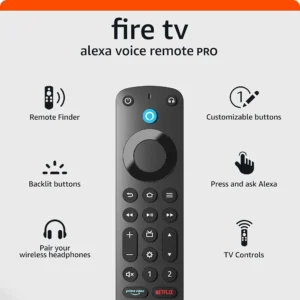
Why we picked it: Combines a remote finder, backlit buttons, Alexa voice control, and customizable shortcuts into the most complete upgrade for compatible Fire TV Stick devices.
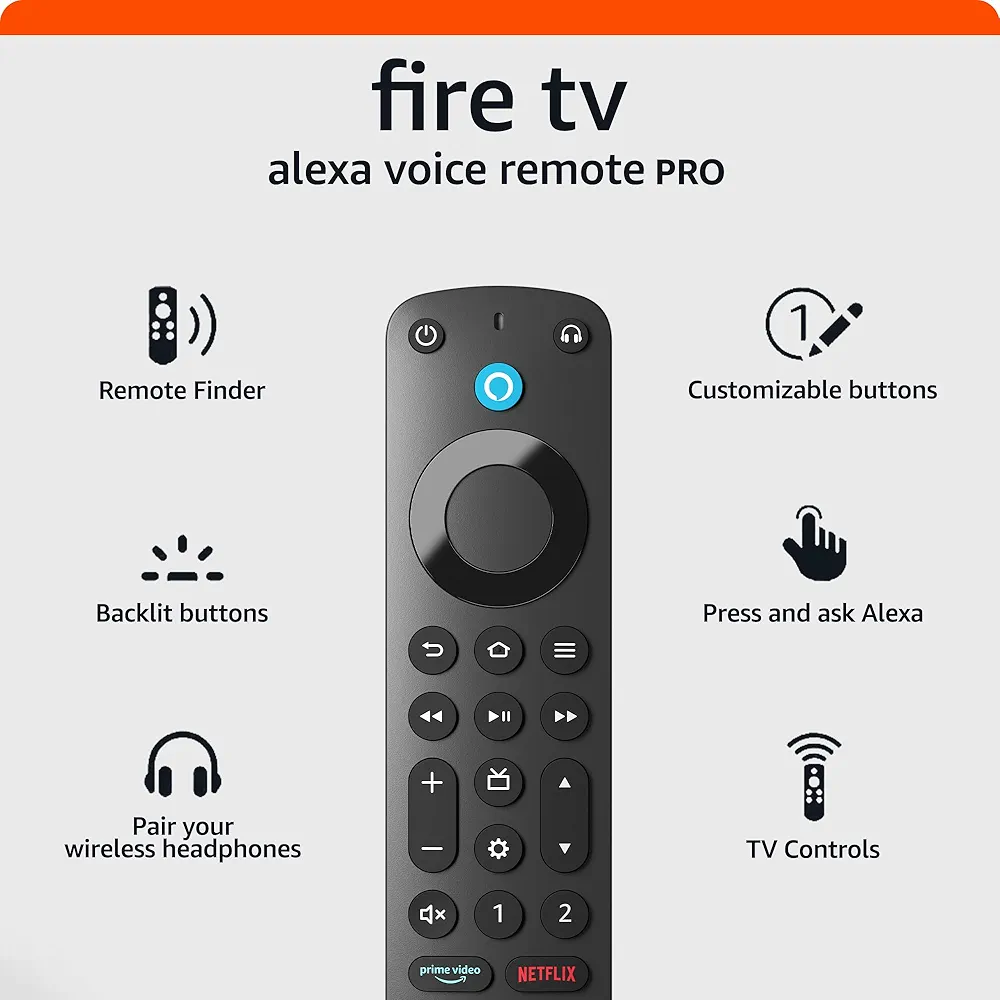 Click image to enlarge | From $34.99 |
Micro-USB Ethernet Adapter — Best for Stable Streaming
Why we picked it: Provides a dependable wired internet connection that minimizes buffering and improves streaming stability for compatible Fire TV Stick models.
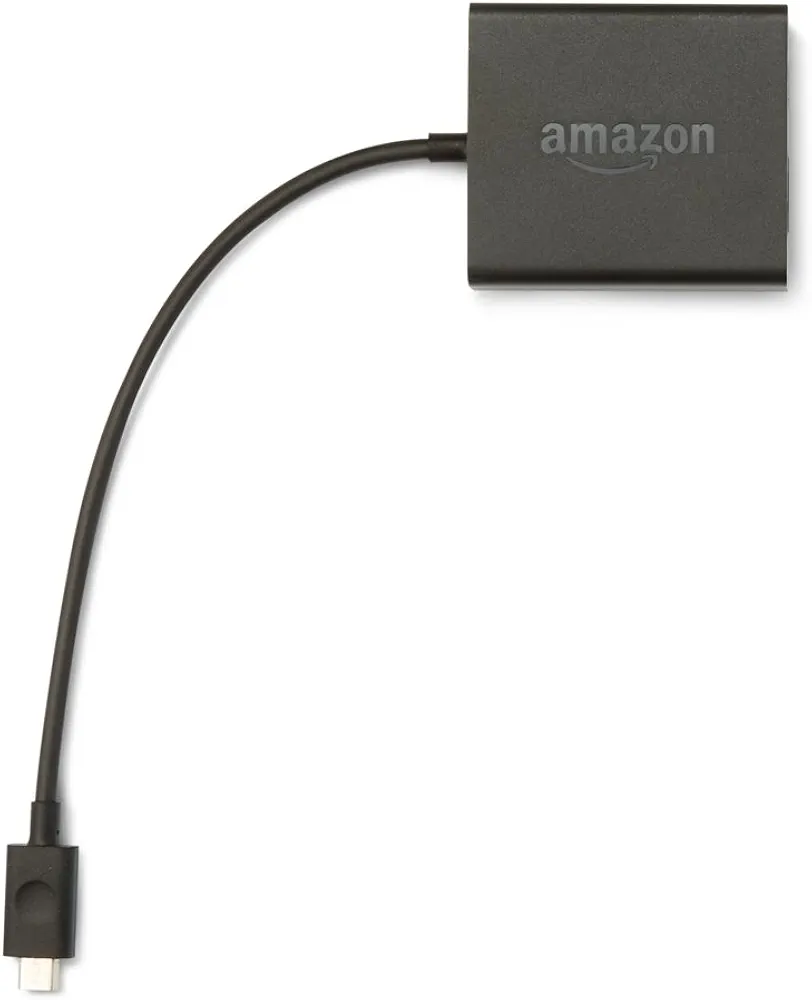 Click image to enlarge | From $14.99 |
TV xStream USB OTG Cable — Best for Storage Expansion
Why we picked it: Adds USB connectivity for supported storage devices and peripherals, making the Fire TV Stick significantly more versatile.
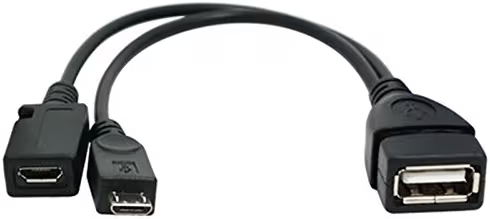 Click image to enlarge | From $5.84 |
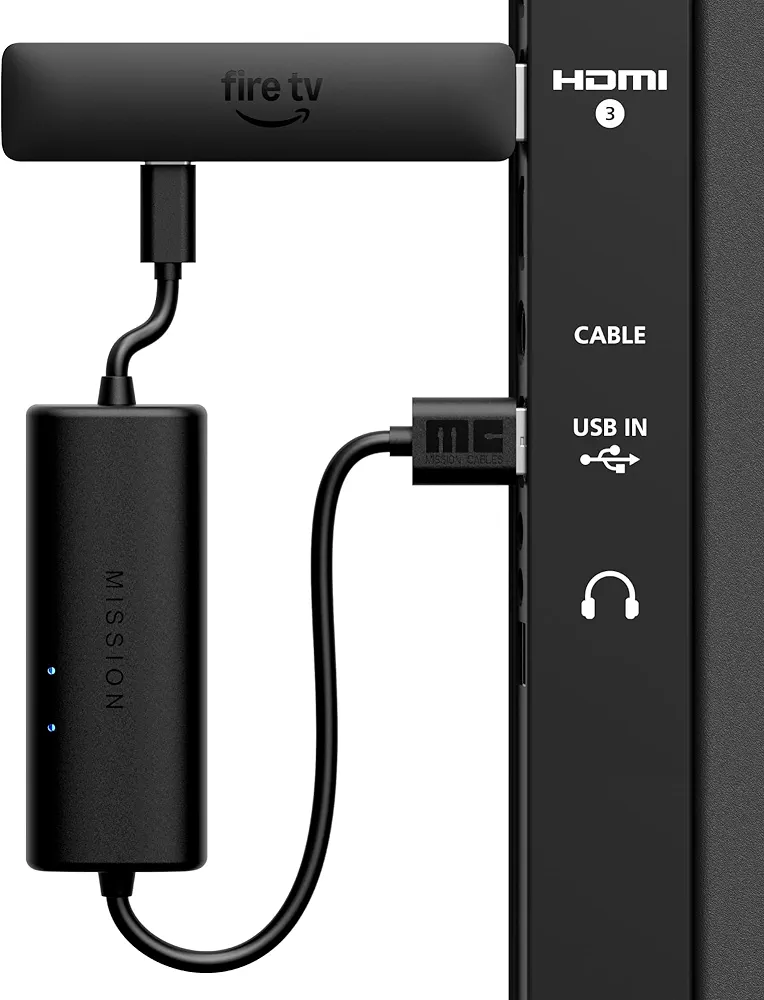
Made for Amazon USB Power Cable — Best for Cleaner Setup
Why we picked it: Powers compatible Fire TV Stick devices directly from supported TV USB ports to reduce cable clutter and create a cleaner installation.
 Click image to enlarge | From $25.99 |
CaseBot Remote Case — Best for Remote Protection
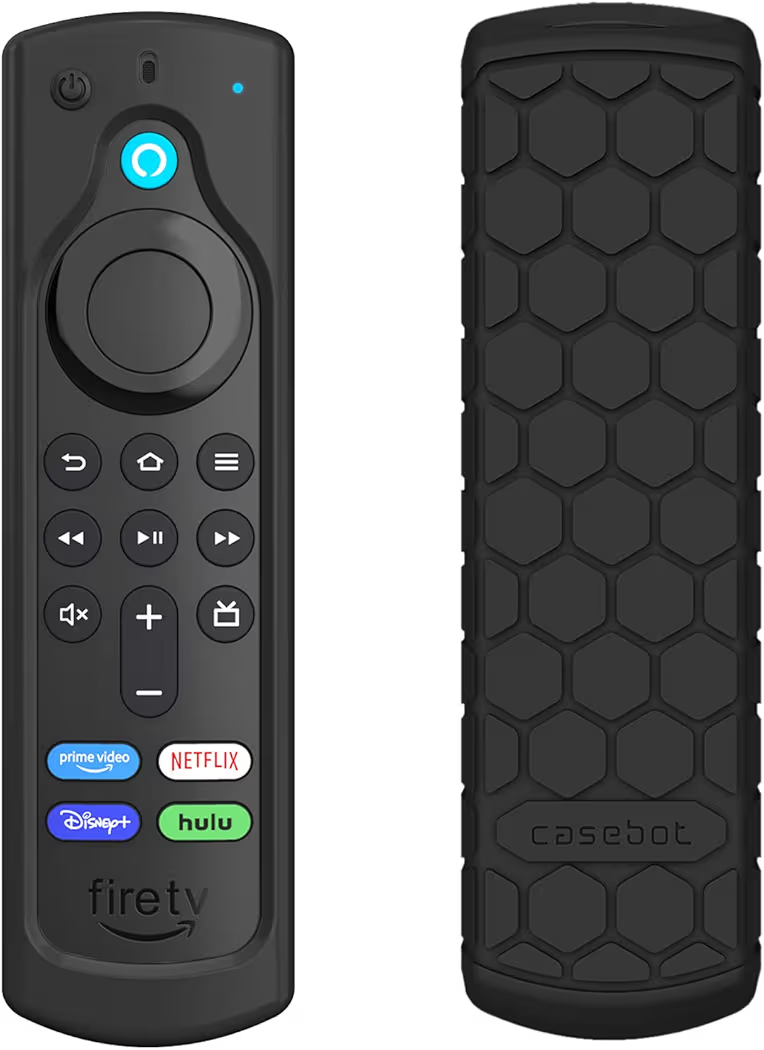
Why we picked it: Improves grip while protecting the Alexa Voice Remote from scratches, bumps, and accidental drops during everyday use.
 Click image to enlarge | From $9.99 |
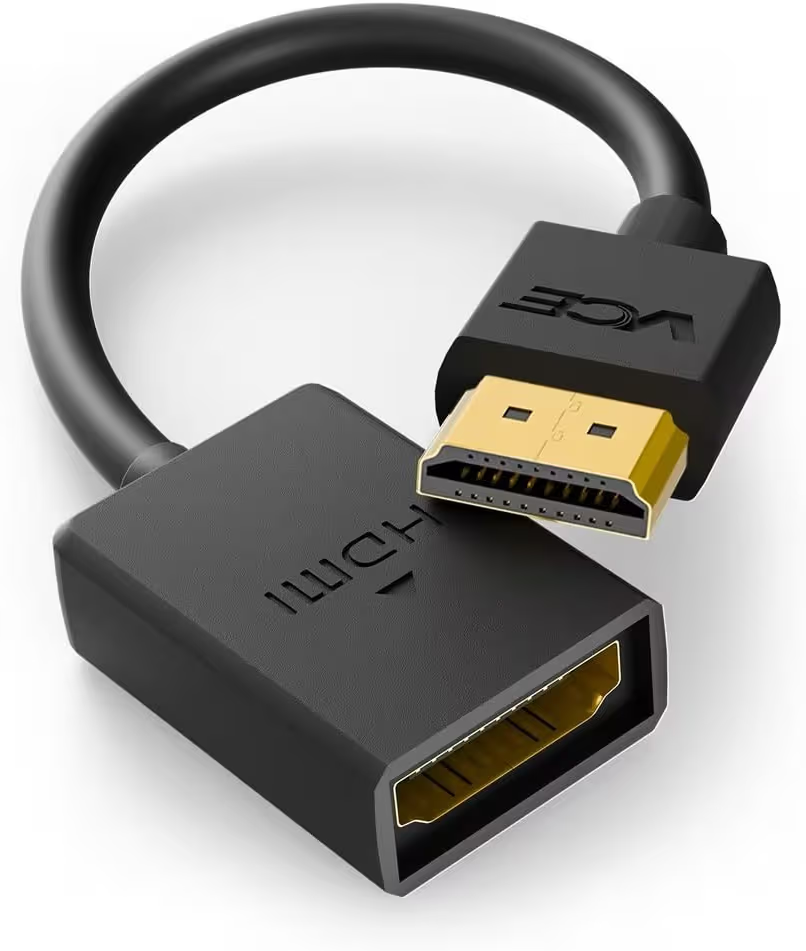
VCE 4K HDMI Extension Cable — Best Budget Upgrade
Why we picked it: Makes it easier to connect a Fire TV Stick behind tight entertainment centers while reducing strain on the TV’s HDMI port.
 Click image to enlarge | From $4.99 |
Prices may change over time. We may earn a commission if you purchase through our links, at no extra cost to you.
Best Accessories for Fire TV Stick
| Product | Best For | Compatible With | Main Features | Pros | Cons | Price |
|---|---|---|---|---|---|---|
| Amazon Fire TV Alexa Voice Remote Pro | Premium Remote | Most modern Fire TV Stick models | Backlit buttons, Alexa, remote finder, shortcut buttons | Official Amazon accessory, easy to use, premium features | Higher price than standard remotes | $34.99 |
| Micro-USB Ethernet Adapter | Buffer-Free Streaming | Compatible Fire TV Stick models with Micro-USB | Wired Ethernet connection | Stable connection, lower latency | Requires an Ethernet cable | $14.99 |
| TV xStream USB OTG Cable | USB Expansion | Compatible Fire TV Stick devices | USB host support, power passthrough | Affordable, expands functionality | Requires compatible USB devices | $5.84 |
| Made for Amazon USB Power Cable | Cable Management | Compatible Fire TV Stick models | TV USB power support | Cleaner installation, fewer cables | Not every TV USB port provides sufficient power | $25.99 |
| CaseBot Remote Case | Protection | Supported Alexa Voice Remotes | Shockproof silicone design | Better grip, protects remote | Adds slight bulk | $9.99 |
| VCE 4K HDMI Extension Cable | Installation Flexibility | Any HDMI-compatible Fire TV Stick | 4K 60Hz support | Reduces HDMI port stress, inexpensive | Does not improve streaming speed | $4.99 |
Different Fire TV Stick users benefit from different accessories. Someone who streams high-resolution content daily may gain the most from an Ethernet adapter, while another user who frequently misplaces the remote will appreciate the Alexa Voice Remote Pro. Matching the accessory to your specific need provides the best long-term value.
Bottom Line: The best accessories for Fire TV Stick focus on solving real problems such as unstable internet, limited connectivity, poor cable management, or remote convenience. Choosing purpose-built accessories delivers a better streaming experience than buying every available add-on.
Best Fire TV Stick Accessories Reviewed
Amazon Fire TV Alexa Voice Remote Pro (Best Overall)
List Price: $34.99
Bottom Line: The Amazon Fire TV Alexa Voice Remote Pro is the best overall Fire TV Stick accessory because it combines convenience, accessibility, and premium features into one official upgrade.
Why We Recommend It
The Amazon Fire TV Alexa Voice Remote Pro solves one of the most common frustrations among Fire TV Stick users: losing the remote. The built-in remote finder helps locate the remote quickly, while backlit buttons make navigation much easier in dark rooms.
Additionally, the Amazon Fire TV Alexa Voice Remote Pro includes two customizable shortcut buttons that allow faster access to favorite apps or Alexa commands. Because it is an official Amazon accessory, compatibility and software support are excellent across supported Fire TV Stick models.
Key Features and Benefits
- Built-in remote finder
- Backlit buttons for nighttime viewing
- Alexa voice control
- Two programmable shortcut buttons
- TV power and volume controls
- Official Amazon accessory with excellent compatibility
| Pros | Cons |
|---|---|
|
|
After upgrading to the Amazon Fire TV Alexa Voice Remote Pro, everyday navigation becomes noticeably more convenient. Searching for movies with Alexa feels faster, while illuminated buttons reduce mistakes when watching TV in a dark room.
Meanwhile, users who frequently experience remote pairing issues should first review our guide on how to pair a Fire TV Stick remote. If the original remote no longer functions correctly, replacing it with the Alexa Voice Remote Pro is often a worthwhile long-term solution.
Micro-USB Ethernet Adapter (Best for Stable Streaming)
List Price: $14.99
Bottom Line: A Micro-USB Ethernet Adapter is one of the most effective Fire TV Stick accessories for reducing buffering on unstable Wi-Fi networks.
Why We Recommend It
The Micro-USB Ethernet Adapter replaces Wi-Fi with a wired internet connection, creating a more reliable streaming experience. Homes with congested wireless networks or thick walls often benefit from the increased stability of Ethernet.
Furthermore, the Micro-USB Ethernet Adapter helps maintain smoother playback during 4K streaming because wired connections are generally less affected by interference than wireless signals.
Key Features and Benefits
- Stable wired internet connection
- Simple plug-and-play installation
- Supports high-quality video streaming
- Reduces wireless interference
- Ideal for crowded Wi-Fi environments
| Pros | Cons |
|---|---|
|
|
After switching from Wi-Fi to Ethernet, streaming sessions are often more consistent, particularly during live sports or high-bitrate movies. Instead of fluctuating wireless signals, the Fire TV Stick receives a direct network connection.
However, if the Fire TV Stick cannot connect wirelessly in the first place, troubleshooting should come before buying new hardware. Our guide on Fire TV Stick won’t connect to Wi-Fi explains several fixes that may restore wireless connectivity.
TV xStream USB OTG Cable (Best for Storage Expansion)
List Price: $5.84
Bottom Line: The TV xStream USB OTG Cable is an inexpensive accessory that expands what a compatible Fire TV Stick can do by adding USB connectivity.
Why We Recommend It
The TV xStream USB OTG Cable allows compatible Fire TV Stick models to connect USB flash drives, keyboards, and certain supported peripherals. This makes the streaming device far more flexible than its standard configuration.
Additionally, the TV xStream USB OTG Cable supports power passthrough, allowing the Fire TV Stick to remain powered while connected to compatible USB accessories.
Key Features and Benefits
- Supports USB flash drives
- Power passthrough design
- Compatible with supported USB peripherals
- Compact and easy to install
- Affordable upgrade
| Pros | Cons |
|---|---|
|
|
Using the TV xStream USB OTG Cable becomes especially useful when additional storage or wired accessories are needed. Connecting a USB flash drive can simplify media playback without relying entirely on cloud storage.
Made for Amazon USB Power Cable (Best for Cleaner Setup)
List Price: $25.99
Bottom Line: The Made for Amazon USB Power Cable creates a cleaner Fire TV Stick installation by reducing visible cables and eliminating the need for a separate wall adapter in compatible setups.
Why We Recommend It
The Made for Amazon USB Power Cable draws power directly from compatible TV USB ports, making wall-mounted installations look much tidier. Fewer cables also make the entertainment area easier to organize.
Furthermore, the Made for Amazon USB Power Cable is designed specifically for Amazon streaming devices, helping maintain dependable power delivery when used with supported televisions.
Key Features and Benefits
- Cleaner cable management
- Official Amazon accessory
- Easy installation
- Ideal for wall-mounted TVs
- Reduces cable clutter
| Pros | Cons |
|---|---|
|
|
After installing the Made for Amazon USB Power Cable behind a wall-mounted television, the setup appears much cleaner because there are fewer visible cables running to the power outlet.
Meanwhile, unexpected reboots can sometimes result from power-related issues rather than the cable itself. If the Fire TV Stick restarts repeatedly, our guide on Fire TV Stick keeps restarting explains additional troubleshooting steps before replacing accessories.
CaseBot Remote Case (Best Remote Protection)
List Price: $9.99
Bottom Line: The CaseBot Remote Case is an affordable Fire TV Stick accessory that improves grip, protects the Alexa Voice Remote from everyday drops, and makes the remote easier to hold.
Why We Recommend It
The CaseBot Remote Case adds a layer of shock-absorbing silicone around the Fire TV Stick remote without affecting button access or voice controls. As a result, accidental drops are less likely to damage the remote, especially in homes with children or pets.
Additionally, the textured silicone surface provides a more secure grip than the bare plastic remote. Many Fire TV Stick users find that the remote feels less slippery during everyday use.
Key Features and Benefits
- Shock-resistant silicone construction
- Improves grip during everyday use
- Precise cutouts for all buttons and microphones
- Helps protect against scratches and minor impacts
- Compatible with supported Alexa Voice Remotes
| Pros | Cons |
|---|---|
|
|
After fitting the CaseBot Remote Case, the Fire TV Stick remote feels noticeably easier to handle during long streaming sessions. The extra grip also reduces the chance of the remote slipping between sofa cushions or falling onto hard floors.
However, a protective case cannot solve pairing or hardware failures. If the original remote stops responding completely, reading our guide about the best Fire TV Stick remote replacement can help you choose the right replacement model.
VCE 4K HDMI Extension Cable (Best Budget Upgrade)
List Price: $4.99
Bottom Line: The VCE 4K HDMI Extension Cable is an inexpensive Fire TV Stick accessory that improves installation flexibility while reducing strain on crowded HDMI ports.
Why We Recommend It
The VCE 4K HDMI Extension Cable creates extra space between the Fire TV Stick and the television. This small change makes installation easier behind wall-mounted TVs or entertainment units where HDMI ports are difficult to access.
Furthermore, reducing pressure on the HDMI connector can help prevent unnecessary stress on both the Fire TV Stick and the television’s HDMI port. The cable also supports 4K resolution at up to 60Hz, making it suitable for modern streaming setups.
Key Features and Benefits
- Supports 4K at 60Hz
- Flexible cable design
- Reduces HDMI port strain
- Improves access behind televisions
- Simple plug-and-play installation
| Pros | Cons |
|---|---|
|
|
Using the VCE 4K HDMI Extension Cable is particularly helpful when the Fire TV Stick sits close to the wall or next to larger HDMI cables. The extra flexibility makes future maintenance and accessory changes much easier.
Meanwhile, display problems such as a blank screen usually require troubleshooting beyond changing cables. If the Fire TV Stick shows no picture, our guide on Fire TV Stick black screen explains the most effective fixes.
Bottom Line: The six accessories above cover the most common Fire TV Stick upgrades, including streaming stability, storage expansion, cable management, remote convenience, device protection, and easier installation. Most users only need one or two of these accessories to noticeably improve the overall Fire TV Stick experience.
Fire TV Stick Compatibility Guide
Direct answer: Most of the recommended Fire TV Stick accessories work across several Fire TV Stick generations, but compatibility varies depending on the connector type, remote generation, and Fire TV Stick model. Checking compatibility before buying helps avoid unnecessary returns.
Which Accessories Work with Every Fire TV Stick Model?
The Amazon Fire TV Alexa Voice Remote Pro works with most recent Fire TV Stick models that support Alexa Voice Remotes. However, older Fire TV devices may not support every premium feature, so confirming compatibility on the product page is recommended.
The Micro-USB Ethernet Adapter and TV xStream USB OTG Cable are designed primarily for Fire TV Stick models that use Micro-USB power connections. Before purchasing either accessory, verify that your specific Fire TV Stick uses the same connector.
The Made for Amazon USB Power Cable is also intended for compatible Fire TV Stick models. Additionally, television USB ports must provide enough power for reliable operation, otherwise the original power adapter remains the better choice.
The CaseBot Remote Case fits only supported Alexa Voice Remote generations. Matching the case to the exact remote version ensures proper access to every button and microphone opening.
The VCE 4K HDMI Extension Cable works with virtually every Fire TV Stick because it connects through the standard HDMI interface. As a result, it remains one of the most universally compatible accessories in this guide.
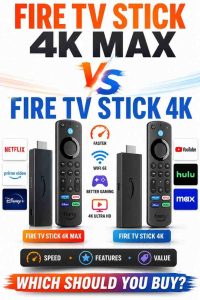
Compatibility also depends on which Fire TV Stick generation you own. Comparing specifications before purchasing accessories helps prevent buying products that are designed for newer hardware. Our comparison of Fire TV Stick HD vs Fire TV Stick 4K explains the key hardware differences, while Fire TV Stick 4K Max vs Fire TV Stick 4K highlights which model is better suited for demanding streaming needs.
Bottom Line: Most Fire TV Stick accessories support multiple models, but checking compatibility with your specific Fire TV Stick and remote generation before purchasing is the safest way to ensure everything works correctly.
Fire TV Stick Buying Guide
Which Accessories Are Essential?
Direct answer: Most Fire TV Stick owners only need one or two accessories. An Ethernet adapter is worthwhile for unstable Wi-Fi, while the Alexa Voice Remote Pro offers the biggest convenience upgrade. The remaining accessories depend on individual usage rather than being essential purchases.
Fire TV Stick owners who regularly stream 4K movies or live sports benefit most from a reliable network connection. Meanwhile, users who frequently misplace the remote or watch television in dark rooms are more likely to appreciate the premium remote upgrade.
Which Accessories Are Optional?
Accessories such as the CaseBot Remote Case, HDMI extension cable, and USB power cable improve convenience instead of solving critical problems. Buying these accessories makes sense only when they address a specific limitation in your entertainment setup.
For example, the HDMI extension cable becomes valuable when HDMI ports are difficult to access, while the USB power cable is ideal for reducing cable clutter behind wall-mounted televisions. Otherwise, the standard accessories included with the Fire TV Stick may already meet your needs.
What to Consider Before Buying
- Confirm compatibility with your Fire TV Stick model.
- Choose accessories that solve a real problem instead of buying unnecessary upgrades.
- Prioritize official or well-reviewed accessories for better reliability.
- Consider installation requirements such as Ethernet availability or USB port compatibility.
- Balance price with long-term value rather than choosing the cheapest option.
Bottom Line: The best Fire TV Stick accessories are the ones that improve your specific streaming experience. Buying accessories based on compatibility and actual needs provides better value than purchasing every available upgrade.
Frequently Asked Questions
What accessories do I really need for Fire TV Stick?
The most useful Fire TV Stick accessories are an Ethernet adapter for stable streaming or the Alexa Voice Remote Pro for easier navigation. Additional accessories such as a USB OTG cable or HDMI extension cable are only necessary if they solve a specific limitation in your setup.
Can I add storage to a Fire TV Stick?
Yes, compatible Fire TV Stick models can use external USB storage through a supported USB OTG cable. However, app support varies, so external storage works best for supported media files and compatible applications rather than every installed app.
Is an Ethernet adapter worth it?
Yes, an Ethernet adapter is worthwhile when Wi-Fi signals are weak or unreliable. A wired network connection typically provides more consistent streaming, especially for 4K content, live television, and homes with multiple connected devices.
Do Fire TV Stick accessories work with every model?
No, compatibility depends on the Fire TV Stick generation and connector type. Always verify that an accessory supports your specific Fire TV Stick model before placing an order.
Which accessory improves streaming the most?
An Ethernet adapter usually provides the biggest improvement for streaming quality because it replaces an unstable wireless connection with a more reliable wired network. Better connectivity reduces buffering and improves playback consistency.
Can I use third-party accessories with Fire TV Stick?
Yes, many third-party accessories work well with Fire TV Stick devices. Choosing reputable brands with confirmed compatibility helps ensure reliable performance and reduces the risk of connection or fitment issues.
Conclusion
The best accessories for Fire TV Stick are the ones that solve everyday problems instead of adding unnecessary complexity. A premium remote, Ethernet adapter, USB OTG cable, USB power cable, protective remote case, and HDMI extension cable each improve a different aspect of the streaming experience.
Rather than purchasing every available accessory, identify the limitation in your current setup first. Choosing accessories based on compatibility, performance, and real-world usefulness will help you get the most value from your Fire TV Stick for years to come.