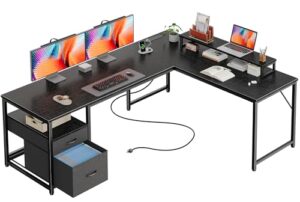
Need to fit two PCs, several monitors, and all your accessories on one surface? A long workstation usually works best, but the right depth matters too. For most multi-computer setups, I recommend the SEDETA 94.5-inch 2-Person Gaming Desk because it combines a very wide workspace with storage, monitor support, and built-in power.
This roundup compares six desks for multiple computers, including long two-person desks, a gaming-focused option, a storage-heavy workstation, and an L-shaped alternative. I also explain how much desk space you need before choosing one.
Best Computer Desks for Multiple Computers at a Glance
The SEDETA 94.5-inch desk is the best overall choice for most dual-computer setups because it balances workspace, storage, and useful built-in features.
- Best Overall: SEDETA 94.5″ 2-Person Gaming Desk — long workspace with storage, lighting, power, and monitor support.
- Best for Storage: SEDETA Farmhouse 96.5″ 2-Person Computer Desk — excellent choice for shared work and organized storage.
- Best Extra-Long Gaming Desk: Casaottima 98″ 2-Person Gaming Desk — the longest straight desk in this roundup.
- Best Simple Workstation: Tribesigns 78.7″ Two-Person Desk — practical shared workspace with integrated shelving.
- Best for Built-In Charging: GYIIYUO 93″ Two-Person Desk — useful charging and storage features for two users.
- Best L-Shaped Alternative: YOMILUVE 63″ Farmhouse L-Shaped Desk — better for rooms where a corner setup makes more sense.
SEDETA 94.5″ 2-Person Gaming Desk
Best Overall
Best For: Dual-PC setups, two users, and buyers who want workspace plus built-in storage.

SEDETA
SEDETA 94.5" 2 Person Gaming Desk with 8 Drawers & Storage Shelves, Grey
This 94.5-inch SEDETA desk is the article's top choice for multiple computers because it provides a very wide shared workspace. Eight drawers, storage shelves, LED lighting, a monitor stand, and built-in power make it suitable for dual-PC and multi-monitor setups.
Who Should Buy It
Buy this if you need a long shared workstation with substantial built-in organization. It suits two users, dual-PC gaming setups, and large home-office configurations.
Why We Pick It
It earned the top position because it balances workspace, storage, monitor support, lighting, and power better than the other desks reviewed.
Features & Benefits
| Feature | Benefit |
|---|---|
| 94.5-inch width | provides extensive horizontal workspace for two computer stations |
| 19.7-inch depth | offers usable but relatively shallow front-to-back space |
| 8 drawers | keeps office and gaming accessories organized |
| Monitor stand | raises displays and frees some desktop space |
| Built-in power strip | provides three AC outlets and two USB ports |
| 325-pound weight recommendation | supports computers, monitors, and accessories within the stated limit |
Pros & Cons
| Pros | Cons |
|---|---|
| ✓ Very wide shared workspace | ✕ Relatively shallow 19.7-inch depth |
| ✓ Extensive storage | ✕ Large footprint may not suit smaller rooms |
| ✓ Built-in power and monitor support |
The SEDETA 94.5-inch desk earns the top position because it offers a very large shared work surface. The listed dimensions are 94.5 inches wide, 19.7 inches deep, and 29.9 inches high.
The desk includes eight fabric drawers, storage shelving, a monitor stand, LED lighting, and a built-in power strip with three AC outlets and two USB ports. The listed maximum weight recommendation is 325 pounds.
That combination makes the desk useful for two computers, multiple monitors, gaming equipment, and office accessories. The monitor stand can also free some desktop space.
Who should buy it: Choose this model if you need a long shared workstation with integrated organization.
Who should avoid it: Avoid it if you need a deep desktop for large monitor arms or very deep equipment.
Main limitation: The 19.7-inch depth is much less impressive than the 94.5-inch width. Measure your monitor setup before buying.
Amazon availability can also vary by delivery location. Check the current listing before ordering.
SEDETA Farmhouse 96.5″ 2-Person Computer Desk
Best for Storage
Best For: Shared home offices, study areas, and buyers who need extensive storage.

SEDETA
SEDETA Farmhouse 96.5" 2 Person Computer Desk with Storage Drawers
This 96.5-inch SEDETA farmhouse desk creates two distinct work areas on one long surface. Three drawers and eight open shelves make it especially useful for shared home offices, study spaces, and organized dual-computer setups.
Who Should Buy It
Buy this if storage matters as much as desktop length. It is a strong fit for shared home offices and study rooms.
Why We Pick It
It earned a spot because it combines an extra-long work surface with substantially more storage than a basic two-person desk.
Features & Benefits
| Feature | Benefit |
|---|---|
| 96.5-inch width | provides separate work areas for two users |
| 19.7-inch depth | accommodates standard computer equipment but limits deep setups |
| 3 drawers | stores files and office supplies |
| 8 open shelves | provides accessible storage for books and accessories |
| Farmhouse design | suits conventional home-office and study environments |
Pros & Cons
| Pros | Cons |
|---|---|
| ✓ Extra-long desktop | ✕ Shallow desktop depth |
| ✓ Excellent storage capacity | ✕ Less gaming-focused than dedicated gaming desks |
| ✓ Suitable for shared offices |
The SEDETA Farmhouse desk is 96.5 inches wide and 19.7 inches deep. The long surface creates two distinct work areas without requiring two separate desks.
Storage is the main reason to choose this model. The desk has three drawers and eight open shelves for office supplies, files, books, and accessories.
The farmhouse styling also makes this desk less gaming-focused than the SEDETA 94.5-inch model. That difference can matter in a shared home office or study room.
Who should buy it: Choose this desk when storage matters as much as desktop length.
Who should avoid it: Avoid it if you prefer a deeper gaming surface or a minimalist desk without built-in shelving.
Main limitation: The 19.7-inch depth limits how much front-to-back space you have for bulky monitor stands and accessories.
Casaottima 98″ 2-Person Gaming Desk
Best Extra-Long Gaming Desk
Best For: Two gaming PCs, shared gaming spaces, and buyers who want maximum straight-desk width.
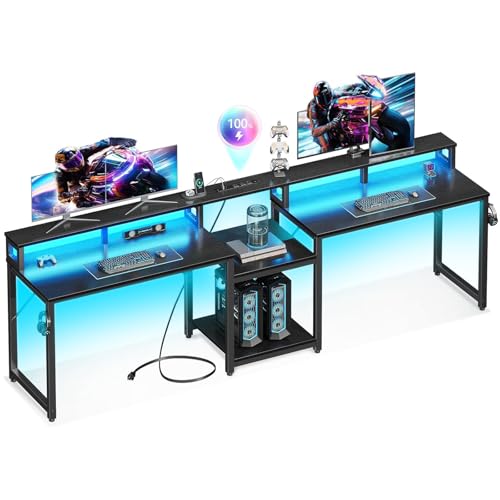
CASAOTTIMA
Casaottima 98'' 2 Person Gaming Desk with LED Lights, Black
The Casaottima 98-inch desk provides the longest straight workspace in this roundup. Its two-person design, monitor support, LED lighting, storage shelf, AC outlets, and USB ports make it well suited to shared gaming and computer setups.
Who Should Buy It
Buy this if maximum straight-desk width is your main priority. It works especially well for two gaming PCs or large shared workstations.
Why We Pick It
It earned its position because its nearly eight-foot width gives two users generous horizontal space while retaining useful gaming features.
Features & Benefits
| Feature | Benefit |
|---|---|
| 98-inch class width | maximizes horizontal workspace for two setups |
| 19.7-inch depth | provides limited front-to-back space for bulky equipment |
| Monitor stand | creates additional display space |
| LED lighting | adds gaming-oriented ambient lighting |
| 3 AC outlets | provides convenient access to power |
| 2 USB ports | supports charging compatible devices |
Pros & Cons
| Pros | Cons |
|---|---|
| ✓ Longest straight desk in the roundup | ✕ Requires substantial room space |
| ✓ Strong gaming feature set | ✕ Shallow desktop depth |
| ✓ Built-in power and USB charging |
The Casaottima 98-inch desk provides one of the largest straight desktop surfaces in this roundup. The listed desktop measures about 97.6 inches long and 19.7 inches deep.
The desk includes a central storage shelf, monitor support, LED lighting, three AC outlets, and two USB charging ports. Its metal frame and adjustable feet are intended to improve stability.
The long design gives two people separate working zones while keeping the setup on one desk. That layout works especially well for shared gaming or work areas.
Who should buy it: Choose Casaottima if maximum width is your priority.
Who should avoid it: Avoid it if your room cannot accommodate a desk close to eight feet wide.
Main limitation: The desk is extremely long but still only about 19.7 inches deep. Width does not replace front-to-back workspace.
💡 Pro Tip: Measure the wall first, then mark the desk footprint on the floor with masking tape. This simple test can prevent buying a desk that overwhelms the room.
Tribesigns 78.7″ Two-Person Desk With Bookshelf
Best Simple Workstation
Best For: Two-person workspaces that need shelving without built-in gaming features.

TRIBESIGNS
Tribesigns Two Person Desk with Bookshelf, 78.7 Computer Office Double Desk for Two Person, Rustic Writing Desk Workstation with Shelf for Home Office (White)
This Tribesigns desk offers a 78.74-inch shared desktop with integrated shelving. Its 23.62-inch depth gives it more front-to-back workspace than several longer desks in the roundup.
Who Should Buy It
Buy this if you want a practical two-person workstation with useful shelving. It is a good fit for home offices and shared study areas.
Why We Pick It
It earned a spot because its deeper desktop and simpler design make it a practical alternative to the longer gaming desks.
Features & Benefits
| Feature | Benefit |
|---|---|
| 78.74-inch width | provides space for two moderate computer stations |
| 23.62-inch depth | gives more room for monitors, keyboards, and accessories |
| Integrated bookshelves | provides accessible storage |
| Metal frame | supports the desktop structure |
| 550-pound maximum weight recommendation | provides substantial stated load capacity |
Pros & Cons
| Pros | Cons |
|---|---|
| ✓ Deeper desktop than several alternatives | ✕ Shorter than the 93-to-98-inch desks |
| ✓ Useful integrated shelving | ✕ Less gaming-focused |
| ✓ High stated weight capacity |
The Tribesigns desk measures 78.74 inches wide, 23.62 inches deep, and 29.52 inches high. That deeper surface gives it an advantage over several longer desks in this roundup.
The desk combines a large shared desktop with open storage and lower bookshelves. Tribesigns lists a maximum weight recommendation of 550 pounds.
The additional depth can make this model more practical for keyboards, monitors, and other desktop equipment. The simpler design also suits home offices better than heavily styled gaming desks.
Who should buy it: Choose this model if you want a practical two-person workstation with useful shelving.
Who should avoid it: Avoid it if you need more than 78 inches of horizontal space for several large monitors.
Main limitation: The desktop is shorter than the 93-to-98-inch alternatives, so very large dual-PC setups may feel tighter.
Tribesigns lists the exact ASIN as B0BCJZL3JR on its product page, which gives this model particularly strong product identification.
GYIIYUO 93″ Two-Person Desk
Best for Built-In Charging
Best For: Two-person home offices that need charging, storage, and a printer area.

GYIIYUO
GYIIYUO 93'' Two Person Desk with Charging Station, Long Desk with 3 Drawer
The GYIIYUO 93-inch desk combines a long two-person workspace with built-in charging and storage. Three drawers, a printer shelf, a keyboard tray, and monitor support make it useful for shared home offices with several powered devices.
Who Should Buy It
Buy this if integrated charging and storage are important to your workstation. It suits two-person offices and mixed computer setups.
Why We Pick It
It earned a spot because its charging station provides convenient access to four AC outlets and two USB ports while the long surface accommodates two users.
Features & Benefits
| Feature | Benefit |
|---|---|
| 93-inch width | provides a large shared workspace |
| 18-inch depth | saves room but limits front-to-back equipment space |
| 3 drawers | provides storage for office supplies |
| Printer shelf | keeps the printer off the main desktop |
| 4 AC outlets | provides convenient access to multiple power connections |
| 2 USB ports | supports compatible device charging |
| Keyboard tray | frees some desktop space |
| Monitor arm | provides an alternative to placing monitors directly on the desktop |
Pros & Cons
| Pros | Cons |
|---|---|
| ✓ Useful built-in charging | ✕ Shallowest straight desktop in the roundup |
| ✓ Long shared surface | ✕ May feel cramped with bulky monitor equipment |
| ✓ Good storage and printer organization |
The GYIIYUO 93-inch desk provides a long shared workspace with three drawers and a dedicated printer shelf. Its listed desktop dimensions are 93 inches wide and 18 inches deep.
The integrated charging system includes four AC outlets and two USB ports. The desk also includes a keyboard tray and monitor arm.
Those features make the GYIIYUO useful for users with several powered devices. Phones, laptops, speakers, printers, and computers can share the built-in charging area.
Who should buy it: Choose this desk if integrated charging and storage are important to your setup.
Who should avoid it: Avoid it if you need a deep desktop for large monitors or bulky monitor arms.
Main limitation: At 18 inches deep, this is the shallowest desktop among the main straight desks in this roundup.
YOMILUVE 63″ Farmhouse L-Shaped Desk
Best L-Shaped Alternative
Best For: Corner rooms, home offices, and users who prefer separate work zones.

YOMILUVE
63" Farmhouse L Shaped Desk with Drawers & Printer Shelf for Home Office
This YOMILUVE L-shaped desk provides a different solution from the long straight desks. Its corner-friendly layout includes storage, a printer shelf, power outlets, and an ergonomic monitor stand that can accommodate two monitors or laptops.
Who Should Buy It
Buy this if your room has a usable corner and you prefer separate work zones. It works well for home offices where an eight-foot straight desk would be difficult to place.
Why We Pick It
It earned a spot because the L-shaped design creates two connected work areas while adding substantial built-in storage.
Features & Benefits
| Feature | Benefit |
|---|---|
| 63-inch main width | provides a dedicated primary work surface |
| 58.2-inch return | creates a second connected work zone |
| 2 storage drawers | keeps frequently used supplies organized |
| Storage cabinet | provides enclosed organization |
| Printer shelf | moves the printer away from the main work surface |
| Integrated charging station | provides convenient device power |
| Monitor stand | supports two monitors or laptops according to the product description |
Pros & Cons
| Pros | Cons |
|---|---|
| ✓ Space-efficient corner design | ✕ Requires substantial corner footprint |
| ✓ Extensive storage | ✕ Less suitable for one uninterrupted multi-monitor surface ### |
| ✓ Separate work zones |
The YOMILUVE takes a different approach from the long straight desks. Its L-shaped design uses a 63-inch main width with a 58.2-inch return.
The desk includes two drawers, an open shelf, a storage cabinet, a printer shelf, power outlets, and a monitor stand. The monitor stand can accommodate two monitors or laptops according to the product description.
The corner design can create useful separation between two computers. One side can handle the primary PC, while the return can hold a second computer or laptop.
Who should buy it: Choose this desk if your room has a usable corner and you prefer an L-shaped workstation.
Who should avoid it: Avoid it if you need one uninterrupted straight surface for two large monitor arrays.
Main limitation: L-shaped desks need more planning because both sides of the footprint matter.
How These Computer Desks Compare
The main differences come down to width, depth, layout, storage, and built-in features. The table below makes those differences easier to compare.
| Desk | Best For | Width | Depth | Notable Features |
|---|---|---|---|---|
| SEDETA 94.5″ | Overall | 94.5″ | 19.7″ | 8 drawers, LED, power, monitor stand |
| SEDETA 96.5″ | Storage | 96.5″ | 19.7″ | 3 drawers, 8 shelves |
| Casaottima 98″ | Extra-long gaming | 97.6″ | 19.7″ | LED, power, USB, monitor stand |
| Tribesigns 78.7″ | Simple workstation | 78.74″ | 23.62″ | Bookshelves, storage |
| GYIIYUO 93″ | Charging | 93″ | 18″ | 4 AC, 2 USB, drawers, monitor arm |
| YOMILUVE 63″ | L-shaped setup | 63″ + return | 58.2″ footprint | Drawers, cabinet, power, monitor stand |
How Much Desk Space Do Two Computers Need?
Two computers need enough surface area for their monitors, keyboards, mice, and other frequently used equipment. The exact requirement depends on the number and size of monitors.
A desk around 78 inches wide can work for two basic computer stations. However, a 90-to-98-inch desk gives each user considerably more horizontal space.
Depth matters just as much as width. OSHA recommends enough desk depth to place the monitor at least 20 inches from the user’s eyes.
For multiple monitors, OSHA also recommends enough space and clearance for the displays. A corner workstation can provide additional depth and workspace in some rooms.
For detailed workstation guidance, see the OSHA computer workstation desk guidance.
What Size Desk Is Best for Multiple Computers?
A desk between 78 and 98 inches wide is a practical range for many two-computer setups. The best size depends on monitor count, PC placement, and available room.
Choose a 78-Inch Desk for a Moderate Setup
A 78-inch desk can work well when each person uses one monitor and a compact computer setup. The Tribesigns model also provides more depth than several longer alternatives.
Choose a 90-Inch or Larger Desk for More Equipment
A 90-inch-plus desk is better when both users need several monitors, speakers, keyboards, and accessories. The extra width creates more separation between the two work areas.
Choose an L-Shaped Desk for a Corner Room
An L-shaped desk works best when a corner can provide two connected work zones. The YOMILUVE model is the most suitable option in this roundup for that layout.
What Should You Look for in a Desk for Multiple Computers?
Prioritize desk depth, width, stability, legroom, storage, and cable management before choosing a model.
- Width: Choose enough horizontal space for every monitor and keyboard.
- Depth: Make sure the desktop supports a comfortable monitor viewing distance.
- Weight capacity: Account for computers, monitors, speakers, and accessories together.
- Legroom: Avoid designs that fill the entire underside with storage.
- Monitor support: A raised shelf or monitor arm can recover valuable desktop space.
- Cable management: Look for ways to route power and display cables cleanly.
- Storage: Drawers and shelves help keep the main work surface clear.
- Stability: Multiple monitors can make a weak or poorly supported desk feel unstable.
- Room footprint: Measure the complete desk footprint before ordering.
For more monitor-focused options, you can also compare desks for two monitors and computer desks with monitor arms.
How Do You Set Up Two Computers on One Desk?
Place each computer in its own work zone, then position the primary monitor directly in front of each user.
- Measure the equipment first. Include monitors, keyboards, speakers, and PC towers.
- Divide the desktop into two zones. Give each computer a clear working area.
- Place monitors at a comfortable distance. Keep frequently used screens directly in front of the user.
- Move PC towers off the desktop when possible. This preserves valuable surface space.
- Use monitor arms when appropriate. Arms can free the area beneath the displays.
- Route cables behind the desk. Keep power and display cables away from the primary work area.
- Keep keyboards and mice within easy reach. Avoid forcing the user to reach across the desk repeatedly.
OSHA recommends keeping frequently used components such as monitors, keyboards, and pointing devices within a comfortable working zone. Multiple monitors should also be positioned to minimize unnecessary head and neck movement.
If your setup includes both monitors and laptops, see this guide to a desk for two monitors and a laptop.
Are L-Shaped Desks Better for Multiple Computers?
L-shaped desks can be better when you need separate work zones or want to use a room corner efficiently.
A long straight desk provides one continuous surface. An L-shaped design instead gives you two connected surfaces at different angles.
The YOMILUVE 63-inch model is therefore a useful alternative for rooms where an eight-foot straight desk would not fit comfortably.
For large monitor arrays, however, a straight desk can make side-by-side positioning simpler.
Do Monitor Arms Save Desk Space?
Monitor arms can save useful desktop space because the monitor no longer needs its original stand on the work surface.
They also make height and viewing-position adjustments easier. However, the desk must support the mounting system and the arm’s clamp or mounting hardware.
Before buying a monitor arm, check the desk thickness and available rear clearance. You can also compare desks with built-in monitor mounts if you prefer an integrated solution.
Which Desk Is Best for Two Computers and Multiple Monitors?
The SEDETA 94.5-inch model is the strongest overall choice for two computers and multiple monitors. Its long desktop and monitor stand provide a practical starting point for a dual-PC workstation.
The Casaottima 98-inch desk is the better alternative when maximum width matters more. The Tribesigns 78.7-inch model is more appealing when desktop depth and simple storage matter more.
Which Desk Is Best for a Home Office?
The SEDETA Farmhouse 96.5-inch desk is the best home-office choice when storage and shared workspace are priorities.
Its farmhouse design also looks less gaming-oriented than desks with prominent LED lighting. That makes it easier to integrate into a conventional office or study.
For a broader workspace plan, use this home office essentials checklist to organize the rest of the setup.
Which Desk Is Best for Gaming?
The SEDETA 94.5-inch and Casaottima 98-inch models are the strongest gaming choices in this roundup. Both provide long shared surfaces with gaming-oriented lighting and monitor support.
The Casaottima gets the edge when maximum width matters. The SEDETA gets the edge when storage is more important.
Can a 60-Inch Desk Fit Two Computers?
A 60-inch desk can fit two compact computer setups, but the available space becomes tight quickly. Two monitors, keyboards, mice, speakers, and other accessories can consume most of the surface.
For two full desktop setups, a 78-inch or larger desk provides a more practical starting point.
What If You Need More Desk Depth?
Choose a desk with a deeper desktop instead of focusing only on total width. The Tribesigns 78.7-inch desk provides 23.62 inches of listed depth, which is greater than the 18-to-19.7-inch depth of several alternatives here.
Depth becomes especially important when you use monitor stands, large speakers, full-size keyboards, or equipment that needs to sit behind the keyboard.
If depth is your main concern, you can also explore recessed monitor computer desks for designs that create additional usable monitor space.
Frequently Asked Questions

What is the best desk for multiple computers?
The SEDETA 94.5-inch 2-Person Gaming Desk is the best overall choice because it combines a long workspace with storage, monitor support, lighting, and built-in power.
What size desk do I need for two computers?
A desk around 78 inches wide can work for two basic setups, while 90 inches or more gives two users considerably more room.
Can two computers fit on one desk?
Yes, two computers can share one desk when the desktop provides enough width and depth for both workstations.
How much desk space do two computers need?
The required space depends on monitor count and equipment, but a 78-to-98-inch desk is a practical range for many dual-computer setups.
How wide should a desk be for multiple monitors?
A wider desk gives multiple monitors more room, so 90 inches or more is preferable for larger dual-user or multi-monitor setups.
How deep should a computer desk be for multiple monitors?
A deeper desktop provides more room for monitor placement, keyboards, and accessories. OSHA recommends enough depth to keep the monitor at least 20 inches from the user’s eyes.
Is an L-shaped desk better for multiple computers?
An L-shaped desk can be better when you need two work zones or want to use a room corner efficiently.
Do monitor arms save desk space?
Yes, monitor arms can free the desktop area occupied by traditional monitor stands.
What should I look for in a desk for multiple computers?
Focus on width, depth, stability, weight capacity, legroom, monitor support, cable management, and storage.
Which desk is best for two computers and monitors?
The SEDETA 94.5-inch desk is the strongest overall option, while the Casaottima 98-inch desk is better for maximum straight-desk width.
Is a 78-inch desk enough for two computers?
A 78-inch desk can be enough for two compact setups, especially when each user has one monitor and limited accessories.
What is the best desk for a dual PC gaming setup?
The SEDETA 94.5-inch and Casaottima 98-inch desks are the strongest choices here because both provide long gaming-oriented work surfaces.
Final Thoughts
The best computer desk for multiple computers depends on how much equipment you need to fit and how much room your workspace provides.
The SEDETA 94.5-inch is the best overall pick for most users. It combines a large shared surface with storage, monitor support, lighting, and power.
The SEDETA 96.5-inch makes more sense when storage is the priority. Meanwhile, the Casaottima 98-inch is the strongest option when maximum straight-desk width matters.
The Tribesigns 78.7-inch is a better fit for a simpler workstation with useful shelving. The GYIIYUO 93-inch stands out for integrated charging and storage.
Finally, the YOMILUVE 63-inch L-shaped desk is the best alternative when a corner layout makes more sense than an eight-foot straight desk.
- SEDETA 94.5″ 2-Person Gaming Desk — Best overall for large dual-computer setups.
- SEDETA Farmhouse 96.5″ 2-Person Computer Desk — Best for storage and shared office use.
- Casaottima 98″ 2-Person Gaming Desk — Best for maximum straight-desk width.
- Tribesigns 78.7″ Two-Person Desk — Best simple workstation with shelving.
- GYIIYUO 93″ Two-Person Desk — Best for built-in charging and storage.
- YOMILUVE 63″ Farmhouse L-Shaped Desk — Best for corner-based multi-computer setups.
Related Articles
Best Multiple Computer Desks in 2026: Top Picks for 2+ PCs
August 30, 2026
Best Desk for 2 Monitors: 9 Top Picks for 2026
August 30, 2026
Best Computer Desks With Monitor Arms: 6 Top Picks
August 30, 2026