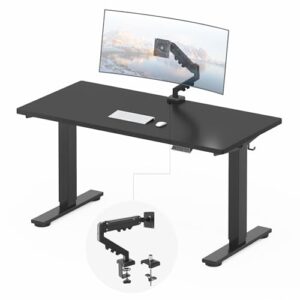
Need a computer desk that can handle multiple screens without making your workspace feel cramped? The Tribesigns 63-Inch Computer Desk with File Drawer is my top pick because it combines a wide work surface, monitor stand, storage, and printer space.
However, a monitor shelf is not the same as an adjustable monitor arm. If you want more screen-position flexibility, a separate VESA monitor arm can be a better solution. This guide compares desks for monitor setups and includes true monitor-arm alternatives for different workspace needs.
For readers building a complete workstation, our guide to a desk for 2 monitors and a laptop also covers another common multi-device layout.
Computer Desks With Monitor Arms: Our Top Picks
The best choice depends on your monitor count, desk space, storage needs, and mounting method.
- Best Overall: Tribesigns 63-Inch Computer Desk with File Drawer
- Best Compact: Tribesigns 55-Inch Computer Desk
- Best Gaming: Tribesigns 74.8-Inch U-Shaped Gaming Desk
- Best for Larger Setups: Tribesigns 78.74-Inch Two-Person Desk
- Best Separate Monitor Arm: HUANUO FlowLift Dual Monitor Stand
- Best Alternative Monitor Arm: MOUNTUP MU0026 Dual Monitor Mount
Tribesigns 63-Inch Computer Desk With File Drawer
Best Overall
Best For: Home offices, dual monitors, storage, and larger computer setups.

TRIBESIGNS
Tribesigns 63 Inch Computer Desk with File Drawer Cabinet, Home Office Desk
This 63-inch Tribesigns desk combines a wide work surface with a raised monitor stand, file drawer cabinet, and printer space. It suits the article's focus on organized home-office and dual-monitor workstations.
Who Should Buy It
Buy it if you want a spacious home-office desk with built-in monitor support and storage. Avoid it if you specifically need an adjustable VESA monitor arm.
Why We Pick It
It earned the top spot because it balances workspace, storage, and monitor support better than the other desks reviewed.
Features & Benefits
| Feature | Benefit |
|---|---|
| 63-inch desktop | gives larger monitor setups more working room |
| Raised monitor stand | elevates displays and frees some main desktop space |
| File drawer cabinet | adds dedicated storage for office documents and accessories |
| Printer space | keeps a printer or similar equipment off the main work area |
Pros & Cons
| Pros | Cons |
|---|---|
| ✓ Spacious workstation | ✕ Monitor stand is not an adjustable VESA arm |
| ✓ Built-in monitor stand | ✕ Large footprint |
| ✓ Useful office storage |
The Tribesigns 63-inch desk earns the top position because it balances workspace and storage well. The elevated monitor stand also helps free part of the main desktop.
The desk includes a file drawer, additional storage, and space for a printer. That combination makes the desk especially useful for a home office rather than a gaming-only setup.
The monitor stand works well for users who prefer a raised display position. However, it is a monitor stand rather than an adjustable VESA monitor arm.
Buy this model if you want an organized workstation with built-in monitor support. Avoid it if adjustable screen positioning is your main priority.
For a setup involving two displays and a laptop, compare it with our guide to a desk for 2 monitors and a laptop.
Tribesigns 55-Inch Computer Desk With Hutch
Best Compact
Best For: Smaller rooms, students, and compact dual-monitor workstations.

TRIBESIGNS
Tribesigns 55 Inch Computer Desk with Hutch, Large Gaming Desk with Monitor Shelf and Storage Shelves, Studio Workstation Desk Studying Writing Table for Home Office (Black)
This 55-inch Tribesigns desk provides a compact workstation with a built-in monitor shelf and storage shelves. Its smaller footprint makes it suitable for bedrooms, apartments, students, and compact home offices.
Who Should Buy It
Buy it if floor space is limited and you need a practical monitor workstation. Avoid it if you plan to run several large monitors with many peripherals.
Why We Pick It
It earned the compact pick because it provides monitor support and storage without requiring the footprint of a much larger desk.
Features & Benefits
| Feature | Benefit |
|---|---|
| 55-inch desktop | provides useful workspace while fitting smaller rooms |
| Monitor shelf | raises the display and creates usable space below it |
| Storage shelves | keep accessories and equipment organized |
| Hutch design | adds vertical storage without extending the main desktop |
Pros & Cons
| Pros | Cons |
|---|---|
| ✓ Compact footprint | ✕ Less workspace than larger desks |
| ✓ Built-in monitor shelf | ✕ Limited room for large multi-monitor setups |
| ✓ Strong customer rating |
The 55-inch Tribesigns desk is a better choice when floor space matters. Its smaller footprint makes it easier to fit into a bedroom, apartment, or compact home office.
A built-in monitor shelf raises the display area while leaving usable space underneath. The desk also provides storage for accessories and everyday office items.
The smaller surface creates a trade-off, however. Large monitors, speakers, laptops, and multiple accessories can quickly consume the available space.
Choose this desk when your setup needs to stay compact. Instead, choose a wider desk if you plan to add three large monitors or several computers.
Our guide to a desk for 2 monitors can help when your setup uses two displays without a laptop.
Tribesigns 74.8-Inch U-Shaped Gaming Desk
Best For Gaming
Best For: Gaming, multiple displays, large peripherals, and spacious workstation layouts.

TRIBESIGNS
Tribesigns 74.8 Inch Gaming Desk, Extra Long U Shaped Computer Desk with Monitor Stand Shelf and CPU Stand, Black Gamer Desk for Home Office, Gaming
This 74.8-inch U-shaped Tribesigns desk provides a large workspace for gaming, multiple displays, peripherals, and computer equipment. The integrated monitor stand shelf and CPU stand help organize a larger gaming workstation.
Who Should Buy It
Buy it if you have enough room for a large U-shaped gaming workstation. Avoid it if your room is small or you frequently need to move the desk.
Why We Pick It
It earned the gaming pick because its extra-long U-shaped layout provides separate areas for monitors, keyboards, computers, and gaming accessories.
Features & Benefits
| Feature | Benefit |
|---|---|
| 74.8-inch length | provides extensive workspace for gaming equipment |
| U-shaped layout | creates multiple work zones around the user |
| Monitor stand shelf | raises the main display area |
| CPU stand | keeps the computer tower off the main desktop |
Pros & Cons
| Pros | Cons |
|---|---|
| ✓ Very large workspace | ✕ Requires substantial floor space |
| ✓ Gaming-focused layout | ✕ Monitor shelf is not a fully adjustable monitor arm |
| ✓ Dedicated CPU area |
The 74.8-inch U-shaped Tribesigns desk provides substantially more workspace than a compact straight desk. The U-shaped layout also creates separate areas for monitors, keyboards, computers, and accessories.
The integrated monitor stand gives the main display area a dedicated raised section. The desk also includes features aimed at gaming and computer work, including storage and a CPU area.
The large footprint is the biggest limitation. A U-shaped desk needs considerably more floor space than a conventional straight desk.
Choose this model if your room can accommodate the larger footprint. Avoid it if you need a desk that can move easily between rooms.
If you are building a workstation around several computers, our guide to a computer desk for multiple computers covers another useful configuration.
Tribesigns 78.74-Inch Two-Person Desk
Best For Large Workstations
Best For: Large multi-monitor setups, shared workspaces, and two-person offices.

TRIBESIGNS
Tribesigns Two Person Desk with Monitor Stand, 78.74" Long Double Computer Office Desk with Storage Shelves, Large Gaming Study Writing Table Workstation for Home Office (Rustic Brown)
This 78.74-inch Tribesigns desk is built around a very large shared workspace with monitor stands and storage shelves. Its two-person design makes it useful for shared offices, large multi-monitor setups, and workstations that need room to grow.
Who Should Buy It
Buy it if you need a very wide desk for two people or extensive computer equipment. Avoid it if available floor space is limited.
Why We Pick It
It earned the large-workstation pick because its long desktop provides substantially more room than the compact and standard-size options.
Features & Benefits
| Feature | Benefit |
|---|---|
| 78.74-inch length | provides extensive horizontal workspace |
| Two-person design | supports shared work or separate workstation zones |
| Monitor stands | provide raised display areas for the users |
| Storage shelves | provide additional space for accessories and equipment |
Pros & Cons
| Pros | Cons |
|---|---|
| ✓ Extremely spacious | ✕ Needs substantial floor space |
| ✓ Suitable for shared workspaces | ✕ Less suitable for small rooms |
| ✓ Built-in monitor stands |
The 78.74-inch Tribesigns desk provides a very large workspace for users who need more than a conventional computer desk.
The wide desktop can accommodate multiple monitors while leaving additional room for keyboards, laptops, documents, or other equipment. Its two-person design also makes it useful for shared work areas.
The larger surface is the main advantage, but the size can become a drawback in smaller rooms. Measure the available wall and floor space before buying.
This desk makes the most sense when you expect your workstation to grow. For a smaller room, the 55-inch Tribesigns option is easier to accommodate.
If your priority is specifically multiple monitors rather than a shared desk, compare this layout with the best home office desk for multiple monitors guide.
HUANUO FlowLift Dual Monitor Stand
Best Separate Monitor Arm
Best For: Existing desks that need adjustable dual-monitor mounting.

HUANUO
HUANUO FlowLift™ Dual Monitor Stand, Fully Adjustable Gaming Monitor Desk Mount for 13–32″ Computer Screens, Full Motion VESA 75x75/100x100 with C-Clamp & Grommet Base, Each Arm Holds 4.4 to 19.8 lbs
The HUANUO FlowLift is a true dual-monitor arm rather than a computer desk with a fixed monitor shelf. It provides full-motion positioning and can free valuable desktop space when paired with a sturdy compatible desk.
Who Should Buy It
Buy it if you already have a suitable desk and want adjustable dual-monitor positioning. Avoid it if your desk cannot safely support a clamp or grommet mount.
Why We Pick It
It earned the separate monitor-arm pick because it adds the flexibility that fixed monitor shelves cannot provide.
Features & Benefits
| Feature | Benefit |
|---|---|
| Dual monitor arms | supports two compatible displays |
| VESA 75x75/100x100 | fits common monitor mounting patterns |
| C-clamp and grommet base | provides two common desk mounting methods |
| 13–32-inch support | accommodates a broad range of computer monitors |
| 4.4–19.8-pound capacity per arm | supports compatible monitors within the stated weight range |
Pros & Cons
| Pros | Cons |
|---|---|
| ✓ Full-motion adjustment | ✕ Requires a compatible desk |
| ✓ Supports two monitors | ✕ Monitor compatibility must be checked before installation |
| ✓ Very large review base |
The HUANUO FlowLift is a different type of solution because it is an actual monitor mount rather than a desk.
Its dual-arm design can hold two compatible displays and free desktop space that traditional monitor stands would occupy.
The mount supports VESA mounting and uses desk-clamp or grommet-style installation. Compatibility still depends on your monitor’s VESA pattern, weight, and size.
Choose this option if you already own a sturdy computer desk. Avoid treating it as a replacement for a desk because the monitor arm still needs a suitable mounting surface.
HUANUO’s official product range also includes single, dual, and triple monitor mounts for different screen configurations. HUANUO’s official monitor-arm range provides the manufacturer’s current compatibility information.
MOUNTUP MU0026 Dual Monitor Mount
Best Alternative Monitor Arm
Best For: Dual-monitor setups that need height, tilt, swivel, and rotation adjustments.

MOUNTUP
MOUNTUP Dual Monitor Desk Mount, Dual Monitor Stand for Desk Fits 17 to 32 Inch Screen, Gas Spring & Height Adjustable Computer Monitor Desk Mount for 2 Monitors, VESA Mount with Clamp/Grommet Base
The MOUNTUP MU0026 provides adjustable dual-monitor mounting for compatible 17- to 32-inch displays. Its gas-spring arms, VESA compatibility, and clamp or grommet mounting make it a flexible alternative to desks with fixed monitor shelves.
Who Should Buy It
Buy it if you want adjustable height, tilt, swivel, and rotation for two monitors. Avoid it if your desk is too thin, unstable, or unsuitable for clamp or grommet mounting.
Why We Pick It
It earned the alternative monitor-arm position because it combines dual-screen support with broad positioning adjustment and cable management.
Features & Benefits
| Feature | Benefit |
|---|---|
| Gas-spring arms | provide smoother monitor height adjustment |
| 17–32-inch support | accommodates common monitor sizes |
| VESA 75x75/100x100 | supports standard mounting patterns |
| Clamp/grommet base | works with different compatible desk surfaces |
| 17.6-pound maximum per arm | supports compatible displays within the manufacturer's stated limit |
Pros & Cons
| Pros | Cons |
|---|---|
| ✓ Broad adjustment range | ✕ Requires a suitable mounting surface |
| ✓ Supports two monitors | ✕ Glass desks need additional reinforcement for safe mounting ### |
| ✓ Cable management included |
The MOUNTUP MU0026 is another true monitor-arm solution for a suitable computer desk.
The mount supports two monitors up to 32 inches and uses 75 × 75 or 100 × 100 VESA mounting. Each arm has a published weight limit, so check your monitor specifications before installation.
Its gas-spring mechanism provides adjustable positioning. The arms can also tilt, swivel, and rotate compatible screens.
The desk itself must also meet the mounting requirements. MOUNTUP lists compatible desk thickness ranges for its clamp and grommet mounting methods.
Do not install a clamp-style monitor arm on a fragile surface without checking the manufacturer’s mounting requirements. MOUNTUP specifically warns about glass-table installations and recommends appropriate reinforcement for safe mounting.
The official MOUNTUP monitor-mount range provides additional information about the manufacturer’s mounting solutions.
Computer Desk With Monitor Stand vs. Monitor Arm
A monitor stand raises a display, while a monitor arm provides adjustable mounting and positioning.
This distinction matters when choosing a desk for a multi-monitor workstation. A built-in shelf can be convenient, but it normally offers less adjustment than a VESA arm.
| Feature | Monitor Stand or Shelf | Monitor Arm |
|---|---|---|
| Raises monitor | Yes | Yes |
| Height adjustment | Usually limited | Usually adjustable |
| Tilt adjustment | Usually limited | Usually available |
| Swivel | Usually unavailable | Usually available |
| Portrait rotation | Usually unavailable | Often available |
| Frees desktop space | Partly | Yes |
| Requires VESA mounting | Not usually | Usually |
VESA’s Flat Display Mounting Interface standard defines standardized mounting interfaces for flat displays and mounting equipment. Check your monitor’s VESA pattern before buying an arm.
You can also review the VESA mounting standard for official information about display mounting interfaces.
💡 Pro Tip: Measure your monitor’s VESA pattern and weight before choosing a monitor arm. Then check the desk thickness and mounting area.
How Wide Should a Desk Be for Two Monitors?
A 55-inch desk can work for many dual-monitor setups, while 60 to 63 inches gives you more working room.
Monitor size changes the amount of space you need. Two 24-inch displays require less horizontal space than two 32-inch displays.
Also account for your keyboard, mouse, speakers, laptop, and other equipment. Monitor arms can recover desktop space, but they do not eliminate the need for a stable and adequately sized desk.
How Deep Should a Computer Desk Be for Monitors?
A deeper desk gives you more room to position displays and keep other equipment in front of them.
The ideal depth depends on monitor size, stand design, viewing distance, and your working position. Measure your equipment instead of relying only on the desk’s advertised width.
If a laptop shares the workstation, consider a laptop stand to keep the laptop from consuming valuable desktop space. Our guide to the best laptop stand for a desk setup covers that type of arrangement.
What Should You Check Before Installing a Monitor Arm?
Check the monitor’s VESA pattern, weight, size, and the desk’s mounting area before installing an arm.
- VESA pattern: Confirm the monitor supports the arm’s mounting standard.
- Monitor weight: Keep the display within the arm’s published capacity.
- Screen size: Check the arm’s supported size range.
- Desk thickness: Confirm the clamp or grommet supports your desktop.
- Desk material: Avoid mounting to unsuitable or fragile surfaces.
- Clearance: Leave enough room behind the desk for the mounting hardware.
- Stability: Use a sturdy desk that can handle the combined equipment load.
For example, the MOUNTUP MU0026 supports 17- to 32-inch monitors, VESA 75 × 75 or 100 × 100 mounting, and up to 17.6 pounds per arm. The manufacturer also specifies desk-thickness limits for its mounting methods.
How to Choose a Computer Desk for Multiple Monitors
The best desk balances width, depth, stability, monitor support, storage, and the available room.
Choose the Right Desk Width
Desk width determines how much horizontal space your monitors and peripherals can occupy.
A 55-inch desk suits many dual-monitor setups. A wider 63-inch or larger desk provides more flexibility for large displays, laptops, speakers, and accessories.
Choose the Right Desk Shape
A straight desk suits compact rooms, while an L-shaped or U-shaped desk provides more workspace.
Choose an L-shaped desk when you want separate zones for monitors, computers, and paperwork. Choose a U-shaped desk when maximum workspace matters more than floor space.
For more home-office desk ideas, see our guide to office computer desks for home.
Check Desk Stability
A stable frame matters when multiple monitors or a monitor arm sit on the desktop.
Monitor movement can become distracting when the desk flexes during typing. A strong frame and suitable desktop construction can reduce unwanted movement.


Consider Cable Management
Multiple monitors create more power and video cables than a single-display setup.
Look for cable-management openings, trays, or enough space to route cables neatly. A clean cable path also makes future upgrades easier.
Think About Future Upgrades
Choose enough workspace for the equipment you expect to add later.
A desk that barely fits two monitors today may become cramped after adding a laptop, speakers, docking station, or third display.
A suitable USB-C docking station for laptops can also simplify connections when a laptop drives external displays.
Can a Monitor Arm Go on Any Computer Desk?
No, a monitor arm does not work safely with every computer desk.
The desk needs a suitable thickness, strong mounting area, and enough structural support for the arm and monitors. The monitor must also meet the arm’s size, weight, and VESA requirements.
Thin, fragile, hollow, or glass surfaces require particular caution. Always follow the monitor-arm manufacturer’s mounting instructions.
Are Monitor Arms Better Than Monitor Stands?
Monitor arms are better when you need flexible screen positioning and more usable desktop space.
A monitor stand can be simpler when you want an inexpensive and stable raised display. A monitor arm makes more sense when height, tilt, swivel, rotation, or screen spacing matters.
For a fixed home-office setup, either solution can work. The better option depends on how often you adjust your displays.
Can a Monitor Arm Hold Two Monitors?
Yes, a dual monitor arm can hold two compatible displays.
However, each arm has its own size and weight limit. The MOUNTUP MU0026, for example, lists support for monitors up to 32 inches and up to 17.6 pounds per arm.
Always calculate each monitor’s weight without exceeding the manufacturer’s capacity.
What Is the Best Desk for Two Monitors and a Laptop?
A desk around 55 to 63 inches is a practical starting point for many two-monitor and laptop setups.
The Tribesigns 63-inch desk is particularly useful when storage and a raised monitor position matter. A separate monitor arm can create even more usable desktop space.
If your setup centers on a laptop and two displays, see our guide to a desk for 2 monitors and a laptop for another comparison.
What Is the Best Computer Desk With Monitor Arms?
The Tribesigns 63-inch computer desk is the best overall choice here for users who want a spacious workstation with built-in monitor support and storage.
However, the desk uses a monitor stand rather than a true adjustable monitor arm. If adjustable positioning matters more, pair a sturdy desk with a HUANUO or MOUNTUP dual monitor arm.
Frequently Asked Questions
Do monitor arms work with any desk?
No, monitor arms require a suitable desk thickness, mounting area, and stable construction.
How wide should a desk be for two monitors?
A 55-inch desk can work for many two-monitor setups, while 60 to 63 inches provides more room.
Can a monitor arm damage a desk?
Yes, an unsuitable clamp or excessive load can damage a desk surface.
Do monitor arms need VESA mounting?
Most conventional monitor arms use VESA mounting, so check your monitor’s mounting pattern before buying.
Can a monitor arm hold a 32-inch monitor?
Yes, many monitor arms support 32-inch displays, but the monitor must also meet the arm’s weight limit.
Is a built-in monitor stand the same as a monitor arm?
No, a built-in monitor stand normally raises the screen without providing the full adjustment range of an articulated monitor arm.
What is the best desk for multiple monitors?
A 63-inch or larger desk is a practical choice for many multi-monitor workstations.
Should I buy a desk with a monitor stand or a separate monitor arm?
Choose a built-in stand for simplicity and a separate monitor arm for greater positioning flexibility.
Final Thoughts
The best computer desk depends on how many monitors you use and how much workspace you need.
- Tribesigns 63-Inch Computer Desk With File Drawer — Best overall for home-office storage and monitor setups.
- Tribesigns 55-Inch Computer Desk — Best compact option for smaller workspaces.
- Tribesigns 74.8-Inch U-Shaped Gaming Desk — Best for spacious gaming workstations.
- Tribesigns 78.74-Inch Two-Person Desk — Best for large or shared workstations.
- HUANUO FlowLift Dual Monitor Stand — Best separate dual-monitor arm option.
- MOUNTUP MU0026 Dual Monitor Mount — Best alternative for adjustable dual-monitor mounting.
Before buying, measure your monitors, desk space, computer equipment, and available floor area. Then choose a desk that leaves room for the setup you use today and the equipment you may add later.
Related Articles

Best Computer Desk for Multiple Computers: 6 Top Picks
August 30, 2026
Best Multiple Computer Desks in 2026: Top Picks for 2+ PCs
August 30, 2026
Best Desk for 2 Monitors: 9 Top Picks for 2026
August 30, 2026