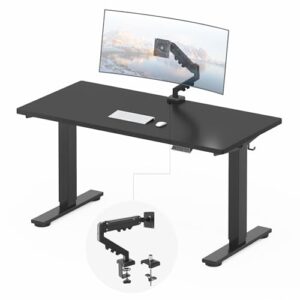
Need room for two monitors and a laptop without turning your workspace into a cluttered mess? A desk for 2 monitors and a laptop should give you enough width, depth, and stability for all three devices. For most people, I recommend the PRAISUN 63-inch L-shaped desk because its larger surface leaves more room for monitors, a laptop, and everyday work gear.
This guide compares the best options for different setups. I also cover desk size, monitor arms, cable management, and ways to create a more comfortable workstation.
Best Desks for Two Monitors and a Laptop
The best desk for two monitors and a laptop combines enough surface space with good stability and practical organization. A 59- to 63-inch desk gives most users a comfortable starting point.
- Best Overall: PRAISUN 63-inch L-Shaped Desk
- Best Versatile Option: Korfile 59-inch L-Shaped Desk
- Best Traditional Workstation: TOPSKY 59-inch L-Shaped Desk
- Best for Gaming: AODK 59-inch Gaming Desk
- Best 63-Inch Alternative: Huuger 63-inch L-Shaped Desk
- Best Standing Desk: Veken 55-inch Electric Standing Desk
- Best L-Shaped Standing Desk: OffiGo 55-inch Electric Standing Desk
- Best Compact Option: Lufeiya 47-inch L-Shaped Desk
Product Reviews
PRAISUN 63-Inch L-Shaped Desk
Best Overall
Best For: Large dual-monitor and laptop workstations

PRAISUN
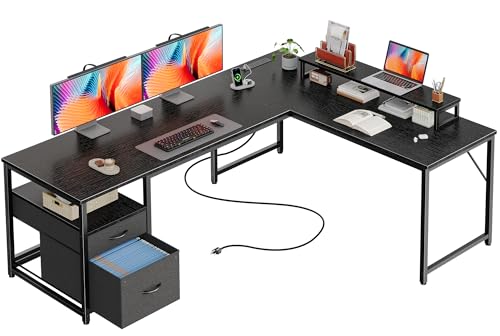
PRAISUN 63 Inch L Shaped Desk with Power Outlets and USB-C Port, Computer Corner Home Office Desk with File Fabric Drawers and Movable Monitor Stand, Larger Storage, Gaming, Writing, Work, Black
The PRAISUN is the largest desk in this roundup, with a 63-inch L-shaped workspace for two monitors and a laptop. Its power outlets, USB-C port, storage, and movable monitor stand make it well suited to a busy home office or gaming workstation.
Who Should Buy It
Buy this if you need generous workspace for multiple screens, a laptop, and accessories. Avoid it if your room cannot accommodate an L-shaped desk.
Why We Pick It
It earned the top spot because the larger surface gives a dual-monitor setup more breathing room. The integrated power and movable monitor stand also reduce desktop clutter.
Features & Benefits
| Feature | Benefit |
|---|---|
| 63-inch L-shaped workspace | provides generous room for two monitors and a laptop |
| Power outlets and USB-C port | keeps charging connections within easy reach |
| Movable monitor stand and storage | helps organize screens and keep work accessories off the main surface |
Pros & Cons
| Pros | Cons |
|---|---|
| ✓ Spacious 63-inch workspace | ✕ Requires substantial floor space |
| ✓ Built-in power and USB-C | ✕ L-shaped design may not suit every room |
| ✓ Useful storage and monitor stand |
The PRAISUN earns the top spot because the 63-inch L-shaped design provides generous working space. The larger surface gives two monitors, a laptop, keyboard, and mouse more room to coexist.
In addition, the desk includes integrated power outlets and USB-C connectivity. The movable monitor stand can also help keep the main desktop less crowded.
Buy it if: You want a spacious workstation for work, study, or gaming.
Avoid it if: Your room cannot accommodate an L-shaped desk.
Korfile 59-Inch L-Shaped Computer Desk
Best Versatile Option
Best For: Users who want storage and monitor space
KORFILE
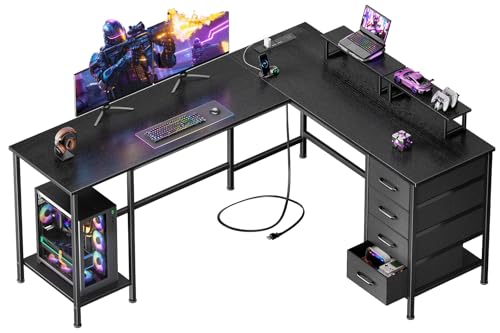
Korfile 59 inch L Shaped Computer Desk with Power Outlets, Black
The Korfile combines a 59-inch L-shaped workspace with two monitor stands and four adjustable storage drawers. The reversible layout gives users more flexibility when arranging a dual-monitor and laptop workstation.
Who Should Buy It
Buy this if you want storage, monitor space, and a flexible corner layout. Avoid it if you prefer a simple rectangular desk without built-in storage.
Why We Pick It
It earned a spot because it balances workspace and organization without focusing mainly on gaming features. Two monitor stands can also help free useful desktop space.
Features & Benefits
| Feature | Benefit |
|---|---|
| 59-inch L-shaped workspace | provides room for multiple screens and a laptop |
| Two monitor stands | raises monitors and frees part of the desktop |
| Four adjustable storage drawers | keeps accessories and paperwork organized |
Pros & Cons
| Pros | Cons |
|---|---|
| ✓ Two monitor stands | ✕ Large corner footprint |
| ✓ Four storage drawers | ✕ Built-in storage reduces some legroom |
| ✓ Reversible layout |
The Korfile combines a 59-inch L-shaped workspace with two monitor stands and built-in storage. That combination makes the desk particularly useful for a multi-screen home office.
The reversible layout also gives you more flexibility when arranging the workstation. Meanwhile, the storage drawers can keep paperwork and accessories away from the main work surface.
Buy it if: You want storage, monitor stands, and a flexible L-shaped layout.
Avoid it if: You prefer a simple rectangular desk with no built-in storage.
TOPSKY 59-Inch L-Shaped Desk
Best Traditional Workstation
Best For: Productivity-focused dual-monitor setups

TOPSKY
TOPSKY L-Shaped Desk Corner Computer Desk 59" x 59" with 24" Deep Workstation Bevel Edge Design (Oak)
The TOPSKY provides a large 59-by-59-inch L-shaped workspace with a 24-inch-deep work surface. Its straightforward design suits productivity-focused users who want space for two monitors and a laptop.
Who Should Buy It
Buy this if you want a spacious traditional workstation with a clean design. Avoid it if you have limited corner space.
Why We Pick It
It earned a position because it offers substantial workspace without adding gaming-focused extras. The included monitor arm can also reduce the space used by monitor stands.
Features & Benefits
| Feature | Benefit |
|---|---|
| 59-by-59-inch L-shaped design | provides a broad corner workstation |
| 24-inch desk depth | leaves useful front-to-back room for peripherals |
| Monitor arm | helps position displays while preserving desktop space |
Pros & Cons
| Pros | Cons |
|---|---|
| ✓ Large corner workspace | ✕ Requires significant corner space |
| ✓ 24-inch working depth | ✕ Limited built-in storage |
| ✓ Clean traditional design |
The TOPSKY S203A offers a large L-shaped workspace without relying heavily on gaming-focused features. Its roughly 59-inch-by-59-inch footprint creates useful room for multiple screens and a laptop.
The approximately 24-inch desk depth also provides more front-to-back workspace. The included monitor arm can further reduce the space consumed by monitor stands.
If you need even more workspace, compare this design with other computer desks for multiple computers.
Buy it if: You want a straightforward workstation with a large corner footprint.
Avoid it if: You have limited corner space.


AODK 59-Inch Gaming Desk
Best for Gaming
Best For: Gaming and work setups

AODK
AODK Gaming Desk w/PC Showcase Stand, 59" Reversible, RGB LED
The AODK is designed for users who want one workstation for gaming and productivity. Its 59-inch surface provides useful room for two monitors and a laptop, while the PC showcase stand and RGB lighting add a gaming-focused style.
Who Should Buy It
Buy this if gaming is an important part of your desk setup. Avoid it if you prefer a minimalist office appearance.
Why We Pick It
It earned its position because it combines a practical 59-inch workstation with gaming-specific features. The reversible design also gives users more flexibility when arranging the setup.
Features & Benefits
| Feature | Benefit |
|---|---|
| 59-inch reversible design | provides substantial workspace with flexible placement |
| PC showcase stand | gives a gaming PC or display equipment a dedicated elevated area |
| RGB LED lighting | adds customizable gaming-style illumination |
Pros & Cons
| Pros | Cons |
|---|---|
| ✓ Spacious 59-inch surface | ✕ Gaming appearance may not suit every office |
| ✓ PC showcase area | ✕ Less focused on minimalist organization |
| ✓ RGB lighting |
The AODK is a strong choice for users who want one desk for gaming and productivity. Its 59-inch surface provides useful room for a dual-monitor arrangement and laptop.
The gaming-focused design adds RGB lighting and an elevated PC showcase area. Therefore, this desk makes more sense for users who want a gaming-oriented workspace rather than a minimalist office.
Buy it if: You want gaming features alongside a multi-screen workspace.
Avoid it if: You prefer a clean, traditional office appearance.
Huuger 63-Inch L-Shaped Desk
Best 63-Inch Alternative
Best For: Users who want maximum L-shaped workspace

HUUGER
Huuger 63 Inch L Shaped Desk with Power Outlets & 0.95 Inch Thicker Desktop
The Huuger provides a spacious 63-inch-class L-shaped workstation with a thicker desktop and built-in power outlets. The large surface leaves room for two monitors, a laptop, speakers, documents, and other work accessories.
Who Should Buy It
Buy this if you want a large L-shaped workstation with plenty of usable surface area. Avoid it if your workspace is too small for a large corner desk.
Why We Pick It
It earned a place as a strong alternative to the PRAISUN because it provides another large-format option. The thicker desktop and power outlets add useful practical features.
Features & Benefits
| Feature | Benefit |
|---|---|
| 63-inch L-shaped workspace | creates room for a multi-monitor laptop setup |
| 0.95-inch thicker desktop | provides a substantial work surface |
| Built-in power outlets | makes charging devices more convenient |
Pros & Cons
| Pros | Cons |
|---|---|
| ✓ Spacious workstation | ✕ Large footprint |
| ✓ Thick desktop | ✕ L-shaped layout needs careful room planning |
| ✓ Built-in power outlets |
The Huuger gives you another 63-inch-class option for a large workstation. The spacious L-shaped surface works well when two monitors and a laptop need dedicated positions.
The larger desktop also leaves room for speakers, documents, or other work accessories. As a result, the Huuger is a useful alternative when you want more workspace without moving to a much longer straight desk.
Buy it if: You want a spacious L-shaped workstation with practical built-in features.
Avoid it if: You need a compact desk for a small bedroom or office.
Veken 55-Inch Electric Standing Desk
Best Standing Desk
Best For: Sit-stand dual-monitor workstations

VEKEN
Veken 55 Inch Large Electric Standing Desk, Gaming Table, White
The Veken adds electric height adjustment to a 55-inch workstation for users who want to alternate between sitting and standing. Its surface can support two monitors and a laptop when the equipment is arranged efficiently.
Who Should Buy It
Buy this if sit-stand flexibility matters more than maximum desktop space. Avoid it if you need a large amount of spare surface area for peripherals.
Why We Pick It
It earned a spot because it gives the roundup a practical standing-desk option. Monitor arms can make the 55-inch surface easier to organize.
Features & Benefits
| Feature | Benefit |
|---|---|
| 55-inch desktop | provides workable space for a dual-monitor laptop setup |
| Electric height adjustment | lets users switch between sitting and standing |
| Height-adjustable workstation design | supports more flexible home-office positioning |
Pros & Cons
| Pros | Cons |
|---|---|
| ✓ Electric height adjustment | ✕ Less surface area than 59- or 63-inch desks |
| ✓ 55-inch workspace | ✕ Equipment placement requires more planning |
| ✓ Suitable for work or gaming |
The Veken adds electric height adjustment to the dual-monitor desk category. Its 55-inch surface can support a two-monitor and laptop setup when the equipment is arranged efficiently.
However, 55 inches leaves less spare space than a 59- or 63-inch desk. Using monitor arms can therefore make the workstation easier to organize.
Buy it if: You want the option to alternate between sitting and standing.
Avoid it if: You need a large amount of free desktop space.
OffiGo 55-Inch L-Shaped Electric Standing Desk
Best L-Shaped Standing Desk
Best For: Users who want standing adjustment and corner workspace
OFFIGO
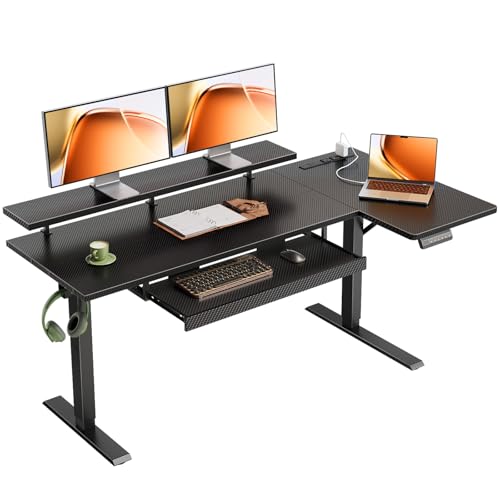
OffiGo 55" Reversible L Shaped Electric Standing Desk, Carbon Fiber Black
The OffiGo combines an L-shaped workstation with electric height adjustment, making it useful for users who want standing flexibility and corner workspace. Its monitor stand, keyboard tray, power outlets, and memory presets add practical workstation features.
Who Should Buy It
Buy this if you want a standing desk with an L-shaped layout. Avoid it if you have no need for electric height adjustment.
Why We Pick It
It earned a spot because it offers a different approach to the dual-monitor workstation. The L-shaped surface provides separate areas for screens, a laptop, and other equipment.
Features & Benefits
| Feature | Benefit |
|---|---|
| 55-inch reversible L-shaped design | provides flexible corner workspace |
| Electric height adjustment with three memory presets | makes preferred working heights easier to select |
| Monitor stand, keyboard tray, and power outlets | helps organize the workstation and keep connections accessible |
Pros & Cons
| Pros | Cons |
|---|---|
| ✓ Electric height adjustment | ✕ Smaller than the 63-inch options |
| ✓ L-shaped workspace | ✕ More complex than a fixed-height desk |
| ✓ Three memory presets |
The OffiGo combines an L-shaped layout with electric height adjustment. That combination makes it useful for people who want more flexibility than a conventional fixed desk.
The monitor stand, keyboard tray, power outlets, and memory presets add practical workstation features. Still, the 55-inch size requires more careful equipment placement than a larger 63-inch desk.
Buy it if: You want a standing desk with an L-shaped workstation.
Avoid it if: You have no need for height adjustment.
Lufeiya 47-Inch L-Shaped Desk
Best Compact Option
Best For: Small rooms and compact workstations

LUFEIYA
Lufeiya White L Shaped Computer Desk with Drawers & Storage Shelves, 47 Inch Corner Reversible Desk with Power Outlet for Home Office Bedroom, L-Shaped Teen PC Desks with Fabric Drawer, White
The Lufeiya is the smallest desk in this roundup, with a 47-inch L-shaped design for compact rooms. Its drawers, storage shelves, and power outlet add useful organization, but the smaller surface limits flexibility with large monitors and a laptop.
Who Should Buy It
Buy this if you need a compact workstation for a bedroom, small office, or tight corner. Avoid it if you use large monitors and need substantial peripheral space.
Why We Pick It
It earned a spot because not every reader has room for a 59- or 63-inch desk. A dual monitor arm and laptop stand can make the smaller surface more practical.
Features & Benefits
| Feature | Benefit |
|---|---|
| 47-inch L-shaped design | fits smaller workspaces more easily |
| Drawers and storage shelves | provide organization without requiring additional furniture |
| Power outlet | keeps device charging closer to the workstation |
Pros & Cons
| Pros | Cons |
|---|---|
| ✓ Compact footprint | ✕ Limited desktop space |
| ✓ Built-in storage | ✕ Less suitable for large dual-monitor setups |
| ✓ Reversible design |
The Lufeiya is the smallest desk in this roundup. Its 47-inch L-shaped design makes it easier to fit into a smaller room.
However, the smaller surface limits flexibility with two large monitors and a laptop. A dual monitor arm and laptop stand can make the available space more usable.
If your workspace is particularly small, a dedicated laptop stand for a desk setup can help move the laptop off the main work surface.
Buy it if: You need an affordable, compact workstation.
Avoid it if: You use large monitors and need lots of peripheral space.
How Big Should a Desk Be for Two Monitors and a Laptop?
A desk should ideally measure at least 55 inches wide for two monitors and a laptop, while 59 to 63 inches provides more comfortable working space.
The exact size depends on your monitor dimensions and how you mount the screens. Two 27-inch monitors consume considerably more horizontal space than two 24-inch displays.
Depth also matters. A deeper desktop gives your monitors more room while leaving space for a keyboard, mouse, and laptop.
Is a 48-Inch Desk Big Enough?
A 48-inch desk can fit two monitors and a laptop, but the arrangement will usually feel cramped.
Monitor arms can improve the situation by moving the screens away from their bulky stands. A laptop stand can also free space for your keyboard and mouse.
Is a 55-Inch Desk Big Enough?
A 55-inch desk can work well for two monitors and a laptop when the equipment is arranged carefully.
For example, mounting both monitors on an arm and placing the laptop on a stand can leave useful room for peripherals.
Is a 60-Inch Desk Better?
A 60-inch-class desk is generally more comfortable for a dual-monitor laptop workstation.
The additional width gives you more freedom to separate the screens and position the laptop. You also get more room for speakers, documents, and other accessories.
What to Look for in a Desk for Two Monitors
The best desk should provide enough space, stability, and organization for your complete workstation.
Desk Width and Depth
Choose a desk with enough width for both monitors and enough depth for comfortable viewing and keyboard placement.
A wider desk also gives you more freedom when changing monitor positions. For most users, a 59- to 63-inch desk offers a strong balance.
Monitor Arm Compatibility
Monitor arms can make a smaller desk much easier to use with two screens.
Before buying, check the desk thickness and mounting area. Also confirm that the desk can support the monitor arm’s clamp without interfering with drawers or shelves.
A dedicated computer desk with monitor arms can be especially useful when desktop space is limited.
Weight Capacity and Stability
A stable desk should comfortably support both monitors, the laptop, and your other equipment.
Monitor arms can concentrate significant weight at one mounting point. Therefore, check the manufacturer’s weight rating before attaching heavy displays.
Cable Management
Good cable management keeps a three-device workstation cleaner and easier to maintain.
Look for cable holes, trays, power outlets, or channels that keep monitor and laptop cables away from your legs.
Storage
Storage is useful when your desk also serves as a home office.
Drawers and shelves can hold documents, chargers, headphones, and other accessories. However, avoid choosing storage that blocks your preferred seating position.
How to Set Up Two Monitors and a Laptop
The easiest setup places the primary monitor directly in front of you and positions the second screen beside it.
- Place the main monitor directly in front of your seating position.
- Position the second monitor beside the primary display.
- Raise the laptop on a stand if you need extra desktop space.
- Connect the laptop to both displays through compatible ports or a docking station.
- Place the keyboard and mouse in front of the main monitor.
- Route power and display cables through the desk’s cable-management system.
- Adjust the screens so your viewing position remains comfortable.
A USB-C docking station for laptops can simplify connections when the laptop supports compatible display output.
💡 Pro Tip: Use monitor arms and a laptop stand when desktop space feels tight. The combination can free a surprising amount of usable workspace.
Desk Types for a Dual-Monitor Laptop Setup
The best desk type depends on your available space, working style, and need for flexibility.
L-Shaped Desk
An L-shaped desk is ideal when you have a corner available and want separate zones for monitors and other equipment.
The extended surface can also give you a dedicated area for paperwork, a laptop, or accessories.
Standing Desk
A standing desk is a good option when you want to alternate between sitting and standing.
Electric models make height changes easier. However, check the desk’s stability at standing height before using heavy monitors.
Traditional Rectangular Desk
A rectangular desk works well when you want a simple workstation with a predictable footprint.
Choose a wider model if both monitors sit directly on the desktop. Monitor arms can make a rectangular desk more space-efficient.
Related Home Office Setup Considerations
A desk is only one part of a productive workstation. Your chair, keyboard, mouse, lighting, and connectivity also affect everyday comfort.
For a broader workspace plan, see this guide to setting up the perfect home office on a budget.
For additional desk ideas, you can also compare home office desks for multiple monitors and office computer desks for home.
A comfortable chair matters too, especially when you spend several hours at the desk. An ergonomic office chair can complement a properly sized workstation.
Frequently Asked Questions
What is the best desk for 2 monitors and a laptop?
The PRAISUN 63-inch L-shaped desk is the best overall choice because it provides generous workspace for two monitors and a laptop.
How big should a desk be for 2 monitors and a laptop?
A 55-inch desk can work, but a 59- to 63-inch desk usually provides more comfortable working space.
What size desk do I need for two monitors and a laptop?
Choose at least 55 inches for a practical setup, or 59 to 63 inches for more workspace.
How deep should a desk be for two monitors and a laptop?
A desk around 24 inches deep gives a useful balance between monitor distance and available workspace.
Can a desk fit two monitors and a laptop?
Yes, most medium-to-large computer desks can fit two monitors and a laptop when the equipment is arranged efficiently.
Is a 55-inch desk big enough for two monitors and a laptop?
Yes, a 55-inch desk can work, especially with monitor arms and a laptop stand.
Is a 60-inch desk big enough for two monitors and a laptop?
Yes, a 60-inch-class desk provides a more comfortable amount of space for most dual-monitor laptop setups.
Do I need monitor arms for two monitors?
No, monitor arms are not required, but they can significantly increase usable desktop space.
Are L-shaped desks good for dual monitors?
Yes, L-shaped desks work well because the extended surfaces provide separate areas for screens, laptops, and accessories.
Are standing desks good for two monitors and a laptop?
Yes, standing desks can work well when the frame remains stable with the combined monitor and equipment weight.
Final Thoughts
The best desk for 2 monitors and a laptop depends on the space available and how much equipment you use. A larger 59- to 63-inch desk is the safest choice for a comfortable workstation.
- PRAISUN 63-Inch L-Shaped Desk — Best overall for spacious setups.
- Korfile 59-Inch L-Shaped Desk — Best for storage and flexibility.
- TOPSKY 59-Inch L-Shaped Desk — Best traditional workstation.
- AODK 59-Inch Gaming Desk — Best for gaming and work.
- Huuger 63-Inch L-Shaped Desk — Strong large-workspace alternative.
- Veken 55-Inch Electric Standing Desk — Best standing option.
- OffiGo 55-Inch L-Shaped Electric Standing Desk — Best L-shaped standing option.
- Lufeiya 47-Inch L-Shaped Desk — Best for compact workspaces.
Related Articles

Best Computer Desk for Multiple Computers: 6 Top Picks
August 30, 2026
Best Multiple Computer Desks in 2026: Top Picks for 2+ PCs
August 30, 2026
Best Desk for 2 Monitors: 9 Top Picks for 2026
August 30, 2026