
Opening an OPay account on your phone is straightforward: install the official OPay app, start registration with your active phone number, complete the verification steps shown in the app, and finish your account setup.
OPay provides mobile financial services in Nigeria, including money transfers, bill payments, airtime and data purchases, savings, debit-card services, and other financial products. The current OPay app is available for Android and iPhone users. 0
This guide explains what you need before registration, how to open an OPay account, what verification involves, what you can do after registration, and how to fix common account problems.
How to Open an OPay Account From Your Phone
You can open an OPay account by downloading the official OPay app, entering your phone number, completing the registration prompts, and providing any identity information requested during verification.
For safety, download the app only from an official app store and confirm that the developer information matches OPay before entering sensitive information.
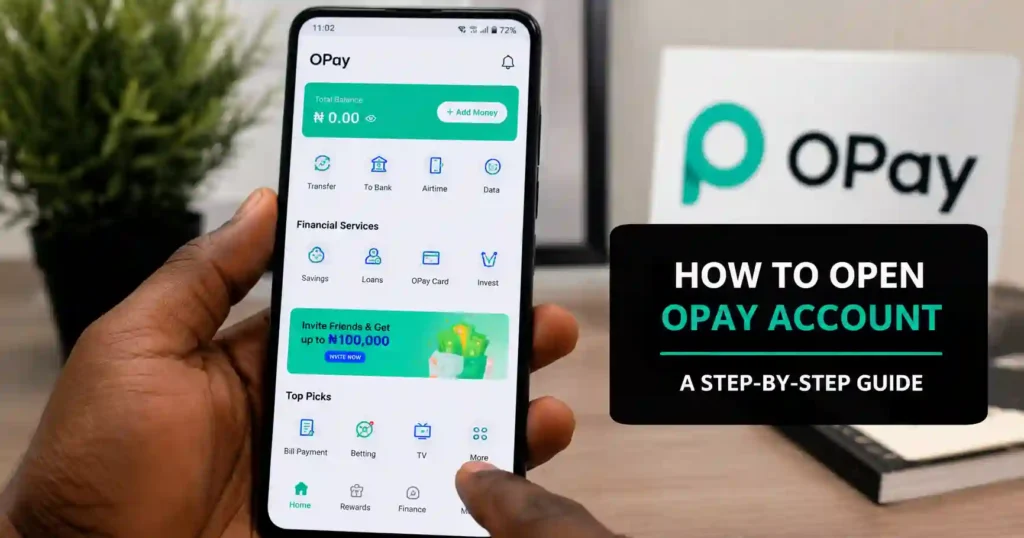 How to open an OPay account on your phone.
What You Need Before Opening an OPay Account
You need a compatible smartphone, an active phone number, internet access, and any identity information OPay requests during registration or verification.
- Smartphone: You need a device that can install and run the OPay mobile app.
- Active phone number: Use a number you can access because registration may involve phone verification.
- Internet connection: A stable mobile-data or Wi-Fi connection makes registration easier.
- Personal information: Enter your details accurately when the app requests them.
- Verification information: OPay may request additional information or identity verification depending on the account setup and services you want to use.
Keep your information accurate because mismatched details can create verification problems later.
How to Open an OPay Account on Your Phone
The basic process is to install the official OPay app, begin registration, verify your phone number, complete the requested profile information, and follow the app’s verification instructions.
1. Download the Official OPay App
Start by downloading OPay from the official Google Play Store or Apple App Store.
Android users can find the current OPay application on Google Play Store. The current listing identifies the app as OPay and the developer as OPay Digital Services Limited. 1
iPhone users can download OPay-Beyond Banking from the Apple App Store. The current Nigerian App Store listing identifies OPay Digital Services Pte. Ltd. as the provider.
💡 Pro Tip: Avoid downloading OPay from unofficial APK websites or links sent by strangers. Financial apps should always come from a trusted source.
2. Install and Open the OPay App
After installation, open the OPay app and begin the account registration process shown on the screen.
The exact wording and layout can change as OPay updates the app. Therefore, follow the current registration prompts instead of relying on screenshots from older versions.
3. Enter Your Active Phone Number
Enter the phone number you want associated with your OPay account and complete the verification step shown in the app.
Use a number you can access during registration. If OPay sends a verification code, enter the code only inside the official application.

4. Complete Your Account Information
Provide the personal information requested by OPay and make sure the details are accurate before submitting them.
Do not deliberately enter incorrect information to bypass verification. Accurate information can help prevent problems when you later use additional OPay services.
5. Complete Any Required Verification
Follow the verification instructions displayed by OPay because the information requested can depend on the account and service requirements.
Additional identity or account information may be requested before certain services or higher account capabilities become available.
If your information does not match the details held by the relevant verification system, the process may fail. Check the information carefully before submitting it again.
6. Finish Your Account Setup
Complete the remaining prompts in the OPay app to finish setting up your account.
Once your account is ready, you can explore the services available to your account, subject to OPay’s current terms and eligibility requirements.
What Can You Do With an OPay Account?
An OPay account can be used for transfers, bill payments, airtime and data purchases, savings features, debit-card services, and other financial services available in the app.
- Send and receive money: Transfer money using available OPay transfer options.
- Pay bills: Use the app to pay supported utility and subscription bills.
- Buy airtime and data: Purchase airtime and data for supported Nigerian networks.
- Manage savings: Access savings products available through OPay.
- Use a debit card: Eligible users can apply for and manage an OPay debit card through the app.
- Access other financial services: Additional services may be available depending on eligibility and current OPay offerings.
The current OPay app listings describe money transfers, bill payments, airtime and data purchases, savings products, debit cards, loans, and several security features.
How to Keep Your OPay Account Safe
The safest approach is to keep your PIN, password, OTPs, and other authentication information private.
Never Share Your OTP
Never give an OTP to another person, even if the person claims to be an OPay employee.
Legitimate support interactions should not require you to disclose confidential authentication codes to strangers.
Protect Your PIN and Password
Use private login credentials and never save them where another person can easily access them.
Avoid using easily guessed information such as your name, birthday, or simple number sequences.
Use the Official OPay App
Install OPay only through an official app store or an official OPay channel.
Fake financial applications can be designed to collect login credentials or personal information.
Review Your Transactions
Check your transaction history regularly and investigate unfamiliar activity immediately.
The current OPay app includes transaction-history and account-activity features that help users track activity.
Use Available Security Controls
Use the security controls available in your current OPay app version to protect your account.
OPay currently lists features such as biometric login, card locking, transaction encryption, real-time notifications, and additional transaction-verification controls.
How to Access OPay Without the App
OPay also provides USSD-based options for certain account and security functions, so an app-only approach is not always necessary.
If you need to use OPay services through USSD, see our guide to the OPay USSD code for the available options and instructions.
USSD access can be particularly useful when you have limited internet access or cannot use the application normally.
What to Do After Opening Your OPay Account
After registration, the next step is to secure the account and explore only the OPay services you actually need.
- Confirm that your profile information is correct.
- Set up the available security features.
- Keep your PIN and authentication information private.
- Review the account’s available transaction options.
- Check the fees or terms before using financial services.
- Keep the OPay app updated.
- Monitor your transaction history regularly.
If you want to check your balance later, our guide to the OPay balance code and balance-checking options can help.
Common OPay Registration Problems and How to Fix Them
Most OPay registration problems can be addressed by checking the phone number, verification information, internet connection, and app version before trying again.
OPay OTP Is Not Arriving
If your OPay verification code does not arrive, check your phone’s network connection and make sure the number you entered is correct.
- Confirm that the phone number is correct.
- Check your mobile network signal.
- Wait briefly before requesting another code.
- Make sure your SMS inbox can receive new messages.
- Restart your phone if the problem continues.
- Contact official OPay support if you still cannot complete verification.
OPay Verification Is Failing
If OPay verification fails, check that your submitted information matches your official identity details.
- Review your name and other personal details.
- Check any requested verification number carefully.
- Make sure uploaded documents are clear if documents are requested.
- Follow the current verification instructions inside the app.
- Contact OPay support if the problem remains unresolved.
OPay App Is Not Opening
If the OPay app will not open, check your internet connection, update the app, restart your phone, and try again.
- Check your mobile data or Wi-Fi connection.
- Close and reopen the application.
- Restart your smartphone.
- Install the latest available OPay update.
- Clear the app cache if your phone provides that option.
- Reinstall the official application if necessary.
OPay App Is Running Slowly
If OPay is running slowly, first check your internet connection and available phone storage.
Close unnecessary background applications and make sure the OPay app is updated. If the issue continues, use official OPay support rather than downloading an unofficial replacement application.
OPay Transaction Failed
If an OPay transaction fails, first check the transaction status before attempting the payment again.
- Confirm that your internet connection is stable.
- Check your available balance.
- Review your transaction history.
- Check whether the transaction is pending rather than failed.
- Avoid repeatedly sending the same payment until you understand the first transaction’s status.
- Contact OPay support if money was deducted and the transaction remains unresolved.
How to Recover an OPay Account
If you cannot access your account, use the recovery or support options provided by the current OPay app rather than sharing your credentials with another person.
Keep the phone number associated with the account available because account-recovery steps may require verification.
How to Contact OPay Support
Use the support options inside the official OPay app or the contact information published by OPay through its official channels.
The current Google Play listing provides OPay support information and identifies the official application developer.
For financial-account problems, avoid relying on unofficial social-media accounts or individuals who ask for your PIN, password, or OTP.
Frequently Asked Questions About Opening an OPay Account
How do I open an OPay account?
Download the official OPay app, enter your active phone number, follow the registration prompts, complete verification, and finish your account setup.
Can I open an OPay account on my phone?
Yes, you can register for OPay through its mobile application on supported Android and iPhone devices.
What do I need to open an OPay account?
You generally need a compatible smartphone, an active phone number, internet access, and the personal or verification information requested during registration.
Does OPay require BVN?
OPay may request identity or verification information depending on the account and service requirements, so follow the verification instructions displayed in your current app.
Is OPay available on Android?
Yes, the official OPay application is available through Google Play for Android users in Nigeria.
Is OPay available on iPhone?
Yes, OPay has an iPhone application available through the Nigerian Apple App Store.
Is opening an OPay account free?
Account registration and individual services can have different terms, so check the current OPay app or official terms before assuming that every transaction or financial service is free.
What can I do with an OPay account?
You can use available OPay services for money transfers, bill payments, airtime and data purchases, savings, debit-card management, and other eligible financial services. 9
Why is my OPay verification failing?
Verification can fail when submitted information does not match the required records or when the requested verification process is incomplete.
What should I do if I do not receive my OPay OTP?
Check your phone number and network connection, wait briefly, request another code if available, and contact official OPay support if the problem continues.
Can I use OPay without internet?
Some OPay functions can be accessed through USSD, depending on the service and current availability.
See our OPay USSD code guide for more information.
How do I check my OPay balance?
You can use the available balance-checking options provided by OPay, including supported in-app or USSD methods.
Our guide on how to check your OPay balance covers the available options.
Can I get an OPay debit card after opening an account?
Eligible OPay users can apply for an OPay debit card through the app or other channels provided by OPay.
Final Thought
Opening an OPay account is mainly an app-based process that starts with downloading the official application and completing the registration and verification prompts.
The most important step is to use accurate personal information and protect your login credentials, PIN, and OTP throughout the process.
- For registration: Download the official OPay app and follow the current signup instructions.
- For account access: Keep your registered phone number and authentication details secure.
- For USSD access: Use the available OPay USSD options when appropriate.
- For balance checks: Follow the available OPay balance-checking methods.
- For login problems: Use the appropriate OPay login and account-access guidance.
Choose the official registration route, complete the required verification carefully, and keep your OPay account information private.
Related Articles

1 Comment