
Important MTN recharge code update: The old *555# recharge sequence has been replaced by the new unified *311*PIN# code. To load an MTN card in 2025, dial *311*Recharge PIN# and press send.
The official code to load MTN card in Nigeria is *311*Recharge PIN#. Following the Nigerian Communications Commission (NCC) harmonization directive, MTN transitioned all recharge activities from the old *555# code to the new unified *311# platform. To load your voucher, simply dial *311* followed by your 16-digit or 17-digit PIN, add the hash (#) key, and press send to receive your airtime credit instantly.
Quick Answer: What Is the Code to Load MTN Card?
The code to load MTN card in 2025 is *311*Recharge PIN#. Dial *311*, enter your MTN recharge PIN, add #, and press the call button.
The new MTN recharge code replaces the older *555# recharge sequence. After a successful recharge, MTN sends a confirmation message showing that the airtime has been credited.
To check your MTN airtime balance after recharging, dial *310#. For data services, use the unified *312# menu.
2025 MTN Unified USSD Codes: Recharge and Airtime Balance
| Service | Unified Code | How to Use |
|---|---|---|
| Load MTN Card | *311*PIN# | Dial *311*, enter your recharge PIN, add #, then press send. |
| Check Airtime Balance | *310# | Dial *310# to check your available airtime balance. |
| Buy Data Bundles | *312# | Dial *312# and follow the prompts to select a data plan. |
| Borrow Airtime/Data | *303# | Dial *303# to access eligible airtime or data borrowing options. |
| Value Added Services | *305# | Dial *305# to access available VAS options. |
| Check SIM Linkage/NIN | *996# | Dial *996# to access SIM linkage and NIN-related services. |
How to Load MTN Card Using the MTN Recharge Code
To load an MTN card, dial *311*Recharge PIN# from the MTN line you want to recharge. The process works with a physical voucher containing the recharge PIN.
How to Load MTN Card With a Physical Voucher
The physical voucher method requires you to reveal the PIN before entering the new unified recharge sequence. Scratch the silver panel carefully so you do not damage any of the digits.
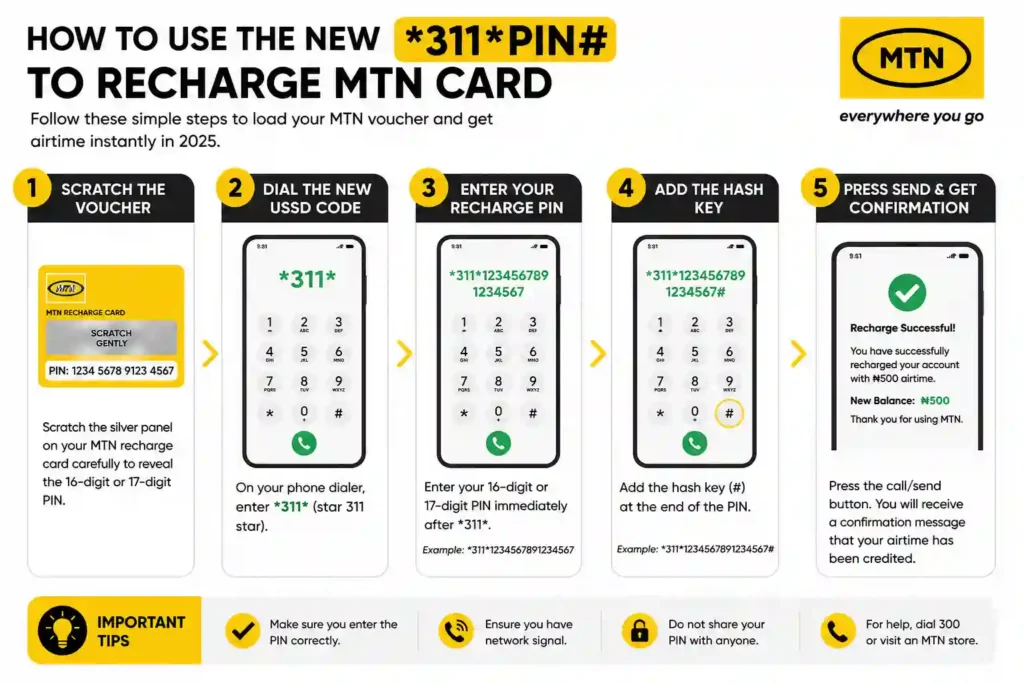
Follow these steps to use the pin to recharge MTN card:
- Scratch the voucher: Carefully remove the silver coating to reveal the recharge PIN.
- Open your dialer: Use the phone application you normally use to make calls.
- Enter the recharge code: Dial *311* followed by the PIN.
- Add the hash key: Finish the sequence with #.
- Press send: Send the USSD request and wait for the confirmation message.
The complete format is *311*Recharge PIN#. Make sure every digit is correct before sending the request.
Why Did the MTN Recharge Code Change to *311#?
The MTN recharge code changed as part of the Nigerian Communications Commission’s move to harmonize USSD service codes across Nigerian telecommunications networks. The change replaced older network-specific sequences with unified codes.
For MTN customers, the major recharge change is the move from the legacy *555# sequence to *311#. Therefore, customers looking for the code to load MTN card should use the new unified format.
This change also makes commonly used services easier to remember when customers use multiple networks. Instead of relying on an older MTN-specific recharge sequence, customers can use the updated unified USSD structure.
How to Load MTN Card for Another Number (Airtime Transfer)
You can load an MTN voucher for another person by using the supported recharge sequence for the recipient’s line or by sending the unused PIN to the recipient. The simplest option is to send the PIN securely so the recipient can recharge directly.
When using a recharge PIN for another number, double-check the recipient’s number and the exact recharge instructions before sending the transaction. This helps prevent mistakes with airtime credit.
How to Load MTN Card for Data Directly
A data-specific voucher can use a different recharge sequence from a standard MTN airtime card. If you have a data PIN, follow the instructions supplied with that voucher.
The available direct-to-data sequence referenced in this guide is *460*6*1#. You can also use the unified *312# menu to manage MTN data services.
After using the *460*6*1# code, customers who need affordable data options can also explore cheap MTN data plans.
For a normal airtime voucher, use the standard *311*PIN# recharge format first. You can then use the appropriate MTN data menu to purchase a data bundle.
How to Check MTN Airtime Balance After Recharging
The MTN airtime balance code in 2025 is *310#. Dial *310# from your MTN line and follow the prompt to view your available airtime balance.
This makes *310# the key code to remember after using the mtn recharge code. It lets you confirm your remaining airtime without relying on the recharge confirmation message alone.
How to Get a 300% MTN Recharge Bonus
Some MTN tariff offers can provide bonus value on qualifying recharges. The MTN Awuf4U offer is one example associated with recharge bonuses for eligible customers.
The bonus depends on the tariff plan, eligibility, recharge amount, and active MTN offer on the line. Therefore, customers should check the offer available on their specific line before relying on a bonus calculation.
MTN Awuf4U Recharge Bonus
MTN Awuf4U has been associated with recharge bonuses that can increase the value received from qualifying recharges. If the offer is active and your line is eligible, the bonus is applied according to the applicable offer terms.
The recharge sequence associated with the offer in the original guide is *888*PIN#. However, do not assume the bonus applies to every MTN line or every recharge.
Before using a promotional recharge code, confirm that the offer is active on your line. MTN tariff promotions can have specific eligibility rules and validity periods.
How to Activate or Use an Eligible MTN Bonus Offer
MTN bonus offers are linked to eligible tariff plans and promotional conditions. If Awuf4U is available on your line, follow the activation or recharge instructions provided by MTN for that offer.
- Check whether your MTN line is eligible for the offer.
- Confirm the applicable recharge amount.
- Check the current bonus terms before recharging.
- Use the recharge sequence specified for the active offer.
- Check your balance after the recharge to confirm the credited value.
The key point is simple: a promotional recharge code should only be used when the associated offer is active and available on your line.
How to Load MTN Airtime From Your Bank
You do not need a physical voucher to recharge an MTN line. Most Nigerian banking apps and USSD banking services allow customers to purchase airtime directly from their bank accounts.
The exact banking USSD sequence depends on the bank. For example, the original guide references *966* for Zenith Bank, *737* for GTBank, and *901* for Access Bank.
Because banking USSD services can change, use your bank’s current instructions when purchasing MTN airtime. You can also use your bank’s mobile application for a visual recharge process.
Using the myMTN App to Recharge
The myMTN App provides another way to manage an MTN line without manually entering a physical recharge PIN. The app can provide access to airtime, data, account information, and available offers.
You can find the myMTN App through the Google Play Store. Check the current offers displayed in the app before relying on any recharge bonus.
Troubleshooting MTN Recharge Problems
Most MTN recharge errors come from an incorrect PIN, an outdated USSD sequence, network issues, or an unavailable promotional offer. Check the recharge format first before trying the transaction again.
- Using the old recharge code: Replace the legacy *555* sequence with *311*PIN#.
- Incorrect PIN: Check every digit on the voucher before sending the request.
- Damaged PIN: If scratching has removed part of the PIN, contact MTN customer support for assistance.
- Network problem: If the USSD request fails because of a temporary network issue, wait and try again.
- Promotional code issue: If a bonus code does not work, confirm that the associated tariff offer is active and available on your line.
Frequently Asked Questions About MTN Recharge
What is the new code to load MTN card?
The new unified code to load an MTN voucher is *311*PIN#. Simply dial this sequence on your mobile phone and press the call button to credit your account.
Does the old MTN recharge code *555# still work?
No. The old *555# recharge code has been decommissioned as part of the unified USSD code changes. MTN customers should use *311*PIN# to load airtime.
What is the MTN recharge code in 2025?
The MTN recharge code in 2025 is *311*PIN#. Enter the recharge PIN between *311* and #, then press send.
How can I check my MTN airtime balance after recharging?
Dial *310# to check your MTN airtime balance. The unified code provides access to your available airtime balance.
Why is *555* not working on my MTN line?
The legacy *555* recharge sequence has been replaced by the unified *311* sequence. Use *311*PIN# when loading an MTN voucher.
Can I load an MTN card for someone else?
You can provide an unused MTN recharge PIN to another person so they can load it on their own line. Keep the PIN secure and confirm the recipient before sharing it.
How do I load a data-specific voucher?
If you purchased an MTN data-specific voucher, follow the instructions supplied with the voucher. The original guide references *460*PIN# and *460*6*1# for data-related voucher options, while *312# provides the unified MTN data menu.
Is there a bonus for using the myMTN App to recharge?
Promotional bonuses can be available through the myMTN App, but offers and eligibility can change. Check the current promotion displayed in the app before recharging.
Final Thoughts on MTN Recharge Codes
The easiest way to remember the updated MTN recharge process is to focus on three key codes. Use *311*PIN# to load an MTN card, *310# to check airtime balance, and *312# for MTN data services.
If you are looking for the code to load MTN card, the main answer is *311*Recharge PIN#. Always check promotional eligibility before using a special tariff recharge sequence such as an Awuf4U offer.
- Load MTN Card: *311*PIN#
- Check Airtime Balance: *310#
- Buy or Manage Data: *312#
- Borrow Airtime/Data: *303#
- VAS Services: *305#
- SIM/NIN Services: *996#
For official service information, visit the MTN Nigeria official website and check the latest available tariff plans, promotions, and service updates.
I抳e learn several just right stuff here. Definitely value bookmarking for revisiting. I surprise how much attempt you set to make this type of magnificent informative website.