Discover the Horizontal Lock Screen Android Samsung S26 secrets. Get 0-degree leveling and see why you don’t need a physical gimbal 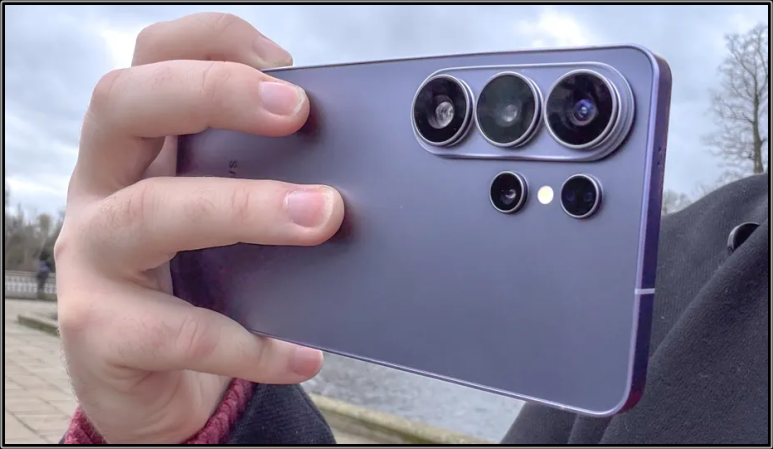
Horizontal Lock at a Glance
| Feature Type | Primary Function | Activation Path |
|---|---|---|
| Display Lock | Prevents screen rotation | Quick Settings > Auto-Rotate |
| Video Lock | Levels video horizon | Camera > Video > Super Steady Icon |
| Advanced Lock | 360-degree stability | Video > Super Steady > Horizontal Lock |
- Auto-Rotate Toggle: Controls basic Android UI orientation.
- Super Steady Mode: Reduces handheld camera shake.
- Horizontal Lock: Maintains a 0-degree horizon despite 360-degree phone rotation.
Note: Standard Android screen locking only affects the user interface, whereas the Samsung Galaxy S26 Horizontal Lock specifically manipulates the camera sensor output for cinematic stabilization.
What is Horizontal Lock Screen Android Technology?
Horizontal Lock screen android technology refers to a dual-purpose system that manages both visual orientation and video stabilization. On the Samsung Galaxy S26, this technology utilizes a Virtual Gimbal powered by the Snapdragon 8 Gen 5 Image Signal Processor (ISP).
The Horizontal Lock software analyzes real-time gyroscope data to identify the direction of gravity. The Samsung Galaxy S26 then crops the high-resolution sensor output to keep the horizon perfectly level, even if the hardware rotates 360 degrees during recording.
Pro Tip: Use Horizontal Lock in high-motion environments to eliminate the need for physical stabilizers or external gimbals.
Who needs to lock their Android screen horizontally?
Mobile videographers require Horizontal Lock to maintain a professional aesthetic during high-action shots like running or cycling. This feature prevents the motion sickness often caused by tilted or jarring handheld footage.
Daily users also benefit from Horizontal Lock screen android settings when reading in bed or using the device on uneven surfaces. Locking the orientation ensures the Android UI does not flip unexpectedly when the device sensors detect minor gravitational shifts.
Why does my Android screen keep rotating unexpectedly?
Unexpected rotation occurs when the accelerometer and gyroscope sensors detect a change in device pitch or roll. Android software interprets these physical movements as a command to switch from Portrait to Landscape mode.
Software bugs or sensitive sensor calibrations can trigger frequent, unwanted flips. Users can mitigate this by engaging the Auto-Rotate lock in the Quick Settings menu to force the device into a fixed orientation.
Where is the Horizontal Lock setting located in Android 16?
In Android 16, the basic Horizontal Lock for the display is found by swiping down from the top of the screen to access Quick Settings. Long-pressing the Auto-Rotate icon opens advanced options for the home screen and lock screen.
For the Samsung Galaxy S26 camera, the Horizontal Lock toggle is located within the Camera App. Users must select Video Mode, tap the Super Steady icon (running figure), and then select the specific Horizontal Lock sub-option.
How Does the Samsung Galaxy S26 Horizontal Lock Work?
The Samsung Galaxy S26 Horizontal Lock works by performing real-time software rotation on the captured video frames. The Galaxy S26 Ultra uses a wide-angle crop from the main sensor to provide the necessary buffer for these adjustments.
As the user tilts the phone, the AI algorithm rotates the frame in the opposite direction at identical speeds. This counter-rotation ensures the final video output remains level with the Earth’s horizon regardless of the phone’s physical angle.
Understanding the Virtual Gimbal: How AI stabilizes your horizon
The Virtual Gimbal is a software-based stabilization technique that replaces mechanical motors. This system uses AI-optimized content architectures to predict camera movement and smooth out jitter in milliseconds.
By leveraging the Snapdragon 8 Gen 5 processor, the Virtual Gimbal maintains QHD resolution at 60fps while locking the horizon. This computational photography approach allows the Samsung Galaxy S26 to deliver stable results that previously required professional external gimbals.
What is the difference between Super Steady and Horizontal Lock?
Super Steady acts as a standard digital image stabilizer that reduces hand-shake and minor vibrations during walking. It functions by using a moderate crop on the ultra-wide lens to absorb shaky movements, providing a result similar to a basic physical stabilizer.
Horizontal Lock is an advanced evolution of stabilization that keeps the video level at a 0-degree horizon regardless of the phone’s roll axis. While Super Steady fails if the phone is turned sideways or upside down, Horizontal Lock on the Samsung Galaxy S26 maintains a perfectly straight frame even through a full 360-degree rotation.
| Feature | Super Steady | Horizontal Lock |
|---|---|---|
| Stabilization Type | Anti-shake (Vibration) | Horizon Leveling (Roll) |
| Maximum Rotation | Approx. 30 degrees | Full 360 degrees |
| Best Use Case | Walking / Light Jogging | Action Sports / Vlogging |
Why the S26 Ultra Horizontal Lock is a gimbal killer for vloggers
The Samsung Galaxy S26 Ultra eliminates the need for bulky hardware by integrating a Virtual Gimbal directly into the Snapdragon 8 Gen 5 chipset. This system processes gyroscope data at high frequencies to counteract physical rotation, allowing creators to film one-handed without tilted footage.
Vloggers benefit from reduced gear weight and faster setup times, as the S26 Ultra achieves professional-grade leveling through software. This internal processing replicates the mechanical roll motor of a physical gimbal, ensuring the horizon remains static during high-intensity movement or transitions.
Step-by-Step: Enabling Horizontal Lock on Samsung S26
Enabling Horizontal Lock requires navigating the Quick Controls menu within the official camera application. This feature is exclusive to Video Mode and must be toggled manually before recording begins to calibrate the Virtual Gimbal sensors.
- Open the Samsung Camera App and select the Video tab.
- Tap the Super Steady icon (a running figure) located at the top of the viewfinder.
- Select the Horizontal Lock icon (a figure with a level horizontal line) from the expanded menu.
- Confirm that the yellow Super Steady with Horizontal Lock prompt appears on the display.
How to find the Super Steady menu in the camera app
The Super Steady menu is located in the top toolbar of the Samsung Galaxy S26 camera interface. It is only visible when the rear camera is active and the mode is set to Video or Pro Video.
Users can identify the menu by its stick man icon with vibrating lines. Tapping this icon reveals a pop-down menu where users can choose between standard stabilization, Super Steady, and Horizontal Lock modes.
Setting up Horizontal Lock for 360-degree rotation video
To record a 360-degree rotation video, the user must engage Horizontal Lock while holding the phone in a steady starting position. Once active, the Galaxy S26 software locks the current horizon as the absolute reference point.
During recording, the operator can physically spin the phone like a steering wheel. The AI algorithm will counter-rotate the image in real-time, keeping the subject upright and the background level despite the hardware’s 360-degree circular motion.
Where to adjust resolution settings for stabilized footage
Resolution adjustments for stabilized footage are managed in the Camera Settings or the top resolution toggle (e.g., FHD/UHD). However, engaging Horizontal Lock automatically overrides these settings to ensure the ISP has enough processing overhead.
Note: If Horizontal Lock is active, the resolution is typically capped at QHD (1440p). Users must disable the feature to return to 8K @ 30fps or standard 4K @ 60fps recording modes.
Technical Limitations: What Samsung Doesn’t Tell You
While Horizontal Lock screen android capabilities are impressive, they rely on digital cropping rather than physical sensor movement. This results in a significant reduction in the Field of View (FOV), as the software needs a “buffer” of pixels to rotate the frame without showing black edges.
Performance also degrades in low-light environments. Since the software must process frames rapidly to stay level, digital noise and artifacts become more prominent when the ISO is pushed to its limits during night-time shooting.
Resolution Caps: Why you are limited to QHD instead of 8K
No, you cannot record in 8K with Horizontal Lock enabled. The Samsung Galaxy S26 caps stabilization resolution at QHD (2560 x 1440) because the Snapdragon 8 Gen 5 requires massive pixel overhead for real-time counter-rotation.
To maintain a 1440p output, the Galaxy S26 Ultra actually captures a much larger 5K or 8K area of the sensor. The remaining pixels are used as a “safety margin” for the Virtual Gimbal to move the frame around without losing the central image data.
Zoom Constraints: How Horizontal Lock restricts you to 2x magnification
Horizontal Lock limits the Samsung Galaxy S26 to a maximum of 2x digital zoom. This restriction exists because the camera is already using a significant sensor crop to facilitate the stabilization algorithm.
Using higher zoom levels like 10x or 100x Space Zoom would leave zero “extra pixels” for the Horizontal Lock to utilize. Consequently, if a user attempts to zoom past 2x, the Android UI will automatically disable the Horizontal Lock feature to prioritize the zoom request.
Lighting Requirements: Why “Good Lighting” is mandatory for digital stabilization
Digital stabilization requires fast shutter speeds to prevent motion blur within individual frames. In low light, the Samsung Galaxy S26 must slow down the shutter to let in more light, which causes the Horizontal Lock algorithm to struggle with tracking points of interest.
Pro Tip: For the best results with Horizontal Lock, ensure your environment has at least 500 lux of brightness. Using this feature at night may result in a “jello effect” where the video appears to wobble or vibrate unnaturally.
Horizontal Lock vs. iPhone Action Mode: Which is better?
The Samsung Galaxy S26 Horizontal Lock offers a 360-degree roll capability that surpasses the iPhone 17 Pro Action Mode. While Apple’s system is excellent at smoothing out vertical jitters, it cannot maintain a level horizon if the phone is fully inverted.
Samsung’s implementation leverages the 200MP sensor on the Ultra model to provide a larger “canvas” for rotation. This gives the S26 Ultra a technical advantage in maintaining landscape orientation during extreme acrobatic or sports filming scenarios.
How Samsung’s horizon tracking compares to Apple’s stabilization
Samsung’s horizon tracking is more aggressive, prioritizing a static 0-degree angle at all times. In contrast, Apple’s Action Mode allows for natural “leans” during turns, which some cinematographers prefer for a more organic feel.
The Galaxy S26 utilizes machine learning to distinguish between intentional panning and accidental tilting. This results in a “locked-in” look that mimics a tripod on a gimbal, whereas the iPhone provides a smoother, handheld “floaty” look.
Who wins in low-light video stabilization tests?
Neither device excels in extreme low light with stabilization active, but the Samsung Galaxy S26 Ultra holds a slight edge due to its larger primary sensor. The S26 Ultra sensor captures 47% more light than previous generations, reducing the image noise associated with digital cropping.
In side-by-side tests, the iPhone 17 Pro often shows more “shutter lag” artifacts in dimly lit rooms. However, both brands recommend disabling Action Mode or Horizontal Lock for night-time videography to preserve 4K resolution and natural textures.
Troubleshooting Common Android Rotation Problems
If the Horizontal Lock screen android function fails, the primary cause is usually a miscalibrated IMU (Inertial Measurement Unit). This sensor cluster manages the accelerometer and gyroscope data required for orientation changes.
Software conflicts with third-party launchers or battery-saving modes can also disable rotation sensors. Users should check if Power Saving Mode is restricting background sensor processing, which often “freezes” the screen in its current orientation.
How to fix a stuck Android screen rotation sensor
Yes, a stuck Android rotation sensor can be fixed through a hardware reset or recalibration. To test the sensor, users can dial *#0*# on the Samsung Phone App to enter the Diagnostic Menu and select Sensor.
- Restart the Device: Clears temporary software glitches affecting the Sensor Hub.
- Calibrate the Compass: Open Google Maps and move the phone in a “figure-8” motion to reset the magnetometer and gyroscope.
- Check for Physical Obstructions: Ensure thick cases or magnetic mounts are not interfering with internal sensors.
What to do if Horizontal Lock is grayed out on your S26
If the Horizontal Lock icon is grayed out, it is likely due to an incompatible camera setting. This feature cannot run simultaneously with certain high-bandwidth video modes or lens selections.
- Check Resolution: Ensure you are not in 8K or 4K @ 120fps mode; switch to FHD or QHD.
- Check Zoom: Reset zoom to 0.6x or 1x; the feature disables itself if you are using Telephoto lenses.
- Check Battery: If the device is in Ultra Power Saving Mode, high-intensity ISP features like Horizontal Lock are disabled to save energy.
Why your apps won’t stay in landscape mode on Android tablets
Certain Android apps are hard-coded to a fixed Portrait orientation by their developers. This override ignores the system-level Horizontal Lock screen android settings on tablets like the Galaxy Tab S10.
Users can bypass this on Samsung devices by using Labs in Settings. Enable “Auto-rotate all apps” to force non-compliant applications to follow the system’s landscape orientation lock, though this may cause some UI stretching.
Frequently Asked Questions (FAQ)
Does Horizontal Lock work on the Samsung S26 selfie camera?
No, Horizontal Lock is currently restricted to the rear camera array on the Samsung Galaxy S26 series. The front-facing 12MP sensor lacks the ultra-wide field of view required to provide the necessary “crop buffer” for 360-degree stabilization.
Can I record in 4K with Horizontal Lock enabled?
No, the Horizontal Lock feature on the S26 Ultra is limited to QHD (1440p) resolution. The hardware uses the remaining 4K and 8K sensor area to facilitate the digital rotation, meaning a 4K final output is not currently possible with this level of stability.
How do I force an Android app to stay in landscape mode?
To force landscape mode, swipe down the Quick Settings panel while the phone is horizontal and tap the Auto-Rotate icon until it turns gray and says Landscape. For stubborn apps, use Samsung Labs to “Force app orientation” in the Advanced Features menu.
Does using Horizontal Lock drain the S26 battery faster?
Yes, Horizontal Lock increases battery consumption by approximately 15% to 20% compared to standard video recording. This is due to the heavy computational load placed on the Snapdragon 8 Gen 5 ISP and NPU for real-time frame processing.
Is Horizontal Lock available on older Galaxy S24 or S25 models?
As of April 2026, Horizontal Lock is a Galaxy S26 exclusive feature. While Samsung Members have hinted at a possible One UI 8.5 update for the S25 Ultra, the older Snapdragon 8 Gen 4 may lack the specific tensor processing power required for smooth 360-degree leveling.
Can I use Horizontal Lock while using the 100x Space Zoom?
No, Horizontal Lock is incompatible with Space Zoom. The feature is restricted to the Ultra-Wide (0.6x) and Wide (1x) lenses, with a maximum digital zoom limit of 2x to preserve image quality during stabilization.
What is the best app for locking screen orientation on Android?
For users on older devices without built-in Horizontal Lock, the Rotation Control or Set Orientation apps on the Google Play Store are the best options. These utilities allow for a forced sensor override across all system applications and system UI.
Final Thoughts on Horizontal Lock Screen Android
Horizontal Lock screen android functionality represents a significant leap in mobile cinematography and user interface control. By combining AI-driven stabilization with high-resolution sensors, the Samsung Galaxy S26 has successfully miniaturized the capabilities of a professional gimbal into a software toggle. While technical limitations like resolution caps and lighting requirements exist, the ability to maintain a perfect horizon in any orientation makes this a vital tool for the modern creator.

Oluremi Olaoye is a professional driver and technology content contributor based in Ondo, Nigeria. As the founder and primary voice behind Gizmosum, Remi leverages practical, daily experience to help users navigate the complexities of digital banking and consumer electronics. With a specialized focus on mobile hardware and SEO strategy, his work provides reliable guides and technical insights designed to simplify the ever-shifting technological era for a global audience.