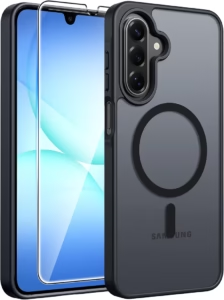
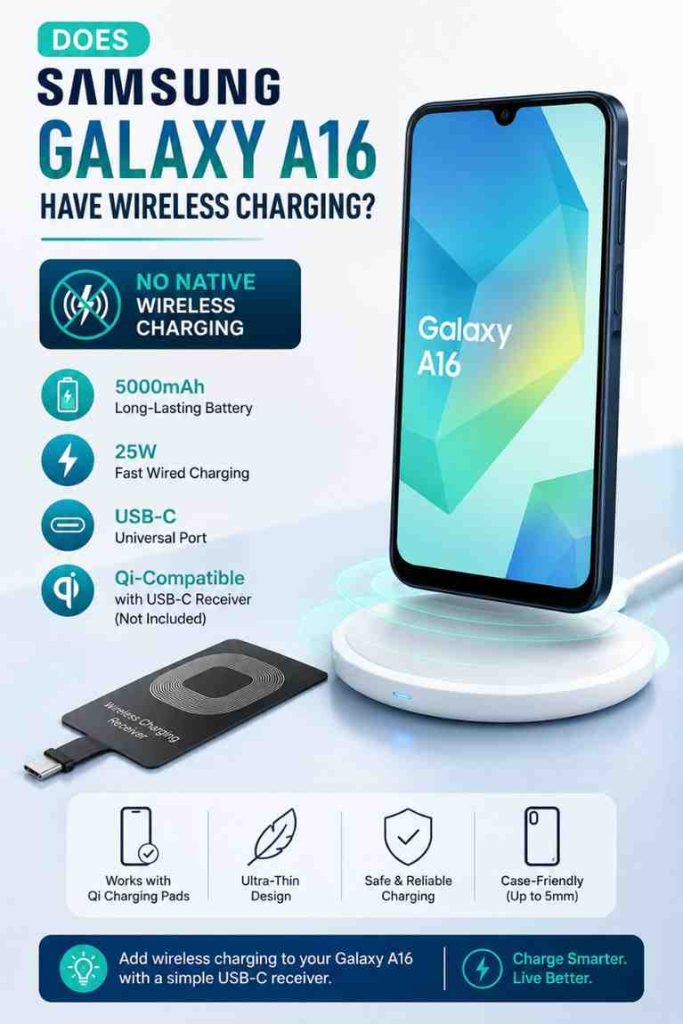
The Samsung Galaxy A16 does not support native wireless charging, whether you own the 4G or 5G model. Instead, the Galaxy A16 relies on USB-C wired charging with support for up to 25W fast charging. However, it is still possible to add Qi wireless charging using a compatible USB-C wireless charging receiver and a Qi-certified charging pad.
If you’re considering upgrading your charging setup, understanding how the Galaxy A16 works can save money and prevent buying incompatible accessories. This guide explains the Galaxy A16 wireless charging capabilities, how to add wireless charging safely, and which accessories are worth buying. If you are also looking for other useful accessories, our guide to Samsung Galaxy A16 accessories covers more worthwhile additions.
Does Samsung Galaxy A16 Have Wireless Charging?
No. The Samsung Galaxy A16 does not support built-in wireless charging because neither the Galaxy A16 4G nor the Galaxy A16 5G includes the internal Qi charging hardware required for cable-free charging.
Does the Galaxy A16 4G support wireless charging?
No. The Samsung Galaxy A16 4G cannot charge wirelessly out of the box. Samsung designed the Galaxy A16 4G with USB-C wired charging only, making a charging cable the standard way to recharge the device. Additionally, the phone lacks the internal receiver coil required for Qi wireless charging.
Does the Galaxy A16 5G support wireless charging?
No. The Samsung Galaxy A16 5G also does not include native wireless charging. Although the Galaxy A16 5G supports faster mobile connectivity than the 4G model, Samsung did not add wireless charging hardware. As a result, both versions share the same charging limitations.
Does Samsung officially support Qi charging on the Galaxy A16?
No. Samsung’s official specifications list USB-C wired charging but do not list Qi wireless charging support for the Galaxy A16. You can confirm the device specifications directly from Samsung’s official website. Any wireless charging functionality requires an external accessory rather than built-in hardware.
 Why Doesn’t Samsung Galaxy A16 Support Wireless Charging?
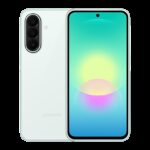
What hardware is missing?
The Samsung Galaxy A16 is missing the internal Qi receiver coil and charging controller needed for wireless charging. Without these components, placing the Galaxy A16 on a wireless charging pad produces no charging response. This limitation is hardware-based and cannot be changed with a software update.
Why Samsung reserves wireless charging for premium Galaxy phones
Samsung generally reserves native wireless charging for premium Galaxy S series and Galaxy Z series devices. Removing the wireless charging coil helps keep manufacturing costs lower, allowing the Galaxy A16 to remain an affordable smartphone while still offering a large battery and 25W wired charging support.
Is this normal for budget Android phones?
Yes. Many budget Android phones omit wireless charging to reduce cost. Devices in the same price category often prioritize battery capacity, display quality, and processor performance instead of premium features like Qi charging. If charging speed matters more than convenience, a quality 25W charger for the Galaxy A16 remains the better option.
Can You Add Wireless Charging to the Samsung Galaxy A16?
Yes. Although the Samsung Galaxy A16 lacks native wireless charging, you can add basic Qi compatibility by installing a USB-C wireless charging receiver underneath a protective case.
What is a USB-C Qi wireless charging receiver?
A USB-C Qi wireless charging receiver is a thin accessory that plugs into the Galaxy A16’s USB-C port. The receiver contains its own wireless charging coil, allowing the phone to receive power from a compatible Qi charging pad even though the phone itself lacks the necessary hardware.
How does a wireless charging receiver work?
The USB-C receiver converts wireless power from a Qi charging pad into power delivered through the Galaxy A16’s USB-C connector. After installing the receiver beneath a slim phone case, the Galaxy A16 can charge simply by placing it on a compatible wireless charger.
Does it work like native wireless charging?
Partially. A USB-C receiver provides similar day-to-day convenience but does not fully match factory-built wireless charging. Charging speeds are usually slower, and the receiver occupies the USB-C port while installed. Nevertheless, many Galaxy A16 owners find it useful for desk, bedside, and office charging.
Best Wireless Charging Receiver
MyMAX Type-C 1300mA Super-Fast Qi Wireless Charging Receiver — Best Overall Wireless Charging Receiver for Samsung Galaxy A16

Price: $14.99
Why We Recommend It
The MyMAX Type-C 1300mA Super-Fast Qi Wireless Charging Receiver is the best companion for the Samsung Galaxy A16 because it directly solves the phone’s biggest charging limitation. After installing the receiver beneath a slim case, the Galaxy A16 becomes compatible with most Qi-certified charging pads without permanently modifying the phone.
Additionally, the MyMAX receiver delivers one of the highest output ratings among USB-C wireless charging receivers while maintaining a slim profile that fits under many protective cases.
Key Features and Benefits
- Designed for USB-C Android smartphones.
- 1300mA high-current wireless charging output.
- Ultra-thin flexible receiver fits beneath most cases.
- Compatible with Qi-certified charging pads.
- Simple installation without tools.
- Affordable way to add wireless charging.
Pros and Cons
| Pros | Cons |
|---|---|
|
|
During everyday charging, the MyMAX receiver works best when paired with a thin case and correctly centered on the charging pad. However, users who regularly need the USB-C port for wired accessories may prefer to remove the receiver when it is not needed.

What Do You Need to Wirelessly Charge the Galaxy A16?
Wireless charging receiver
The Samsung Galaxy A16 requires a USB-C wireless charging receiver before any Qi charging pad can work. Without this receiver, placing the Galaxy A16 on a wireless charger will not start charging because the phone lacks the necessary receiver coil.
Qi-certified charging pad
The Samsung Galaxy A16 also requires a Qi-certified wireless charging pad after installing the receiver. Choosing a quality charger improves charging stability and helps reduce alignment problems commonly found with inexpensive charging pads.
Best Qi Charging Pad
Belkin 15W Wireless Charging Pad — Best Premium Qi Charging Pad for Samsung Galaxy A16
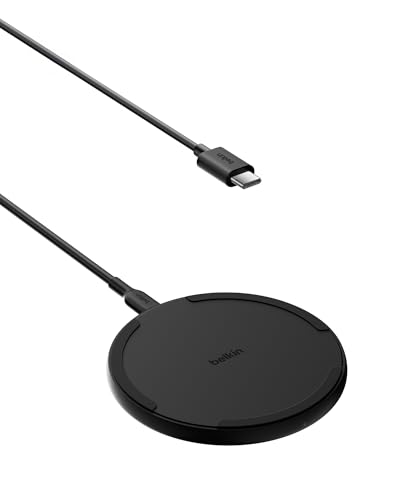
Limited Time Deal: -11% $15.99 (Was $17.99)
Why We Recommend It
The Belkin 15W Wireless Charging Pad is an excellent match for the Samsung Galaxy A16 after adding a USB-C wireless charging receiver. Belkin has built a strong reputation for reliable Qi-certified chargers, making it a dependable choice for everyday charging at home or in the office.
Key Features and Benefits
- Qi-certified wireless charging.
- Up to 15W charging output.
- SmartProtect safety features.
- Compatible with many Android devices.
- Includes 5-foot charging cable.
- Works through most slim cases.
Pros and Cons
| Pros | Cons |
|---|---|
|
|
Is Using a Wireless Charging Adapter Worth It?
Yes, a wireless charging adapter is worth considering if convenience matters more than charging speed. The Samsung Galaxy A16 cannot charge wirelessly on its own, so a USB-C Qi receiver offers an affordable way to use wireless charging pads at home, in the office, or on a bedside table without replacing the phone.
Benefits
The biggest advantage of adding a wireless charging receiver to the Samsung Galaxy A16 is convenience. Instead of plugging in a USB-C cable every time, you simply place the phone on a compatible Qi charging pad. Additionally, the charging port experiences less frequent plugging and unplugging during daily use.
Drawbacks
A wireless charging receiver also introduces a few compromises. Charging is generally slower than Samsung’s supported 25W wired charging, and the receiver occupies the USB-C port while installed. Furthermore, some thick protective cases may reduce charging efficiency or prevent the phone from charging altogether.
Who should buy one?
A wireless charging receiver is best for Samsung Galaxy A16 owners who already own Qi charging pads or regularly use wireless chargers at work, in the car, or beside the bed. If convenience is more important than charging speed, the adapter provides a practical upgrade without buying a new phone.
Who should stick with wired charging?
Most Samsung Galaxy A16 users should continue using wired charging. The built-in 25W fast charging support provides faster, more reliable charging and avoids compatibility issues that sometimes occur with third-party wireless charging receivers.
Is Wired Charging Better Than Wireless Charging on the Galaxy A16?
Charging speed comparison
Yes. Wired charging is significantly faster than adapter-based wireless charging on the Samsung Galaxy A16. A compatible 25W USB-C charger delivers more consistent charging speeds, while most wireless charging receivers are limited by their design and power conversion.
| Feature | 25W Wired Charging | Wireless Charging Receiver |
|---|---|---|
| Charging Speed | Fastest | Slower |
| Convenience | Requires cable | Simply place on pad |
| USB-C Port | Available | Occupied by receiver |
| Extra Hardware | None | Receiver and Qi charger required |
| Best For | Daily fast charging | Desk and bedside charging |
Convenience comparison
Wireless charging offers greater convenience because the Samsung Galaxy A16 only needs to be placed on a charging pad. However, wired charging remains the better option when you need to recharge quickly before leaving home or during busy days.
Battery health considerations
Both charging methods are safe when you use quality accessories. Choosing certified chargers and avoiding excessive heat is more important than choosing wired or wireless charging alone. Additionally, removing thick insulating cases during charging may help reduce heat buildup.
Overall recommendation
For most Samsung Galaxy A16 owners, a quality 25W wired charger remains the best everyday solution. A wireless charging receiver is recommended only if you specifically want the convenience of cable-free charging.
Best Wired Charger
Samsung Compatible 25W Fast Charger – Best Wired Charger for Samsung Galaxy A16

Price: $12.99
Why We Recommend It
The Samsung Compatible 25W Fast Charger is the simplest recommendation for Samsung Galaxy A16 owners because it matches the phone’s supported charging speed and includes a long USB-C cable. Instead of adding extra accessories, this charger delivers dependable performance with minimal setup.
Key Features and Benefits
- Supports up to 25W fast charging.
- USB-C to USB-C charging cable included.
- 6-foot cable provides extra reach.
- Smart charging chipset improves charging efficiency.
- Compatible with Samsung Galaxy A16 and many other Galaxy devices.
Pros and Cons
| Pros | Cons |
|---|---|
|
|
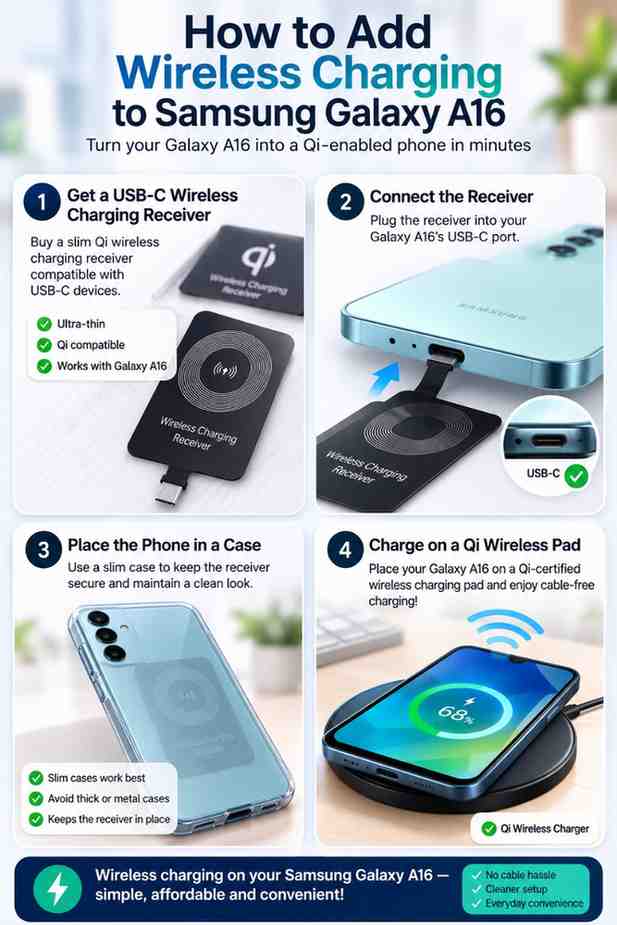 How Do You Add Wireless Charging to the Galaxy A16?
Step 1 — Install the receiver
Connect the USB-C wireless charging receiver to the Samsung Galaxy A16 charging port. Make sure the flexible receiver lies flat against the back of the phone before installing a protective case.
Step 2 — Place it under the case
Install a slim case over the Samsung Galaxy A16 and the receiver. Thin TPU and silicone cases usually work best because they help keep the receiver in position while still allowing Qi charging.
Step 3 — Position on a Qi charger
Place the Samsung Galaxy A16 in the center of a Qi-certified charging pad. Correct alignment is important because even a small shift may interrupt charging when using an external receiver.
Common setup mistakes to avoid
- Using a receiver designed for Micro-USB instead of USB-C.
- Choosing very thick or metal phone cases.
- Using low-quality charging pads with poor alignment.
- Expecting wireless charging speeds to match 25W wired charging.

What Problems Can You Encounter When Using a Wireless Charging Adapter?
Charging is slower than expected
Yes, slower charging is normal. A Samsung Galaxy A16 using a USB-C wireless charging receiver cannot match the speed of the phone’s supported 25W wired charging because power is transferred through additional hardware.
Thick phone cases
Very thick protective cases can reduce charging efficiency. If the Samsung Galaxy A16 repeatedly starts and stops charging, removing the case is an easy way to determine whether case thickness is causing the problem.
Charging keeps disconnecting
Charging interruptions usually occur because the Samsung Galaxy A16 is not correctly centered on the charging pad. Additionally, poorly built wireless charging receivers may disconnect more frequently than higher-quality models.
Phone becomes warm while charging
Mild warmth is normal during wireless charging. However, excessive heat may indicate poor alignment, a low-quality charging accessory, or inadequate ventilation. Using certified accessories and avoiding direct sunlight while charging can help minimize heat.
Should You Buy a Wireless Charging Receiver or Keep Using USB-C Charging?
Best option for most users
The best option for most Samsung Galaxy A16 owners is to continue using 25W wired charging. It is faster, simpler, and requires no additional accessories.
Best option for desk charging
A USB-C wireless charging receiver paired with a Qi-certified charging pad is ideal if the Samsung Galaxy A16 spends most of the day on a desk where convenience matters more than charging speed.
Best option for travel
Wired charging is generally better for travel because it requires fewer accessories and provides faster charging during short stops. A portable power bank for the Galaxy A16 is also a useful companion for long trips.
Best option for long-term reliability
Using Samsung Galaxy A16 wired charging with quality chargers and cables offers the most reliable long-term experience. Fewer accessories mean fewer compatibility issues and a simpler charging routine.
Frequently Asked Questions
Does Samsung Galaxy A16 support wireless charging?
No. The Samsung Galaxy A16 does not include native Qi wireless charging hardware. Both the 4G and 5G models rely on USB-C wired charging, although a compatible USB-C wireless charging receiver can add basic Qi charging functionality.
Can I add wireless charging to the Galaxy A16?
Yes. Installing a USB-C wireless charging receiver allows the Samsung Galaxy A16 to work with most Qi-certified charging pads. A slim phone case is recommended to help keep the receiver securely in place.
Does the Galaxy A16 support Qi charging?
No. The Samsung Galaxy A16 does not support Qi charging by itself. Qi compatibility becomes available only after installing an external USB-C wireless charging receiver.
Can I use a MagSafe charger with the Galaxy A16?
Not directly. The Samsung Galaxy A16 lacks built-in MagSafe magnets. Some third-party magnetic cases and rings may improve alignment, but a USB-C wireless charging receiver is still required for charging.
Does wireless charging work through a phone case?
Yes. Most slim TPU or silicone cases work well with a wireless charging receiver. Very thick, rugged, or metal cases may interfere with charging performance.
Is wireless charging slower than USB-C charging?
Yes. The Samsung Galaxy A16 charges noticeably faster through a compatible 25W USB-C charger than through an external wireless charging receiver.
Which wireless charging receiver is best for the Galaxy A16?
The MyMAX Type-C 1300mA Super-Fast Qi Wireless Charging Receiver is one of the strongest options because it combines a slim design, good compatibility with USB-C Android phones, and dependable everyday performance.
Final Thought
The Samsung Galaxy A16 does not support native wireless charging, but that does not mean you are limited to cables forever. A quality USB-C wireless charging receiver paired with a Qi-certified charging pad provides an affordable way to enjoy wireless charging at home or at work.
For most Samsung Galaxy A16 owners, however, a dependable 25W USB-C charger remains the faster and more practical choice. If convenience is your priority, the MyMAX receiver and Belkin charging pad make an excellent combination without upgrading to a more expensive Galaxy smartphone.
Related Articles
Galaxy S23 vs iPhone 15: Which Phone Is Better?
August 29, 2026
Samsung Galaxy A17 5G Review: Specs, Price & Features
August 28, 2026
Samsung Galaxy A27 5G Review: Specs, Camera & Battery
August 22, 2026