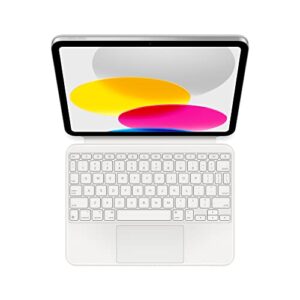
If you’re looking for the best case for iPad A16, the right choice depends on how you use your tablet. A slim folio works well for everyday use, while a rugged case offers better protection for travel, work sites, or children. This guide compares seven carefully selected iPad A16 cases based on protection, build quality, Apple Pencil support, stand design, long-term value, and verified customer feedback. If you’re also protecting the display, choosing the right iPad A16 screen protector completes your setup, while the best iPad A16 charger helps you get the most from your tablet.
📌 Quick Answer
For most people, the MoKo Slim Stand Case is the best overall iPad A16 case thanks to its lightweight design, reliable protection, Apple Pencil support, and outstanding customer reputation. However, rugged users, students, professionals, and parents may benefit more from one of the specialized alternatives below.

MOKO
MoKo for iPad (A16) 11th Generation Case, iPad 10th Gen Case, Navy Blue
The MoKo Slim Stand Case is the top recommendation in this guide because it offers an excellent balance of protection, portability, and everyday usability. Its slim translucent back, trifold stand, and dependable magnetic cover make it suitable for students, professionals, and home users looking for reliable everyday protection.
Who Should Buy It
Ideal for most iPad A16 owners, including students, professionals, commuters, and anyone wanting lightweight everyday protection. It's also a great choice for users who frequently carry their iPad and want Apple Pencil support.
Why We Pick It
It earned the Best Overall badge thanks to its excellent value, premium everyday features, lightweight design, and outstanding customer reputation backed by over 42,000 reviews.
Features & Benefits
| Feature | Benefit |
|---|---|
| Trifold Stand | provides comfortable viewing and typing angles |
| Apple Pencil Support | keeps your stylus secure and accessible |
| Auto Wake/Sleep | helps save battery and improves convenience |
Pros & Cons
| Pros | Cons |
|---|---|
| ✓ Lightweight design | ✕ Not designed for heavy-duty drops |
| ✓ Excellent value | ✕ Limited rugged protection |
| ✓ Trusted customer reputation |

PROCASE
ProCase for iPad A16 11th/10th Generation Case with Pencil Holder -Pink
The ProCase with Pencil Holder is the budget recommendation for buyers who want dependable protection without spending much. Despite its affordable price, it includes premium features such as a flexible TPU back, Apple Pencil holder, and automatic wake and sleep support.
Who Should Buy It
Best for students, casual users, and anyone replacing an older iPad case on a budget. It's also suitable for buyers who want good everyday protection at a low price.
Why We Pick It
It earned a place in the roundup because it delivers outstanding value while maintaining strong build quality and practical everyday features.
Features & Benefits
| Feature | Benefit |
|---|---|
| Pencil Holder | stores your Apple Pencil securely |
| Flexible TPU Back | absorbs everyday bumps and impacts |
| Auto Wake/Sleep | automatically manages display power when opening or closing the cover |
Pros & Cons
| Pros | Cons |
|---|---|
| ✓ Affordable price | ✕ Basic stand design |
| ✓ Good everyday protection | ✕ Not intended for rugged environments |
| ✓ Built-in Pencil holder |

SEYMAC
SEYMAC stock Case for iPad (A16) 11th/10th Generation 11''/10.9'' 2025/2022, Full-Body Drop Protection Case with Screen Protector &360° Rotate Hand Strap/Stand, Green+Black
The SEYMAC Full-Body Case is the rugged choice for users who need maximum protection in demanding environments. Its multi-layer construction, built-in screen protector, rotating stand, and carrying straps make it ideal for travel, outdoor work, and heavy daily use.
Who Should Buy It
Best for construction workers, travelers, warehouse staff, field technicians, and anyone who frequently uses an iPad in challenging conditions.
Why We Pick It
It earned the Best Rugged badge because it offers comprehensive protection while adding practical features such as a rotating stand, hand strap, and shoulder strap.
Features & Benefits
| Feature | Benefit |
|---|---|
| Full-Body Protection | shields the iPad from drops and impacts |
| Built-in Screen Protector | helps prevent scratches and display damage |
| 360° Rotating Stand | improves viewing flexibility during work or entertainment |
Pros & Cons
| Pros | Cons |
|---|---|
| ✓ Excellent drop protection | ✕ Bulkier than folio cases |
| ✓ Includes screen protector | ✕ Heavier than slim designs |
| ✓ Versatile carrying options |

DTTO
DTTO for iPad A16 Case, for iPad 11th/10th Gen Case (2025/2022), Brown
The DTTO Premium Leather Folio is the preferred option for professionals who want a premium appearance without sacrificing protection. It combines a faux leather exterior with multiple viewing angles, Apple Pencil storage, and a secure magnetic closure.
Who Should Buy It
Ideal for office workers, executives, business travelers, and users who regularly attend meetings or presentations.
Why We Pick It
It was selected as Editor's Choice because it offers one of the best combinations of premium design, functionality, and customer satisfaction in the business folio category.
Features & Benefits
| Feature | Benefit |
|---|---|
| Premium Faux Leather | provides a professional appearance |
| Multi-Angle Stand | supports comfortable viewing positions |
| Magnetic Closure | keeps the cover securely closed during transport |
Pros & Cons
| Pros | Cons |
|---|---|
| ✓ Premium business design | ✕ Less rugged than heavy-duty cases |
| ✓ Excellent build quality | ✕ Premium styling may not suit every user |
| ✓ Highly rated by customers |

TYPECASE
typecase Touch iPad A16 11th/10th Gen Case with Keyboard, 360° Rotating
The typecase Touch Keyboard Case transforms the iPad A16 into a compact productivity device with a backlit keyboard, multi-touch trackpad, and rotating hinge. It is designed for users who spend significant time typing, studying, or working on their tablet.
Who Should Buy It
Best for professionals, students, writers, and remote workers who frequently type documents or emails on an iPad.
Why We Pick It
It earned the Best Keyboard Case badge because it delivers a laptop-like experience while still providing reliable device protection.
Features & Benefits
| Feature | Benefit |
|---|---|
| Backlit Keyboard | improves typing in low-light environments |
| Multi-Touch Trackpad | enables precise navigation |
| 360° Rotating Hinge | supports multiple work and viewing positions |
Pros & Cons
| Pros | Cons |
|---|---|
| ✓ Excellent productivity features | ✕ More expensive than standard cases |
| ✓ Comfortable typing experience | ✕ Adds extra weight |
| ✓ Integrated trackpad |

FINTIE
Fintie Folio Case for iPad (A16) 11th Gen 11 in, iPad 10th Generation 10.9"
The Fintie Folio Case offers one of the strongest combinations of affordability, versatility, and everyday functionality. Its multi-angle stand, document pocket, elastic closure, and Pencil holder make it a dependable companion for work, school, and travel.
Who Should Buy It
Perfect for students, office workers, and everyday users looking for dependable protection without paying premium prices.
Why We Pick It
It earned the Best Value badge because it combines practical features, strong customer satisfaction, and competitive pricing.
Features & Benefits
| Feature | Benefit |
|---|---|
| Multi-Angle Stand | supports comfortable viewing positions |
| Document Pocket | stores notes or papers |
| Pencil Holder | keeps your stylus securely attached |
Pros & Cons
| Pros | Cons |
|---|---|
| ✓ Excellent value | ✕ Not intended for rugged use |
| ✓ Versatile design | ✕ Fabric exterior may show wear over time |
| ✓ Strong customer reputation |

INFILAND
INFILAND Kids Case for iPad A16 11th Generation 11 Inch (2025), iPad 10th Generation 10.9 Inch (2022), Heavy Duty Rugged Shockproof Protective Cover with Dual-Support Folding Kickstand (Magenta-Pink)
The INFILAND Kids Case is built for younger users who need stronger protection against drops and rough handling. Its reinforced construction and dual-support folding kickstand make the iPad easier for children to use at home, in classrooms, or while traveling.
Who Should Buy It
Best for parents buying an iPad A16 case for children, schools, or family use where durability is a priority.
Why We Pick It
It earned the Best for Kids badge because it combines rugged protection with a child-friendly design that emphasizes durability and ease of use.
Features & Benefits
| Feature | Benefit |
|---|---|
| Rugged Construction | withstands everyday drops and bumps |
| Dual-Support Kickstand | provides stable hands-free viewing |
| Reinforced Corners | adds extra impact protection |
Pros & Cons
| Pros | Cons |
|---|---|
| ✓ Child-friendly design | ✕ Limited color options |
| ✓ Strong drop protection | ✕ Bulkier than standard folio cases |
| ✓ Stable kickstand |
Product Comparison Table
| Product | Image | Amazon | Best For | Protection | Pencil Support | Stand Type | Amazon Rating | Our Rating | Price |
|---|---|---|---|---|---|---|---|---|---|
| MoKo Slim Stand Case | 🔍 Click image to enlarge | View Now at Amazon | Best Overall | Excellent | Yes | Trifold | 4.6 ★ (42,511) | 9.2/10 | -27% $9.95 |
| ProCase with Pencil Holder | 🔍 Click image to enlarge | View Now at Amazon | Best Budget | Very Good | Yes | Trifold | 4.6 ★ (6,382) | 9.2/10 | -$7.18 |
| SEYMAC Full-Body Case |  🔍 Click image to enlarge | View Now at Amazon | Best Rugged | Maximum | Yes | 360° Rotating | 4.5 ★ (11,171) | 9.0/10 | $29.99 |
| DTTO Premium Leather Folio | 🔍 Click image to enlarge | View Now at Amazon | Editor’s Choice | Excellent | Yes | 360° Rotating | 4.7 ★ (1,796) | 9.4/10 | $21.99 |
| typecase Touch Keyboard Case | 🔍 Click image to enlarge | View Now at Amazon | Best Keyboard Case | Excellent | Yes | 360° Keyboard | 4.5 ★ (4,808) | 9.0/10 | -$58.47 |
| Fintie Folio Case | 🔍 Click image to enlarge | View Now at Amazon | Best Value | Very Good | Yes | Multi-angle | 4.6 ★ (14,512) | 9.2/10 | -$17.99 |
| INFILAND Kids Case | 🔍 Click image to enlarge | View Now at Amazon | Best for Kids | Maximum | Yes | Dual Kickstand | 4.7 ★ (77) | 9.4/10 | $14.95 |
Our Top iPad A16 Case Picks
Best Overall — Why MoKo Is Our Top Pick
The MoKo Slim Stand Case is the best case for iPad A16 because it delivers the strongest balance of protection, portability, and everyday usability. Additionally, the slim translucent back, precise cutouts, and dependable magnetic cover make it suitable for students, professionals, and home users alike.
MoKo also stands out because of its outstanding reputation. A 4.6-star rating from more than 42,500 buyers demonstrates long-term customer satisfaction, while the lightweight folio design keeps the iPad comfortable to hold for extended reading or streaming sessions.
Editor’s Verdict
Choose the MoKo Slim Stand Case if you want one case that performs well in almost every situation without paying premium prices.
Best Budget Choice — Why ProCase Offers the Best Value
The ProCase with Pencil Holder is the best budget option for buyers who want dependable protection without overspending. Although affordable, ProCase includes premium features such as automatic wake and sleep, a flexible TPU back, and integrated Apple Pencil storage.
A 4.6-star rating across more than 6,300 customer reviews confirms that ProCase consistently delivers excellent value. Therefore, it is an easy recommendation for students, casual users, and anyone replacing an older iPad case.
Best Rugged Protection — Why SEYMAC Is Ideal for Heavy-Duty Protection
The SEYMAC Full-Body Case is the strongest recommendation for users who prioritize durability above everything else. The rugged three-layer construction, rotating hand strap, shoulder strap, kickstand, and built-in screen protector provide outstanding protection during travel, outdoor work, or demanding environments.
SEYMAC’s reputation is equally impressive. More than 11,100 Amazon reviews and a 4.5-star rating show that the design has proven reliable for thousands of long-term users.

Best Business Folio — Why DTTO Is Perfect for Professionals
The DTTO Premium Leather Folio is the ideal choice for office workers, executives, and professionals who want a polished appearance alongside dependable protection. Furthermore, the premium faux leather exterior and rotating stand make meetings, presentations, and note-taking far more comfortable.
Despite its professional styling, DTTO still offers practical everyday features including multiple viewing angles, Apple Pencil storage, and secure magnetic closure. Its 4.7-star rating from nearly 1,800 buyers makes it one of the highest-rated folio cases available.
Best Keyboard Case — Why typecase Is Best for Productivity
The typecase Touch Keyboard Case transforms the iPad A16 into a compact productivity workstation. The integrated backlit keyboard, multi-touch trackpad, and 360-degree rotating hinge create a laptop-like experience for writing, studying, and remote work.
A 4.5-star rating with more than 4,800 customer reviews highlights its strong balance between functionality and value. Consequently, this keyboard case is ideal for users who spend hours typing on their iPad.
Best Value Folio — Why Fintie Is Great for Everyday Use
The Fintie Folio Case delivers one of the best combinations of affordability, versatility, and everyday protection. Multiple viewing angles, a document pocket, elastic closure, and Apple Pencil holder make the design especially useful for school, work, and travel.
Its popularity is reflected by a 4.6-star rating from more than 14,500 reviews. Combined with Amazon’s Choice recognition, Fintie remains one of the safest recommendations for everyday users.
Best Kids Case — Why INFILAND Is the Best Choice for Children
The INFILAND Kids Case is designed specifically for younger users who need stronger protection against accidental drops and rough handling. The reinforced shell and dual-support kickstand make the tablet easier for children to use at home, in classrooms, or while travelling.
Although newer than several competitors, the case already holds an impressive 4.7-star Amazon rating. Parents looking for a dedicated child-friendly case will appreciate the durable construction and practical stand design.
📌 Before Buying an iPad A16 Case
Always verify your iPad model number before ordering. Most cases in this guide fit the 2025 iPad A16 (A3354, A3355, A3356) and the compatible 2022 iPad 10th Generation models, but they will not fit every 10.9-inch iPad.
Buying Guide: How to Choose the Best Case for iPad A16
The best case for iPad A16 depends on how and where you use your tablet. Some users need a slim folio for reading and streaming, while others need military-grade protection for work, school, or travel. Choosing the right case means balancing protection, functionality, portability, and budget.
Quick Buying Tip
Start by identifying your primary use. Daily home use requires a lightweight folio, while children, outdoor workers, and travelers benefit from rugged protection with reinforced corners and built-in screen protection.
Choose the Right Protection Level
The first decision is how much protection your iPad A16 actually needs. Slim folio cases protect against scratches and minor bumps, whereas rugged cases absorb heavy drops and impacts thanks to reinforced corners and multi-layer construction.
If the iPad frequently leaves your home, stronger protection is worth the extra weight. However, users who mainly browse, stream videos, or read indoors can comfortably choose a thinner case.
Look for Apple Pencil Compatibility
A dedicated Apple Pencil holder keeps the stylus secure while preventing accidental loss. Many modern iPad A16 cases also support magnetic charging or provide a protected storage slot for USB-C Apple Pencil models.
If you regularly take notes or create digital artwork, Pencil compatibility quickly becomes an essential feature instead of a convenience.
Pick a Stand That Matches Your Workflow
The stand design determines how comfortable the iPad A16 feels during everyday use. Trifold stands are excellent for reading and streaming, while rotating stands improve presentations, video calls, and drawing.
Keyboard cases usually include adjustable viewing angles that create a laptop-like workspace for productivity. Meanwhile, heavy-duty cases often include rotating hand straps for easier carrying.
Check Build Materials Before Buying
Build quality affects both durability and comfort. Premium TPU, polycarbonate, and microfiber interiors resist scratches while maintaining a lightweight design. Silicone bumpers provide additional shock absorption during accidental drops.
Cheaper plastic cases may feel similar initially, but they often crack, discolor, or loosen after months of regular use.
Verify Automatic Wake and Sleep Support
Automatic wake and sleep functionality helps preserve battery life by turning the display on when the cover opens and off when it closes. Nearly all premium folio cases include this feature, making daily use faster and more convenient.
If battery efficiency matters, this small feature quickly becomes noticeable during long-term ownership.
Consider Weight and Portability
The lightest iPad A16 case is not always the best choice. Slim cases are comfortable for reading and traveling, but rugged models provide superior protection at the cost of extra bulk.
Students and commuters usually prefer lightweight folios, whereas technicians, warehouse workers, and parents often appreciate heavier protective designs.
Choose a Keyboard Case Only if You’ll Actually Type
A keyboard case dramatically improves productivity, but it also increases cost and weight. If you regularly write emails, attend online classes, or edit documents, a keyboard case is a worthwhile investment.
Otherwise, a traditional folio case provides nearly all the protection most users need while remaining easier to carry.
Best Choice by User Type
- Most users: MoKo Slim Stand Case
- Budget buyers: ProCase
- Professionals: DTTO Premium Folio
- Students: Fintie Folio
- Heavy-duty protection: SEYMAC Rugged Case
- Productivity: typecase Keyboard Case
- Children: INFILAND Kids Case
How We Chose the Best iPad A16 Cases
Every recommendation in this guide was selected using practical buying criteria instead of marketing claims. The goal was to recommend products that consistently perform well for real-world iPad A16 owners.
Protection Performance
We prioritized cases that protect the iPad A16 against scratches, drops, and everyday wear. Rugged models received additional consideration for reinforced corners, raised bezels, and full-body protection.
Build Quality
Materials such as TPU, polycarbonate, microfiber lining, and premium synthetic leather generally last longer than thin plastic shells. Durable construction also improves long-term value.
User Feedback
Verified customer ratings and review counts played an important role during selection. Products with thousands of positive reviews have demonstrated long-term reliability across a much larger group of buyers.
Ease of Daily Use
Features including automatic wake and sleep, Apple Pencil storage, adjustable stands, magnetic closures, and lightweight designs improve everyday usability without making the case unnecessarily bulky.
Value for Money
Price alone does not determine value. Instead, we compared features, protection, build quality, and customer satisfaction to identify cases that deliver the best overall ownership experience within each price category.
Why These Products Stand Out
Every featured case is either an Amazon’s Choice product, a highly rated bestseller, or a model with an established reputation backed by thousands of verified customer reviews. This helps reduce the risk of choosing low-quality accessories.
Frequently Asked Questions
What is the best case for iPad A16 overall?
The MoKo Slim Stand Case is the best overall choice because it combines excellent protection, Apple Pencil support, lightweight construction, and exceptional customer satisfaction. It suits students, professionals, and casual users without significantly increasing the size of the iPad.
Does the iPad A16 use the same cases as the iPad 10th Generation?
Yes, many iPad A16 cases are also compatible with the iPad 10th Generation because both models share nearly identical dimensions and button layouts. However, always verify the supported model numbers listed by the manufacturer before purchasing.
Is a rugged iPad A16 case worth buying?
Yes, a rugged case is worthwhile if the iPad travels frequently or is used in demanding environments. Full-body protection reduces the risk of expensive repairs while adding useful features such as hand straps, kickstands, and screen protectors.
Do all iPad A16 cases support Apple Pencil charging?
No. Some cases include only a storage slot, while others fully support magnetic attachment and charging. Always check the product specifications if Apple Pencil charging is an important requirement.
Are keyboard cases better than regular folio cases?
Keyboard cases are better for productivity because they add a physical keyboard and trackpad for typing and document editing. However, standard folio cases remain lighter, more affordable, and easier to carry during everyday use.
Final Thought
The best case for iPad A16 depends on your daily routine, but several products clearly stand above the competition. The MoKo Slim Stand Case remains the strongest all-around recommendation, while ProCase delivers exceptional value for budget buyers. Professionals will appreciate the DTTO Premium Folio, productivity users should consider the typecase Keyboard Case, and SEYMAC offers the highest level of protection. Families with young children will benefit most from the INFILAND Kids Case, while Fintie continues to provide one of the best everyday folio designs available.
- MoKo Slim Stand Case — Best Overall
- ProCase with Pencil Holder — Best Budget
- SEYMAC Full-Body Case — Best Rugged Protection
- DTTO Premium Leather Folio — Editor’s Choice
- typecase Touch Keyboard Case — Best Keyboard Case
- Fintie Folio Case — Best Value
- INFILAND Kids Case — Best for Kids
Choose the case that matches your lifestyle instead of simply buying the cheapest option. A well-designed iPad A16 case protects your investment, improves everyday usability, and can easily last through years of daily use.
Which iPad A16 Case Is Best for You?
The best case for iPad A16 depends on your daily routine rather than the highest price. Matching the case to your lifestyle helps you get better protection, improved usability, and better long-term value.
Best for Students
The Fintie Folio Case is the best option for students because it combines a lightweight design, multiple viewing angles, Apple Pencil storage, and reliable everyday protection. It easily fits into backpacks without adding unnecessary bulk.
Best for Professionals
The DTTO Premium Leather Folio is ideal for professionals who regularly attend meetings or travel for work. Its premium leather finish, multi-angle stand, and business-friendly appearance make it suitable for office environments.
Best for Kids
The INFILAND Kids Case offers the highest level of protection for younger users. Reinforced corners and a sturdy kickstand help reduce accidental damage while making the iPad easier to use during learning and entertainment.
Best for Travelers
The MoKo Slim Stand Case is an excellent travel companion because it keeps the iPad protected without adding excessive weight. The slim profile fits comfortably inside backpacks, briefcases, and carry-on luggage.
Best for Outdoor Workers
The SEYMAC Full-Body Case is the strongest choice for demanding environments. Its rugged construction, rotating hand strap, shoulder strap, and built-in screen protector provide confidence when working on construction sites, in warehouses, or outdoors.
Best for Apple Pencil Users
Users who frequently sketch or take handwritten notes should prioritize cases with secure Pencil storage. The MoKo, ProCase, DTTO, and Fintie models all provide convenient Apple Pencil support without sacrificing protection.
Best for Productivity
The typecase Touch Keyboard Case is the best choice for users replacing a laptop. The integrated keyboard, multi-touch trackpad, and rotating hinge create a comfortable workspace for writing, editing documents, and attending online meetings.
📌 Quick Recommendation
If you don’t have a specialized requirement, choose the MoKo Slim Stand Case. It delivers the best balance of protection, portability, quality, and value for most iPad A16 owners.
Common Mistakes When Buying an iPad A16 Case
Buying the Wrong Model
Always confirm the model number on the back of your iPad before purchasing. Many cases support both the iPad A16 and iPad 10th Generation, but not every 10.9-inch iPad shares the same dimensions.
Ignoring Apple Pencil Compatibility
If you regularly use an Apple Pencil, make sure the case includes proper storage or magnetic charging support. Otherwise, carrying the Pencil separately increases the risk of losing or damaging it.
Choosing Style Over Protection
A stylish case is useful only if it also protects the tablet. Thin decorative covers may look attractive, but reinforced corners and quality materials provide much better long-term protection.
Buying the Cheapest Option
The lowest-priced case is not always the best value. Spending slightly more often results in stronger materials, longer durability, and better everyday usability.
Forgetting Screen Protection
A protective case cannot fully protect the display during every accident. Pairing your case with a quality screen protector provides more complete protection against scratches and impacts.
Quick Recommendations
- Best Overall: MoKo Slim Stand Case
- Best Budget: ProCase with Pencil Holder
- Editor’s Choice: DTTO Premium Leather Folio
- Best Rugged Protection: SEYMAC Full-Body Case
- Best Keyboard Case: typecase Touch Keyboard Case
- Best Value: Fintie Folio Case
- Best for Kids: INFILAND Kids Case