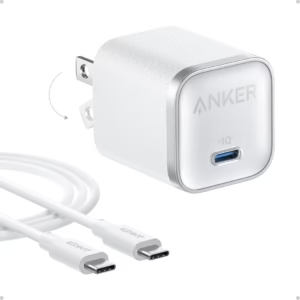
The best google pixel fast charger in 2026 are USB-C chargers with enough wattage for your model, with 30W-or-higher PPS being the safest general target for newer Pixels. For the broadest compatibility, the Google 45W USB-C Power Charger is the strongest overall choice, while 30W and 20W options can offer better value for compatible models and everyday charging. Google currently recommends its 30W, 45W, and 67W USB-C chargers, PPS adapters rated at 30W or more, and other USB-PD adapters rated at 15W or more.
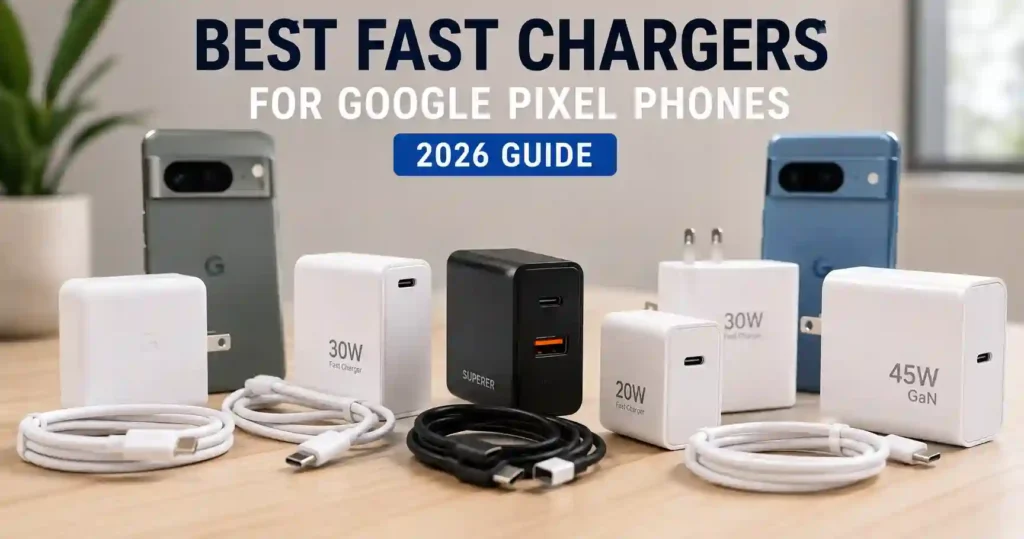 Which Google Pixel Fast Charger Is Best in 2026?
The Google 45W USB-C Power Charger is the best overall choice for most Pixel users who want a high-output first-party charger. It supports USB PD 3.1 PPS and delivers up to 45W, making it a strong match for newer Pixel phones and other USB-C devices.
However, a 45W charger is not automatically necessary for every Pixel. A compatible 30W charger can be a better value for users whose phones do not need more power, while a 20W option can make sense for older or lower-power models and secondary charging locations.
💡 Best buying rule: Match the charger to your Pixel’s supported charging rate, then prioritize USB-C PD, PPS support, cable quality, and a reputable safety design.
Best Google Pixel Fast Chargers Compared
The seven chargers below cover different needs, from Google’s first-party 45W adapter to inexpensive 20W bundles and long-cable options.
| Product | Best For | Amazon | Output | Key Advantage |
|---|---|---|---|---|
| Google 45W USB-C Power Charger | Best Overall | View on Amazon | 45W | Official Google USB PD 3.1 PPS |
| ARCCRA 30W USB-C Fast Charger | Best Budget 30W | View on Amazon | 30W | 6ft USB-C cable included |
| YEAHFUN 2-Pack 20W USB-C Charger | Best Multi-Room Value | View on Amazon | 20W each | Two charging sets with cables |
| Sidpro 20W USB-C Fast Charger | Best Super-Budget Option | View on Amazon | 20W | 6ft USB-C cable included |
| Aymla 45W GaN Charger 2-Pack | Best GaN Value | View on Amazon | 45W each | GaN, PPS and two chargers |
| WODENTA 30W USB-C Charger 2-Pack | Best Family Option | View on Amazon | 30W each | 6ft and 10ft cables |
| Superer 30W Dual-Port Charger | Best Dual-Port Option | View on Amazon | 30W | USB-C and USB-A ports |
Why USB-C PD and PPS Matter for Pixel Fast Charging
USB-C Power Delivery provides the power negotiation, while PPS allows compatible devices and chargers to adjust charging power more precisely. Google currently says Pixel phones can use PPS power adapters rated at 30W or more, as well as other USB-PD adapters rated at 15W or more.
This means buying a charger solely because it advertises a high wattage can be misleading. A 65W or 100W charger does not automatically make a Pixel charge at that wattage because the phone controls how much power it accepts.
Google 45W USB-C Power Charger: Best Overall
Best Overall
Best For: Pixel owners who want an official high-output charger with broad USB-C compatibility.

Google 45W USB-C Power Charger
This first-party Google charger is the premier choice for powering modern Pixel phones, delivering optimal USB PD 3.1 PPS charging speeds. It provides a reliable and future-proof power supply that effortlessly matches the maximum charging rates of newer Pixel models.
Who Should Buy It
Pixel owners who want the fastest possible first-party charging speeds for newer models like the Pixel 9 Pro XL and prefer the peace of mind of official Google hardware.
Why We Pick It
It is Google's most powerful first-party compact charger, fully supporting the PPS standard required to fast-charge modern Pixel phones and tablets efficiently.
Features & Benefits
| Feature | Benefit |
|---|---|
| 45W USB PD 3.1 PPS | Powers up the Google Pixel 9 Pro XL to 70% battery in approximately 30 minutes. |
| Broad Compatibility | Works seamlessly across your entire Pixel ecosystem including phones, Buds, the Pixel Tablet, and laptops. |
| Eco-Mindful Design | Constructed with 47% recycled plastics, offering a more sustainable charging solution. |
Pros & Cons
| Pros | Cons |
|---|---|
| ✓ Official Google product ensuring perfect compatibility | ✕ Charging cable is not included in the box |
| ✓ Supports fast-charging PPS standards | |
| ✓ Versatile enough to power laptops and tablets |
The Google 45W USB-C Power Charger is the safest all-around recommendation because it is Google’s own high-output USB-C charger. Its USB PD 3.1 PPS design supports up to 45W and provides charging profiles designed for compatible USB-C devices.
Google says the charger can power Pixel phones, Pixel Buds, Pixel Tablet and compatible laptops. The company also advertises charging a Pixel 9 Pro XL to 70% in about 30 minutes under its stated testing conditions.
The main limitation is value. A user with a lower-power Pixel may not benefit enough from a 45W first-party charger to justify choosing it over a less expensive 20W or 30W option.
ARCCRA 30W USB-C Fast Charger: Best Budget 30W Option
Best Budget 30W
Best For: Pixel users who want a 30W charger and an included 6ft USB-C cable.

ARCCRA
ARCCRA 30W USB-C Fast Charger with 6ft Cable
This budget-friendly 30W wall charger delivers the USB PD 3.0 with PPS fast charging that newer Google Pixel phones require to charge efficiently. By combining a 30W power block with a durable 6ft USB-C to USB-C cable, it offers an all-in-one charging solution right out of the box.
Who Should Buy It
Pixel owners who want a complete, budget-friendly 30W PPS charging setup without having to purchase a high-quality USB-C cable separately.
Why We Pick It
It hits the sweet spot for Pixel fast charging by offering 30W output with PPS support and a long 6ft cable at an incredibly accessible price point.
Features & Benefits
| Feature | Benefit |
|---|---|
| PPS Fast Charging | Charges compatible Pixel models up to 60% in just 30 minutes by adjusting the power dynamically. |
| 6ft USB-C to USB-C Cable | Provides plenty of length and flexibility to comfortably use your Pixel while charging from a couch or bedside table. |
| Smart IC Safety Chip | Protects your device from overcharging, overheating, and short circuits by matching current to your phone's exact needs. |
Pros & Cons
| Pros | Cons |
|---|---|
| ✓ Includes a durable 6ft USB-C cable | ✕ Single USB-C port limits charging to one device at a time |
| ✓ Supports critical USB PD 3.0 PPS fast charging | |
| ✓ Highly affordable pricing |
The ARCCRA 30W USB-C Fast Charger is a practical budget alternative for users who want more output than a basic 20W adapter. The Amazon listing shown in the supplied product research identifies it as a 30W USB-C charger with a 6ft charging cable.
The included long cable also makes this option more convenient for bedside tables, desks and outlets that sit farther from the phone. However, buyers should verify the charger’s current USB-PD and PPS specifications before expecting the same charging behavior as Google’s 45W adapter.
YEAHFUN 2-Pack 20W USB-C Chargers: Best Multi-Room Value
Best Multi-Room Value
Best For: Households that want two inexpensive charging locations.

YEAHFUN
YEAHFUN 20W USB-C Fast Charger (2-Pack with 6ft Cables)
This convenient two-pack of 20W USB-C chargers is an excellent, budget-friendly way to power older or standard-speed Google Pixel models across multiple rooms. Each block comes paired with a 6-foot USB-C to C cable, making it easy to set up dedicated charging stations in your home or office without buying extra accessories.
Who Should Buy It
Pixel owners with standard-speed or older models who want to set up dual charging stations at home, in the office, or by the bedside without spending a fortune.
Why We Pick It
We chose this bundle because it delivers incredible multi-room value by providing two complete 20W charging setups (both blocks and 6-foot cables) in a single package, perfectly matching the everyday charging needs of compatible Pixel phones.
Features & Benefits
| Feature | Benefit |
|---|---|
| Dual 20W PD Blocks | Charges compatible USB-C devices up to three times faster than standard 5W chargers. |
| Two 6-Foot Cables | Provides generous reach and flexibility to comfortably use your Pixel on the sofa or in bed while charging. |
| Built-in Safety System | Protects your devices from overcurrent, overvoltage, short circuits, and overheating for reliable daily use. |
Pros & Cons
| Pros | Cons |
|---|---|
| ✓ Includes two charger blocks and two 6ft cables | ✕ 20W limit is slower than 30W+ PPS chargers for the latest flagship Pixels |
| ✓ Great value for multi-room setups | ✕ Only available in white color option |
| ✓ Supports 20W Power Delivery fast charging |
The YEAHFUN 2-Pack 20W USB-C Charger provides two charging blocks and cables, making it useful when one charger needs to stay beside the bed while another remains at a desk or in another room.
The 20W output makes this bundle more suitable for users who do not need the higher charging rates offered by 30W or 45W adapters. It is therefore a value-focused choice rather than the best option for extracting maximum charging performance from newer high-speed Pixel models.
Sidpro 20W USB-C Fast Charger: Best Super-Budget Option
Best Super-Budget
Best For: Buyers who want an inexpensive USB-C charger and long cable for everyday or backup use.
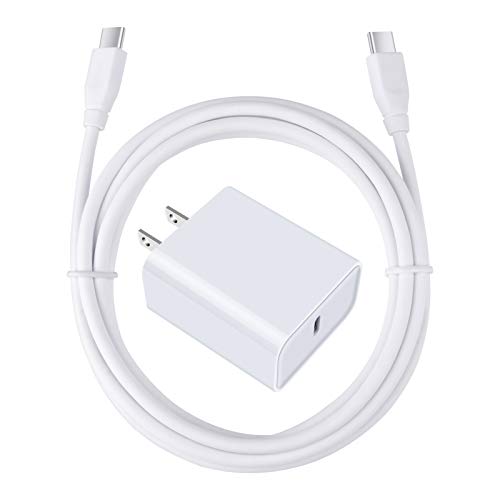
SIDPRO
Sidpro 20W USB-C Fast Charger with 6ft Cable
This ultra-affordable 20W charger kit is an excellent match for older Pixel models or secondary charging spots where you don't need maximum 45W speeds. It delivers reliable USB Power Delivery to safely fast charge your compatible Pixel phone up to 50% in about 30 minutes.
Who Should Buy It
Pixel users on a tight budget or those looking for a cheap, dependable secondary charger for an office or bedroom that still supports fast Power Delivery charging.
Why We Pick It
We selected this kit because it delivers a complete 20W USB-PD charging solution, including a long 6ft cable, at an incredibly low price point for Pixel owners who don't require 30W or 45W outputs.
Features & Benefits
| Feature | Benefit |
|---|---|
| 20W USB Power Delivery | Charges compatible Pixel devices up to 50% in 30 minutes, saving you time over standard chargers. |
| Included 6ft USB-C Cable | Provides plenty of reach to comfortably use your Pixel phone while it charges at your desk or bed. |
| Multi-Protection System | Safeguards your device against overload voltage, short circuits, and overheating during fast charging cycles. |
Pros & Cons
| Pros | Cons |
|---|---|
| ✓ Extremely budget-friendly price under $8 | ✕ Limited to 20W, which is slower than what newer Pixels can handle |
| ✓ Comes with a 6ft 3A fast charging cable | ✕ Does not support the higher PPS standards required for maximum Pixel charging speeds |
| ✓ Compact and highly portable wall plug design |
The Sidpro 20W USB-C Fast Charger is aimed at buyers who want a simple 20W charging setup without moving into higher-output premium chargers. The supplied Amazon listing identifies it as a 20W 3A PD adapter with a 6ft USB-C cable.
The long cable is useful when the wall outlet is not directly beside the charging position. However, the 20W ceiling makes this a better budget or secondary charger than a universal high-performance choice for newer Pixel models.
Aymla 45W GaN Charger 2-Pack: Best GaN Value
Best GaN Value
Best For: Pixel users who want two 45W chargers with GaN technology and PPS support.
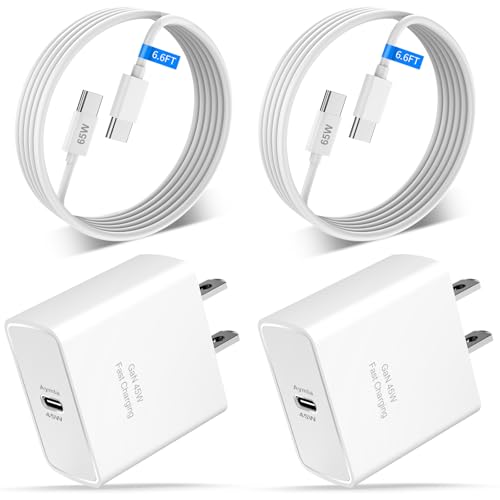
AYMLA
2 Pack 45W USB C Fast Charger GaN Adapter with 6.6FT Type C Cable for Pixel
The Aymla 45W GaN Charger 2-Pack combines two 45W USB-C chargers with 6.6ft USB-C cables, giving households two high-output charging stations. The article highlights its GaN design, PD 3.0, and PPS support as key advantages.
Who Should Buy It
Best for Pixel users who need two higher-output chargers for different rooms or devices. It is also a strong choice for buyers who prefer compact GaN charging hardware.
Why We Pick It
It earned the Best GaN Value spot because it provides two 45W chargers and two long cables in one package. PPS support also makes it more appropriate for high-speed Pixel charging than many basic 20W alternatives.
Features & Benefits
| Feature | Benefit |
|---|---|
| 45W output | provides high charging capacity for compatible devices |
| GaN technology | enables a compact high-output charger design |
| PPS support | allows compatible devices to adjust charging power more precisely |
| 6.6ft cable | provides flexible charging from farther-away outlets |
Pros & Cons
| Pros | Cons |
|---|---|
| ✓ Two 45W chargers | ✕ Third-party rather than Google first-party |
| ✓ GaN design | ✕ Two chargers may be unnecessary for single-device users |
| ✓ PPS support |
The Aymla 45W GaN Charger 2-Pack stands out because the package combines two 45W chargers with 6.6ft USB-C cables. The supplied product listing also identifies PD 3.0 and PPS charging support.
GaN technology can make high-output charger designs more compact and efficient than many older silicon-based designs. Still, buyers should focus on verified charging protocols and safety information rather than assuming that every GaN charger performs identically.
This bundle is particularly attractive for households that need one high-output charger in the bedroom and another in a home office or living area.
WODENTA 30W USB-C Charger 2-Pack: Best Family Option
Best Family Option
Best For: Families that need two 30W chargers with different cable lengths.

WODENTA
WODENTA 30W USB-C Fast Charger 2-Pack
This convenient 2-pack provides 30W of power to quickly charge newer Google Pixel models up to 40% in just 30 minutes. Equipped with GaN technology, it delivers safe and efficient charging alongside two extra-long cables for ultimate flexibility.
Who Should Buy It
This bundle is perfect for families, couples, or multi-device users who need to fast-charge Google Pixel phones in different rooms without being restricted by short cords.
Why We Pick It
We chose this pack because it delivers the optimal 30W speed recommended for Google Pixels while offering incredible value with two GaN chargers and two different extra-long cables.
Features & Benefits
| Feature | Benefit |
|---|---|
| 30W Fast Charging | Powers up compatible Google Pixel models to 40% capacity in 30 minutes when you need a quick top-up. |
| Dual-Length Cables | Includes one 6ft and one 10ft USB-C to USB-C cable so you can comfortably use your phone while it charges far from an outlet. |
| GaN Technology | Ensures the charger block runs cooler, safer, and more efficiently during high-speed charging sessions. |
Pros & Cons
| Pros | Cons |
|---|---|
| ✓ Complete 2-pack charging set | ✕ Requires PPS compatibility for maximum advertised speeds |
| ✓ Generous 6ft and 10ft cable lengths | |
| ✓ Intelligent trickle-charge protection |
The WODENTA 30W USB-C Charger 2-Pack includes two charging blocks and two USB-C cables. The supplied product listing identifies the cables as 6ft and 10ft, giving this bundle more flexibility than a standard short-cable package.
The combination is useful for bedrooms, living rooms and shared workspaces where outlet placement varies. The 30W output also places the bundle in a useful middle ground between inexpensive 20W chargers and 45W models.
The key limitation is that the Amazon listing alone does not establish that its charging behavior matches Google’s official 45W PPS charger. Buyers who need the most predictable high-speed charging should prioritize verified PPS specifications.
Superer 30W Dual-Port Charger: Best Dual-Port Option
Best Dual-Port Option
Best For: Users who want to charge a Pixel alongside another USB device.

SUPERER
Superer 30W Dual Port Fast Charger for Google Pixel
This versatile 30W charger is designed specifically to meet the fast-charging needs of your Google Pixel while offering the convenience of dual-port charging. By featuring both USB-C and USB-A ports alongside an included 6-foot cable, it eliminates the need to carry multiple adapters for your phone and accessories.
Who Should Buy It
Pixel owners who want to fast-charge their phone while simultaneously powering up accessories like Pixel Buds or a Pixel Watch without taking up an extra wall outlet.
Why We Pick It
It perfectly balances the 30W power delivery recommended for modern Pixels with dual-port versatility, a generous 6-foot cable, and smart AI temperature protections at a great price point.
Features & Benefits
| Feature | Benefit |
|---|---|
| Dual USB-C & USB-A Ports | Allows you to fast-charge your Pixel phone and power your accessories simultaneously without sharing outlets |
| Built-in AI Chip | Monitors temperature and battery status to protect your Pixel from overheating and preserve long-term battery health |
| Extra-Long 6ft Cable | Provides plenty of reach and flexibility for comfortable bedside, office, or travel use |
Pros & Cons
| Pros | Cons |
|---|---|
| ✓ Convenient dual-port design | ✕ Only available in white |
| ✓ Includes a durable 6ft USB-C cable | |
| ✓ PD 3.0 support for fast Pixel charging | |
| ✓ 24-month manufacturer warranty |
The Superer 30W Dual-Port Charger is different from the single-port choices because the supplied Amazon listing shows both USB-C and USB-A connectivity. That makes it useful when a Pixel needs charging alongside another device.
The product listing shown in the supplied screenshot identifies it as a 30W charger for Google Pixel 8, 7, 6 and Pro models. It also carries an Amazon’s Choice badge and a large number of customer ratings in the supplied screenshot.
Because dual-port chargers can distribute available power differently when both ports are occupied, buyers should check the manufacturer’s output table before assuming the Pixel will receive the full advertised output while another device is connected.
How to Choose the Right Google Pixel Charger
Choose a Pixel charger by matching the phone’s charging capability with the adapter’s PD or PPS support, then consider cable length, port count and value.
Choose 45W for Newer High-Speed Pixel Models
A 45W charger is the better long-term choice when you want one adapter for newer high-speed Pixel phones and other USB-C devices. Google’s 45W charger is officially rated for USB PD 3.1 PPS with a maximum output of 45W.
Google’s current charging guidance also lists newer Pixel models capable of charging at 30W or more, including Pixel 9 Pro XL, Pixel 10-series models and Pixel 11-series models.
Choose 30W for a Balanced Everyday Charger
A 30W charger is a strong middle-ground option when your Pixel does not require a higher-output adapter. It can provide useful charging performance without the extra size or cost that some higher-output chargers bring.
Google specifically recommends 30W USB-C Fast Chargers and PPS adapters rated at 30W or more for compatible Pixel charging.
Choose 20W for Budget and Secondary Charging
A 20W charger makes the most sense when low cost and convenience matter more than maximum charging speed. It can be useful as a backup, travel adapter or dedicated charger in a second room.
However, Google states that PPS adapters should be rated at 30W or more for its recommended PPS charging setup, so buyers seeking the best high-speed performance should not assume that every 20W adapter provides the same result.
Check PPS Before Buying a Third-Party Charger
Look for explicit PPS support when you want a third-party charger aimed at higher-speed Pixel charging. Wattage alone does not tell you whether the adapter supports the charging profile your phone can use.
For technical background, the USB-IF USB Power Delivery information provides the authoritative standards context for USB Power Delivery.
Use a Suitable USB-C Cable
The cable matters because Google states that USB-C-to-USB-C charging is faster than using USB-A-to-USB-C with a USB-A adapter. A compatible USB-C cable is therefore the preferred pairing for modern Pixel fast charging.
A long cable can improve convenience, but cable length should not be treated as proof of charging speed. Check the cable’s specifications when maximum charging performance matters.
Consider Port Count for Multiple Devices
A dual-port charger is useful when you regularly charge a Pixel and another device at the same time. A single-port charger is simpler when the Pixel is the only device being charged.
Before buying a multi-port model, check how the charger divides power when both ports are occupied.
Is a 45W Charger Safe for Google Pixel?
Yes, a compatible 45W USB-C charger is safe for a Pixel because the phone does not simply absorb the charger’s full rated output. Charging speed depends on the phone, charger, cable and negotiated charging profile.
Google’s own 45W charger supports multiple USB PD and PPS output profiles rather than forcing 45W into every connected device.
Can You Use a 65W or 67W Charger With Google Pixel?
Yes, a compatible higher-wattage USB-C PD charger can be used when the charger supports the appropriate standards for the Pixel. The extra wattage represents the charger’s capacity rather than a requirement that the phone consume that amount.
Google currently lists its own 67W USB-C Fast Charger among compatible charging options, while also recommending PPS adapters rated at 30W or more and other USB-PD adapters rated at 15W or more.
Why Is My Google Pixel Charging Slowly?
A Pixel can charge slowly because of the adapter, cable, power source, temperature, phone usage or charging conditions. Google notes that laptops and other power sources can charge more slowly than a wall outlet, while excessive heat can also affect charging.
Check the Wall Adapter
Start by checking whether the charger supports USB-C PD or the recommended PPS specification. A charger with a high advertised wattage but unsuitable charging profiles may not provide the expected Pixel charging performance.
Check the Cable
Replace the cable if it is damaged, loose or unsuitable for the charger. Google recommends using a compatible USB-C cable and warns that charging speed can vary according to the charger and cable.
Move the Phone to a Cooler Location
Move the Pixel away from excessive heat if charging becomes unusually slow or pauses. Google says a Pixel can pause charging when the phone becomes too warm as a battery-protection measure.
Reduce Heavy Phone Usage While Charging
Limit demanding activity while charging if you want the fastest possible top-up. Google specifically recommends limiting phone usage while charging to improve charging speed.
How to Protect Google Pixel Battery Health While Fast Charging
Use Charging optimization, avoid excessive heat and use a compatible charger instead of deliberately choosing a slower or poorly matched adapter. Google’s current battery guidance includes Adaptive Charging and an 80% charging limit for supported Pixel phones.
Use the 80% Charging Limit When Appropriate
The 80% limit can prioritize long-term battery health when you normally finish the day with charge remaining. Google says the feature is available on Pixel 6a and later devices.
Use Adaptive Charging Overnight
Adaptive Charging can delay the final part of a charge so the phone reaches 100% closer to the time you normally unplug it. Google says the feature learns charging habits and can reduce the amount of time the battery remains fully charged.
Keep the Phone Cool
Keeping the Pixel in a cool environment is important during charging. Google warns that high temperatures can trigger charging protection and affect charging behavior.
Are Third-Party Chargers Safe for Google Pixel?
A reputable third-party USB-C charger can be a sensible Pixel accessory when it follows appropriate USB-C, PD or PPS specifications and has credible safety information. Google’s charging guidance explicitly allows compatible PPS and USB-PD adapters from sources other than Google.
The important distinction is between a third-party charger with clearly documented specifications and an inexpensive adapter that only advertises a large wattage number without explaining its charging protocols.
What to Check Before Buying a Third-Party Charger
Check the advertised USB-C PD or PPS support, output profiles, cable compatibility, manufacturer information and applicable safety markings.
- USB-C output
- USB Power Delivery support
- PPS support when higher-speed Pixel charging is required
- Appropriate wattage for the Pixel model
- Clear manufacturer specifications
- Suitable cable
- Credible safety and warranty information
Google Pixel Charger Buying Mistakes to Avoid
The biggest mistake is choosing a charger by wattage alone. A high wattage number does not guarantee the correct charging protocol, cable compatibility or charging performance.
- Do not assume 100W means the Pixel will charge at 100W.
- Do not assume every 20W charger provides the same charging experience.
- Do not ignore PPS when shopping for higher-speed third-party charging.
- Do not use a damaged or loose USB-C cable.
- Do not judge a charger only by its Amazon rating.
- Do not assume a long cable automatically supports maximum charging.
- Do not keep the phone in excessive heat while charging.
Frequently Asked Questions About Google Pixel Fast Chargers
What is the best fast charger for Google Pixel?
The Google 45W USB-C Power Charger is the best overall choice for users who want an official high-output Pixel charger. It supports USB PD 3.1 PPS and delivers up to 45W.
Does Google Pixel need PPS for fast charging?
PPS is recommended for compatible higher-speed Pixel charging, but Google also supports other USB-PD adapters rated at 15W or more. Google specifically lists PPS adapters rated at 30W or more among its recommended options.
Is a 30W charger enough for Google Pixel?
A 30W charger is enough for many Pixel charging situations and is a strong middle-ground option. However, the exact charging rate depends on the Pixel model and charger compatibility.
Can I use a 65W charger with my Google Pixel?
Yes, you can use a compatible 65W USB-C PD charger with a Pixel. The phone controls its charging intake rather than automatically drawing the charger’s full rated capacity.
Can I use a 67W charger with Google Pixel?
Yes, Google’s own 67W USB-C Fast Charger is listed as a compatible charging option. Actual charging speed still depends on the Pixel model, charger and cable.
Why does my Pixel charge slowly with a powerful charger?
A powerful charger can still charge slowly if its charging profile, cable, power source or operating conditions are unsuitable. Google notes that charging speed can change depending on the charger and cable, and wall outlets can provide better charging performance than some laptop ports.
Does the USB-C cable affect Pixel charging speed?
Yes, the cable can affect charging speed. Google recommends compatible USB-C cables and states that USB-C-to-USB-C charging is faster than USB-A-to-USB-C charging with a USB-A adapter.
Is it safe to charge a Pixel overnight?
Pixel phones include charging optimization features designed to reduce the time the battery remains fully charged. Adaptive Charging can delay the final charge, while supported devices can use the 80% limit to prioritize battery longevity.
What does the Pixel 80% charging limit do?
The 80% limit stops normal charging at 80% to prioritize long-term battery health. Google says this feature is available on Pixel 6a and later devices.
Are GaN chargers better for Google Pixel?
GaN chargers can be attractive when you want a compact high-output adapter, but GaN alone does not guarantee better Pixel charging. Check the actual USB-PD and PPS specifications before buying.
Can I use a MacBook charger for Google Pixel?
You can use a compatible USB-C MacBook charger, but charging performance depends on its supported USB-PD profiles and the Pixel model. Do not assume every laptop charger provides the same Pixel charging speed.
Final Thought
The Google 45W USB-C Power Charger remains the strongest overall choice when you want first-party hardware, USB PD 3.1 PPS and broad compatibility. For a lower-cost setup, the ARCCRA 30W is a practical everyday option, while the Aymla 45W GaN 2-Pack makes more sense for buyers who need two higher-output chargers.
- Best Overall: Google 45W USB-C Power Charger | View Now at Amazon
- Best Budget 30W: ARCCRA 30W USB-C Fast Charger | View Now at Amazon
- Best Multi-Room Value: YEAHFUN 2-Pack 20W USB-C Chargers | View Now at Amazon
- Best Super-Budget: Sidpro 20W USB-C Fast Charger | View Now at Amazon
- Best GaN Value: Aymla 45W GaN Charger 2-Pack | View Now at Amazon
- Best Family Option: WODENTA 30W USB-C Charger 2-Pack | View Now at Amazon
- Best Dual-Port: Superer 30W Dual-Port Charger | View Now at Amazon
Choose the charger that matches your Pixel’s supported charging rate, then prioritize compatible PD or PPS technology and a suitable USB-C cable.
Related Articles
Best Power Banks for Samsung Galaxy A16 (2026 Picks)
June 10, 2026