
iPad A16 vs iPad Air M4 is really a choice between value and higher performance. The A16 model is the better buy for everyday tasks, while the M4 Air is the stronger option for demanding work, creative apps, and longer-term performance.
At the prices supplied for these two 128GB Wi-Fi models, the iPad A16 costs $399, while the iPad Air M4 costs $649. That $250 gap matters, especially when both tablets share an 11-inch Liquid Retina display, 12MP cameras, Touch ID, and all-day battery claims.
If everyday browsing, streaming, schoolwork, note-taking, and casual gaming are the priority, the Apple iPad 11-inch A16 offers the stronger value. The M4 Air makes more sense when faster performance, Apple Pencil Pro support, a better display treatment, Wi-Fi 7, and demanding workloads justify the extra cost.
This comparison breaks down the performance, display, accessories, cameras, connectivity, battery, storage, price, and use cases. It also explains which model makes more sense for students, gamers, artists, professionals, and casual users.

iPad A16 vs iPad Air M4: Which One Should You Buy?
The iPad A16 is the better value, while the iPad Air M4 is the better performance choice. The right model depends on whether saving $250 matters more than having the extra hardware capabilities.
The regular iPad uses Apple’s A16 chip with a 5-core CPU and 4-core GPU. The Air uses the M4 chip with an 8-core CPU, 9-core GPU, hardware-accelerated ray tracing, and 12GB unified memory.
Therefore, the M4 Air has considerably more headroom for demanding apps, multitasking, graphics work, and other intensive workloads.
🏆 Best value: Apple iPad 11-inch A16 at the supplied $399 price.
🥇 Best performance: Apple iPad Air 11-inch M4 at the supplied $649 price.
What Are the Main Differences Between the Two iPads?
The biggest differences are the processor, display construction, Apple Pencil support, connectivity, USB speed, and available storage. The two tablets look similar in everyday use, but the Air has more advanced hardware underneath.
| Feature | iPad A16 | iPad Air M4 |
|---|---|---|
| Chip | A16 | M4 |
| CPU | 5-core | 8-core |
| GPU | 4-core | 9-core |
| Neural Engine | 16-core | 16-core |
| Memory | Not specified by Apple on the cited specs page | 12GB unified memory |
| Display | 11-inch Liquid Retina | 11-inch Liquid Retina |
| Resolution | 2360 × 1640 | 2360 × 1640 |
| Brightness | 500 nits | 500 nits |
| Wide color | No P3 listed | P3 wide color |
| Fully laminated | No | Yes |
| Anti-reflective coating | No | Yes |
| Apple Pencil Pro | No | Yes |
| Wi-Fi | Wi-Fi 6 | Wi-Fi 7 with Apple N1 |
| USB | USB 2 up to 480Mb/s | USB 3 up to 10Gb/s |
| External display | Up to 4K at 60Hz | Up to 6K at 60Hz |
| Starting storage | 128GB | 128GB |
| Maximum storage | 512GB | 1TB |
Apple’s technical specifications confirm the A16 model’s 5-core CPU, 4-core GPU, 11-inch 2360 × 1640 display, USB 2 connection, and support for up to a 4K external display. See Apple’s official iPad 11-inch technical specifications.
The M4 Air adds a 9-core GPU, 12GB unified memory, P3 color, full lamination, anti-reflective treatment, Apple Pencil hover, USB 3, and support for an external display up to 6K at 60Hz. See Apple’s official iPad Air technical specifications.
Apple iPad 11-inch A16 — Best Value
Best For: Everyday use, students, streaming, browsing, note-taking, and buyers who want the most iPad for less money.
APPLE
Apple iPad 11-inch (A16, 128GB, Wi-Fi 6)
The Apple iPad 11-inch powered by the A16 chip offers the perfect balance of everyday usability and cost savings. If you want a brilliant Liquid Retina display, fast Wi-Fi 6, and reliable performance without paying the premium price of the M4 Air, this model is the smarter financial choice for 2026.
Who Should Buy It
Students, casual gamers, and everyday users who need an iPad for streaming, note-taking, and web browsing without spending extra for creative professional hardware.
Why We Pick It
At $399, this model represents the ultimate value choice in our comparison, delivering 90% of what casual users need at a $250 savings compared to the M4 Air.
Features & Benefits
| Feature | Benefit |
|---|---|
| A16 Bionic Chip | Delivers smooth performance for multi-tasking, games, and photo editing |
| 11-inch Liquid Retina Display | True Tone comfort adjusts to any ambient light for comfortable viewing |
| 12MP Center Stage Camera | Keeps you perfectly framed during video calls and online classes |
Pros & Cons
| Pros | Cons |
|---|---|
| ✓ Outstanding $250 savings over the M4 Air | ✕ Slower USB 2 speeds compared to the Air |
| ✓ Gorgeous True Tone Liquid Retina display | ✕ Does not support Apple Pencil Pro |
| ✓ All-day battery life for school or work |
Why We Choose It
The A16 iPad earns the Best Value badge because it covers the core tablet experience without the Air’s premium price.
The supplied listing puts the 128GB Wi-Fi model at $399, down from $449. At that price, the tablet offers a strong balance of performance, portability, storage, and everyday features.
The A16 chip gives this model more processing power than older entry-level iPads. The 128GB starting capacity also makes the base configuration more practical for apps, photos, documents, and downloaded media.
For someone who mainly browses the web, watches videos, attends classes, takes notes, reads documents, and plays casual games, the extra $250 for the Air may not deliver enough practical value.
Features and Benefits
- A16 chip: Provides responsive performance for everyday apps, multitasking, browsing, and casual gaming.
- 128GB storage: Gives a useful starting capacity for apps, school files, photos, and offline entertainment.
- 11-inch Liquid Retina display: Provides a large viewing area for reading, streaming, browsing, and note-taking.
- 2360 × 1640 resolution: Keeps text, images, and interface elements sharp on the compact tablet.
- 500-nit brightness: Makes the screen easier to view in typical indoor environments.
- Wi-Fi 6: Provides fast wireless networking on compatible routers.
- USB-C: Simplifies charging and accessory connectivity with a common modern connector.
- 12MP rear camera: Handles document scans, photos, and video recording.
- 12MP landscape Center Stage camera: Keeps video calls more engaging when the subject moves around the frame.
- Touch ID: Provides convenient device unlocking and authentication.
- Magic Keyboard Folio support: Adds a keyboard and trackpad-style productivity setup when typing matters.
Editor Analysis
The A16 model makes the most sense when value is the main buying factor. The tablet still delivers a modern 11-inch Liquid Retina display, USB-C, Touch ID, strong cameras, and a current-generation A16 processor.
Who should buy it?
Choose this model if schoolwork, web browsing, streaming, video calls, note-taking, email, and casual gaming make up most of the workload.
It is also a sensible choice for families that need several tablets without paying Air-level prices.
Who should avoid it?
Skip the A16 model if professional creative work, heavy multitasking, advanced graphics, Apple Pencil Pro features, or very fast external storage transfers are central to the workload.
Important limitations
The display lacks several premium features found on the Air. Apple lists the A16 screen without P3 wide color, full lamination, or anti-reflective coating.
The USB-C port also operates at USB 2 speeds up to 480Mb/s. That matters when moving large video or image files.
For protection options, Gizmosum also covers the best cases for the iPad A16 and iPad A16 screen protectors.
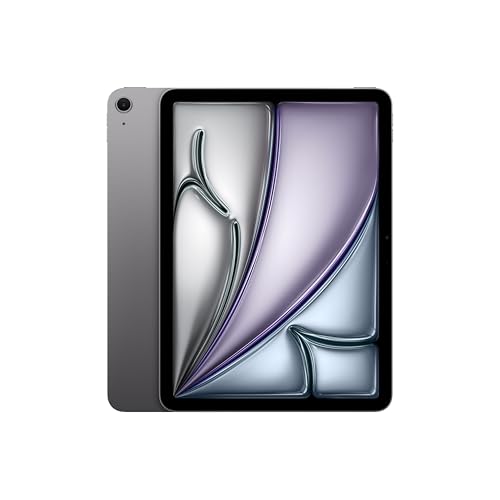
Apple iPad Air 11-inch M4 — Best Performance
Best For: Demanding apps, multitasking, creative work, gaming, Apple Pencil Pro users, and buyers planning to keep the tablet for years.
APPLE
Apple iPad Air 11-inch (M4)
The iPad Air M4 is the definitive performance pick in our comparison, offering massive processing upgrades over the A16 model. With its desktop-class M4 chip, Wi-Fi 7 connectivity, and Apple Pencil Pro support, it is built to handle demanding workloads and creative projects that the standard iPad cannot.
Who Should Buy It
Creative professionals, digital artists, and power users who need Apple Pencil Pro support, advanced multitasking, and a fully laminated P3 wide color display for demanding workflows.
Why We Pick It
We chose the M4 iPad Air because it represents the ultimate future-proof choice in the lineup, offering hardware-accelerated ray tracing and a massive leap in processing power over the A16 model.
Features & Benefits
| Feature | Benefit |
|---|---|
| Apple M4 Processor | Delivers advanced graphics and incredible performance for smooth multitasking and complex AI tasks. |
| Wi-Fi 7 with Apple N1 | Provides ultra-fast wireless connections for quick transfers of large files and seamless streaming. |
| Fully Laminated P3 Display | Features ultralow reflectivity and wide color for a highly accurate and stunning visual experience. |
Pros & Cons
| Pros | Cons |
|---|---|
| ✓ Incredible performance with desktop-class M4 chip | ✕ Costs $250 more than the iPad A16 model |
| ✓ Supports Apple Pencil Pro and Magic Keyboard | |
| ✓ Ultra-fast Wi-Fi 7 wireless connectivity | |
| ✓ Fully laminated screen with anti-reflective coating |
Why We Choose It
The M4 Air earns the Best Performance badge because it moves the tablet closer to Apple’s higher-performance iPad class without reaching iPad Pro pricing.
The supplied 128GB Wi-Fi listing costs $649, down from $749. That makes the Air $250 more expensive than the supplied A16 model.
The premium buys more than a faster processor. The M4 version adds 12GB unified memory, a 9-core GPU, P3 color, full lamination, anti-reflective treatment, Apple Pencil Pro support, Wi-Fi 7, and a faster USB connection.
Those advantages matter most when the tablet handles demanding creative or productivity tasks.
Features and Benefits
- M4 chip: Provides substantially more performance headroom for demanding apps and multitasking.
- 8-core CPU: Handles intensive processing workloads more comfortably than the entry-level configuration.
- 9-core GPU: Gives graphics-heavy apps and games more processing capability.
- 12GB unified memory: Provides substantial memory capacity for demanding multitasking and professional applications.
- Hardware-accelerated ray tracing: Helps compatible graphics workloads produce more advanced lighting effects.
- P3 wide color: Provides a broader color range for supported creative content.
- Fully laminated display: Makes the screen feel more directly connected to the image or writing surface.
- Anti-reflective coating: Helps reduce reflections in brighter environments.
- Apple Pencil Pro support: Unlocks more advanced stylus features for drawing, notes, and creative work.
- Apple Pencil hover: Helps preview the Pencil position before the tip touches the display.
- Wi-Fi 7 with Apple N1: Provides newer wireless connectivity on compatible networks.
- USB 3 up to 10Gb/s: Makes large file transfers much faster than the A16 model’s USB 2 connection.
- Up to 6K external display: Gives professionals more flexibility with high-resolution external screens.
Editor Analysis
The Air is the better technical package, but the premium only makes sense for workloads that can use it. Casual tablet tasks will not suddenly become $250 better simply because the processor is faster.
The M4 chip becomes more valuable when several demanding apps remain active, graphics workloads increase, or the tablet becomes part of a serious productivity setup.
Who should buy it?
Choose the Air if creative applications, demanding games, advanced multitasking, digital art, video editing, or professional productivity matter.
The model is also a stronger fit for someone who wants Apple Pencil Pro support and the more advanced display construction.
Who should avoid it?
Skip the premium if the tablet will mainly handle YouTube, Netflix, web browsing, email, basic schoolwork, and casual games.
In those situations, the A16 model can provide the core experience at a much lower supplied price.
Important limitations
The biggest drawback is simple: the Air costs more. The supplied listings show a $250 difference between the two 128GB Wi-Fi models.
The Air also does not automatically make every application faster. Apps must be capable of using the additional processor and memory resources.
Which iPad Has Better Performance, A16 or M4?
The M4 iPad Air has clearly stronger performance hardware than the A16 iPad. Apple’s specifications show more CPU and GPU cores, 12GB unified memory, hardware-accelerated ray tracing, and a 120GB/s memory bandwidth on the Air.
| Performance area | A16 iPad | M4 iPad Air | Winner |
|---|---|---|---|
| CPU | 5-core | 8-core | M4 |
| GPU | 4-core | 9-core | M4 |
| Memory | Not specified on cited Apple page | 12GB unified | M4 |
| Ray tracing | Not listed | Hardware accelerated | M4 |
| Memory bandwidth | Not listed | 120GB/s | M4 |
For normal browsing and streaming, both are capable. However, demanding games, video editing, graphics applications, and heavy multitasking give the M4’s additional hardware more room to work.
Is M4 Better Than A16 for Gaming?
Yes, the M4 Air is the stronger gaming platform because its GPU has more cores and supports hardware-accelerated ray tracing.
The A16 model still suits casual and moderately demanding games. However, the M4 configuration offers more graphics headroom for demanding titles and future workloads.
Is the A16 Enough for Everyday Use?
Yes, the A16 is more than adequate for everyday tablet activities. Browsing, streaming, social apps, video calls, schoolwork, note-taking, and casual games do not require the M4’s full performance capability.
Which Display Is Better?
The M4 Air has the more advanced display, even though both 11-inch models share the same resolution and 500-nit brightness. The Air adds P3 wide color, full lamination, anti-reflective coating, and Apple Pencil hover.
| Display feature | A16 | M4 Air |
|---|---|---|
| Screen size | 11 inches | 11 inches |
| Technology | Liquid Retina IPS | Liquid Retina IPS |
| Resolution | 2360 × 1640 | 2360 × 1640 |
| Pixel density | 264 ppi | 264 ppi |
| Brightness | 500 nits | 500 nits |
| P3 wide color | No | Yes |
| Full lamination | No | Yes |
| Anti-reflective coating | No | Yes |
| Apple Pencil hover | No | Yes |
The difference is especially important for artists and anyone who writes or draws frequently. The fully laminated panel and Pencil hover support make the Air a more advanced creative tool.
What Does the M4 Air Have That the A16 Does Not?
The Air adds P3 color, full lamination, anti-reflective treatment, Apple Pencil Pro support, Pencil hover, Wi-Fi 7, USB 3, and stronger external-display support.
- Apple M4 processor
- 9-core GPU
- 12GB unified memory
- Hardware-accelerated ray tracing
- P3 wide color
- Fully laminated display
- Anti-reflective coating
- Apple Pencil Pro compatibility
- Apple Pencil hover
- Wi-Fi 7 with Apple N1
- USB 3 up to 10Gb/s
- External display support up to 6K at 60Hz
- Up to 1TB storage
What Does the A16 iPad Do Better for the Money?
The A16 model delivers the core iPad experience for significantly less money. The supplied $399 price makes it easier to recommend for basic and moderate workloads.
The tablet includes 128GB starting storage, an 11-inch Liquid Retina screen, A16 processing, USB-C, Touch ID, Wi-Fi 6, and 12MP cameras.
It also supports Apple Pencil USB-C and Magic Keyboard Folio. Therefore, the less expensive model can still become a useful school or productivity device.
Someone considering the A16 should also see Gizmosum’s guide to keyboard options for the iPad A16 before choosing an accessory setup.
Which iPad Has Better Apple Pencil Support?
The iPad Air M4 has better Apple Pencil support because it works with Apple Pencil Pro and supports hover. The A16 model supports Apple Pencil USB-C and first-generation Apple Pencil with the required adapter.
| Accessory feature | A16 iPad | M4 Air |
|---|---|---|
| Apple Pencil USB-C | Yes | Yes |
| Apple Pencil Pro | No | Yes |
| Apple Pencil 1st generation | Yes, with adapter | No |
| Pencil hover | No | Yes |
For simple handwriting and annotations, either model can work. Artists and advanced note-takers should choose the Air because Apple Pencil Pro adds more capabilities.
Which iPad Has the Better Keyboard Setup?
The M4 Air has the more advanced keyboard ecosystem, while the A16 offers a practical Magic Keyboard Folio setup. The choice depends on how much laptop-style work the tablet will handle.
The A16 supports Magic Keyboard Folio, which adds a keyboard and trackpad-style control. That makes the lower-priced model more useful for schoolwork, writing, email, and basic productivity.
The Air supports Apple’s Magic Keyboard designed for iPad Air. The higher-performance hardware also makes the Air better suited to demanding multitasking.
How Do the Cameras Compare?
Both models offer 12MP front and rear camera systems for common tablet photography and video calls. Camera differences should therefore carry less weight than processor, display, and accessory differences when choosing between these tablets.
| Camera area | A16 | M4 Air |
|---|---|---|
| Rear camera | 12MP Wide | 12MP Wide |
| Front camera | 12MP Center Stage | 12MP Center Stage |
| Video calls | Center Stage | Center Stage |
For video calls, both models can keep the front-facing camera useful in landscape orientation. Therefore, camera performance is not a major reason to pay the Air premium.
Which Model Has Better Connectivity?
The M4 Air has the more advanced connectivity package because it supports Wi-Fi 7 and faster USB 3 transfers. The A16 model uses Wi-Fi 6 and USB 2.
| Connectivity | A16 iPad | M4 Air |
|---|---|---|
| Wi-Fi | Wi-Fi 6 | Wi-Fi 7 |
| Wireless chip | — | Apple N1 |
| USB speed | USB 2 up to 480Mb/s | USB 3 up to 10Gb/s |
| External display | Up to 4K at 60Hz | Up to 6K at 60Hz |
The USB difference is especially important for someone moving large video files to external storage. For ordinary charging and accessory use, the difference is less noticeable.
Which iPad Has More Storage Options?
The M4 Air offers more storage flexibility because it reaches 1TB, while the A16 model tops out at 512GB. Both models start at 128GB.
| Storage | A16 | M4 Air |
|---|---|---|
| 128GB | Yes | Yes |
| 256GB | Yes | Yes |
| 512GB | Yes | Yes |
| 1TB | No | Yes |
For schoolwork and everyday use, 128GB can be enough when files stay manageable. Creative professionals should consider 512GB or 1TB if large projects will remain on the tablet.
Do Both iPads Have Similar Battery Life?
Yes, Apple rates both models for up to 10 hours of web browsing over Wi-Fi or video playback. Battery claims are therefore not a major reason to choose one model over the other.
Actual battery life varies with brightness, applications, wireless activity, accessories, and workload. Demanding games and intensive creative applications can consume power faster than light browsing.
Which iPad Is Better for Students?
The A16 is the better student value, while the M4 Air is better for students doing advanced creative or technical work. Most students can save $250 by choosing the entry model without losing the core tablet experience.
| Student task | Recommended model | Reason |
|---|---|---|
| Reading PDFs | A16 | Lower cost |
| Web research | A16 | Enough performance |
| Note-taking | A16 | Supports Apple Pencil USB-C |
| Digital art | M4 Air | P3, lamination, Pencil Pro, hover |
| Video editing | M4 Air | Stronger processor and GPU |
| Casual gaming | A16 | Better value |
| Demanding gaming | M4 Air | Stronger graphics hardware |
Students interested in note-taking can also use Gizmosum’s iPad notes and tricks guide for practical setup ideas.
Which One Is Better for Drawing and Digital Art?
The M4 Air is the better choice for drawing because its display and Apple Pencil Pro support are more advanced. The fully laminated panel, P3 color, anti-reflective coating, and hover feature all help creative workflows.
The A16 still supports Apple Pencil USB-C. Therefore, the less expensive tablet remains useful for handwriting, simple sketches, annotations, and basic creative work.
Is the M4 Air Worth the Extra $250?
The M4 Air is worth the extra $250 when its performance and premium features will actually be used. For basic tablet tasks, the A16 provides better value.
| If the priority is… | Better choice |
|---|---|
| Lowest cost | A16 |
| Everyday browsing | A16 |
| Streaming | A16 |
| Basic schoolwork | A16 |
| Heavy multitasking | M4 Air |
| Digital art | M4 Air |
| Advanced gaming | M4 Air |
| Large file transfers | M4 Air |
| Apple Pencil Pro | M4 Air |
💡 Buying rule: If the A16 already handles your planned workload, keep the $250 difference. If the workload needs the M4 features, the Air is the smarter long-term choice.
How We Choose Between the A16 and M4 Air
We compare the two tablets by performance, display quality, accessories, connectivity, storage, battery expectations, and real-world value. Specifications alone do not determine the better purchase.
Performance and workload
Processor capability matters most when a tablet handles demanding applications. Therefore, the M4 receives the advantage for intensive workloads.
Display experience
The screen resolution is similar on both models. However, the Air’s laminated P3 panel and anti-reflective coating give creative users more advanced display hardware.
Accessory compatibility
Apple Pencil support can change the value equation for artists and students. The M4’s Apple Pencil Pro compatibility gives it a clear advantage for advanced stylus work.
Connectivity
Wi-Fi 7 and USB 3 make the Air more future-facing for compatible networks and high-speed file transfers.
Price-to-performance value
The supplied prices make the A16 substantially cheaper. Therefore, the lower-cost model wins when the additional Air features are unnecessary.
What Are the Common Buying Mistakes?
The biggest mistake is paying for M4 performance without having a workload that benefits from it. A second mistake is choosing 128GB without considering how much local storage the tablet will need.
- Choosing the M4 only because it is faster: Faster hardware matters less for simple browsing and streaming.
- Ignoring display differences: Artists should consider P3 color, lamination, and Pencil hover.
- Ignoring storage: Large video and creative projects can fill 128GB quickly.
- Overlooking USB speed: Large file transfers benefit from the Air’s USB 3 connection.
- Buying the wrong Apple Pencil: Check compatibility before adding a stylus to the budget.
- Comparing only processor names: Display, memory, connectivity, and accessories also affect value.
What Makes a Good iPad for Students?
A good student iPad needs enough performance, practical storage, strong battery life, useful accessories, and a display that works well for reading and writing.
| Criterion | Why it matters |
|---|---|
| Performance | Keeps apps and multitasking responsive |
| Storage | Stores documents, apps, photos, and media |
| Apple Pencil support | Helps with handwritten notes and diagrams |
| Keyboard support | Improves essay writing and productivity |
| Battery | Reduces dependence on chargers during classes |
Which iPad Should You Buy for Everyday Use?
Choose the A16 iPad for everyday use because it delivers the essential tablet experience at a lower supplied price. The M4 Air is unnecessary for many casual workloads.
The A16 handles browsing, streaming, video calls, document work, note-taking, and casual gaming. It also provides 128GB starting storage.
If the tablet will replace a laptop for demanding work, however, the Air becomes more attractive.
Which iPad Is Better for Professional Work?
The M4 Air is better for professional work because its stronger processor, larger memory capacity, faster USB connection, and advanced display support suit demanding workflows.
Professionals working with large files can also benefit from USB 3 transfer speeds. Creative users gain additional value from P3 color and Apple Pencil Pro compatibility.
Does the iPad Air M4 Have Apple Intelligence?
Yes, the M4 Air supports Apple Intelligence. The M4 platform includes the Neural Engine and hardware designed for Apple’s current AI features.
AI feature availability can depend on software version, language, region, and Apple’s current feature requirements. Therefore, buyers should check Apple’s current software documentation before relying on a specific AI feature.
Can the A16 iPad Replace a Laptop?
The A16 can replace a laptop for light productivity, but it is not the ideal choice for every laptop-style workload. Keyboard support makes writing and basic office tasks practical.
However, demanding multitasking, professional creative applications, large file transfers, and advanced external-display setups favor the M4 Air.
Can You Edit 4K Video on These iPads?
Both models can handle video-related tasks, but the M4 Air is the stronger choice for demanding 4K editing workflows. The M4 has substantially more CPU and GPU headroom.
The Air also supports hardware-accelerated H.264, HEVC, ProRes, and ProRes RAW media features. That makes the premium model more suitable for advanced video workflows.
How Much Does Each Model Cost?
The supplied 128GB Wi-Fi A16 model costs $399, while the supplied 128GB Wi-Fi M4 Air costs $649. The difference is $250 based on the prices provided for this comparison.
| Model | Storage | Supplied price | Previous price | Badge |
|---|---|---|---|---|
| Apple iPad 11-inch A16 | 128GB | $399 | $449 | Best Value |
| Apple iPad Air 11-inch M4 | 128GB | $649 | $749 | Best Performance |
Prices can change after publication. Check the current Amazon listing before buying, especially when a limited-time discount is shown.
Where Should You Spend the Extra Money?
If you have an extra $250, spend it on the Air only when you need its performance, display, Pencil Pro, or connectivity advantages. Otherwise, keeping the difference is the smarter value decision.
For an A16 buyer, some of the saved money can instead go toward useful accessories. Gizmosum’s iPad A16 charger guide can help with charging options.
Final Buying Decision
Buy the A16 iPad if value is the priority; buy the M4 Air if performance and advanced features are the priority. Neither model is universally better for every buyer.
| Buyer type | Best choice | Why |
|---|---|---|
| Budget buyer | A16 | Lower supplied price |
| Student | A16 | Strong everyday value |
| Casual user | A16 | Enough performance |
| Digital artist | M4 Air | P3, lamination, Pencil Pro |
| Video editor | M4 Air | Stronger media performance |
| Power user | M4 Air | More performance headroom |
| Heavy file transfers | M4 Air | USB 3 up to 10Gb/s |
Frequently Asked Questions
Which is better, iPad A16 or iPad Air M4?
The iPad Air M4 is technically better, but the A16 is the better value for most everyday workloads. The Air wins performance, display technology, Pencil Pro support, connectivity, and storage flexibility.
Is the iPad Air M4 worth the extra money?
The Air is worth the premium when you need its stronger performance, advanced display, Apple Pencil Pro, or faster connectivity. Otherwise, the A16 offers a better value at the supplied price.
What is the difference between iPad A16 and iPad Air M4?
The main difference is hardware capability. The Air has the M4 chip, 12GB unified memory, a 9-core GPU, P3 color, full lamination, Pencil Pro support, Wi-Fi 7, and USB 3.
Is the iPad A16 good enough for everyday use?
Yes, the A16 is well suited to everyday tablet use. Browsing, streaming, schoolwork, video calls, note-taking, and casual gaming fit its capabilities well.
Is M4 better than A16 for iPad?
Yes, M4 is the stronger processor platform for demanding iPad workloads. The M4 Air has more CPU and GPU cores and includes 12GB unified memory.
Which iPad has better performance, A16 or M4?
The M4 Air has better performance. Its 8-core CPU, 9-core GPU, 12GB unified memory, and hardware-accelerated ray tracing give it more performance headroom.
Does iPad A16 support Apple Pencil Pro?
No, the A16 iPad does not support Apple Pencil Pro. The model supports Apple Pencil USB-C and first-generation Apple Pencil with the required adapter.
Does iPad Air M4 have a better screen than iPad A16?
Yes, the M4 Air has the more advanced display. Both screens share the same 11-inch size, resolution, and 500-nit brightness, but the Air adds P3, full lamination, anti-reflective treatment, and Pencil hover.
Which iPad is better for students, A16 or M4?
The A16 is the better choice for most students because it costs less and handles common school tasks well. Students doing advanced art, video editing, or demanding technical work should consider the M4 Air.
Is iPad Air M4 better for gaming?
Yes, the M4 Air is better suited to demanding gaming. Its 9-core GPU and hardware-accelerated ray tracing provide more graphics capability than the A16 configuration.
Which iPad has more storage options?
The M4 Air has more storage options because it reaches 1TB. The A16 model offers up to 512GB.
Which iPad has better connectivity?
The M4 Air has better connectivity because it supports Wi-Fi 7 and USB 3. The A16 uses Wi-Fi 6 and USB 2.
Which iPad will last longer?
The M4 Air offers more performance headroom for demanding future workloads, but software support cannot be predicted precisely. The A16 remains a current-generation iPad and can be a sensible long-term value choice.
Can the iPad A16 use a keyboard?
Yes, the A16 iPad supports Apple’s Magic Keyboard Folio. A keyboard can make writing, email, document editing, and schoolwork more convenient.
Can the iPad Air M4 replace a laptop?
The M4 Air can replace a laptop for many workflows, but the result depends on the applications and accessories required. A keyboard, trackpad, external display, and appropriate iPadOS apps can make the setup more capable.
Can you edit 4K video on the iPad Air M4?
Yes, the M4 Air is well suited to demanding video editing workloads. Its M4 processor and hardware media engines provide substantial performance for supported video formats.
Why is the iPad Air M4 more expensive?
The Air costs more because it includes substantially stronger hardware and several premium features. The M4 processor, 12GB unified memory, advanced display, Pencil Pro support, Wi-Fi 7, and USB 3 all contribute to the higher price.
Why should I buy the iPad A16 instead of the iPad Air?
Buy the A16 when you want the core iPad experience without paying for features you may not use. The lower supplied price makes the entry model particularly attractive for browsing, streaming, schoolwork, and casual entertainment.
Final Thoughts
The A16 iPad is the winner for value, while the M4 Air is the winner for performance. The $250 difference should guide the decision rather than the processor name alone.
For most everyday buyers, the A16 delivers enough performance and features. The M4 Air earns its premium when demanding applications, creative work, advanced stylus features, faster connectivity, or higher storage capacity matter.
- Apple iPad 11-inch A16 — Best Value for everyday use, students, browsing, streaming, and casual gaming.
- Apple iPad Air 11-inch M4 — Best Performance for demanding workloads, creative work, advanced gaming, and Apple Pencil Pro users.