Choosing a Prime Video subscription through Amazon vs Apple App Store comes down to the subscription you have and the company handling your billing. Amazon manages direct subscriptions, while Apple manages eligible subscriptions billed through its system. The practical differences appear when you need to review charges, change payment details, cancel, or request a refund. This guide explains how to identify your billing provider and manage the correct subscription without accidentally canceling a different membership.
Last updated: October 17, 2026. Subscription prices, taxes, promotions, and availability can change. Check the current offer and renewal terms before subscribing.
Prime Video Subscription Through Amazon vs Apple App Store: What’s the Difference?
The main difference is who bills you and manages the subscription. Amazon handles direct Amazon-billed subscriptions, while Apple manages eligible subscriptions billed through its subscription system.
Before comparing the two routes, distinguish among three arrangements:
- Amazon Prime membership: A broader membership that includes Prime Video benefits under the applicable plan and terms.
- Standalone Prime Video subscription: A subscription to Prime Video without purchasing the broader Amazon Prime membership.
- Prime Video add-on subscription: A separate subscription to an additional channel or service available through Prime Video.
These arrangements do not necessarily share the same billing or cancellation process. The correct procedure depends on the subscription you actually hold and the company that processes its recurring charge.
| Subject | What It Is | Best For | Key Difference |
|---|---|---|---|
| Prime Video through Amazon | A subscription billed directly through Amazon | Subscribers who prefer managing direct subscriptions through Amazon | Amazon handles billing and cancellation for its direct subscriptions |
| Prime Video billed through Apple | An eligible subscription billed through Apple’s subscription system | Subscribers who prefer managing eligible subscriptions through their Apple Account | Apple handles billing and cancellation for the Apple-billed subscription |
Amazon’s official Prime Video cancellation guidance explains how to cancel a direct subscription and distinguishes a Prime Video-only subscription from an Amazon Prime membership.
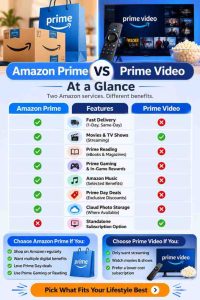
Also read: Amazon Prime vs Prime Video: Key Differences
Does Prime Video Cost More Through Apple or Amazon?
There is no universal price winner established by the billing method alone. The actual cost depends on the available subscription, billing period, applicable taxes, promotional terms, and renewal amount.
Compare the same type of subscription before deciding. A standalone Prime Video subscription, an Amazon Prime membership, and an additional channel subscription are different arrangements.
Use this checklist to compare the offers:
- Match the subscription: Compare the same plan rather than a standalone video subscription with a broader membership.
- Check the billing period: Confirm whether the offer renews monthly or follows another schedule.
- Review the renewal amount: Compare the recurring charge, not just the initial promotional offer.
- Check taxes: Compare the final amount applicable to your account and location.
- Identify separate subscriptions: Prime Video, Amazon Prime, and additional channels can involve separate charges.
The most reliable comparison uses the actual renewal amount for the same subscription and billing period. Changing the billing provider does not automatically guarantee savings.
How Does Prime Video Billing Work Through Amazon vs Apple?
The billing provider determines which account-management system you should check first. Amazon-billed subscriptions are managed through Amazon, while subscriptions billed through Apple are managed through the Apple Account associated with the purchase.
How Amazon Handles Prime Video Payments
Amazon-billed subscribers use their Amazon account to review direct subscription details, renewal information, and eligible payment settings.
To review your subscription:
- Sign in to the Amazon account associated with Prime Video.
- Open Prime Video and go to Account & Settings.
- Review the account or membership section for the subscription you hold.
- Check the current status and renewal details.
- Review the payment settings associated with the subscription.
The available controls depend on whether you have a standalone Prime Video subscription, Amazon Prime membership, or a separate add-on subscription.
Also read: Can You Watch Prime Video Without Amazon Prime?
How Apple Handles Prime Video Payments
An Apple-billed subscription is managed through the Apple Account associated with the purchase. Apple provides a central subscription-management screen for eligible recurring subscriptions.
On an iPhone or iPad:
- Open Settings.
- Tap your name at the top of the screen.
- Select Subscriptions.
- Look for the relevant subscription and open its details.
- Review the status, renewal information, and available management options.
If the subscription does not appear, search your email for an Apple receipt and check which Apple Account was used for the purchase. If a family member’s account appears on the receipt, that account may be the one associated with the subscription.
For further guidance, consult Apple’s official subscription cancellation instructions.
Which Billing Method Is Easier to Manage?
Amazon billing suits subscribers who prefer managing their subscriptions through Amazon. Apple billing suits subscribers who prefer managing eligible recurring subscriptions through their Apple Account.
Neither billing method automatically improves streaming quality. Choose based on your preferred account-management system and confirm which company processes the recurring charge.
How Do You Cancel Prime Video Through Amazon or Apple?
Cancel the subscription through the company that bills it. Direct Amazon subscriptions use Amazon’s subscription controls, while Apple-billed subscriptions use Apple’s cancellation process.

How to Cancel a Prime Video Subscription Through Amazon
For a subscription billed directly by Amazon, follow these steps:
Also read: prime video amazon series
- Sign in to the Amazon account associated with the subscription.
- Open Prime Video and go to Account & Settings.
- Select the relevant account or membership section.
- For a standalone Prime Video subscription, choose the available option to end the subscription.
- If Prime Video is included with Amazon Prime, review the Amazon Prime membership controls instead.
- Follow the confirmation instructions and check the resulting subscription status.
Amazon’s official guidance distinguishes a Prime Video-only subscription from an Amazon Prime membership. Review the type of membership displayed in your account before confirming cancellation.
How to Cancel a Prime Video Subscription Through Apple
For a subscription billed through Apple, use the Apple Account associated with the purchase.
- Open Settings on your iPhone or iPad.
- Tap your name.
- Select Subscriptions.
- Open the relevant subscription if it appears.
- Select Cancel Subscription when that option is available.
- Follow the confirmation instructions and review the resulting status.
If you cannot find the subscription, check the Apple Account associated with the purchase receipt. If another account or billing provider handles the charge, use that provider’s subscription-management process.
Apple’s subscription cancellation guide explains how to cancel an Apple-billed subscription and what to check if it does not appear in the account.
What If Prime Video Does Not Appear in Your Subscriptions?
If Prime Video does not appear in your Apple subscription settings, check the purchase receipt and identify the account and billing provider associated with the charge.
Search your email for a receipt, then compare the transaction with your bank or card statement. If Amazon processed the payment, sign in to the relevant Amazon account. If Apple processed it, use the Apple Account associated with the purchase.
A Reddit discussion about locating a subscription associated with a different Apple Account is available here: discussion about a subscription and its associated Apple Account. Verify the thread’s details before relying on any particular account of what happened.

Which Company Handles Prime Video Refunds?
Start with the company that processed the charge. Amazon handles refund requests for eligible Amazon-billed subscriptions, while Apple has a separate process for eligible purchases billed through its system.
Canceling a subscription and obtaining a refund are different actions. Ending a subscription does not automatically return money from a previous charge.
How to Request a Refund for an Amazon-Billed Subscription
Start with Amazon’s customer-service or subscription-help process. Identify the subscription, the charge, and the reason for your request.
Refund eligibility depends on the subscription type and the applicable terms. Amazon’s terms distinguish standalone video subscriptions from Prime membership benefits and subscriptions billed through third parties.
Review the Prime Video subscription terms for the conditions applicable to your subscription.
How to Request a Refund for an Apple-Billed Subscription
For an Apple-billed charge, use Apple’s official refund-request process. Sign in with the Apple Account associated with the purchase, locate the transaction, select the refund option, and submit the request.
Apple reviews refund requests under its applicable policies. Submitting a request does not guarantee approval.
If you cannot find the transaction, check the Apple Account shown on the receipt. Apple also explains how to locate purchases and investigate unfamiliar charges in its billing and subscriptions help center.
What If You Do Not Recognize the Charge?
Identify the billing provider before requesting a refund or reporting a charge. Review your Amazon account, Apple purchase history, email receipts, and bank or card statement.
If neither account explains the charge, contact the company shown on the transaction. For a charge you believe is unauthorized, contact your bank or card issuer about its dispute process.
A Reddit discussion about an unfamiliar subscription charge is available here: discussion about identifying an unexpected charge. Treat individual forum experiences as anecdotal and verify the actual transaction before taking action.
Prime Video Through Amazon vs Apple: Pros and Cons
Amazon billing centralizes direct subscription management in the Amazon account. Apple billing centralizes eligible subscriptions in the Apple Account. The practical trade-off is which account you prefer to use for recurring payments and subscription changes.
| Factor | Amazon Billing | Apple Billing |
|---|---|---|
| Subscription management | Use the relevant Amazon account and membership controls | Use the Apple Account associated with the purchase |
| Cancellation | Cancel direct subscriptions through Amazon | Cancel eligible Apple-billed subscriptions through Apple |
| Payment management | Review the payment settings associated with the Amazon subscription | Review payment settings associated with the Apple Account |
| Refund requests | Start with Amazon for eligible Amazon-billed charges | Start with Apple for eligible Apple-billed charges |
| Account troubleshooting | Identify the Amazon account and subscription type | Identify the Apple Account and purchase receipt |
| Main convenience | Centralized management of direct Amazon subscriptions | Centralized management of eligible Apple-billed subscriptions |
Advantages of Amazon Billing
- Direct management of Amazon-billed subscriptions through the Amazon account.
- A practical fit for subscribers who already manage Amazon Prime and Prime Video through Amazon.
- Access to the relevant Amazon membership and payment settings in one account.
Advantages of Apple Billing
- Subscription management through Apple Account settings.
- A practical fit for people who prefer managing eligible recurring subscriptions through Apple’s ecosystem.
- Access to Apple’s purchase-history and refund-request processes for eligible Apple-billed transactions.
Limitations to Consider
Amazon billing requires access to the correct Amazon account and membership controls. Apple billing requires access to the Apple Account associated with the purchase.
Neither route eliminates the need to identify the billing provider. If you forget which account you used, check receipts and transaction records before attempting cancellation.
Which Prime Video Subscription Option Should You Choose?
Choose Amazon billing if you prefer managing a direct subscription through Amazon. Choose Apple billing if the relevant subscription is available through Apple’s billing system and you prefer managing it through your Apple Account.
Use these guidelines to decide:
- Choose Amazon billing if you already manage your Amazon Prime membership and direct Prime Video subscription through Amazon.
- Choose Apple billing if an eligible subscription is available through Apple and you prefer Apple’s subscription-management system.
- Compare actual renewal terms if price is your main concern.
- Identify your existing billing provider before canceling or changing your payment arrangement.
- Review separate subscriptions if your bank statement shows more than one recurring charge.
Before making changes, confirm whether you have an Amazon Prime membership, a standalone Prime Video subscription, or an additional channel subscription. These arrangements are distinct, and changing one does not automatically cancel every other subscription associated with your accounts.
Frequently Asked Questions
Is Prime Video Cheaper Through Amazon or Apple?
Neither billing route is universally cheaper. Compare the actual recurring charge for the same subscription and billing period, including applicable taxes. A standalone Prime Video subscription differs from an Amazon Prime membership, so comparing those two arrangements directly can be misleading. Review the current offer and renewal terms before deciding.
Also read: Does Amazon Prime Video Offer a 3-Month
Can I Cancel Prime Video Through Amazon If I Subscribed Through Apple?
If Apple bills the subscription, use the Apple Account associated with the purchase to cancel it. Amazon’s cancellation guidance distinguishes direct subscriptions from third-party arrangements. If the subscription is missing from Apple settings, check your receipts and other Apple Accounts to identify the company handling the charge.
How Do I Find Out Who Bills My Prime Video Subscription?
Check your Amazon account, Apple subscription settings, email receipts, and bank or card statement. Look for a transaction or receipt that identifies the billing company. If the subscription does not appear in the account you checked, verify whether another account or a third-party provider handles the payment before attempting cancellation.
Can I Get a Refund for Prime Video Through Apple?
You can submit an eligible Apple-billed purchase for review through Apple’s refund-request process. Sign in with the Apple Account associated with the transaction, locate the purchase, and submit the request. Approval is not automatic. If the charge does not appear, check the receipt and verify which Apple Account was used.
Does an Amazon Prime Membership Include Prime Video?
Amazon Prime membership includes Prime Video benefits under the applicable membership terms. A standalone Prime Video subscription is a different arrangement. Before canceling, check which membership appears in your account because ending a standalone video subscription and ending an Amazon Prime membership involve different account controls.
Also read: Amazon Prime Video vs Netflix: Which Is Better?
Can I Use the Same Prime Video Account on Apple Devices?
You can sign in to the Prime Video app on compatible Apple devices with the Amazon account associated with your viewing access. The streaming account and the billing account serve different purposes. Watching on an iPhone, iPad, or Apple TV does not, by itself, establish that Apple processes your subscription payment.
Which Is Easier to Cancel, Amazon or Apple Billing?
Amazon billing suits subscribers who already manage their subscriptions through Amazon. Apple billing suits subscribers who prefer managing eligible subscriptions through Apple Account settings. Neither is automatically easier for everyone. The simplest route is to identify the billing provider first and then use the account associated with the subscription.
What Should I Do If Amazon and Apple Both Charge Me?
Compare both transactions with your Amazon account, Apple purchase history, and email receipts. Check whether the charges relate to separate memberships, subscriptions, or additional channels before canceling anything. If a charge remains unexplained, contact the relevant billing company and ask your bank or card issuer about investigating a potentially unauthorized transaction.
Final Thoughts
The choice between a Prime Video subscription through Amazon and one billed through Apple’s App Store comes down to subscription eligibility, billing preferences, and account management. Amazon suits subscribers who prefer managing direct subscriptions through Amazon, while Apple suits subscribers who prefer managing eligible Apple-billed subscriptions through their Apple Account.
Prime Video through Amazon: Choose this route when you prefer direct subscription management through Amazon. Prime Video billed through Apple: Choose this route when the relevant subscription is available through Apple’s billing system and you prefer Apple’s account-management tools. Before making changes, identify the billing provider, check the current renewal terms, and confirm which membership or subscription you want to keep.
Sources and References
- Amazon Prime Video subscription cancellation guidance — Explains cancellation for direct Prime Video subscriptions and distinguishes Prime Video-only subscriptions from Amazon Prime memberships.
- Amazon Prime Video subscription terms — Covers subscription billing, cancellation, and refund conditions.
- Apple subscription cancellation instructions — Explains how to cancel an Apple-billed subscription and identify the account associated with a purchase.
- Apple refund-request instructions — Explains how to submit an eligible refund request and locate purchases associated with an Apple Account.
- Apple billing and subscriptions help — Provides information about subscription management, payment methods, purchase history, and unfamiliar charges.
- Reddit discussion about an Apple Account-linked subscription — A community discussion relevant to locating a subscription associated with an Apple Account.
- Reddit discussion about an unfamiliar subscription charge — A community discussion relevant to identifying and investigating an unexpected charge.