Views: 50
Can I use MTN Broadband data on my phone?
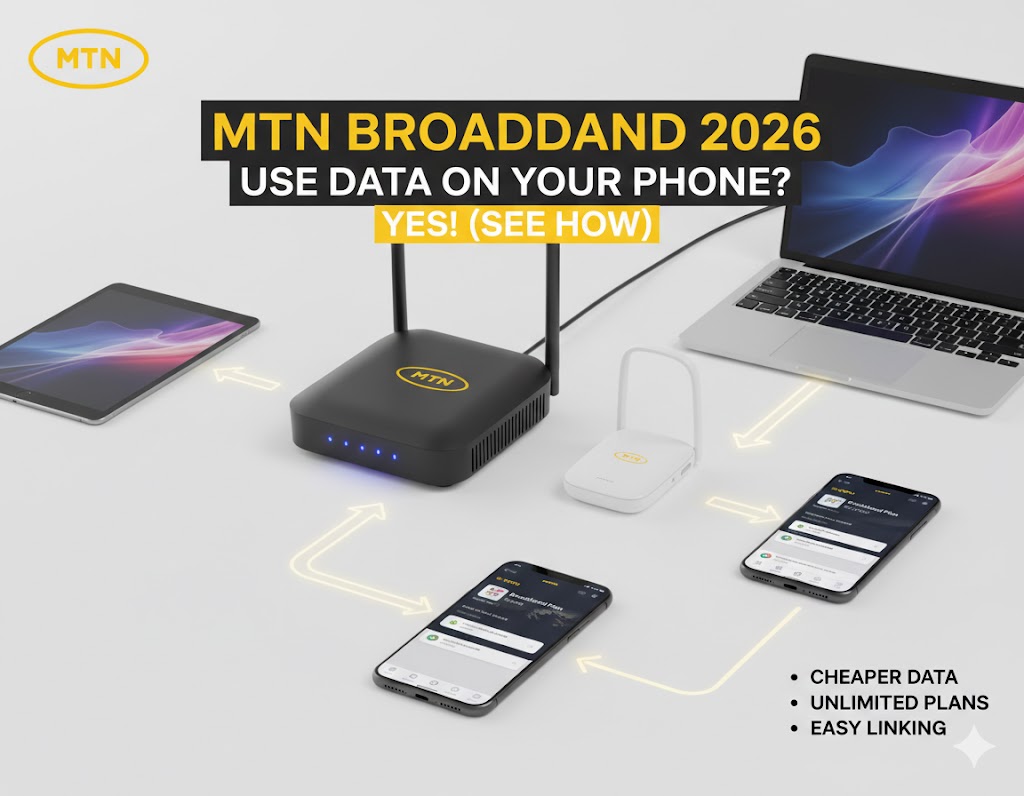
Yes, you can use MTN Broadband data on your phone in 2026. While the data is designed for routers and MiFi devices, MTN allows you to link your mobile number as a beneficiary via the Broadband One Account feature. Simply dial *312*500*1# on your primary phone to link your broadband SIM and start sharing your data across all your mobile devices.
 MTN Broadband Plans 2026: Requirements, Eligibility, and Subscription Process
 MTN Broadband Plans 2026: Requirements, Eligibility, and Subscription Process
Let’s be honest: buying small data bundles every few days is a quick way to drain your wallet. In 2026, if you are still paying ₦1,000 for 1.5GB, you are paying a massive premium for convenience. That is ₦666 per GB! Contrast that with MTN’s broadband offerings where ₦9,000 gets you 30GB. That drops your cost to just ₦300 per GB.
The “Broadband Gap” is the massive difference in value between regular mobile data and home/office plans. MTN Broadband plans are cheaper because they are designed for high-volume users—people who stream 4K videos, attend Zoom meetings, and run smart homes. That is why upgrading to a broadband-eligible SIM is the single best way to cut your monthly internet expenses in half.
Can I use MTN Broadband data on my phone?
One of the most frequent questions we get at Gizmosum is whether these cheap gigabytes are “locked” to a router box. In the past, the answer was yes, but in 2026, MTN has made it seamless to use your broadband data on your smartphone through the “One Account” feature.
The “One Account” Feature: How to link your phone number
The MTN Broadband One Account allows one “Sponsor” (your Router/MiFi SIM) to share data with multiple “Beneficiaries” (your phone and family members). This means you can keep your router at home but still browse with its data while you are at work or school.
Step-by-Step Linking: Dialing *312*500*1#
To start using broadband data on your phone, follow these exact steps:
- Insert your Broadband SIM into your router or MiFi first to ensure it is active.
- On your primary phone, dial the USSD code *312*500#.
- Select Option 1 (Link/Manage Device).
- Enter your Broadband SIM number when prompted.
- Once linked, you can purchase any broadband bundle, and your phone will automatically pull from that data balance.
Difference between MTN Broadband data and normal data
You might wonder: “If it’s the same network, why the different price?” The difference lies in Network Prioritization and Device Locking.
- Speed Priority: Broadband SIMs are optimized for Fixed-Wireless Access (FWA). That is why they often feel faster and more stable during peak hours (6 PM – 11 PM) than regular mobile SIMs.
- Device Constraints: To qualify for these prices, the SIM must be registered as a Broadband SIM. You cannot simply buy these plans on a regular ₦200 SIM card bought by the roadside.
Top 10 Best MTN Broadband Plans in Nigeria (2026 Updated)
Choosing the right plan depends on your “data appetite.” Here is the official 2026 breakdown of the most cost-effective bundles currently available on the MTN Broadband Portal.
| Plan Name | Data Volume | Price (₦) | Cost Per GB |
|---|---|---|---|
| Monthly Budget | 30GB + 5GB YouTube | ₦9,000 | ₦300 |
| Standard Monthly | 60GB + 5GB YouTube | ₦14,500 | ₦241 |
| Heavy User | 120GB + 5GB YouTube | ₦24,000 | ₦200 |
| Ultra Bundle | 200GB + 5GB YouTube | ₦37,500 | ₦187 |
| Yearly Giant | 1.5TB (1500GB) | ₦225,000 | ₦150 |
30GB Monthly Broadband Plan (₦9,000): Best for light home users
This is the most popular plan for individuals. For just ₦9,000, you get 30GB of high-speed data plus a 5GB bonus specifically for YouTube, Zoom, or MS Teams. If you mostly browse, use WhatsApp, and stream occasionally, this bundle will comfortably last the full 30 days.
120GB to 200GB Plans: The “Work from Home” sweet spot
If your career depends on stable internet, these are the plans for you. Starting at ₦24,000, these bundles offer a significantly lower cost-per-GB. They are ideal for remote workers who spend hours on video calls or designers who upload large files to the cloud. That is why we recommend these for small offices and busy households.
1.5TB Yearly Broadband Plan: For businesses and heavy streamers
Tired of subscribing every month? The 1.5TB annual plan is the ultimate “set it and forget it” option. While ₦225,000 seems like a high upfront cost, it breaks down to roughly 125GB per month for only ₦18,750. This is the cheapest way to buy MTN data in 2026 if you have the budget to pay annually.
MTN Silver & Ruby Unlimited: Does MTN Broadband have unlimited data?
In 2026, the word “unlimited” comes with a small asterisk. While MTN does offer unlimited plans, they operate under a Fair Usage Policy (FUP). This ensures that a few heavy users don’t slow down the network for everyone else. That is why understanding these two premium tiers is essential before you commit.
- MTN Silver Unlimited (₦30,000): This plan gives you a massive 150GB of high-speed data. Once you hit this 150GB limit, you receive 2GB daily data drops for the remainder of the 30 days.
- MTN Ruby Unlimited (₦55,000): The ultimate power-user plan. You get 260GB of high-speed data initially. After hitting the cap, you also receive 2GB daily drops to keep you connected until the month ends.
Understanding the FUP: What happens when the “unlimited” speed slows down?
Once you exhaust your primary 150GB or 260GB, your speed doesn’t just “stop”—it throttles. You will be able to browse and send emails, but 4K streaming and large downloads will become noticeably slower. That is why we recommend the Ruby plan for large households where 10+ devices are connected simultaneously.
MTN Broadband Plans: Requirements and Eligibility 2026
Before you rush to subscribe, you must ensure your hardware is compatible. MTN Broadband plans are device-specific, meaning they won’t work on just any regular smartphone SIM without the right setup.
Device Locking: Why you need an MTN MiFi, HyNetflex, or 5G Router
To access these specific prices, your SIM must be registered to an MTN-approved broadband device.
Whether it is the portable Pocket MiFi or the powerful 5G HyNetflex, the network “locks” these data rates to the device’s IMEI. If you put a broadband SIM into a standard phone without linking it via the “One Account” feature first, the data will not work.
SIM Types: How to get a dedicated Broadband SIM
You cannot use a standard MTN “Yellow” SIM for these plans. You must visit an MTN Experience Center or an authorized retailer to purchase a Broadband SIM. These are specifically provisioned for high-speed home and office data.
The 180-Day Rule: Keeping your SIM active
Warning: MTN Broadband SIMs have a strict “activity window.” If your MiFi or Router SIM goes 180 days without a “revenue-generating event” (buying data or airtime), the SIM may be deactivated and the number recycled. That is why we suggest loading at least ₦100 airtime every few months if you aren’t using the device regularly.
How to buy MTN Broadband data: All Subscription Codes
Managing your broadband account is significantly easier in 2026. You no longer need to remove the SIM from the router to subscribe.
- USSD Method: Dial *312*500# or *461*1# from your linked primary phone. This allows you to “Buy for Device” using the airtime on your phone.
- MTN Broadband Portal: Visit broadband.mtn.ng while connected to your router’s Wi-Fi. The portal will automatically recognize your number and allow you to pay via card or MoMo.
- Zigi & MyMTN App: You can chat with Zigi on WhatsApp (09033000001) or use the MyMTN NG App to manage multiple broadband devices from one dashboard.
MTN MiFi & Router Data Plans: Pricing and Bonuses
One of the biggest perks of switching to broadband is the “Welcome” phase. MTN is aggressive about winning new users in 2026 with massive bonuses.
New Device Welcome Bonus: Up to 120GB Free
When you buy and activate a new device, MTN gifts you an Activation Bonus to get started:
- 4G MiFi: 30GB Free Data.
- 4G Router (HyNetflex): 60GB Free Data.
- 5G Router: 100GB to 120GB Free Data (depending on the promo cycle).
100% Nursery Bonus: Double data for 6 months
This is the “secret sauce” for new users. For your first 6 months, MTN gives you a 100% bonus on every broadband bundle you buy. That is why your first half-year on MTN Broadband is the cheapest internet you will ever experience in Nigeria—effectively getting 60GB for the price of 30GB!
Frequently Asked Questions (FAQs) – Your MTN Broadband Queries Answered
We have compiled the most urgent questions regarding MTN Broadband. That is why we have provided direct, actionable answers below to help you save more on data.
What is the meaning of MTN broadband data?
MTN Broadband data refers to specialized, high-volume data bundles designed for Fixed Wireless Access (FWA). Unlike regular mobile data, broadband data is optimized for routers (like the HyNetflex) and MiFi devices. It offers a significantly lower cost-per-gigabyte and higher network priority, making it ideal for homes and offices that require stable, high-speed internet for multiple users.
How to check MTN broadband data balance?
In 2026, the most reliable USSD code to check your broadband balance is *461*4# or *323*4#. You can also monitor your usage in real-time by logging into the MTN Broadband Portal (broadband.mtn.ng) or using the MyMTN NG App. That is why we recommend keeping the app installed; it allows you to manage multiple linked devices from a single screen.
Can I use broadband on my phone?
Yes, but there is a catch. You cannot simply buy a broadband bundle on a regular mobile SIM. You must have an MTN Broadband SIM (usually inside a router). However, you can use that data on your phone by linking your mobile number as a beneficiary. Once linked via *312*500#, your phone will “pull” from the router’s data balance even when you are away from home.
Can I use a mobile broadband SIM in my phone?
Technically, a physical MTN Broadband SIM can be inserted into a smartphone. However, MTN’s systems are designed to detect the device’s IMEI. If the SIM is not in a registered broadband device (like a MiFi or Router), it may fail to browse or restrict you to expensive “pay-as-you-go” rates. That is why the best method is to keep the SIM in your router and use the One Account feature to share data to your phone.
MTN HyNetflex data plan vs. Regular Router plans: What is the difference?
| Feature | MTN HyNetflex | Regular Router/MiFi |
|---|---|---|
| Network Type | 4G/5G Hybrid + Ethernet | 4G or 5G Wireless only |
| Best For | Heavy Office/Gaming use | Home/Personal use |
| Unlimited Options | Higher Tier (Ruby/Diamond) | Capped & Silver Unlimited |
How to connect MTN broadband to phone?
The fastest way to connect is via Wi-Fi. Simply turn on your MTN MiFi or Router, find the SSID name on your phone’s Wi-Fi settings, and enter the password (usually found on a sticker under the device). If you want to connect without Wi-Fi, use the One Account linking code: dial *312*500*1# on your phone and follow the prompts to add your number as a beneficiary.
Final Verdict: Is it worth the switch in 2026?
If you consume more than 20GB of data per month, switching to MTN Broadband is a financial “no-brainer.” You move from paying nearly ₦700/GB on mobile plans to as low as ₦150/GB on annual broadband plans. That is why we recommend starting with the ₦9,000 for 30GB monthly plan to test the signal strength in your specific location before committing to the larger unlimited bundles.
Pro Tip: Always check your eligibility by dialing *312*500#. If your SIM is not eligible, visit an MTN store for a Broadband SIM upgrade—it is often free or costs less than ₦500.

Oluremi Olaoye is a professional driver and technology content contributor based in Ondo, Nigeria. As the founder and primary voice behind Gizmosum, Remi leverages practical, daily experience to help users navigate the complexities of digital banking and consumer electronics. With a specialized focus on mobile hardware and SEO strategy, his work provides reliable guides and technical insights designed to simplify the ever-shifting technological era for a global audience.