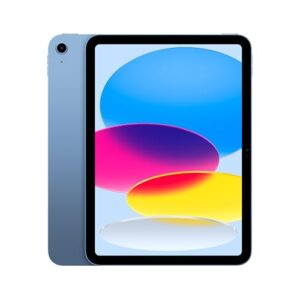
The iPad A16 has a 2360 × 1640-pixel resolution and a pixel density of 264 pixels per inch (PPI). Its 11-inch Liquid Retina display delivers clear text, detailed images and a comfortable viewing experience for everyday tablet use.
However, resolution is only one part of screen quality. This guide explains the iPad A16’s resolution, pixel density, brightness and display limitations. It also compares its screen with the 10th-generation iPad and the 11-inch iPad Air.
iPad A16 Resolution and Display Specifications
The iPad A16 has a native resolution of 2360 × 1640 pixels at 264 PPI. Apple identifies the panel as an 11-inch Liquid Retina display with IPS technology.
Here are the main display specifications:
| Display specification | iPad A16 |
|---|---|
| Display name | Liquid Retina |
| Screen size | 11 inches |
| Measured diagonal | 10.86 inches |
| Native resolution | 2360 × 1640 pixels |
| Pixel density | 264 PPI |
| Display technology | LED-backlit IPS LCD |
| Maximum brightness | 500 nits |
| Refresh rate | 60Hz |
| Color technology | sRGB color space |
| True Tone | Yes |
| Fully laminated display | No |
| Anti-reflective coating | No |
The 2360 × 1640 resolution describes the number of pixels across the display. The 264 PPI figure describes how densely those pixels are arranged.
Apple also specifies a 500-nit brightness rating, True Tone and an oleophobic coating. These features contribute to the overall viewing experience, but they do not change the native resolution.
What Do 2360 × 1640 Resolution and 264 PPI Mean?
The 2360 × 1640 resolution means the display contains 2360 pixels horizontally and 1640 pixels vertically in landscape orientation. The 264 PPI rating describes the pixel density across each inch of the screen.
Understanding the native resolution
Resolution measures the number of individual pixels that form an image. A higher pixel count can display more detail when other display characteristics are comparable.
The iPad A16’s 2360 × 1640 resolution gives it enough pixels for detailed text, photographs, illustrations and video content. Its rectangular pixel grid also supports both landscape and portrait viewing.
Understanding 264 pixels per inch
Pixel density measures how closely the display’s pixels sit together. The iPad A16 has 264 pixels in every inch of its display area.
At normal tablet viewing distances, this density produces clear text and detailed images. Individual pixels are not normally distracting during reading, browsing or video playback.
Pixel density is not the only factor behind perceived sharpness. Viewing distance, image quality, screen brightness and the content itself also influence what you see.
Resolution versus iPadOS display scaling
The physical pixel resolution is different from the logical dimensions that apps use to arrange their interfaces.
At 2× scaling, the 2360 × 1640-pixel display corresponds to a logical landscape canvas of 1180 × 820 points. Each logical point maps to two physical pixels in each direction.
This distinction explains why the number of pixels does not directly tell you how many buttons, lines of text or app elements fit on the screen. iPadOS uses logical points to position interface elements and adapts layouts to the available screen space.
Is the iPad A16 Screen Sharp Enough for Everyday Use?
Yes. The iPad A16’s 264 PPI display is sharp enough for reading, browsing, online learning, documents, photos and video streaming.
Its resolution provides a good balance for everyday tablet activities. However, the screen’s other characteristics affect how premium the viewing experience feels.

Reading and web browsing
The iPad A16 displays text clearly in ebooks, websites, PDFs and digital documents. Its pixel density helps keep letters and interface elements defined during normal use.
The 11-inch screen also gives you room to read longer passages and view more webpage content than a typical smartphone display. You can adjust text size and brightness to suit your preferences.
For students and everyday readers, the resolution is sufficient for notes, online articles, research materials and digital textbooks.
Online learning and productivity
The display works well for video lessons, presentations, spreadsheets and document editing. Its resolution keeps interface elements and written content clear.
However, screen size and multitasking layout matter as much as pixel count when working with several documents. The 11-inch panel offers useful working space, but it does not replace a larger desktop monitor for every workflow.
Photos and image viewing
The iPad A16 can display detailed photographs and illustrations at its native resolution. Images look clear when their source files contain enough detail.
Its standard sRGB color coverage is suitable for general image viewing. Color-sensitive creative work is a different consideration because the iPad Air supports the wider P3 color gamut.
Watching movies and streaming videos
The iPad A16 is suitable for watching movies, television shows and online videos. Its resolution provides detailed playback, while its IPS panel supports broad viewing angles.
Video quality still depends on the streaming source and the resolution of the original content. A 4K video does not turn the iPad’s built-in screen into a 4K display. The panel displays the video within its native 2360 × 1640-pixel resolution.
The 60Hz refresh rate is sufficient for ordinary films and television programmes. It is less noticeable during conventional video playback than during fast scrolling or high-frame-rate gaming.
iPad A16 Brightness and Outdoor Visibility
The iPad A16 has a rated maximum brightness of 500 nits. This level is suitable for many indoor environments, including classrooms, offices and living rooms.
Brightness describes how much light the display produces. It does not measure resolution, pixel density or color accuracy.
Is 500 nits bright enough?
Yes. A 500-nit rating provides useful brightness for reading, browsing and watching videos in ordinary indoor lighting.
You can increase the brightness when working near windows or in brighter rooms. True Tone also adjusts the display’s color balance to suit the ambient lighting environment.
Can you use the iPad A16 outdoors?
The display is usable outdoors, but direct sunlight can make content harder to see. Reflections are an important consideration because the iPad A16 does not have the anti-reflective coating found on the iPad Air.
For better visibility, avoid positioning the screen directly toward bright sunlight. Increasing brightness and changing the viewing angle can also help.
The 500-nit rating should not be confused with guaranteed sunlight readability. Ambient light, reflections and screen positioning all affect visibility.
Three Important iPad A16 Display Limitations
The iPad A16 has a sharp display, but it lacks some premium screen features. Its non-laminated construction, standard sRGB color coverage and 60Hz refresh rate distinguish it from more advanced iPad displays.
1. The display is not fully laminated
The iPad A16 uses a non-laminated display. This means there is a visible separation between the front glass and the underlying display panel.
On a fully laminated screen, the display layers are bonded more closely together. This construction creates a more integrated appearance and reduces the perceived gap between the glass and displayed content.
The difference is particularly relevant when writing or drawing with an Apple Pencil. The non-laminated construction can make the screen feel less direct because the displayed line sits beneath the glass surface.
It does not reduce the native resolution or make ordinary text unreadable. It is mainly a difference in screen construction and interaction.
2. The display uses sRGB rather than wide P3 color
The iPad A16 supports the standard sRGB color space rather than the wider P3 color gamut available on the iPad Air.
Color gamut describes the range of colors a display can reproduce. P3 covers a wider range of colors than sRGB, particularly in some red and green tones.
For reading, browsing, video streaming and ordinary photo viewing, sRGB is generally sufficient. However, photographers, illustrators and other users working with color-sensitive content can benefit from a display with wider color coverage.
This limitation affects color reproduction, not the number of pixels. The iPad A16 still has a 2360 × 1640 resolution and 264 PPI.
3. The display has a standard 60Hz refresh rate
The iPad A16 has a 60Hz refresh rate. This means the display refreshes up to 60 times per second.
A 60Hz panel is suitable for reading, watching videos, browsing websites and everyday app use. However, scrolling and animations do not look as smooth as they can on a higher-refresh-rate display.
This difference is easier to notice when comparing the iPad A16 with an iPad Pro featuring ProMotion technology. ProMotion supports adaptive refresh rates up to 120Hz on compatible models.
For most basic tablet activities, 60Hz remains usable. People who prioritize smoother scrolling, drawing interactions or high-frame-rate gaming will notice the difference more readily.
iPad A16 vs iPad 10th Generation vs iPad Air Display
The iPad A16 and 10th-generation iPad share the same core display resolution and pixel density. The 11-inch iPad Air also has the same resolution, but adds premium display features.
| Display feature | iPad A16 | iPad 10th generation | 11-inch iPad Air M4 |
|---|---|---|---|
| Resolution | 2360 × 1640 | 2360 × 1640 | 2360 × 1640 |
| Pixel density | 264 PPI | 264 PPI | 264 PPI |
| Measured diagonal | 10.86 inches | 10.86 inches | 10.86 inches |
| Display technology | IPS LCD | IPS LCD | IPS LCD |
| Brightness | 500 nits | 500 nits | 500 nits |
| Wide P3 color | No | No | Yes |
| Fully laminated | No | No | Yes |
| Anti-reflective coating | No | No | Yes |
| Refresh rate | 60Hz | 60Hz | 60Hz |
iPad A16 vs iPad 10th generation screen
The iPad A16 retains the same 2360 × 1640 resolution and 264 PPI density as the 10th-generation iPad. Both models have an 11-inch-class IPS LCD display with a 10.86-inch measured diagonal.
Therefore, the A16 model does not represent a resolution upgrade over the 10th generation. Its newer chip does not change the panel’s native pixel count.
Users upgrading from the 10th-generation iPad should not expect a major difference in display sharpness based on resolution alone.
iPad A16 vs 11-inch iPad Air M4 screen
The 11-inch iPad Air M4 has the same 2360 × 1640 resolution and 264 PPI density as the iPad A16. Its advantages come from additional display features rather than a higher pixel count.
The Air supports P3 wide color, full lamination and an anti-reflective coating. These features improve its suitability for color-sensitive work and create a more integrated screen experience.
Both displays have a 500-nit brightness rating. The Air’s additional features make it the more advanced panel, even though its resolution is identical.
For a broader device comparison, read our iPad A16 vs iPad Air M4 comparison.
Is the iPad A16 Resolution Good?
Yes. The iPad A16’s 2360 × 1640 resolution and 264 PPI density provide good sharpness for everyday tablet activities.
It is a suitable display for reading, web browsing, online learning, document work, photos and video streaming. Its 500-nit brightness and True Tone support also contribute to a practical everyday viewing experience.
However, the screen is not a premium display. The non-laminated construction, sRGB color coverage and 60Hz refresh rate are its main limitations.
Choose the iPad A16 display if:
- You mainly read ebooks, articles and digital documents.
- You browse websites and use everyday applications.
- You watch movies, online videos and television programmes.
- You want a sharp 11-inch-class screen for school or general productivity.
- You do not need wide P3 color or a high-refresh-rate panel.
Consider the iPad Air instead if:
- You work with color-sensitive photographs or illustrations.
- You prefer a fully laminated display.
- You want an anti-reflective coating.
- You value the additional display features of a more premium tablet.
Overall, the iPad A16 has a good resolution for its intended everyday use. Its limitations are related to display technology and premium features, not insufficient pixel density.
Frequently Asked Questions
What is the resolution of the iPad A16?
The iPad A16 has a native display resolution of 2360 × 1640 pixels. Its pixel density is 264 PPI.
How many PPI does the iPad A16 have?
The iPad A16 has 264 pixels per inch (PPI). This density produces clear text and detailed images at normal tablet viewing distances.
Is the iPad A16 screen actually 11 inches?
Apple identifies it as an 11-inch display. However, the rectangular screen measures 10.86 inches diagonally. Its rounded corners make the actual viewable area slightly smaller.
Is the iPad A16 display 4K?
No. The iPad A16 has a native resolution of 2360 × 1640 pixels. It can play supported high-resolution video content, but its built-in screen is not a 4K panel.
Does the iPad A16 have a 120Hz display?
No. The iPad A16 has a standard 60Hz display. It does not have the 120Hz ProMotion technology available on compatible iPad Pro models.
Is the iPad A16 display laminated?
No. The iPad A16 has a non-laminated display, which means there is a separation between the front glass and the display panel.
Does the iPad A16 support P3 wide color?
No. The iPad A16 uses standard sRGB color coverage rather than the wider P3 color gamut available on the iPad Air.
Is the iPad A16 good for watching movies?
Yes. Its 2360 × 1640 resolution, IPS panel and 500-nit brightness make it suitable for everyday video streaming. The 60Hz refresh rate is sufficient for conventional films and television programmes.
Is the iPad A16 screen better than the 10th-generation iPad?
The two models have the same 2360 × 1640 resolution and 264 PPI density. The iPad A16 does not offer a resolution upgrade over the 10th-generation model.
Is the iPad Air display better than the iPad A16 display?
Yes. The 11-inch iPad Air has the same resolution and pixel density but adds P3 wide color, full lamination and an anti-reflective coating.
Sources and References
- Apple: iPad (A16) Technical Specifications — official display resolution, pixel density, brightness, screen size and technology.
- Apple: iPad (10th generation) Technical Specifications — previous-generation display specifications.
- Apple: iPad Air Technical Specifications — P3 wide color, full lamination and anti-reflective coating.
- GSMArena: Apple iPad 11-inch A16 Display Review — independent display testing and information about refresh rate, color coverage and lamination.
Related Articles

iPad A16 Review: Pros, Cons and Buying Advice
November 1, 2026