
Galaxy Tab S11 Ultra Review shows a flagship 14.6-inch Android tablet built around a Dynamic AMOLED 2X display, MediaTek Dimensity 9400+ processor, 11,600mAh battery, S Pen support, Galaxy AI, and Samsung DeX. For most buyers, the 256GB configuration offers the better balance, while the 1TB/16GB version targets professionals and power users who need more storage and memory.
The Galaxy Tab S11 Ultra combines a large 120Hz AMOLED screen with a slim 5.1mm design, microSD expansion, Wi-Fi 7, and IP68 protection. Its strongest advantages are the large workspace, multitasking features, creative tools, and flagship-class hardware, while 45W charging is one of its less impressive specifications.
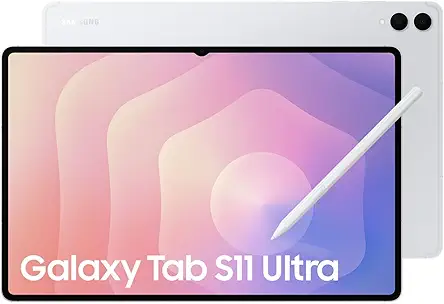
Galaxy Tab S11 Ultra Review: Which Model Is Best?
Our Verdict
The Galaxy Tab S11 Ultra 256GB is the best choice for most buyers because it delivers the flagship experience without requiring maximum internal storage.
The 1TB/16GB configuration is better for professionals, creators, and power users who regularly handle large files or demanding multitasking workloads.
The Galaxy Tab S11 Ultra is not simply a larger Android tablet. Its 14.6-inch display, S Pen, Samsung DeX, Galaxy AI features, and high-end processor make it particularly suited to users who want a tablet that can handle serious work as well as entertainment.
Galaxy Tab S11 Ultra Models at a Glance
| Product | Best For | Amazon | Key Difference |
|---|---|---|---|
| Galaxy Tab S11 Ultra 256GB + 12GB | Best Overall Value | View on Amazon | 256GB storage with 12GB RAM |
| Galaxy Tab S11 Ultra 1TB/16GB | Premium Power | View on Amazon | 1TB storage with 16GB RAM |
What Makes the Galaxy Tab S11 Ultra a Flagship Tablet?
The Galaxy Tab S11 Ultra stands out through its large AMOLED display, Dimensity 9400+ processor, S Pen support, Samsung DeX, Galaxy AI, and large battery.
The tablet is designed for users who want more workspace than a conventional 10- or 12-inch tablet provides. Its 14.6-inch panel gives productivity apps, games, documents, creative software, and video content plenty of room.
The hardware is complemented by Android 16 and One UI 8. Together, the software and hardware focus on multitasking, productivity, creative work, and connected-device workflows.
Why does the Dimensity 9400+ matter?
The MediaTek Dimensity 9400+ gives the Galaxy Tab S11 Ultra the processing capability needed for demanding Android workloads.
The chipset uses a 3nm architecture and includes a high-performance Cortex-X925 CPU core alongside an Immortalis-G925 GPU. That combination is designed for intensive applications, gaming, multitasking, and creative workloads.
The processor is especially important for users who expect a tablet to handle several demanding applications rather than simple browsing and streaming.
Is the Galaxy Tab S11 Ultra good for gaming?
Yes, the Galaxy Tab S11 Ultra is well suited to demanding mobile games because it combines a flagship processor, capable GPU, 120Hz display, and large screen.
The Immortalis-G925 GPU provides modern graphics capabilities, while the 120Hz panel allows supported games to display smoother motion.
The large display also gives games with complex controls and interfaces more usable space. Actual gaming performance will still vary by title, graphics settings, software optimization, and thermal conditions.
How Good Is the Galaxy Tab S11 Ultra Display?
The Galaxy Tab S11 Ultra has a 14.6-inch Dynamic AMOLED 2X display with 1848 × 2960 resolution and a 120Hz refresh rate.
The large AMOLED panel is one of the tablet’s strongest features. It provides a spacious canvas for documents, split-screen applications, games, movies, photo editing, and drawing.
- Display: 14.6-inch Dynamic AMOLED 2X
- Resolution: 1848 × 2960 pixels
- Refresh rate: 120Hz
- HDR: HDR10+
- Aspect ratio: 16:10
Why is the 14.6-inch display useful for productivity?
The 14.6-inch screen provides enough workspace for comfortable multitasking and desktop-style workflows.
Users can view more information while working with documents, browsers, spreadsheets, communication tools, and creative applications. Samsung DeX makes the large panel even more useful by providing a desktop-oriented interface.
The same screen benefits digital artists because the S Pen has a large canvas for sketching, drawing, annotations, and handwriting.
Is the Galaxy Tab S11 Ultra display good for movies?
Yes, the Dynamic AMOLED 2X display and HDR10+ support make the Galaxy Tab S11 Ultra well suited to video consumption.
The 14.6-inch size provides a more immersive viewing area than smaller tablets. The four-speaker system also complements the large screen for movies and other media.
How Thin and Portable Is the Galaxy Tab S11 Ultra?
The Galaxy Tab S11 Ultra measures about 5.1mm thick, giving it a remarkably slim profile for a 14.6-inch tablet.
The supplied specifications identify the Wi-Fi model at approximately 692g. That weight is reasonable for its size, but the tablet remains physically large compared with smaller Android tablets.
Its thin design makes it attractive for users who want a large screen without a bulky chassis. However, a protective cover is sensible when carrying such a large, thin device in a backpack or laptop bag.
Does the Galaxy Tab S11 Ultra have water resistance?
The Galaxy Tab S11 Ultra is specified with IP68 dust and water resistance.
This rating adds protection against everyday exposure to dust and water. However, water resistance is not a reason to deliberately expose the tablet to water, and users should follow Samsung’s care instructions for liquid exposure.
How Fast Is the Galaxy Tab S11 Ultra?
The Galaxy Tab S11 Ultra uses the MediaTek Dimensity 9400+ and high-memory configurations to support demanding multitasking.
The processor platform is particularly useful when switching between productivity applications, creative software, browsers, games, and communication tools.
Is 16GB RAM worth choosing?
16GB RAM is most valuable for users who regularly run demanding applications or keep many applications active during professional workflows.
The 256GB configuration is already positioned as a capable flagship option, while the 1TB/16GB configuration provides more headroom for power users.
For simple browsing, streaming, note-taking, and casual applications, the additional memory may be less important than storage capacity and price.
How Long Does the Galaxy Tab S11 Ultra Battery Last?
The Galaxy Tab S11 Ultra uses an 11,600mAh battery designed for extended tablet use.
Battery life varies according to screen brightness, refresh rate, applications, connectivity, gaming, and other workload factors. The large capacity gives the tablet a strong hardware foundation for long sessions.
Does the Galaxy Tab S11 Ultra support fast charging?
Yes, the Galaxy Tab S11 Ultra supports 45W wired charging.
However, 45W is relatively modest compared with some competing flagship tablets that advertise higher charging rates. Heavy users should therefore plan charging around longer work or entertainment sessions.
How can you preserve Galaxy Tab S11 Ultra battery health?
Battery health can benefit from avoiding excessive heat and using the tablet’s available battery-protection features.
Users who keep the tablet connected to power for long periods should review Samsung’s battery-protection settings. Avoiding unnecessary heat during charging is also a sensible long-term practice.
What Are the Galaxy AI and One UI 8 Features?
Galaxy AI and One UI 8 add productivity, note-taking, multitasking, and creative tools to the Galaxy Tab S11 Ultra.
The tablet combines Android 16 with Samsung’s software environment. Features such as Note Assist, Drawing Assist, Multi-window, Taskbar functionality, and Samsung DeX are particularly relevant to productivity users.
What does Note Assist do?
Note Assist helps users organize and work with notes more efficiently.
The feature is useful for meetings, study sessions, planning, and other situations where users create large amounts of written information.
How useful is Drawing Assist?
Drawing Assist complements the S Pen by adding AI-assisted tools to creative workflows.
Artists and students can use the tablet for sketches, annotations, diagrams, and other visual work. The large display gives these tools more working space than a smaller tablet.
How Good Is Samsung DeX on the Galaxy Tab S11 Ultra?
Samsung DeX gives the Galaxy Tab S11 Ultra a desktop-style interface that makes the large display more useful for productivity.
DeX is especially useful when the tablet is paired with a keyboard and mouse. It can make application switching and window management feel more familiar to laptop users.
The feature is one of the strongest reasons to consider the Galaxy Tab S11 Ultra as a laptop alternative for workflows that already work well on Android.
Can the Galaxy Tab S11 Ultra work as a second screen?
The supplied article identifies Second Screen support for compatible Windows PCs.
This feature can turn the tablet into an additional wireless workspace for supported Windows setups. The large AMOLED panel makes the tablet particularly useful when displaying documents, communication tools, reference material, or other secondary content.
Is the Galaxy Tab S11 Ultra Good for Digital Artists?
Yes, the Galaxy Tab S11 Ultra is a strong option for digital artists because of its large AMOLED canvas and S Pen support.
The S Pen is useful for drawing, writing, annotation, and creative applications. The 14.6-inch display also gives artists more room to work without constantly zooming into small areas.
Users who want a paper-like writing feel should choose a compatible screen protector carefully because surface texture can affect S Pen movement.
For display protection options, see this guide to Galaxy Tab S11 Ultra screen protectors.
How Good Are the Galaxy Tab S11 Ultra Cameras?
The Galaxy Tab S11 Ultra uses 13MP wide and 8MP ultrawide rear cameras, plus a 12MP ultrawide front camera.
The camera system is useful for video calls, document capture, scanning, casual photography, and other tablet-based imaging tasks. Rear-camera video recording supports 4K at 30fps according to the supplied specifications.
Are the cameras a major reason to buy the Galaxy Tab S11 Ultra?
No, the display, processor, battery, S Pen, and productivity features are stronger reasons to buy the Galaxy Tab S11 Ultra.
The cameras are useful supporting features, but buyers looking primarily for mobile photography should consider a smartphone-focused device instead.
How Good Is Galaxy Tab S11 Ultra Audio?
The Galaxy Tab S11 Ultra has four stereo speakers designed to provide built-in audio for media, games, and calls.
The speaker arrangement suits the tablet’s large display and entertainment-focused design. It is especially convenient when watching movies or playing games without headphones.
There is no traditional 3.5mm headphone jack, so wired audio requires USB-C connectivity or a suitable adapter.
Galaxy Tab S11 Ultra Technical Specifications
| Feature | Specification |
|---|---|
| Processor | MediaTek Dimensity 9400+ |
| Display | 14.6-inch Dynamic AMOLED 2X |
| Resolution | 1848 × 2960 pixels |
| Refresh Rate | 120Hz |
| Battery | 11,600mAh |
| Charging | 45W wired charging |
| Operating System | Android 16 with One UI 8 |
| Rear Cameras | 13MP wide + 8MP ultrawide |
| Front Camera | 12MP ultrawide |
| Video | Up to 4K at 30fps |
| Connectivity | Wi-Fi 7 and Bluetooth |
| Expansion | microSDXC |
| Thickness | Approximately 5.1mm |
| Weight | Approximately 692g for Wi-Fi model |
| Water/Dust Resistance | IP68 |
Galaxy Tab S11 Ultra 256GB + 12GB Review
Best Overall Value
Best For: Buyers who want flagship Galaxy Tab S11 Ultra performance with a practical storage configuration.
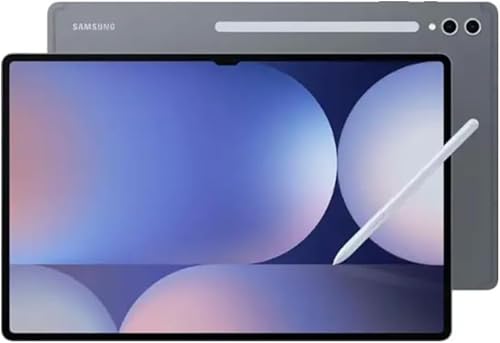
SAMSUNG
Samsung Galaxy Tab S11 Ultra (256GB + 12GB RAM, Wi-Fi)
This 256GB configuration of the Galaxy Tab S11 Ultra represents the sweet spot for most users looking to experience Samsung's ultimate 14.6-inch tablet. Armed with the powerful Dimensity 9400+ processor and an included S Pen, it delivers elite multitasking, creative workspace, and entertainment without the premium price of the maximum storage model.
Who Should Buy It
This is the ideal model for productivity enthusiasts, digital artists, and entertainment lovers who want the expansive 14.6-inch workspace and premium processing power of the S11 Ultra, but do not require the costly 1TB internal storage capacity.
Why We Pick It
We chose this specific configuration because it strikes the perfect balance of price and high-end performance, offering the flagship 120Hz display, 12GB of RAM, and the versatile S Pen experience outlined in our review.
Features & Benefits
| Feature | Benefit |
|---|---|
| 14.6" Dynamic AMOLED 2X | Provides an incredibly spacious, anti-reflective 120Hz display with plenty of room for multitasking, DeX work, and immersive entertainment. |
| Dimensity 9400+ Chipset | Utilizes 3nm architecture to handle intensive Android workloads, demanding creative apps, and gaming with ease. |
| 11,600 mAh Battery | Offers a massive power reserve to support prolonged productivity sessions and high-resolution media playback on the large screen. |
Pros & Cons
| Pros | Cons |
|---|---|
| ✓ Stunning 14.6-inch anti-reflective display | ✕ No cellular data or calling support (Wi-Fi only) |
| ✓ Excellent value compared to the 1TB model | ✕ No USA warranty included on this model |
| ✓ S Pen included in the box | |
| ✓ Wi-Fi 7 and USB 3.2 connectivity |
The 256GB + 12GB configuration is the best fit for most users because it balances storage, memory, and the tablet’s flagship hardware. The model uses the same large 14.6-inch AMOLED display and Dimensity 9400+ platform that define the Galaxy Tab S11 Ultra experience.
It is particularly suitable for professionals, students, creators, and entertainment-focused users who do not need 1TB of internal storage. The included S Pen also makes this configuration useful for handwriting, annotations, and creative work.
The main limitation is its lower storage and memory compared with the 1TB/16GB configuration. However, microSDXC expansion provides another option for users who need more local storage.
Galaxy Tab S11 Ultra 1TB/16GB Review
Premium Power
Best For: Power users who need extensive storage and high memory capacity for demanding workloads.
The 1TB/16GB configuration is designed for buyers who want maximum capacity within the supplied lineup. The larger storage capacity is useful for large creative projects, games, downloaded media, documents, and other files.
The 16GB memory configuration is also better suited to users who regularly multitask across demanding applications. Professionals using DeX with intensive workflows have more memory headroom to work with.
For casual browsing, streaming, and note-taking, however, the premium configuration may offer more capacity than necessary.
Which Galaxy Tab S11 Ultra Model Should You Buy?
Choose the 256GB model for the best balance, or choose the 1TB/16GB model when storage and multitasking capacity are priorities.
| Model | Best For | Amazon | Main Advantage |
|---|---|---|---|
| Galaxy Tab S11 Ultra 256GB + 12GB | Most buyers | Check Price | Better balance of capability and capacity |
| Galaxy Tab S11 Ultra 1TB/16GB | Power users | Check Price | More storage and memory |
Galaxy Tab S11 Ultra Buying Guide
The best Galaxy Tab S11 Ultra configuration depends on your storage needs, multitasking requirements, creative workload, and budget.
How much storage should you choose?
Choose 256GB if you use cloud storage or maintain a moderate local file library.
The 1TB option is better for users who store large amounts of video, games, creative projects, documents, or media locally.
Should you buy the 1TB/16GB version?
Buy the 1TB/16GB model if you regularly work with large files or demanding multitasking workloads.
The configuration provides more room for local storage and more memory headroom. Casual users can usually choose the lower configuration without giving up the core Galaxy Tab S11 Ultra experience.
Is the Galaxy Tab S11 Ultra a good laptop replacement?
The Galaxy Tab S11 Ultra can replace a laptop for users whose workflows are compatible with Android and Samsung DeX.
The large display, keyboard support, DeX interface, multitasking features, and S Pen create a capable mobile workstation. However, users dependent on specialized desktop-only applications should verify compatibility first.
Who should avoid the Galaxy Tab S11 Ultra?
Users who prioritize compact size, very low weight, or aggressive charging speeds may prefer a smaller tablet or another flagship platform.
The 14.6-inch display is excellent for workspace but makes the tablet physically large. Likewise, 45W charging may not satisfy users who prioritize the fastest possible recharge times.
💡 Pro Tip: Choose the storage configuration based on how much content you keep locally, not simply on the highest available specification. Cloud storage and microSD expansion can reduce the need for maximum internal storage.
How to Maintain the Galaxy Tab S11 Ultra
Maintain the Galaxy Tab S11 Ultra by protecting its display and chassis, keeping the USB-C port clean, and avoiding unnecessary heat.
How should you clean the AMOLED display?
Use a clean microfiber cloth for routine display cleaning and avoid harsh chemicals.
Gently remove fingerprints and dust without applying excessive pressure. Never spray liquid directly onto the tablet’s display or ports.
How can you protect the 5.1mm chassis?
Use a compatible protective cover when transporting the tablet.
A case can help protect the rear panel, corners, and camera area from everyday scratches. Avoid placing heavy objects directly on the tablet inside a bag.
How can you protect the Galaxy Tab S11 Ultra screen?
A compatible screen protector can help reduce everyday scratches while preserving normal touchscreen and S Pen use.
Users who frequently draw or write should consider the protector’s surface texture because different materials can change the feel of the S Pen.
See the dedicated Galaxy Tab S11 Ultra screen protector guide for compatible protection options.
How can you maintain the USB-C port?
Keep the USB-C port free of dust and lint to help maintain reliable charging and connectivity.
Do not insert sharp metal objects into the port. If debris accumulates, use safe cleaning methods recommended for electronic charging ports.
Frequently Asked Questions About the Galaxy Tab S11 Ultra
What is the best Galaxy Tab S11 Ultra model?
The 256GB + 12GB model is the best overall choice for most buyers, while the 1TB/16GB version is better for power users.
Is the Galaxy Tab S11 Ultra good for gaming?
Yes, its Dimensity 9400+, Immortalis-G925 GPU, 120Hz display, and large AMOLED screen make it well suited to demanding mobile games.
Is the Galaxy Tab S11 Ultra good for digital art?
Yes, the large AMOLED display and S Pen make it a strong choice for drawing, sketching, handwriting, and creative applications.
Does the Galaxy Tab S11 Ultra support microSD?
Yes, the supplied specifications identify microSDXC expansion as a feature of the Galaxy Tab S11 Ultra.
Does the Galaxy Tab S11 Ultra support 45W charging?
Yes, the Galaxy Tab S11 Ultra supports 45W wired charging.
How large is the Galaxy Tab S11 Ultra display?
The Galaxy Tab S11 Ultra has a 14.6-inch Dynamic AMOLED 2X display.
Does the Galaxy Tab S11 Ultra support Samsung DeX?
Yes, Samsung DeX is a major productivity feature of the Galaxy Tab S11 Ultra.
Can the Galaxy Tab S11 Ultra work as a second monitor?
Yes, the supplied article identifies Second Screen functionality for compatible Windows PCs.
Is the Galaxy Tab S11 Ultra better than the iPad Pro?
Neither is universally better because the choice depends on the user’s ecosystem and workflow. The Galaxy Tab S11 Ultra emphasizes Android multitasking, Samsung DeX, S Pen functionality, expandable storage, and its large 14.6-inch display.
Should you buy the 256GB or 1TB Galaxy Tab S11 Ultra?
Choose 256GB for general use and 1TB/16GB for large local files and demanding multitasking.
What accessories should you buy for the Galaxy Tab S11 Ultra?
A protective cover, compatible screen protector, keyboard accessory, and suitable charging equipment are the most useful additions.
Final Thought
The Galaxy Tab S11 Ultra is a compelling flagship tablet for users who want a very large Android workspace without giving up high-end performance or productivity tools. Its 14.6-inch Dynamic AMOLED 2X display, Dimensity 9400+, S Pen, Galaxy AI, Samsung DeX, and 11,600mAh battery give it a strong combination of entertainment and professional capabilities.
- Best Overall Value: Galaxy Tab S11 Ultra 256GB + 12GB | View Now at Amazon
- Premium Power: Galaxy Tab S11 Ultra 1TB/16GB | View Now at Amazon
Choose the configuration that matches your storage and workload requirements, then protect the large display and thin chassis for long-term use.