Google Pixel 11 Pro XL cases need to do more than prevent scratches: the best choice should fit the XL model precisely, protect its large camera bar and display edges, and match how you use magnetic accessories. The official Google Pixelsnap Case is our Best Overall pick because it combines a model-specific fit, raised edges, camera-bar protection, and built-in magnetic accessory support. The six alternatives below cover different priorities, from a lower-cost everyday case to rugged coverage, a kickstand, premium materials, and a rotating stand.
For a large phone like the Pixel 11 Pro XL, the right case is a balance between grip, protection, pocket comfort, and accessory compatibility. A thicker shell is useful for rougher routines, while a slimmer hybrid case is easier to carry. Magnetic compatibility is also worth checking before buying, especially if you already use a charger, stand, wallet, or grip that attaches to the back of your phone.
All seven picks in this guide are made for the Pixel 11 Pro XL model. Do not assume a case for the Pixel 11 or Pixel 11 Pro will fit the XL: the camera opening, dimensions, button positions, and charging-coil alignment need to match the exact phone.
Our recommendations are organized by practical use rather than a single protection ranking. The Google Pixelsnap Case is the balanced choice; Spigen Ultra Hybrid MagFit suits shoppers who want a less expensive magnetic case; Mous Limitless Walnut prioritizes premium materials; OtterBox Defender Series Pro emphasizes heavy-duty coverage; Spigen Tough Armor MagFit adds a kickstand; UAG Dot focuses on grip; and TORRAS Q3 Air adds a rotating stand.

Quick Comparison: Best Google Pixel 11 Pro XL Cases
The Google Pixelsnap Case is the Best Overall choice because Google combines raised display edges, added camera-bar protection, and magnetic accessory compatibility in a case made for the Pixel 11 series. Choose a different pick when a built-in stand, extra-rugged construction, or a textured grip matters more to you.
|
Google Pixelsnap Case
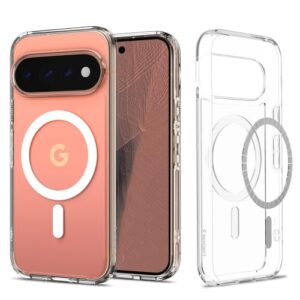
View on Amazon |
 Spigen Ultra Hybrid
View on Amazon |
 Mous Case
View on Amazon |
 OtterBox Google Pixel
View on Amazon |
 Spigen Tough Armor
View on Amazon |
 UAG Made
View on Amazon |
 TORRAS Q3 Air
View on Amazon |
| Price | ||||||
|---|---|---|---|---|---|---|
| $49.99 | $16.99 | $74.99 | – | $19.99 | $44.95 | $65.99 |
| Key Features | ||||||
|
|
|
|
|
|
|
Prices may have changed since this page was updated. Check Amazon for the current price.
How to Choose a Pixel 11 Pro XL Case
The best Pixel 11 Pro XL case is the one that matches your most common risk and daily routine. Start with exact model compatibility, then compare edge coverage, grip, thickness, magnetic accessory support, and any extra feature you will use regularly. No case removes every risk, and a raised lip does not replace a screen protector.
| Priority | What to look for | Best match in this guide |
|---|---|---|
| Balanced everyday use | Raised edges, camera-bar coverage, magnetic accessory support | Google Pixelsnap Case |
| Lower purchase cost | Hybrid shell, basic drop cushioning, magnetic ring | Spigen Ultra Hybrid MagFit |
| Premium finish | Distinctive back material, impact-absorbing construction, magnets | Mous Limitless Walnut |
| Heavy-duty protection | Multiple protective layers and a covered, reinforced feel | OtterBox Defender Series Pro |
| Hands-free viewing | Integrated kickstand that does not need a separate accessory | Spigen Tough Armor MagFit |
| Grip-first handling | Textured surface and impact-resistant core | UAG Dot |
| Adjustable viewing angle | Rotating stand integrated into the case | TORRAS Q3 Air |
Check model fit before anything else
Choose the exact Pixel 11 Pro XL version in the product options. Cases for other Pixel 11 models are not interchangeable just because the names are similar. A mismatch can affect the camera opening, button access, speaker cutouts, and the position of the magnets relative to compatible accessories. If you are comparing options for the smaller model instead, see our Google Pixel 11 Pro case guide.
Understand magnetic compatibility
A magnetic case makes it easier to attach compatible chargers, stands, wallets, and grips, but the strength and alignment of the magnetic array vary by design. Google calls its accessory ecosystem Pixelsnap. Spigen uses the MagFit name for its magnetic cases. Check the accessory maker’s compatibility guidance if you plan to use a car mount or a charger that needs precise alignment.
| Magnetic feature | What it means in practice | Useful for |
|---|---|---|
| Built-in magnet array | Allows compatible accessories to attach without a separate ring | Chargers, stands, wallets, and grips |
| Wireless charging support | Lets you charge without removing the case when the phone, charger, and case work together | Desk and bedside charging |
| Kickstand or rotating ring | Adds a viewing aid, but changes the case’s shape and moving parts | Video calls, recipes, and travel |
| Raised camera surround | Creates a buffer when the back rests on a flat surface | Everyday desk and table use |
Think about the trade-off between bulk and coverage
Thicker cases can offer more material around corners and edges, but they also add size to an already large phone. Slimmer cases are easier to slide into a pocket, although their feel and level of coverage differ. If you often drop your phone on hard floors or use it outdoors, favor construction and grip over the thinnest profile.
| Case style | Typical benefit | Trade-off to consider |
|---|---|---|
| Slim hybrid | Less added bulk and a straightforward shape | Less substantial coverage than a heavy-duty multi-layer shell |
| Premium impact case | Distinctive finish with impact-focused materials | Higher purchase cost and a more noticeable edge |
| Rugged multi-layer case | More extensive shell coverage | Greater size and weight in a pocket |
| Stand-equipped case | Hands-free viewing without carrying a separate stand | Moving parts or a raised feature on the back |
1. Google Pixelsnap Case — Best Overall
Best for: Pixel owners who want a straightforward, Google-made case with magnetic accessory support and everyday protection.


In Stock
Limit 3 per order
Sold by Amazon.com
Price and availability as of November 10, 2026 3:38 pm. They may change.


Why it is the best all-round option
The Google Pixelsnap Case is the best starting point for most Pixel 11 Pro XL owners because it combines an exact-series fit with built-in magnetic accessory support. Google describes raised edges around the display and extra protection around the camera bar, addressing two areas that often touch a desk or floor first. It is a balanced option for people who want a protective everyday case without a separate stand or bulky multi-layer design.
The main advantage is simplicity. The case is made for the Pixel 11 family and works with compatible magnetic chargers, stands, and other accessories. That makes it a natural match for someone who wants the Google accessory system to work without adding a separate magnetic adapter. The Obsidian finish also gives the phone a restrained, dark appearance.
Protection and fit
Google describes the Pixelsnap Case as drop-tested and built to protect against drops and scratches. Raised edges help keep the display from resting directly against a flat surface, while the camera-bar area receives additional coverage. These features are useful for everyday bumps, desk contact, and placing the phone down between tasks, but they are not a promise that the phone will survive every fall.
The most important fit detail is choosing the Pixel 11 Pro XL variant. A case for the smaller Pixel 11 or Pixel 11 Pro is not a substitute. If you use a screen protector, check that its edges do not lift against the case lip. The same practical check applies to camera protectors: an extra cover around the camera bar can affect fit if its dimensions overlap the case. For a separate accessory comparison, see our Google Pixel 11 Pro screen protector guide.
Magnetic accessories and daily handling
Built-in magnets are the Pixelsnap Case’s defining convenience feature. Compatible chargers, stands, grips, and other accessories can attach directly to the case, reducing the need to remove it each time you change accessories. If you already use a magnetic charging stand at a desk or bedside, the case keeps that routine simple. For wired charging accessories, our Google Pixel fast charger guide covers another part of a practical charging setup.
It does not have a built-in kickstand, rotating ring, or the layered outer construction of the OtterBox Defender Series Pro. Buyers who want a case to stand on its own for video calls should look at Spigen Tough Armor MagFit or TORRAS Q3 Air instead. People who prioritize extra rugged coverage should compare the Defender before choosing.
Google Pixelsnap Case vs. Spigen Ultra Hybrid MagFit
Google Pixelsnap Case vs. Spigen Ultra Hybrid MagFit on simplicity: Google’s case wins for a Google-first accessory setup because it belongs to the Pixelsnap family and has raised display edges plus extra camera-bar protection. Spigen is the more budget-minded alternative and uses a PC-and-TPU hybrid construction with Air Cushion Technology. Choose Google for the direct ecosystem match; choose Spigen when purchase cost matters more.
Google Pixelsnap Case vs. OtterBox Defender Series Pro
Google Pixelsnap Case vs. OtterBox Defender Series Pro on bulk and coverage: the Google case is the simpler everyday pick, while OtterBox is the better match for buyers who want a multi-layer shell with a silicone outer cover, rigid inner shell, and memory-foam backing. The Defender’s added structure is more substantial, but the Google case is the more straightforward choice for routine carry and magnetic accessories.
Pros and Cons
| Pros | Cons |
|---|---|
| Made for the Pixel 11 series | No built-in kickstand |
| Raised display edges and added camera-bar protection | Not as heavily layered as OtterBox Defender Series Pro |
| Works with compatible Pixelsnap accessories | Less specialized than TORRAS Q3 Air for adjustable viewing |
| Simple everyday design | Does not offer the distinctive walnut finish of Mous Limitless |
2. Spigen Ultra Hybrid MagFit — Best Budget Pick
Best for: Buyers who want a magnetic case with a hybrid shell and a lower entry cost than the premium and rugged options.


In Stock
Limit 30 per order
Sold by Spigen Inc
Price and availability as of November 10, 2026 3:38 pm. They may change.
A practical magnetic case without premium extras
The Spigen Ultra Hybrid MagFit is the value-focused choice in this group. Its polycarbonate back and thermoplastic polyurethane frame combine a firmer rear panel with more flexible edges, while Air Cushion Technology adds cushioning at vulnerable areas. The built-in MagFit ring supports compatible magnetic accessories, so shoppers do not have to choose between a lower-cost case and magnetic convenience.
The Frost Black version gives the phone a dark, understated look. It is a better fit for people who want a fairly simple case than for buyers who need an integrated stand or a heavy multi-layer shell. The main value comes from combining basic protective construction, magnetic support, and a familiar case shape in one product.
Hybrid materials and everyday protection
The PC-and-TPU design serves two different purposes: the rigid back gives the case structure, while the more flexible frame helps with installation and handling. Spigen also uses Air Cushion Technology for drop cushioning. Raised edges around the display and camera area help keep glass and lenses away from some flat surfaces, although a raised lip cannot protect every angle of impact.
The Ultra Hybrid is not the most rugged option here. The OtterBox Defender Series Pro has a more involved multi-layer design, and the Spigen Tough Armor MagFit adds a more substantial structure with a built-in kickstand. Those cases make more sense for people who routinely work outdoors, handle equipment, or want a phone that can prop itself up.
MagFit compatibility and portability
The built-in metal ring is the key reason to choose the MagFit version rather than a non-magnetic case. It supports compatible magnetic accessories, including chargers and stands, and makes it easier to keep a regular desk setup. Before buying a car mount or other accessory, confirm that its magnet arrangement is compatible with the case and phone.
For a large phone, a simpler hybrid case can be easier to pocket than a rugged model with a kickstand. The Ultra Hybrid is a sensible pick if you want everyday protection and magnetic convenience but do not need a rotating ring or premium back material. The case’s design is less distinctive than Mous Limitless Walnut and does not provide the stand features of the TORRAS Q3 Air.
Spigen Ultra Hybrid MagFit vs. Google Pixelsnap Case
Spigen Ultra Hybrid MagFit vs. Google Pixelsnap Case on value: Spigen wins for buyers whose first priority is keeping the case purchase cost lower, while Google is the stronger fit for someone who prefers Google’s own case design and accessory ecosystem. Both offer magnetic accessory support and raised edges; the choice comes down to budget and preference for a first-party case.
Spigen Ultra Hybrid MagFit vs. Spigen Tough Armor MagFit
Spigen Ultra Hybrid MagFit vs. Spigen Tough Armor MagFit on portability: Ultra Hybrid is the simpler choice because it lacks the integrated kickstand and more involved protective structure of Tough Armor. Tough Armor is better for frequent hands-free viewing and buyers who prefer a more substantial shell. If you rarely use a stand, Ultra Hybrid avoids paying for a feature that will sit unused.
Pros and Cons
| Pros | Cons |
|---|---|
| PC-and-TPU hybrid construction | Less substantial than OtterBox Defender Series Pro |
| Air Cushion Technology | No built-in kickstand like Spigen Tough Armor MagFit |
| MagFit ring for compatible accessories | No rotating stand like TORRAS Q3 Air |
| Budget-friendly position within this selection | Less distinctive finish than Mous Limitless Walnut |
3. Mous Limitless Walnut — Best Premium Case
Best for: Buyers who want a premium-looking walnut finish, impact-focused construction, and built-in magnetic compatibility.


In Stock
Limit 26 per order
Sold by Mous Products US
Price and availability as of November 10, 2026 3:38 pm. They may change.
Premium materials with impact-focused design
The Mous Limitless Walnut is the premium pick because it pairs a distinctive walnut back with impact-absorbing AiroShock material, reinforced corners, and a raised camera area. The built-in magnetic array works with Pixelsnap accessories, so the case combines a more refined appearance with everyday magnetic convenience. It suits buyers who care about how a case looks and feels as much as its protective structure.
The walnut finish makes this case stand apart from the dark, practical look of the Google and Spigen options. Its material choice is the main reason to pay more: it gives the phone a warm, natural-looking back rather than a plain plastic finish. The case also has a more substantial edge than a very slim shell, which is part of its protective design.
What AiroShock and reinforced corners add
Mous describes AiroShock as an impact-absorbing material and combines it with reinforced corners. The raised camera bump creates a buffer around the camera area when the phone rests on a table. Together, those details make Limitless a reasonable choice for someone who wants premium styling without choosing a purely decorative cover.
Do not treat any material name as a guarantee against damage. Drop height, landing surface, impact angle, and whether the phone strikes a corner all affect the result. For more extensive multi-layer coverage, the OtterBox Defender Series Pro is the better match. For a less expensive hybrid case, Spigen Ultra Hybrid MagFit is the more economical alternative.
Magnetic accessories and everyday comfort
The magnetic array makes the case compatible with Pixelsnap accessories, including compatible chargers and stands. That is useful for a buyer who wants a premium finish without losing the convenience of a magnetic charging setup. Check accessory compatibility if you rely on a particular car mount or grip, because magnetic accessories differ in shape and attachment requirements.
The Limitless Walnut is not the most budget-friendly choice, and it does not have an integrated kickstand. If you often watch videos with your phone resting on a table, Spigen Tough Armor MagFit or TORRAS Q3 Air is more convenient. If your main need is a case that can take a beating at work, compare its feel and coverage against the Defender before choosing a premium finish.
Mous Limitless Walnut vs. Google Pixelsnap Case
Mous Limitless Walnut vs. Google Pixelsnap Case on premium finish: Mous wins for buyers who want a walnut-style back and impact-focused AiroShock construction, while Google is the simpler first-party option with raised edges and camera-bar coverage. Both support compatible magnetic accessories. Choose Mous for the material-led design; choose Google for a straightforward case that fits the Pixelsnap ecosystem.
Mous Limitless Walnut vs. OtterBox Defender Series Pro
Mous Limitless Walnut vs. OtterBox Defender Series Pro on style versus coverage: Mous is the better match for a premium walnut appearance with reinforced corners, while OtterBox is the more protective-feeling choice because of its multi-layer construction. Buyers who want a case that looks less utilitarian should favor Mous; buyers who put rugged coverage first should favor OtterBox.
Pros and Cons
| Pros | Cons |
|---|---|
| Distinctive walnut finish | Higher purchase cost than Spigen Ultra Hybrid MagFit |
| AiroShock impact-absorbing material | No integrated kickstand like Spigen Tough Armor MagFit |
| Reinforced corners and raised camera bump | More style-led than the rugged OtterBox Defender Series Pro |
| Built-in magnetic array for Pixelsnap accessories | Walnut appearance will not suit buyers who prefer a plain shell |
4. OtterBox Defender Series Pro — Best Rugged Option
Best for: People who prioritize extensive case coverage for demanding routines, outdoor use, and frequent handling.


A multi-layer design for demanding use
The OtterBox Defender Series Pro is the rugged pick because its construction combines a silicone outer cover, rigid inner shell, and memory-foam backing. OtterBox positions this model as a heavy-duty option for the Pixel 11 Pro XL and states that it delivers seven times the drop protection of the MIL-STD-810G 516.6 standard. That is the brand’s test-based comparison, not a guarantee that every real-world drop ends without damage.
The layered design is a better fit for people who use their phone around tools, work surfaces, outdoor equipment, or other places where a fall is more likely. It is less suitable for someone who wants the smallest possible case. A substantial protective shell adds bulk, and buyers should consider how it feels in a pocket and whether it fits their preferred car holder or desk stand.
Layered coverage and camera protection
The rigid inner shell gives the case structure, while the outer silicone cover adds a more flexible layer. Memory foam at the back is another part of its protective construction. This is a different approach from the single hybrid shell of Spigen Ultra Hybrid MagFit, which is easier to carry but not as extensively layered.
OtterBox also emphasizes drop protection in its Pixel 11 case range. Treat the stated military-standard comparison as the company’s test claim rather than an independent guarantee. No case can eliminate the risk of broken glass, damaged camera components, or internal damage under every impact condition. A screen protector is still worth considering if scratches and front-glass contact are concerns.
Who should choose Defender Series Pro?
Choose Defender if coverage matters more than a slim silhouette. The case is also a practical option for people who have damaged phones before or who work in settings where a phone is frequently set down on rough surfaces. If the phone spends most of its day in a pocket, on a clean desk, or in a bag, the added size can be harder to justify.
The Google Pixelsnap Case is the simpler everyday alternative, while Mous Limitless Walnut offers a more premium finish with impact-absorbing material and reinforced corners. The Defender is not the right choice for buyers whose main priority is an integrated stand: Spigen Tough Armor MagFit and TORRAS Q3 Air make hands-free viewing easier.
OtterBox Defender Series Pro vs. Google Pixelsnap Case
OtterBox Defender Series Pro vs. Google Pixelsnap Case on rugged construction: OtterBox wins for buyers who want a silicone outer cover, rigid inner shell, and memory-foam backing. Google is the more straightforward everyday case with magnetic accessory support and raised edges. Pick OtterBox for a heavier-duty setup; pick Google for a simpler carry and a first-party Pixelsnap experience.
OtterBox Defender Series Pro vs. Mous Limitless Walnut
OtterBox Defender Series Pro vs. Mous Limitless Walnut on protection style: OtterBox wins for extensive layered coverage, while Mous is better for shoppers who want a walnut finish with AiroShock material and reinforced corners. The choice is not simply good versus bad protection; it is a decision between a more rugged shell and a premium-looking case with a different construction.
Pros and Cons
| Pros | Cons |
|---|---|
| Silicone outer cover and rigid inner shell | Bulkier than Google Pixelsnap Case |
| Memory-foam backing | Less pocket-friendly than Spigen Ultra Hybrid MagFit |
| Heavy-duty focus for demanding routines | No built-in kickstand like Spigen Tough Armor MagFit |
| OtterBox states a seven-times military-standard drop-protection comparison | Not the most style-focused option beside Mous Limitless Walnut |
5. Spigen Tough Armor MagFit — Best Kickstand and Protection
Best for: People who want a more substantial case with magnetic compatibility and a built-in kickstand for hands-free viewing.



In Stock
Limit 30 per order
Sold by Spigen Inc
Price and availability as of November 10, 2026 3:38 pm. They may change.
Protection with a useful stand
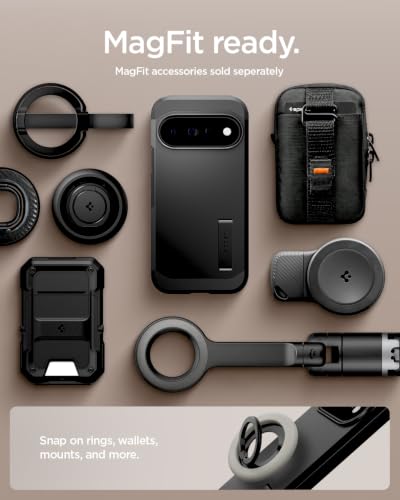
The Spigen Tough Armor MagFit combines PC and TPU construction with XRD impact foam, raised edges, magnetic compatibility, and a built-in kickstand. That mix makes it the most practical choice for people who regularly watch videos, join video calls, follow recipes, or keep their phone propped up on a desk. Unlike a separate stand, the kickstand travels with the case.
The case has a more substantial build than the Ultra Hybrid MagFit. That is useful for buyers who want extra structure around the phone, but it adds a feature and shape that slim-case shoppers do not need. The built-in magnetic ring also supports compatible Pixelsnap accessories, keeping the case useful beyond its stand.
Kickstand use and daily convenience
An integrated kickstand is most useful when the phone spends time in landscape orientation on a flat surface. It can make a long video, a video call, or a recipe easier to follow without holding the device. It is less valuable for someone who mostly uses the phone while walking or prefers a bare, smooth back.
Stand hinges and moving parts are additional elements to keep clean and treat with care. If you rarely prop up your phone, the Google Pixelsnap Case offers a simpler shape. If you want a rotating ring-style stand rather than a conventional kickstand, TORRAS Q3 Air is the more specialized option.
Materials and magnetic features
Spigen lists PC, TPU, and XRD impact foam in the Tough Armor AI MagFit design. Raised edges help protect the screen and camera area from contact with flat surfaces. The built-in magnetic system is meant to work with compatible accessories, so check the requirements of your charger or mount before relying on it for a particular setup.
Tough Armor is not as minimal as Ultra Hybrid, and it does not offer the walnut finish of Mous Limitless. It is a functional choice for people who want a stand and a more protective structure in one case. If you need the most extensive multi-layer shell in this group, OtterBox Defender Series Pro remains the stronger rugged alternative.
Spigen Tough Armor MagFit vs. TORRAS Q3 Air
Spigen Tough Armor MagFit vs. TORRAS Q3 Air on stand design: Tough Armor wins for buyers who prefer a built-in kickstand in a more protective PC-and-TPU shell, while TORRAS is the better match for a rotating stand. Choose Spigen for its XRD foam and conventional kickstand; choose TORRAS if adjusting the rear ring is central to how you use the phone.
Spigen Tough Armor MagFit vs. Spigen Ultra Hybrid MagFit
Spigen Tough Armor MagFit vs. Spigen Ultra Hybrid MagFit on features: Tough Armor wins for hands-free viewing because it includes a kickstand and XRD impact foam. Ultra Hybrid is the simpler, more budget-minded option with PC-and-TPU construction and Air Cushion Technology. If you do not need a stand, Ultra Hybrid is easier to justify; if you do, Tough Armor combines the extra function with the case.
Pros and Cons
| Pros | Cons |
|---|---|
| Built-in kickstand for hands-free viewing | More substantial than Spigen Ultra Hybrid MagFit |
| PC, TPU, and XRD impact foam | Stand adds a moving part to the case |
| Raised edges around screen and camera | Not as extensively layered as OtterBox Defender Series Pro |
| Magnetic compatibility for accessories | No rotating ring stand like TORRAS Q3 Air |
6. UAG Dot — Best Grip and Magnetic Features
Best for: People who want a textured surface, magnetic accessory support, and an impact-resistant core in a relatively streamlined rugged style.


In Stock
Limit 30 per order
Sold by URBAN ARMOR GEAR®
Price and availability as of November 10, 2026 3:38 pm. They may change.
Grip-focused construction
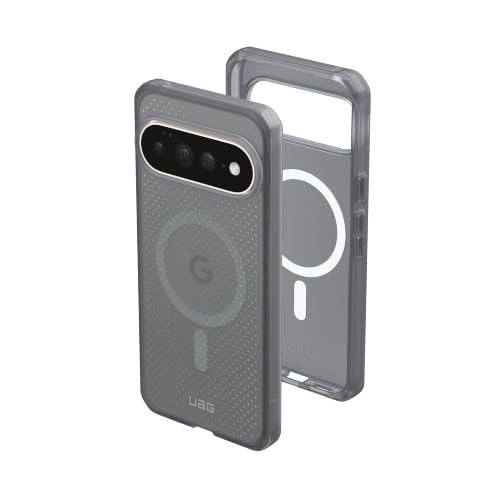
The UAG Dot stands out for its textured anti-slip grip, lightweight co-mold construction, impact-resistant core, and built-in magnetic module. The surface texture is useful for people who find smooth cases hard to hold securely, particularly when carrying a large phone one-handed. Raised edges add a buffer around the screen and camera area when the phone rests on a flat surface.
The Ash finish has a more rugged look than the Google Pixelsnap Case and the Spigen Ultra Hybrid MagFit. The Dot is a useful middle ground for buyers who want a case with a tactile grip without moving to the more substantial Defender Series Pro. It also keeps magnetic accessories in the mix rather than forcing a choice between grip and charging convenience.
Grip and daily handling
Grip is an important part of protection because a case that feels secure can be easier to hold during everyday use. The Dot’s textured surface is its clearest practical difference from smoother cases. It is especially relevant for people who carry their phone while walking, taking photos, or moving between rooms and work areas.
A textured case is not automatically the best choice for every hand. Some users prefer a smooth finish that slides easily into a pocket, while others want a soft, tacky feel. If you prefer a premium material and a distinctive back, Mous Limitless Walnut is the alternative. If you want more extensive layered coverage, OtterBox Defender Series Pro is the more rugged direction.
Magnetic module and raised edges
The built-in magnetic module supports compatible accessories, and the raised edges help keep the display and camera area from directly touching some flat surfaces. This makes the Dot a practical option for people who use magnetic charging stands or grips and also want a more tactile shell.
Magnetic accessories differ in design, so verify that your particular charger, wallet, grip, or car mount works with the case. The Dot does not have a kickstand like Spigen Tough Armor MagFit or a rotating stand like TORRAS Q3 Air. If hands-free viewing is a daily need, choose one of those instead of relying on a separate accessory.
UAG Dot vs. Google Pixelsnap Case
UAG Dot vs. Google Pixelsnap Case on grip: UAG wins for buyers who want a textured anti-slip surface and an impact-resistant core, while Google is the simpler first-party choice with raised edges and extra camera-bar protection. Both support compatible magnetic accessories. Pick UAG for a more tactile hold; pick Google for a clean, straightforward Pixelsnap design.
UAG Dot vs. OtterBox Defender Series Pro
UAG Dot vs. OtterBox Defender Series Pro on carrying feel: UAG is the better match for buyers who want a textured grip without choosing the most substantial multi-layer design in this group. OtterBox is the more heavy-duty option with a silicone outer cover, rigid inner shell, and memory-foam backing. Choose based on whether grip and manageable size or maximum case structure matters more.
Pros and Cons
| Pros | Cons |
|---|---|
| Textured anti-slip grip | No integrated kickstand like Spigen Tough Armor MagFit |
| Impact-resistant core | Less extensively layered than OtterBox Defender Series Pro |
| Built-in magnetic module | Not as premium-looking as Mous Limitless Walnut for material-focused buyers |
| Raised screen and camera edges | Texture is less suited to buyers who prefer a smooth finish |
7. TORRAS Q3 Air — Best Rotating Stand
Best for: Buyers who want an integrated rotating stand alongside magnetic accessory compatibility and everyday impact protection.


In Stock
Limit 30 per order
Sold by TORRAS®
Price and availability as of November 10, 2026 3:38 pm. They may change.
A rotating stand for flexible viewing
The TORRAS Q3 Air is the stand-focused pick because it combines a rotating stand with magnetic compatibility, AirPro Cushion protection, and raised edges. A rotating rear feature gives users a built-in way to prop up the phone or adjust how they hold it. It is a practical fit for video calls, watching clips, reading recipes, and keeping the screen visible on a desk or tray table.
The integrated stand is the main reason to choose Q3 Air over a simpler magnetic case. It reduces the need to carry a separate phone stand and gives the rear of the case an additional function. That convenience comes with a more feature-heavy back than the Google Pixelsnap Case or Spigen Ultra Hybrid MagFit.
Stand versatility and everyday use
A rotating stand helps when the phone needs to sit at different angles or when the user wants to switch between holding and propping it up. It can be useful on a desk during a video call, on a kitchen counter while following instructions, or on a train table during a trip. The exact best angle depends on the surface and the orientation you use.
If you prefer a simpler stand mechanism, Spigen Tough Armor MagFit has a built-in kickstand and a more substantial protective design. If you do not need any stand at all, Google Pixelsnap Case is the cleaner everyday choice. The TORRAS case is most compelling for people who know they will use the rotating feature often.
Magnetic support and protection details
TORRAS combines magnetic compatibility with AirPro Cushion protection and raised edges. These features support daily use while keeping magnetic accessories available. Check compatibility with your specific charger or mount, particularly if the accessory relies on a precise ring position or has a tight clamp around the phone.
Like any case with an integrated stand, the rotating mechanism adds a moving component to the back. Keep it free of debris and avoid forcing it beyond its natural movement. The case is not a substitute for careful handling, and raised edges do not guarantee that the display or camera survives every fall.
TORRAS Q3 Air vs. Spigen Tough Armor MagFit
TORRAS Q3 Air vs. Spigen Tough Armor MagFit on stand flexibility: TORRAS wins for buyers who want a rotating stand, while Spigen is the better fit for a conventional kickstand paired with PC, TPU, and XRD impact foam. Choose TORRAS if adjustable rear support is the key feature; choose Spigen if you prefer a more protective-feeling shell and a straightforward kickstand.
TORRAS Q3 Air vs. Google Pixelsnap Case
TORRAS Q3 Air vs. Google Pixelsnap Case on hands-free viewing: TORRAS wins because it includes a rotating stand, while Google offers magnetic accessory support without an integrated stand. Google is the simpler choice for buyers who already own a separate stand or rarely prop up their phone. TORRAS is more useful when the stand will be used often.
Pros and Cons
| Pros | Cons |
|---|---|
| Rotating stand built into the case | More feature-heavy than Google Pixelsnap Case |
| Magnetic accessory compatibility | Moving stand mechanism needs sensible handling |
| AirPro Cushion protection | No multi-layer design like OtterBox Defender Series Pro |
| Raised edges around the screen and camera | Not the simplest choice for buyers who never use a stand |
Which Pixel 11 Pro XL Case Should You Buy?
The best choice depends on which feature will matter most after the first week. A magnetic case is useful only if you actually use compatible accessories; a kickstand is worth the added structure if you regularly watch or prop up your phone; and a rugged shell makes more sense when your phone faces frequent knocks than when it mostly sits on a desk.
| Your situation | Recommended case | Why it fits |
|---|---|---|
| You want a balanced everyday case | Google Pixelsnap Case | First-party design, raised edges, camera-bar coverage, and magnetic support |
| You want to spend less on the case | Spigen Ultra Hybrid MagFit | Hybrid shell, Air Cushion Technology, and magnetic accessory support |
| You prefer premium materials | Mous Limitless Walnut | Walnut finish, AiroShock material, reinforced corners, and magnets |
| Your phone faces rougher daily conditions | OtterBox Defender Series Pro | Silicone outer cover, rigid inner shell, and memory-foam backing |
| You often watch content hands-free | Spigen Tough Armor MagFit | Integrated kickstand and magnetic compatibility |
| You want a more secure-feeling grip | UAG Dot | Textured surface and impact-resistant core |
| You want a rotating stand | TORRAS Q3 Air | Integrated rotating stand and magnetic compatibility |
Buying checklist before checkout
- Confirm the exact device option says Google Pixel 11 Pro XL.
- Check the case color and finish, especially if you are choosing Walnut, Ash, Frost Black, or Obsidian.
- Verify that your magnetic charger, stand, wallet, grip, or car mount is compatible with the case.
- If you use a screen protector, check its fit with the case’s raised edges.
- Consider whether you will use a kickstand or rotating stand often enough to justify the extra structure.
- Review the seller, return terms, and current availability before completing an order.
Frequently Asked Questions
What is the best Google Pixel 11 Pro XL case overall?
The Google Pixelsnap Case is the best overall choice for most people because it combines a model-specific design, raised display edges, added camera-bar protection, and magnetic accessory compatibility. It suits everyday carry without adding a stand or a bulky multi-layer shell. Choose another pick if rugged coverage, premium materials, a textured grip, or a rotating stand is your top priority.
Are Pixel 11 Pro XL cases compatible with Pixelsnap accessories?
Not every case supports magnetic accessories, so check the exact model’s feature details before buying. The Google Pixelsnap Case is made for the Pixelsnap accessory ecosystem, and the Spigen MagFit, Mous Limitless, UAG Dot, and TORRAS Q3 Air options in this guide also include magnetic support. Confirm compatibility with your particular charger, wallet, grip, or mount.
Which Google Pixel 11 Pro XL protective case is best for drops?
The OtterBox Defender Series Pro is the strongest match for buyers who want a multi-layer design, with a silicone outer cover, rigid inner shell, and memory-foam backing. Mous Limitless Walnut offers impact-absorbing AiroShock material and reinforced corners in a more premium-looking design. Neither case guarantees that a phone will survive every drop, so a screen protector remains worth considering.
Which Google Pixel 11 Pro XL case has a kickstand?
Spigen Tough Armor MagFit has a built-in kickstand for hands-free viewing, while TORRAS Q3 Air uses a rotating stand. Tough Armor is the better fit if you want a conventional kickstand paired with a more substantial shell. TORRAS suits people who prefer a rotating rear feature. The Google Pixelsnap Case and Spigen Ultra Hybrid MagFit do not have built-in stands.
Is the Google Pixelsnap Case better than Spigen Ultra Hybrid MagFit?
The Google Pixelsnap Case is better for buyers who prefer Google’s own case design and a direct Pixelsnap accessory match. Spigen Ultra Hybrid MagFit is the value-focused alternative, combining a PC-and-TPU shell, Air Cushion Technology, and a magnetic ring. Both are practical everyday options; choose based on budget, finish, and whether you prefer a first-party Google case.
Is Mous Limitless Walnut better than OtterBox Defender Series Pro?
Mous Limitless Walnut is better for buyers who value a walnut finish, AiroShock impact-absorbing material, reinforced corners, and magnetic accessories. OtterBox Defender Series Pro is better for people who prioritize a more extensive multi-layer shell. The Mous design is more style-led, while OtterBox has a more rugged profile. Your daily environment should decide which trade-off makes sense.
How should I compare Google Pixel 11 Pro XL case prices?
Compare the current purchase cost with the features you will use, rather than choosing by price alone. A simpler magnetic case can be better value if you do not need a stand, while a kickstand or rugged shell can justify a higher cost when those features matter every day. Check the current Amazon price, seller, return terms, and exact model before ordering.
Do I still need a screen protector with a case?
A case and a screen protector protect different areas. Raised edges help keep the display from touching some flat surfaces, while a screen protector adds a sacrificial layer over the glass. Neither guarantees protection from every impact, especially a direct hit on an exposed edge or corner. If scratches and front-glass damage worry you, consider a protector that fits the case without lifting.
Final Thoughts
For most owners, the Google Pixelsnap Case is the Best Overall pick thanks to its raised display edges, added camera-bar protection, and magnetic accessory support. The Spigen Ultra Hybrid MagFit is the budget-minded alternative, while the Mous Limitless Walnut is the premium choice for a distinctive finish and impact-focused materials.
Choose the OtterBox Defender Series Pro for a multi-layer rugged design, the Spigen Tough Armor MagFit for a kickstand, the UAG Dot for textured grip, or the TORRAS Q3 Air for a rotating stand. Confirm the Pixel 11 Pro XL model option and accessory compatibility before checkout.
Sources and References
- Google Pixel phone hardware tech specs
- Google Pixelsnap Case product details
- Spigen Ultra Hybrid MagFit details
- Spigen Tough Armor MagFit details
- Mous Limitless case details at Google Store
- OtterBox Pixel 11 case announcement
- UAG Dot case details
- Pixel 11 Pro case discussion on Reddit
- Pixel 11 Pro XL case discussion on Reddit
Related Articles

Best iPhone 17 Air Cases of 2026: Reviews & Buying Guide
January 27, 2026