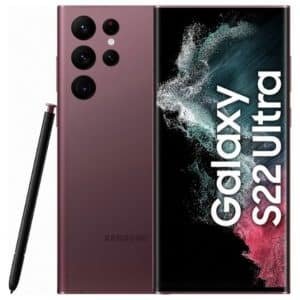
The best way to fast charge the Galaxy S23 series is to match the charger and cable to your model: the Galaxy S23 supports up to 25W wired charging, while the Galaxy S23+ and S23 Ultra support up to 45W, with wireless charging reaching up to 15W. The right USB-C charger, compatible cable, and charging settings matter more than simply choosing the highest wattage.
This guide focuses on the Galaxy S23, Galaxy S23+, and Galaxy S23 Ultra and explains how to get their supported charging speeds without relying on unsupported testing claims. It also compares four supplied charging accessories, including a 45W third-party charger, Samsung’s 15W wireless charger, the Anker 313 wireless pad, and a Samsung 5A USB-C cable.
Which Galaxy S23 Charging Setup Is Fastest?
The fastest setup depends on the Galaxy S23 model: use a 25W compatible charger for the S23, while the S23+ and S23 Ultra can use a 45W charger with a suitable 5A USB-C cable.
Wireless charging is more convenient but slower, with the S23 series supporting up to 15W wireless charging. Samsung also recommends compatible approved chargers and cables for the intended charging modes.
How Fast Can the Galaxy S23 Series Charge?
The Galaxy S23 charges at up to 25W wired, while the Galaxy S23+ and Galaxy S23 Ultra support up to 45W wired charging.
| Galaxy Model | Maximum Wired Charging | Wireless Charging | Best Cable Setup |
|---|---|---|---|
| Galaxy S23 | 25W | Up to 15W | Compatible USB-C cable |
| Galaxy S23+ | 45W | Up to 15W | 5A USB-C cable for 45W |
| Galaxy S23 Ultra | 45W | Up to 15W | 5A USB-C cable for 45W |
A 45W charger does not make the standard Galaxy S23 charge at 45W. The phone determines the maximum charging level it can accept, so the standard S23 remains limited to its supported 25W wired mode.
For the S23+ and S23 Ultra, however, the charger and cable both matter. Samsung identifies a 5A cable as part of the setup for its higher-speed 45W charging mode.
What Do You Need for Galaxy S23 Fast Charging?
You need a compatible USB-C charger, a suitable cable, and the correct charging mode enabled on the phone.
| Accessory | Recommended Setup | Purpose |
|---|---|---|
| Wall Charger | 25W for S23 or 45W for S23+/S23 Ultra | Fast wired charging |
| USB-C Cable | 5A cable for supported 45W charging | Higher-speed wired charging |
| Wireless Charger | Compatible 15W wireless charger | Convenient wireless charging |
| Power Source | Wall outlet | Stable charging power |
| Phone Setting | Fast charging enabled | Activates supported charging modes |
Samsung’s official guidance recommends compatible charging accessories and explains that Super Fast Charging requires the appropriate charger and USB-C cable. The company also notes that charging speed can decrease when the device or surrounding temperature becomes too high.
For a broader look at Samsung USB-C charging options, see our guide to USB-C chargers for Samsung phones.
How to Enable Fast Charging on Galaxy S23
Enable Fast Charging or Super Fast Charging from the Galaxy S23 battery settings before connecting the charger.
- Open Settings.
- Tap Battery and device care.
- Select Battery.
- Tap More battery settings.
- Turn on Fast charging, Super fast charging, or Fast wireless charging, depending on the available option.
The exact menu names can vary with the Galaxy S23 software version. Samsung’s support instructions use the Battery and device care menu for these charging controls.
💡 Pro Tip: A 45W charger is useful for the Galaxy S23+ and S23 Ultra, but buying a 45W adapter will not increase the standard Galaxy S23 beyond its supported 25W charging level.
What Is the Best Charging Method for Galaxy S23?
Wired charging is the better choice when speed matters most, while wireless charging is better for convenience at a desk or bedside.
| Charging Method | Best For | Main Advantage | Main Limitation |
|---|---|---|---|
| 25W Wired | Galaxy S23 | Fast everyday charging | Lower maximum power than S23+ and Ultra |
| 45W Wired | Galaxy S23+ and S23 Ultra | Highest supported wired speed | Requires suitable charger and cable |
| 15W Wireless | Desk and bedside charging | Cable-free convenience | Slower than wired charging |
| Wireless PowerShare | Charging compatible accessories | Reverse wireless charging | Uses the phone’s own battery |
Best Galaxy S23 Fast Charging Accessories Compared
The four recommended accessories cover the main Galaxy S23 charging needs, from 45W wired charging to convenient wireless charging and a dedicated 5A cable.
| Product | Best For | Amazon | Key Feature |
|---|---|---|---|
| Vilive 45W USB-C Super Fast Charger | Galaxy S23+ and S23 Ultra | View on Amazon | 45W USB-C charger with 10FT Type-C cable |
| Samsung 15W Wireless Charger Single | Convenient wireless charging | View on Amazon | 15W wireless charging pad with USB-C cable |
| Anker 313 Qi-Certified Wireless Charger | Budget wireless charging | View on Amazon | 10W Qi-certified charging |
| Samsung Type-C to Type-C 1.8m Cable | 45W-capable wired setups | View on Amazon | 1.8m USB-C to USB-C 5A cable |
Recommended Galaxy S23 Charging Accessories
Vilive 45W USB-C Super Fast Charger
Best 45W Third-Party Charger
Best For: Galaxy S23+ and S23 Ultra owners who want a 45W USB-C charging setup.

VILIVE
45W USB C Super Fast Charger Type C Charger Fast Charging Android Phone Charger Block with 10FT Type C Charging Cable for Samsung Galaxy S26 Ultra/S26/S26+/S25/S25 Ultra/S25+/S24 Ultra/S23 Ultra/S22
This Vilive charger is included as the 45W wired option for Galaxy S23+ and S23 Ultra users who want higher-speed charging. The article highlights its 45W USB-C charger and included 10FT Type-C charging cable, while noting that the standard Galaxy S23 does not use the full 45W output.
Who Should Buy It
It is best for Galaxy S23+ and S23 Ultra owners who want a 45W wired charging setup and a long cable. It is less necessary for standard Galaxy S23 owners because that model supports up to 25W wired charging.
Why We Pick It
It earned a spot because it combines a 45W charger with a long 10FT Type-C cable in one setup. The main consideration is that it is a third-party alternative rather than a Samsung-branded charger.
Features & Benefits
| Feature | Benefit |
|---|---|
| 45W USB-C output | provides the power level relevant to Galaxy S23+ and S23 Ultra fast wired charging |
| 10FT Type-C cable | gives substantially more reach from the wall outlet |
| USB-C charging | works with modern USB-C charging setups |
Pros & Cons
| Pros | Cons |
|---|---|
| ✓ 45W charging capability | ✕ Not necessary for maximum speed on the standard Galaxy S23 |
| ✓ 10FT cable included | ✕ Third-party alternative to Samsung accessories |
| ✓ Suitable for Galaxy S23+ and S23 Ultra |
The Vilive charger is the strongest fit here for users with a Galaxy S23+ or S23 Ultra who want a 45W charging setup. The supplied listing identifies a 45W USB-C charger and includes a 10FT Type-C charging cable.
It is not necessary for the standard Galaxy S23 because that model does not use the full 45W output. Buyers should also verify that the included cable and charger support the charging mode required by their specific phone.
The main advantage is the combination of the charger and long cable. The main consideration is that it is a third-party option, so buyers who prefer Samsung-branded accessories may want the Samsung cable and charger route instead.
Samsung 15W Wireless Charger Single
Best Wireless Charger
Best For: Galaxy S23 owners who prefer simple 15W wireless charging for desks and bedside use.

SAMSUNG
Samsung 15W Wireless Charger Single, Cordless Super Fast Charging Pad for Galaxy Phones and Devices, Compact Design, LED Indicator, USB C Cable Included, 2022, US Version, Grey
This Samsung wireless charging pad is the article's main choice for convenient 15W wireless charging on the Galaxy S23 series. It combines up to 15W wireless charging with a compact design, LED charging indicator, USB-C cable, and built-in cooling.
Who Should Buy It
It is best for Galaxy S23 users who prefer cable-free charging at a desk or bedside. It is a better fit for convenience-focused users than people who need the fastest possible wired top-up.
Why We Pick It
It earned its spot because it directly matches the article's 15W wireless charging recommendation and comes from Samsung. The built-in cooling system also makes it suitable for users who frequently leave a Galaxy phone on the charging pad.
Features & Benefits
| Feature | Benefit |
|---|---|
| Up to 15W wireless charging | provides the maximum wireless charging level discussed for the Galaxy S23 series |
| Built-in cooling fan | helps manage heat during wireless charging |
| LED indicator | shows charging status and errors |
| USB-C cable included | provides the required charging connection |
Pros & Cons
| Pros | Cons |
|---|---|
| ✓ Samsung-branded wireless charger | ✕ Wireless charging is slower than wired charging |
| ✓ Up to 15W charging | ✕ Correct phone placement is important |
| ✓ Built-in cooling fan |
The Samsung 15W Wireless Charger is the most direct choice for users who want Samsung-branded wireless charging. The supplied product listing identifies up to 15W wireless charging, a compact design, an LED indicator, and a USB-C cable included with the charger.
The built-in cooling system is another useful feature for users who frequently leave the phone on the charging pad. However, wireless charging remains less direct than wired charging when the priority is the fastest possible top-up.
Good alignment also matters. Keep metal objects, cards, and other foreign materials away from the charging area because they can interfere with wireless charging.
Anker 313 Qi-Certified Wireless Charger
Best Budget Wireless Charger
Best For: Galaxy S23 owners who want a simple Qi-certified wireless charging pad at a lower specification level.
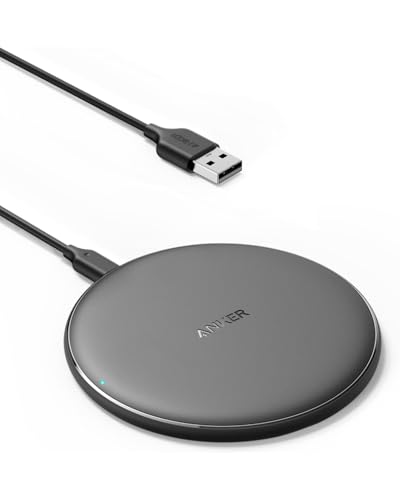
ANKER
Anker 313 Qi-Certified 10W Fast Wireless Charger Pad
The Anker 313 is the lower-power wireless option in the article, providing up to 10W Qi-certified charging for compatible Samsung devices. It is positioned as a practical alternative for casual wireless charging rather than the fastest Galaxy S23 charging solution.
Who Should Buy It
It is best for Galaxy S23 owners who want an affordable and simple wireless charging pad for everyday top-ups. Buyers should already have a suitable power adapter because the AC adapter is not included.
Why We Pick It
It earned a spot because it offers Qi-certified wireless charging in a simple pad design and provides a lower-cost alternative to Samsung's 15W charger. The article also highlights its lack of MagSafe compatibility and lower 10W maximum output.
Features & Benefits
| Feature | Benefit |
|---|---|
| 10W wireless output | provides convenient wireless charging below the Galaxy S23 series' 15W maximum |
| Qi certification | supports standard Qi wireless charging |
| Through-case charging | can charge through compatible cases up to the supported thickness |
| Charging indicator | provides visual charging status |
Pros & Cons
| Pros | Cons |
|---|---|
| ✓ Qi-certified charging | ✕ AC adapter not included |
| ✓ Affordable wireless option | ✕ Slower than a 15W wireless charger |
| ✓ Supports charging through compatible thin cases |
The Anker 313 is a practical alternative when you want wireless charging without paying for a higher-power Samsung pad. The supplied listing identifies it as a Qi-certified 10W wireless charger and notes that the AC adapter is not included.
Its 10W maximum output makes it more suitable for casual charging and convenient top-ups than for the fastest possible Galaxy S23 charging. It also is not a MagSafe-compatible charger, so buyers should not expect magnetic attachment.
The biggest buying consideration is the missing AC adapter. Make sure you already have a suitable power adapter before choosing this pad.
Samsung Type-C to Type-C 1.8m Cable (5A), Black
Best Cable for 45W Charging
Best For: Galaxy S23+ and S23 Ultra users who need a suitable USB-C cable for higher-speed wired charging.

SAMSUNG
Samsung Type-C to Type-C 1.8m Cable (5A), Black
This Samsung USB-C to USB-C cable is the article's dedicated cable recommendation for higher-speed Galaxy S23 charging. Its 5A specification and 1.8m length make it particularly relevant to the 45W charging setup used by the Galaxy S23+ and S23 Ultra.
Who Should Buy It
It is best for Galaxy S23+ and S23 Ultra owners who need a suitable USB-C cable for a 45W charging setup. It is also useful for users who want additional reach from a 1.8m cable.
Why We Pick It
It earned a spot because the article identifies a suitable 5A cable as an important part of the 45W setup. The Samsung branding also makes it a straightforward choice for users who prefer first-party accessories.
Features & Benefits
| Feature | Benefit |
|---|---|
| 5A current rating | supports the cable requirement associated with compatible 45W charging setups |
| USB-C to USB-C | connects modern USB-C chargers and Galaxy devices |
| 1.8m length | provides extra reach compared with shorter charging cables |
Pros & Cons
| Pros | Cons |
|---|---|
| ✓ Samsung-branded cable | ✕ Cable alone does not provide 45W charging |
| ✓ 5A specification | ✕ Requires a compatible USB-C charger ### |
| ✓ 1.8m length |
The Samsung Type-C to Type-C cable is a strong match for higher-speed Galaxy S23 charging because the supplied listing identifies it as a 5A cable with a 1.8m length.
The extra cable length is useful when the wall outlet is not directly beside the charging location. More importantly, the 5A specification makes it relevant to the 45W charging setup used by compatible Galaxy S23+ and S23 Ultra models.
The cable does not replace the charger. A suitable 45W charging adapter is still required when charging a compatible S23+ or S23 Ultra at its higher supported wired speed.
How to Choose the Right Galaxy S23 Charger
Choose the charger based on your exact Galaxy S23 model, desired charging method, and cable requirements.
Choose 25W for the Standard Galaxy S23
A 25W compatible charger is sufficient for the standard Galaxy S23 because the phone supports up to 25W wired charging.
Buying a higher-wattage charger can still work, but the phone will not automatically charge at the charger’s maximum output. The device controls how much power it accepts.
Choose 45W for Galaxy S23+ and S23 Ultra
A 45W compatible charger is the better choice when you want the highest supported wired charging speed on the Galaxy S23+ or S23 Ultra.
Pair the charger with a suitable 5A USB-C cable. Samsung specifically recommends a 5A Type-C cable for its 45W Super Fast Charging setup.
Choose 15W Wireless Charging for Convenience
A 15W wireless charger is the better choice when you value cable-free charging more than maximum speed.
Wireless charging works particularly well on a desk, nightstand, or other location where the phone can remain stationary. The Galaxy S23 series supports fast wireless charging, but the actual speed can vary with the charger, adapter, phone condition, alignment, and temperature.
Check the Cable Before Blaming the Charger
A high-wattage charger cannot deliver the intended charging mode if the cable does not support the required power and charging protocol.
This is especially important for the S23+ and S23 Ultra when targeting 45W charging. A suitable 5A USB-C cable should be part of the setup.
How to Make Galaxy S23 Charge Faster
The simplest way to improve charging speed is to use the correct charger and cable, enable the appropriate charging mode, and reduce heat during charging.
- Use a suitable 25W or 45W charger for your model.
- Use a compatible USB-C cable.
- Enable the appropriate fast charging option.
- Keep the phone’s screen off when possible.
- Avoid demanding apps while charging.
- Keep the phone away from excessive heat.
- Use a wall outlet instead of a low-power computer USB port.
- Keep the charging port clean and dry.
Samsung notes that the phone may charge more slowly when the device or surrounding temperature becomes too high. Using the phone heavily while charging can also increase the time required to reach a full charge.
How to Fix Galaxy S23 Fast Charging Not Working
If fast charging stops working, first check the charging setting, charger, cable, power source, and USB-C port.
Check the Fast Charging Setting
Open Settings, go to Battery and device care, select Battery, and check More battery settings.
Make sure the relevant Fast Charging or Super Fast Charging option is enabled. Menu names can vary with software versions.
Check the Charger and Cable
Replace the cable or charger if either accessory is damaged, loose, or incompatible with the required charging mode.
For 45W charging on compatible models, check that the charger and cable support the required setup rather than relying only on the wattage printed on the charger.
Check the USB-C Port
Inspect the USB-C port for dust, lint, moisture, or other foreign material before charging.
Never force a connector into the port. If the port is wet, allow it to dry completely before connecting a charger.
Reduce Heat During Charging
Move the phone to a cooler location if it becomes unusually hot while charging.
Heat can cause charging speed to decrease automatically. Avoid gaming or running demanding applications during a high-speed charging session when possible.
Try Another Wall Outlet
A different wall outlet can help identify whether the power source is contributing to the charging problem.
Also avoid relying on a computer USB port when maximum charging speed is the goal because computer ports may provide less charging power.
How to Use Wireless PowerShare on Galaxy S23
Wireless PowerShare lets a compatible Galaxy S23 device share battery power wirelessly with another compatible device.
You can use it for compatible Galaxy phones, earbuds, watches, and other supported devices. For detailed positioning instructions and troubleshooting, see our guide to using Wireless PowerShare on the Galaxy S23 series.
Wireless PowerShare is useful in emergencies, but it is not a replacement for wired charging when speed and efficiency are the priority.
Galaxy S23 Charging Tips for Better Battery Care
Good charging habits focus on controlling heat, using suitable accessories, and avoiding unnecessary stress on the charging system.
- Use compatible chargers and cables.
- Keep the phone reasonably cool during charging.
- Avoid charging through a damaged cable.
- Keep the USB-C port dry.
- Remove foreign objects from the wireless charging area.
- Avoid heavy gaming while charging when heat becomes excessive.
- Use the charging mode that matches your actual needs.
Fast charging is designed to manage power automatically, so a higher-rated charger does not force the Galaxy S23 to accept more power than it supports.
Samsung also recommends approved charging accessories and warns that incompatible accessories can affect charging performance and potentially damage the device.
Frequently Asked Questions About Galaxy S23 Fast Charging
Does the Galaxy S23 support 45W charging?
The standard Galaxy S23 supports up to 25W wired charging, while the Galaxy S23+ and S23 Ultra support up to 45W wired charging.
Does the Galaxy S23+ support 45W charging?
Yes, the Galaxy S23+ supports up to 45W wired charging with a compatible charger and suitable cable.
Does the Galaxy S23 Ultra support 45W charging?
Yes, the Galaxy S23 Ultra supports up to 45W wired charging with the appropriate charging accessories.
What cable do I need for 45W Galaxy S23 charging?
A suitable 5A USB-C cable is recommended for the 45W charging setup on compatible Galaxy S23+ and S23 Ultra models.
Can I use a 45W charger with the Galaxy S23?
Yes, you can use a 45W charger with the standard Galaxy S23, but the phone will remain limited to its supported 25W wired charging level.
How fast does the Galaxy S23 charge wirelessly?
The Galaxy S23 series supports up to 15W wireless charging with compatible charging equipment.
Why is my Galaxy S23 charging slowly?
Slow charging can result from an incompatible charger, unsuitable cable, disabled fast charging, excessive heat, poor power delivery, or a problem with the USB-C port.
Can I use a third-party charger with the Galaxy S23?
Yes, but the charger should support the charging mode required by the specific Galaxy S23 model, and Samsung recommends approved compatible charging accessories.
Is wireless charging better than wired charging on Galaxy S23?
Wired charging is better when speed is the priority, while wireless charging is better when convenience matters more.
Can I charge another phone with Galaxy S23 Wireless PowerShare?
Yes, Wireless PowerShare can charge compatible wireless-charging devices from the Galaxy S23 series.
Final Thought
The best Galaxy S23 fast charging setup depends on the exact model. The standard Galaxy S23 needs up to 25W wired charging, while the S23+ and S23 Ultra can take advantage of up to 45W with the right charger and 5A USB-C cable.
For wireless convenience, the Samsung 15W Wireless Charger is the most direct match among the supplied options, while the Anker 313 provides a lower-power Qi-certified alternative. For compatible 45W wired charging, the Vilive 45W charger and Samsung 5A cable provide the supplied options worth considering.
- Best 45W Third-Party Charger: Vilive 45W USB-C Super Fast Charger | View Now at Amazon
- Best Wireless Charger: Samsung 15W Wireless Charger Single | View Now at Amazon
- Best Budget Wireless Charger: Anker 313 Qi-Certified Wireless Charger | View Now at Amazon
- Best Cable for 45W Charging: Samsung Type-C to Type-C 1.8m Cable (5A) | View Now at Amazon
Choose the charger and cable that match your Galaxy S23 model, then enable the appropriate charging mode for the best everyday results.
Related Articles
Best Samsung Galaxy S23 Ultra Wallet Cases
April 10, 2025Samsung Galaxy S22+ 256GB Review: Worth It in 2026?
March 29, 2025