John had always been a bit nervous about online banking. After hearing about friends getting hacked or losing money, he stuck to traditional banking methods. One Saturday morning, though, he faced a big problem. His electricity bill was due, and he didn’t have time to run to the bank. Frustrated, he remembered a friend mentioning something about using a simple code on his phone to handle all his banking needs, even without an internet connection. That’s when he decided to explore the Zenith Bank USSD code.
Today, I’m going to show you how easy it is to use the Zenith Bank USSD code to manage your finances. With just a few simple step using your phone, you can check your balance, transfer funds, and pay
What is a USSD Code?
A USSD code, or Unstructured Supplementary Service Data, allows you to communicate with your bank by dialing a short code on your mobile phone. It’s similar to texting but doesn’t require an internet connection. This makes it highly convenient, especially in areas where the internet is not always reliable or available.
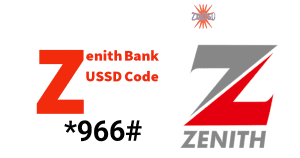
With Zenith Bank’s *966# USSD code, banking has never been easier. Whether you’re checking your balance, transferring money, buying airtime, or paying bills, you can do it all from any mobile phone. Plus, there’s no need for a smartphone; if your phone can dial, you’re good to go.
If you have First bank account, You can read my guide on FirstBank USSD Code
Benefits of Using Zenith Bank USSD Transfer Code
Before we jump into the specific transactions you can perform with the Zenith Bank USSD transfer code, let’s look at the major benefits it offers:
No Internet Required: Unlike mobile banking apps that require an internet connection, USSD codes work perfectly without data or Wi-Fi. This gives you access even in remote areas where the internet may be limited or expensive.
Available 24/7: You can use the Zenith Bank USSD code 24 hours a day, 7 days a week. Whether it’s early in the morning or late at night, you can perform your transactions anytime.
Works on All Mobile Phones: You don’t need a smartphone to use the Zenith Bank USSD code. Whether you have a basic phone or a smartphone, you can access the service easily.
Secure Transactions: You need to confirm each transaction using your 4-digit PIN. This will ensures that your account is protected.
Fast and Convenient: You complete transactions almost instantly, saving you the time and effort of visiting a bank or finding an ATM.
How to Register for Zenith Bank USSD Banking
To enjoy the benefits of Zenith Bank USSD service, you must register first. You can complete the registration process in just a few minutes by following these steps:
Dial *966# on your mobile phone: Ensure you use the phone number linked to your Zenith Bank account. The USSD code will only work if the number is registered with the bank.
Follow the prompts: Enter the last four digits of your debit card number to confirm that you are the account holder.
Create a 4-digit PIN: Choose a secure 4-digit PIN. You will use this PIN to authorize all future transactions, so make sure to choose something easy to remember but difficult for others to guess.
Confirm your PIN: Re-enter the PIN to confirm it. Once you have done that, you’re all set! You can now start using the Zenith Bank USSD service.
How to Use Zenith Bank Swift Code to Check Your Account Balance
The most common transaction people perform on their phones is checking their account balance. With the Zenith Bank USSD code, you can check your balance anytime, anywhere, in just a few seconds.
- Dial *966*00# on your phone.
- Enter your 4-digit PIN when prompted.
- Wait for your account balance to appear on your phone screen.
Your account balance will display on your phone screen almost immediately. You will also receive a confirmation message with the balance. With this you keep track of your finances, especially when budgeting or making important financial decisions.
How to Transfer Money Using the Zenith Bank sort Code
Sending money to family, friends, or business partners has never been easier. Whether you’re transferring money to another Zenith Bank account or a different bank, you can do it with the zenith bank USSD code for transfer.
To Transfer Money to a Zenith Bank Account:
Dial *966*Amount*AccountNumber#.
Confirm the details: The recipient’s account name will appear. Make sure it’s correct before proceeding.
Enter your 4-digit PIN: To confirms your transaction.
Wait for confirmation: You will receive a message confirming that the transfer succeeded.
To Transfer Money to Another Bank:
Dial *966*Amount*AccountNumber#.
Select the recipient’s bank: A list of banks will appear. Choose the recipient’s bank.
Enter your 4-digit PIN to confirm.
Receive confirmation: You’ll receive a message confirming the successful transaction.
Transferring money with the transfer code is quick and secure. Just make sure you input the correct account details to avoid mistakes.
How to Buy Airtime with Zenith Bank Transfer Code
One of the greatest conveniences of Zenith Bank’s USSD service is the ability to recharge your mobile phone instantly. You can buy airtime for yourself or someone else with just a few simple steps.
To Buy Airtime for Yourself:
- Dial *966*Amount#.
- Wait for confirmation: Your phone will receive the airtime instantly, and you will receive a confirmation message.
To Buy Airtime for Someone Else:
Dial *966*Amount*Recipient’sPhoneNumber#.
Confirm the transaction: Enter your PIN, and the airtime will go to the recipient’s phone.
With this feature, you want to top up a loved one’s phone credit or need to recharge quickly without other methods.
How to Pay Bills Using Zenith Bank USSD
Paying bills is another essential task that Zenith Bank has simplified with its USSD code service. You can pay for services like electricity, water, and TV subscriptions directly from your phone.
- Dial *966*7*Amount*BillerCode#.
- Follow the prompts: Enter the correct amount and details as you proceed through the payment process.
- Confirm the payment: Enter your 4-digit PIN to complete the transaction.
Paying bills with the USSD code is extremely convenient. You don’t need to visit a payment center or use a third-party app. Everything is done from your phone, saving you time and effort.
How to Block Your Zenith Bank ATM Card Using the Swift Code
If your ATM card is lost or stolen, you can block it immediately with Zenith Bank’s USSD code to prevent unauthorized transactions.
- Dial *966*911#.
- Follow the instructions: Confirm that you want to block your ATM card.
With this feature your account will remains secure, even if someone else has access to your card.
Potential Issues You May Encounter
While Zenith Bank’s USSD code is reliable, you may encounter a few issues. Here are some common problems and their solutions:
Zenith Bank USSD Code Not Working:
If the USSD code doesn’t work, ensure that you are using the phone number linked to your Zenith Bank account. If you are, try restarting your phone or checking for network issues.



Transaction Delays:
Network congestion may occasionally delay transactions. Should in case, wait for a few minutes and check your account balance to see if the transaction succeeded.
Incorrect PIN:
If you enter the wrong PIN too many times, your USSD service may be temporarily blocked for security reasons. Contact Zenith Bank customer support to reset your PIN or unlock your account.
Insufficient Funds:
Ensure you have enough funds in your account before performing a transaction. If you try to make a payment without enough balance, the transaction will fail.
Final Though
The zenith bank USSD service is indeed a lifesaver for all those who wish to save themselves the stress of having to perform transactions on the go. With just a few steps, you can check your balance, transfer money, buy airtime, and pay bills without the need for internet access. Whether you’re at home, at work, or traveling, the USSD code *966# gives you the freedom to handle your banking needs with ease.
By following this steps, you’ll confidently use the Zenith Bank USSD code and effectively manage your finances.
Remember to always protect your 4-digit PIN and verify your transactions before confirming them. Enjoy the convenience of banking at your fingertips with Zenith Bank’s USSD service!
Frequently Asked Questions (FAQs)
How much does it cost to use Zenith Bank USSD?
Using Zenith Bank’s USSD service is free, but your mobile network may charge a small fee per transaction. These fees are typically minimal, but it’s always a good idea to check with your service provider.
Can I use the USSD code on multiple phone numbers?
No, the USSD code service is linked to the phone number registered with your Zenith Bank account. You can only use the USSD code on that number. If you need to change your registered number, visit a Zenith Bank branch to update your details.
What should I do if I forget my 4-digit PIN?
If you forget your PIN, visit a Zenith Bank branch to reset it. Bring a valid ID and your account details for verification.
Can I reverse a transaction made using the USSD code?
Once a transaction is complete, you cannot reverse it. Always double-check the recipient’s details before confirming a transaction.
Is the Zenith Bank USSD service secure?
Yes it is secure, Zenith Bank uses encryption and secure protocols to protect your transactions
Source https://pastandprofiles.com/zenith-bank-ussd-code/
Related Articles
Jaiz Bank Transfer Code: Dial *773# (Quick Registration Guide 2026)
December 24, 2025