Amazon Prime Free Trial can be canceled before the renewal date to avoid being charged while still allowing eligible members to enjoy remaining trial benefits. This guide explains how to cancel Amazon Prime Free Trial without being charged, how Amazon billing works, and the exact cancellation steps for desktop and Android devices. If you’re still deciding whether to start a trial, see the Amazon Prime Free Trial guide for current eligibility and offers.
Amazon Prime memberships renew automatically unless auto-renewal is turned off before the trial ends. Additionally, understanding your renewal date and cancellation options helps prevent unexpected charges and ensures you make an informed decision about keeping or ending the membership.
How Can You Cancel an Amazon Prime Free Trial Without Being Charged?
You can cancel an Amazon Prime Free Trial without being charged by turning off automatic renewal before the trial expiration date. Amazon Prime Free Trial generally allows eligible members to keep their benefits until the trial ends, even after cancellation, provided the membership has not already renewed.
Amazon Prime stores the renewal date inside the Membership & Subscriptions settings. Therefore, checking that date first helps you cancel with confidence and reduces the chance of an unexpected subscription charge. If you are unsure whether you qualify for another trial, review the Prime Free Trial eligibility requirements.
What is the fastest way to stop automatic renewal?
The fastest way to stop Amazon Prime Free Trial renewal is to visit your Prime membership settings, choose Manage Membership, and select the option to end or cancel the membership before the billing date. Amazon updates the renewal status immediately after confirmation.
Additionally, verify the confirmation screen or email after canceling. Keeping that confirmation provides reassurance that Amazon Prime will not renew automatically at the end of the trial period.
When should you cancel your free trial?
You should cancel Amazon Prime Free Trial before the scheduled renewal date shown in your account. Canceling before the billing date prevents the membership from converting into a paid subscription while allowing eligible users to continue using remaining trial benefits.
Waiting until the final day may still work, but canceling at least a day earlier provides extra protection against time zone differences, payment processing, or simply forgetting the renewal date.
How Does Amazon Prime Free Trial Billing Work?
Amazon Prime Free Trial billing begins automatically when the free trial expires unless automatic renewal has been canceled. Amazon uses the payment method linked to your Amazon account to process the membership fee.
Understanding how Amazon Prime billing works helps you avoid accidental charges and decide whether the membership continues to provide enough value. If you are comparing subscription options, the membership pricing guide explains what happens after the trial ends.
When does Amazon charge your payment method?
Amazon charges your payment method when the free trial expires and automatic renewal remains active. The exact charge date appears in your Prime membership settings before the trial finishes.
Checking that renewal date regularly is useful if multiple family members share an Amazon account or if you signed up several weeks earlier and no longer remember the expiration date.



Does Amazon send a renewal reminder before billing?
Amazon may send renewal reminders for some memberships, but you should not rely on receiving one. Amazon Prime Free Trial users remain responsible for tracking their own renewal date and managing their subscription.
Therefore, reviewing your membership settings yourself is the safest approach. Depending entirely on reminder emails could result in missing the renewal notice if the message is filtered or overlooked.
How can you check your renewal date?
You can check the Amazon Prime Free Trial renewal date by signing in to your Amazon account, opening Prime Membership, and viewing the Membership & Subscriptions page. Amazon clearly displays the next billing or renewal date for eligible memberships.
Taking a screenshot or adding the renewal date to your calendar creates an additional reminder. Consequently, you reduce the risk of forgetting when the free trial ends.
How Do You Cancel Amazon Prime Free Trial on a Computer?
You can cancel Amazon Prime Free Trial on a computer through your Amazon account without contacting customer support. The desktop interface provides direct access to membership management and renewal settings.
Using a computer also makes it easier to review membership details before confirming cancellation. If you are unsure what benefits you will lose, compare them with Amazon Prime membership benefits before making a final decision.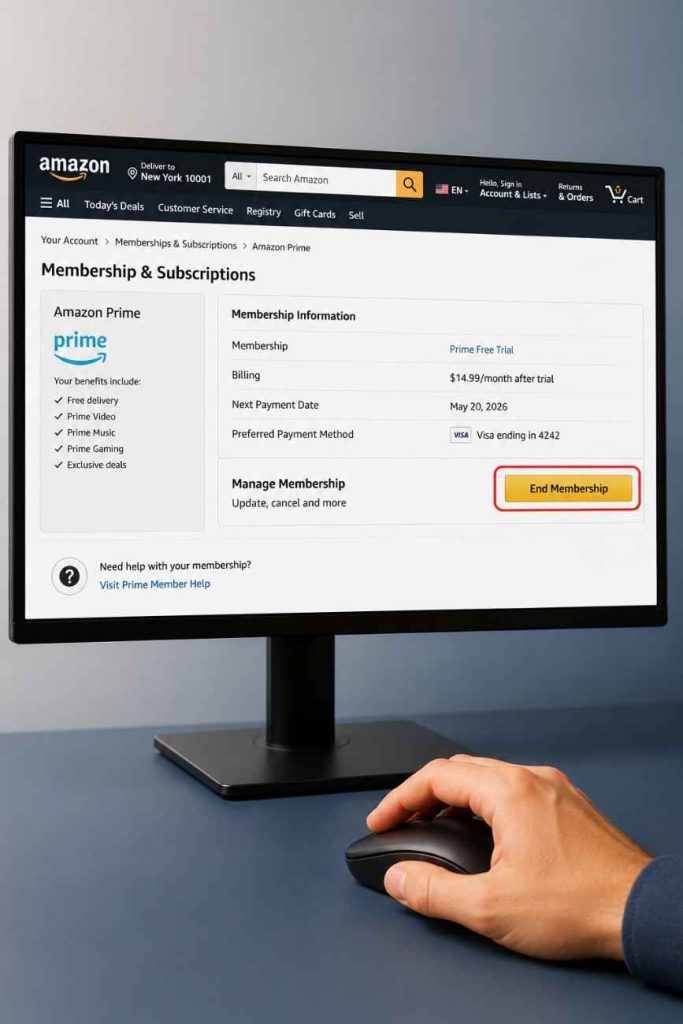
Where can you find Membership & Subscriptions?
You can find Membership & Subscriptions by signing in to Amazon, selecting Account, and opening the Prime membership management page. Amazon groups subscription settings in one location so members can review renewal dates and account status.
After opening the membership page, verify that you are using the correct Amazon account. Many unexpected renewals happen because users accidentally check a different account than the one holding the active Prime membership.
Which options should you select to avoid renewal?
Select the option to manage or end your Prime membership, then continue through the confirmation prompts until Amazon confirms the cancellation. Amazon Prime Free Trial should display a confirmation message after the request is completed.
Finally, review your account again to confirm the renewal status has changed. Saving the confirmation email provides additional proof that automatic renewal has been disabled.
How Do You Cancel Amazon Prime Free Trial on Android?
You can cancel Amazon Prime Free Trial on Android using either the Amazon Shopping app or a mobile web browser. Both methods access the same Amazon account settings and update the membership immediately after confirmation.
Android users should ensure the cancellation applies to the correct Amazon account before confirming the request. Meanwhile, understanding the difference between Prime shopping benefits and streaming services becomes easier after comparing Prime and Prime Video.
Can you cancel through the Amazon Shopping app?
Yes, you can cancel Amazon Prime Free Trial through the Amazon Shopping app if membership management is available for your account. Open the app, access your account settings, navigate to Prime Membership, and follow the cancellation prompts.
After confirming the request, Amazon should update your membership status immediately. Checking your renewal date one final time ensures the cancellation was processed successfully.
Can you cancel using a mobile browser?
Yes, you can cancel Amazon Prime Free Trial from a mobile browser by signing in to Amazon and opening the Prime membership page. The browser version provides nearly the same options available on the desktop website.
Using a browser can be helpful if the Amazon Shopping app does not display membership settings on your device. After cancellation, verify that automatic renewal has been turned off before closing the page.
How Do You Cancel Amazon Prime Free Trial on iPhone or iPad?
You can cancel an Amazon Prime Free Trial on an iPhone or iPad by signing in to your Amazon account and managing your Prime membership. The exact steps depend on whether the membership was started directly through Amazon or through Apple’s subscription system.
Checking how the subscription was created saves time and prevents confusion during cancellation. If you are still comparing trial options, the official Prime free trial link explains the latest offers and eligibility requirements.
Does canceling through the Amazon app work on iOS?
Yes, canceling through the Amazon app works for many Amazon Prime memberships started directly with Amazon. Open the Amazon app, go to Your Account, select Prime Membership, and follow the prompts to end automatic renewal before the billing date.
Additionally, confirm the cancellation by checking your membership status after completing the process. A confirmation email from Amazon provides extra assurance that your free trial will not convert into a paid membership.
What if you subscribed through Apple?
If the Amazon Prime membership was purchased through Apple, you must cancel it from the Apple Subscriptions settings instead of the Amazon app. Apple manages billing for subscriptions purchased through the App Store.
Open the Settings app, tap your Apple ID, choose Subscriptions, locate Amazon Prime if available, and cancel the subscription before the renewal date. Reviewing both Apple and Amazon account pages helps confirm the cancellation has been applied correctly.
Can You Cancel Amazon Prime and Still Use the Free Trial?
Yes, Amazon Prime Free Trial benefits usually remain available until the scheduled expiration date after you cancel automatic renewal. Canceling prevents future billing rather than ending eligible trial access immediately.
This approach allows members to continue enjoying Prime shipping, Prime Video, and other included services during the remaining trial period. To understand everything included, explore Prime membership benefits.
Will your Prime benefits end immediately?
No, Amazon Prime benefits generally do not end immediately when you cancel a free trial before renewal. Eligible members can usually continue using Prime until the displayed expiration date.
However, always review the cancellation confirmation because promotional offers and regional policies may vary. The expiration date shown in your account remains the most reliable reference.
What benefits remain until the trial expires?
Amazon Prime Free Trial members can usually continue accessing eligible benefits such as fast shipping, Prime Video, Prime Reading, Prime Gaming, Amazon Music, and exclusive shopping deals until the trial officially ends.
If streaming is your primary reason for joining, comparing Prime Video without Prime can help determine whether keeping the full membership is necessary.
What Happens After You Cancel Your Amazon Prime Free Trial?
After you cancel Amazon Prime Free Trial, the membership remains active until the trial expires, after which recurring billing stops if cancellation was completed successfully. Amazon also keeps your customer account active for future purchases.
Ending the trial does not delete your Amazon account, order history, wish lists, or payment information unless you remove those details separately.
Can you reactivate Prime later?
Yes, you can reactivate Amazon Prime later by purchasing a new membership from your Amazon account. Eligibility for another free trial depends on Amazon’s promotional rules and your account history.
If another free trial is unavailable, Amazon normally offers paid monthly or annual membership plans that can be started at any time.
Will your payment method remain on your account?
Yes, canceling Amazon Prime Free Trial does not automatically remove your saved payment methods. Amazon continues storing payment information unless you manually delete the payment method from your account settings.
Keeping a payment method on your account is normal and does not restart Prime automatically after cancellation.
What Common Mistakes Can Cause Amazon to Charge You?
Most unexpected Amazon Prime charges happen because members misunderstand the renewal process rather than because of a technical problem. Avoiding a few common mistakes greatly reduces the chance of paying for an unwanted membership.
Waiting until after the renewal date
Waiting until after the renewal date is the most common reason Amazon charges for Prime. Once the membership renews, the billing process has already started according to your subscription terms.
Setting a calendar reminder several days before the renewal date provides enough time to review your decision without rushing.
Thinking uninstalling the app cancels Prime
Deleting the Amazon Shopping app does not cancel Amazon Prime Free Trial. The membership is connected to your Amazon account rather than to the application installed on your device.
Always manage your subscription through your Amazon account or the appropriate subscription settings to stop automatic renewal.
Removing your payment card without canceling
Removing a payment card alone does not cancel Amazon Prime Free Trial. Amazon still requires the membership itself to be canceled before the renewal date.
Complete the cancellation process first, then update your payment methods later if needed.
Canceling the wrong Amazon account
Some customers own multiple Amazon accounts for work, family, or different email addresses. Canceling the wrong account leaves the active Prime membership unchanged.
Verify the email address associated with your Prime membership before making changes to avoid unnecessary charges.
Is It Better to Cancel or Keep Amazon Prime?
The best choice depends on how often you use Amazon Prime benefits. Members who regularly shop, stream content, or use digital services often receive more value by keeping the subscription than occasional shoppers.
What benefits are worth paying for?
Amazon Prime includes fast delivery, Prime Video, Prime Reading, Prime Gaming, Amazon Music, exclusive discounts, and other member-only features. Using several of these services each month often justifies the membership cost.
If entertainment is your priority, choosing one of the best Fire TV Stick devices can improve the overall streaming experience with Prime Video.
Who should keep a Prime membership?
People who shop on Amazon frequently, stream movies regularly, or use multiple Prime services are the strongest candidates for keeping Amazon Prime after the free trial ends.
Students should also review the Prime Student free trial because it offers qualifying users additional savings and extended promotional benefits.
When is canceling the better option?
Canceling Amazon Prime is the better option if you signed up only for a temporary purchase, a limited-time promotion, or a short streaming event and no longer expect to use the included services.
Reviewing your usage before the renewal date helps determine whether the recurring membership fee provides enough ongoing value.
What Should You Do If Amazon Already Charged You?
If Amazon already charged your payment method, review your membership status immediately and determine whether the renewal happened recently. Amazon may provide assistance depending on your account history and membership usage.
Can you request a refund?
Yes, you can request a refund from Amazon if the membership renewed unintentionally and your account meets Amazon’s refund requirements. Refund eligibility depends on factors such as recent renewal and whether Prime benefits were used after billing.
For the latest refund policies, refer to the official Amazon Help Center.
How do you contact Amazon Customer Service?
You can contact Amazon Customer Service through the Help section of your Amazon account using live chat, phone, or email support where available. Having your membership details ready speeds up the process.
Explain when the renewal occurred and that you intended to cancel before the billing date. Clear account information helps the support team review your request efficiently.
FAQ
Can I cancel Amazon Prime on the last day of the free trial?
Yes, you can cancel on the last day before the renewal occurs. However, canceling at least one day earlier provides additional protection against forgetting the deadline or experiencing unexpected delays.
Will I lose Prime benefits immediately after canceling?
No, eligible Amazon Prime Free Trial members generally keep their benefits until the scheduled trial expiration date. Always verify the expiration date shown in your membership settings after cancellation.
Does deleting the Amazon app cancel my Prime membership?
No, deleting the Amazon app does not cancel Amazon Prime. The membership is attached to your Amazon account, so you must complete the cancellation through your account settings or subscription management page.
Can I get another Amazon Prime free trial later?
Maybe. Amazon determines eligibility based on your account history and current promotional offers. If another free trial is unavailable, you can still subscribe to a paid Prime membership at any time.
Can I cancel Amazon Prime from my phone?
Yes, Amazon Prime can be canceled from both Android and iPhone devices using the Amazon app, a mobile browser, or the appropriate subscription settings if the membership was purchased through Apple.
What happens if I forget to cancel my free trial?
If you forget to cancel before the renewal date, Amazon automatically converts the free trial into a paid membership and charges your selected payment method according to your subscription plan.
How do I know my Amazon Prime renewal date?
You can find your renewal date by signing in to your Amazon account, opening Prime Membership, and viewing the Membership & Subscriptions page. Recording that date on your calendar helps prevent unexpected charges.
Final Thought
Canceling Amazon Prime Free Trial without being charged is straightforward when you know your renewal date and disable automatic renewal before billing begins. Reviewing your membership settings early, confirming the cancellation, and understanding which Prime benefits remain available until expiration will help you avoid unnecessary charges while making the best decision for your needs.
Related Articles

Amazon Prime Day Deals: How to Save More
July 26, 2026
Amazon Prime American Express Free Trial Explained
July 17, 2026
Official Amazon Prime Free Trial Link (Updated)
July 17, 2026